
1. Ürün Bittiview
The Paddsun AW-NU231 is a Wireless USB Wi-Fi Adapter designed to provide wireless internet connectivity to compatible devices, primarily certain LG TV models and desktop computers. This adapter supports the IEEE 802.11n standard, operating on the 2.4GHz frequency band with a maximum data transfer rate of 300Mbps. It enables your device to connect to a wireless network for streaming content, browsing, and other internet-dependent functions.
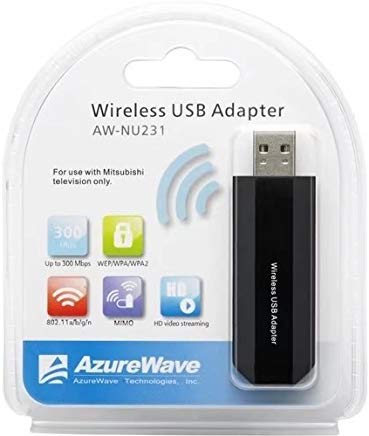
Image: The Paddsun AW-NU231 Wireless USB Wi-Fi Adapter, a compact dongle designed for easy connectivity.
2. Kurulum Talimatları
- Cihazı Kapatma: Ensure your television or desktop computer is powered off before proceeding with the installation.
- Adaptörü Takın: Locate an available USB port on your compatible device. Carefully insert the Paddsun AW-NU231 USB Wi-Fi Adapter into the USB port.
- Cihazı Açın: Power on your television or desktop computer.
- Driver Installation (for Desktops):
- For most modern operating systems, the adapter may be recognized automatically (plug-and-play).
- If not, you may need to install drivers. Refer to your operating system's device manager or the manufacturer's support webSürücü indirme sitesi.
- Ağ Ayarlarına Erişim:
- For LG TVs: Navigate to the TV's settings menu, usually found under "Network" or "Connection" settings.
- For Desktops: Access your operating system's network settings.
- Wi-Fi'ye bağlanın: Select "Wireless Connection" or "Wi-Fi" from the network options. Your device should scan for available wireless networks. Select your desired network from the list and enter the Wi-Fi password if prompted.
- Bağlantıyı Doğrulayın: Once connected, your device should indicate a successful internet connection.
3. Kullanım Talimatları
Once the Paddsun AW-NU231 adapter is successfully installed and connected to a Wi-Fi network, your device will have internet access. The operation of the Wi-Fi connection is managed through your device's operating system or TV interface.
- Otomatik Yeniden Bağlantı: The adapter is designed to automatically reconnect to the last known Wi-Fi network when the device is powered on, provided the network is available and the password has not changed.
- Changing Networks: To connect to a different Wi-Fi network, navigate to your device's network settings and select a new network from the available list.
- Uyumluluk: This adapter is specifically designed for compatibility with various LG TV models including LM6200-CE, LA6200-CN, LM6400-CE, LM6400-CA, LM6450-CA, LA6500-CC, LM6600-CE, LW5500, LV5700, LW6500, and can also be used with desktop computers.
4. Bakım
Proper care ensures the longevity and optimal performance of your Paddsun AW-NU231 Wi-Fi adapter.
- Temizlik: Gently wipe the adapter with a soft, dry cloth. Avoid using liquid cleaners or solvents, which can damage the device.
- Depolamak: Kullanılmadığı zaman adaptörü serin ve kuru bir yerde, doğrudan güneş ışığından ve aşırı sıcaklıklardan uzakta saklayın.
- İşleme: Avoid dropping the adapter or subjecting it to strong impacts. Do not bend or force the USB connector.
- Yazılım Güncellemeleri: For desktop use, ensure your operating system and any relevant drivers are kept up-to-date to maintain compatibility and performance. For TVs, ensure your TV's firmware is updated.
5. Sorun Giderme
If you encounter issues with your Paddsun AW-NU231 Wi-Fi adapter, refer to the following common solutions:
- Adaptör Algılanamadı:
- Adaptörün USB portuna tam olarak takıldığından emin olun.
- Cihazınızda farklı bir USB portu deneyin.
- Restart your television or computer.
- For desktops, check Device Manager to see if the adapter is listed and if there are any driver issues.
- Wi-Fi ağına bağlanılamıyor:
- Verify that your Wi-Fi network is active and broadcasting.
- Double-check the Wi-Fi password for accuracy.
- Ensure the adapter is within range of your wireless router.
- Kablosuz yönlendiricinizi ve modeminizi yeniden başlatın.
- Yavaş İnternet Hızı:
- Ensure the adapter is not obstructed and has a clear line of sight to the router if possible.
- Ağınızdaki bant genişliğini tüketen diğer cihazları kontrol edin.
- Yönlendiricinizi ve modeminizi yeniden başlatın.
- Update drivers for desktop computers.
- Aralıklı Bağlantı:
- Move the device closer to the wireless router.
- Girişim kaynaklarını kontrol edin (örneğin mikrodalgalar, kablosuz telefonlar).
- Yönlendiricinizin yazılımının güncel olduğundan emin olun.
6. Özellikler
| Özellik | Detay |
|---|---|
| Marka | padsun |
| Örnek | AW-NU231 |
| Donanım Arayüzü | USB |
| Uyumlu Cihazlar | Desktop, Specific LG TV Models (e.g., LM6200-CE, LA6200-CN, LM6400-CE, LM6400-CA, LM6450-CA, LA6500-CC, LM6600-CE, LW5500, LV5700, LW6500) |
| Veri Aktarım Hızı | Saniyede 300 Megabit (Mbps) |
| kablosuz standardı | IEEE 802.11n |
| Frekans Bandı | 2.4 GHz |
| Paket Boyutları | 12.2x10.2x1.4 cm |
| Ürün Ağırlığı | 20 gr |
7. Garanti Bilgileri
The Paddsun AW-NU231 Wireless USB Wi-Fi Adapter comes with a 1 Yıl Garanti Satın alma tarihinden itibaren geçerlidir. Bu garanti, üretim hatalarını ve normal kullanım koşullarındaki arızaları kapsar. Yanlış kullanım, kazalar, yetkisiz değişiklikler veya hatalı montajdan kaynaklanan hasarları kapsamaz.
Please retain your proof of purchase for warranty claims. For detailed terms and conditions, refer to the warranty card included with your product or contact customer support.
8. Destek
For further assistance, technical support, or warranty inquiries regarding your Paddsun AW-NU231 Wireless USB Wi-Fi Adapter, please refer to the following resources:
- Üreticinin Webalan: Visit the official Paddsun website for updated drivers, FAQs, and support contact information.
- Müşteri Hizmetleri: Contact the retailer or manufacturer's customer service department directly.
- Çevrimiçi Kaynaklar: Search online forums or support communities for solutions to common issues.