
Önemli Güvenlik Talimatları
KULLANMADAN ÖNCE TÜM TALİMATLARI DİKKATLİCE OKUYUN.
- Temizlemeden, bakımını yapmadan veya taşımadan önce vantilatörün fişini mutlaka prizden çekin.
- Fan çalışırken parmaklarınızı veya başka herhangi bir nesneyi ızgaradan içeri sokmayın.
- Hasarlı bir kablo veya fişle hiçbir fanı çalıştırmayın. Fanı atın veya inceleme ve/veya onarım için yetkili bir servis tesisine iade edin.
- Kabloyu halının altından geçirmeyin. Kabloyu kilim, yolluk veya benzeri örtülerle örtmeyin. Kabloyu trafik alanından uzakta ve üzerine basılmayacağı bir yere yerleştirin.
- Fanı ıslak veya nemli ortamlarda kullanmayın.amp banyo veya çamaşır yıkama alanları gibi yerler.
- Bu vantilatör yalnızca iç mekan kullanımı içindir. Dış mekanlarda kullanmayın.
- Keep the fan away from curtains, drapes, or any objects that may get caught in the fan blades.
- Vantilatör çalışırken çocukları gözetim altında tutun.
Ürün Bittiview
The Optimus 18-inch High Velocity Industrial Floor Fan is designed to provide powerful air circulation in various indoor environments. Its robust construction and high-velocity motor make it suitable for workshops, garages, and large rooms.
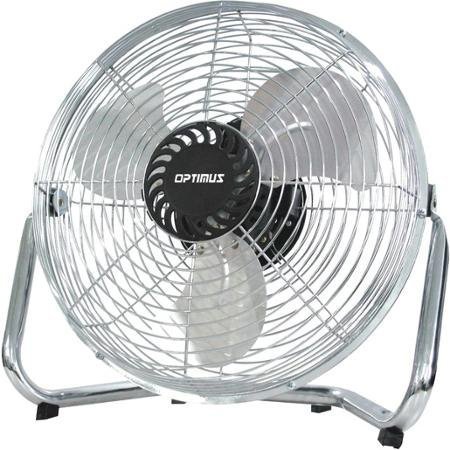
Image: Optimus 18-inch High Velocity Industrial Floor Fan. This image shows the fan with its silver metallic finish and sturdy floor stand.
Temel Özellikler:
- 18-inch diameter for wide air distribution.
- Industrial-grade high velocity airflow.
- Durable metallic finish.
- Floor standing design for stable placement.
- Multiple power levels for adjustable airflow.
Kurulum Talimatları
- Vantilatörün ambalajını açın: Carefully remove the fan and all components from the packaging. Retain packaging for future storage or transport.
- Assemble the Floor Stand:
- Attach the fan head to the floor stand using the provided screws and tools. Ensure all connections are secure.
- Verify the fan head can pivot smoothly on the stand.
- Atama: Place the fan on a firm, level surface. Ensure there is adequate space around the fan for proper air circulation and to prevent obstruction of the air intake/output. Keep the fan at least 3 feet away from walls or furniture.
- Güç Bağlantısı: Ensure the fan is in the "OFF" position before plugging it into a standard 120V AC electrical outlet.
Kullanım Talimatları
This fan features push-button controls for easy operation. A remote control may also be included for convenience.
- Güç Açma/Kapatma: Locate the power button on the control panel. Press the button once to turn the fan ON. Press it again to turn the fan OFF.
- Fan Hızının Ayarlanması: The fan has 4 power levels. After turning the fan ON, repeatedly press the speed control button to cycle through the available speed settings (Low, Medium, High, Max). The fan will operate at the selected speed.
- Hava Akış Yönünün Ayarlanması: The fan head can be tilted manually to direct airflow upwards or downwards. Gently tilt the fan head to the desired angle. Do not force the fan head beyond its intended range of motion.
Bakım
Düzenli temizlik ve bakım, fanınızın en iyi performansı göstermesini ve ömrünü uzatmasını sağlayacaktır.
- Fanın Temizlenmesi:
- Temizlemeden önce mutlaka vantilatörün fişini prizden çekin.
- Yumuşak bir d kullanınamp Vantilatörün dış yüzeylerini silmek için bir bez kullanın. Aşındırıcı temizleyiciler veya sert kimyasallar kullanmayın, çünkü bunlar yüzeye zarar verebilir.
- To clean the fan blades, carefully remove the front grille (if detachable, refer to assembly instructions for details). Wipe the blades with a soft cloth. Ensure the grille is securely reattached before operating the fan.
- Fanı tekrar prize takmadan önce tüm parçaların tamamen kuru olduğundan emin olun.
- Depolamak: When not in use for extended periods, store the fan in a cool, dry place. It is recommended to store it in its original packaging to protect it from dust and damage.
Sorun giderme
| Sorun | Olası Neden | Çözüm |
|---|---|---|
| Fan çalışmıyor. | Not plugged in; power outlet not working; fan switch is off. | Ensure fan is securely plugged into a working outlet. Check household fuse/circuit breaker. Press the power button to turn the fan on. |
| Düşük hava akımı. | Fan speed set too low; obstructed intake/output; dirty blades. | Increase fan speed. Clear any obstructions. Clean fan blades and grilles as per maintenance instructions. |
| Olağandışı ses veya tıkırtı. | Loose parts; fan not on a level surface; foreign object in blades. | Unplug the fan and check for any loose screws or components. Place the fan on a stable, level surface. Carefully inspect for and remove any foreign objects. |
Özellikler
| Özellik | Detay |
|---|---|
| Marka | En iyi |
| Model Adı | Yüksek Hız |
| Ürün Model Numarası | 306c1b92-f36b-4ccc-ac62-2ad33d5c9efb |
| Çap | 18 inç |
| Renk | Gümüş |
| Stil | Endüstriyel |
| Güç Kaynağı | Kablolu Elektrik |
| Güç Seviyesi Sayısı | 4 |
| Kontrol Yöntemi | Düğme Kontrolü |
| İç/Dış Mekan Kullanımı | Kapalı |
| Dahil Bileşenler | Floor Stand, Remote Control |
| Şartname Karşılandı | OSHA |
Garanti ve Destek
Optimus products are manufactured to high-quality standards. This product is covered by a limited warranty against defects in materials and workmanship from the date of purchase. Please refer to the warranty card included with your product for specific terms and conditions.
For technical support, troubleshooting assistance, or warranty claims, please contact Optimus customer service. Contact information can typically be found on the product packaging or the official Optimus webalan.
Lütfen garanti amaçlı satın alma belgenizi saklayın.