
Yaheetech YT-00009601
Yaheetech Mobile Computer Desk Instruction Manual
Modeli: YT-00009601
giriiş
Satın aldığınız için teşekkür ederizasing the Yaheetech Mobile Computer Desk. This manual provides detailed instructions for assembly, operation, and maintenance to ensure safe and efficient use of your new desk. Please read this manual thoroughly before assembly and retain it for future reference.
Güvenlik Bilgileri
Yaralanmaları ve ürün hasarını önlemek için lütfen aşağıdaki güvenlik talimatlarına uyun:
- Ensure proper assembly of all components before use.
- Do not exceed the maximum weight limits for each shelf:
- Top: 30 kg (66.1 lb)
- Drawer: 2 kg (4.4 lb)
- Middle Shelf: 20 kg (44.1 lb)
- Bottom Shelf: 10 kg (22 lb)
- Use the locks on the casters to stabilize the desk when it is in place.
- Montaj sırasında küçük parçaları çocuklardan uzak tutun.
- Sıcak nesneleri koruyucu bir malzeme kullanmadan doğrudan masa yüzeyine koymaktan kaçının.
- Masanın üzerinde durmayın veya oturmayın.
Paket İçeriği
Please verify that all components listed in your product's included parts list are present before beginning assembly. If any parts are missing or damaged, please contact customer support.
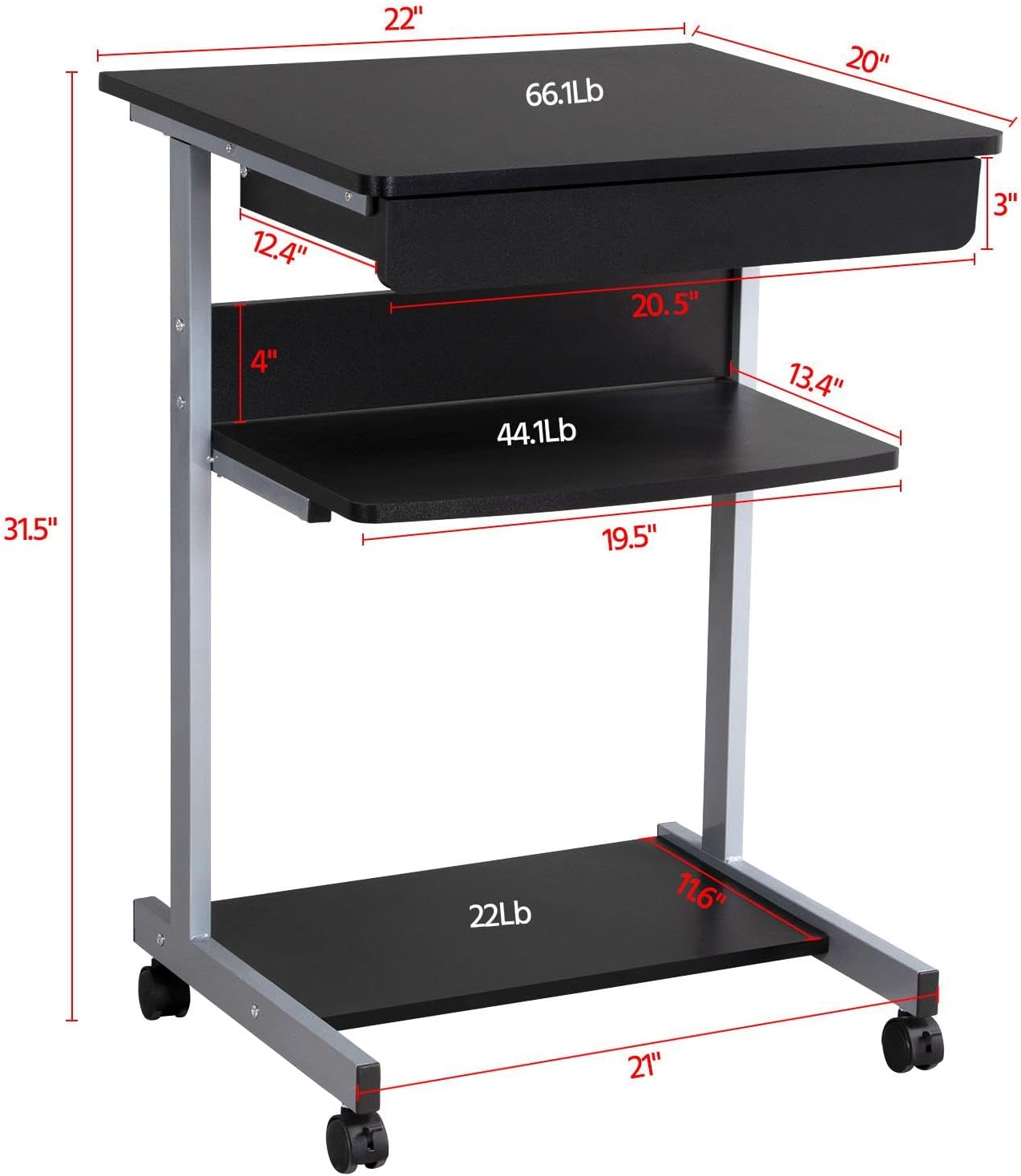
Image: Diagram showing the dimensions and weight capacities of the desk components.
Kurulum ve Montaj
Assembly is designed to be straightforward. It is recommended to have a clear, spacious area for assembly. All necessary tools are included.
Montaj Adımları:
- Attach the side frames: Secure the horizontal bars to the vertical support frames using the provided screws.
- Install casters: Screw the four rolling casters into the bottom of the desk frame. Ensure the two lockable casters are placed at the front for easy access.
- Mount the bottom shelf: Attach the bottom shelf to the lower section of the frame using the designated screws.
- Attach the middle shelf: Secure the middle shelf to the frame at the desired height.
- Install the keyboard tray slides: Attach the drawer slides to the desk frame. Ensure they are correctly oriented for smooth operation.
- Assemble the keyboard tray: Connect the sides and back of the keyboard tray, then slide the bottom panel into place. Attach the remaining drawer slides to the keyboard tray.
- Insert the keyboard tray: Carefully slide the assembled keyboard tray into the installed drawer slides on the desk frame.
- Attach the top desktop panel: Secure the main desktop panel to the top of the frame.
Video: Detailed installation instructions for the Yaheetech Mobile Computer Desk.

Resim: Yakın çekim view highlighting the heavy MDF boards, thickened frame, smooth steel ball drawer, open middle shelf, open bottom shelf, and lockable casters.
Kullanım Talimatları
Hareketlilik ve Kararlılık:
- The desk is equipped with four rolling casters for easy movement.
- To secure the desk in place, engage the locks on the two front casters. Push the lever down to lock and up to unlock.
Using the Keyboard Tray:
- The keyboard tray slides smoothly on metal runners. Gently pull the tray outwards to extend it for use.
- Push the tray inwards until it is fully retracted when not in use to save space.
Depolama Rafları:
- The top surface is suitable for a laptop or monitor, with a maximum load of 30 kg (66.1 lb).
- The middle shelf can hold items up to 20 kg (44.1 lb), such as books or accessories. The back plate helps prevent items from falling.
- The bottom shelf is designed for a printer or other larger items, with a maximum load of 10 kg (22 lb).
Video: Demonstration of the small rolling computer desk cart for home office use, highlighting mobility and storage.

Image: The desk in use with a laptop, showing its compact design and functionality.
Bakım
To maintain the appearance and longevity of your Yaheetech Mobile Computer Desk:
- Temizlik: Yüzeyleri reklamla silinamp Bez. Sert kimyasallardan veya aşındırıcı temizleyicilerden kaçının.
- Denetleme: Tüm vidaları ve bağlantıları düzenli olarak kontrol ederek sıkı olduklarından emin olun. Gerekirse tekrar sıkın.
- Tekerlekler: Keep the casters free of debris to ensure smooth rolling.
Sorun giderme
Masaüstü bilgisayarınızla ilgili herhangi bir sorunla karşılaşırsanız, lütfen aşağıdaki yaygın çözümlere bakın:
- Masa sallanıyor: Ensure all screws are securely tightened. Check that the desk is on a flat, even surface. Engage the locks on the casters.
- Keyboard tray not sliding smoothly: Check the drawer slides for any obstructions or debris. Ensure the slides are properly aligned and lubricated if necessary.
- Kayıp parçalar: Ürün elinize ulaştığında herhangi bir parça eksikse, lütfen derhal müşteri hizmetleriyle iletişime geçin.
Burada ele alınmayan sorunlar için lütfen Yaheetech müşteri desteğiyle iletişime geçin.
Özellikler
| Marka | Yaheetech |
| Model Numarası | YT-00009601 |
| Ürün Boyutları (D x G x Y) | 56 x 51 x 79 cm (20"D x 22"G x 31.1"Y) |
| Ürün Ağırlığı | 24.3 Pound |
| Renk | Siyah |
| Malzeme Türü | Engineered Wood (MDF), Metal (Iron) |
| Maksimum Ağırlık Önerisi (Üst) | 30 Kilogram (66.1 lb) |
| Çekmece için Maksimum Ağırlık Önerisi | 2 Kilogram (4.4 lb) |
| Maksimum Taşıma Kapasitesi Önerisi (Orta Raf) | 20 Kilogram (44.1 lb) |
| Maksimum Taşıma Kapasitesi Önerisi (Alt Raf) | 10 Kilogram (22 lb) |
| Çekmece Sayısı | 1 |
| Raf Sayısı | 2 (Open Shelves) |
| Özel Özellik | Compact, Mobile with Lockable Casters |
| Gerekli Montaj | Evet |
| Tüm Montaj Aletlerini İçerir | Evet |
Garanti ve Destek
For warranty information, please refer to the documentation included with your purchase or contact Yaheetech directly. Yaheetech aims to provide quality products and customer satisfaction.
If you require further assistance, have questions about assembly, or need to report missing/damaged parts, please contact Yaheetech customer support through their official webÜrünün satın alındığı site veya perakendeci.
Ask a question about this manual
Ask about setup, troubleshooting, compatibility, parts, safety, or missing instructions. Manuals+ will review the question and use this page’s manual context to help answer it.