
giriiş
The Konftel EGO is a compact and portable personal speakerphone designed for crystal-clear audio conferencing. Featuring OmniSound audio technology, it is suitable for small meetings, individual use, and travel. This manual provides instructions for setting up, operating, and maintaining your Konftel EGO.
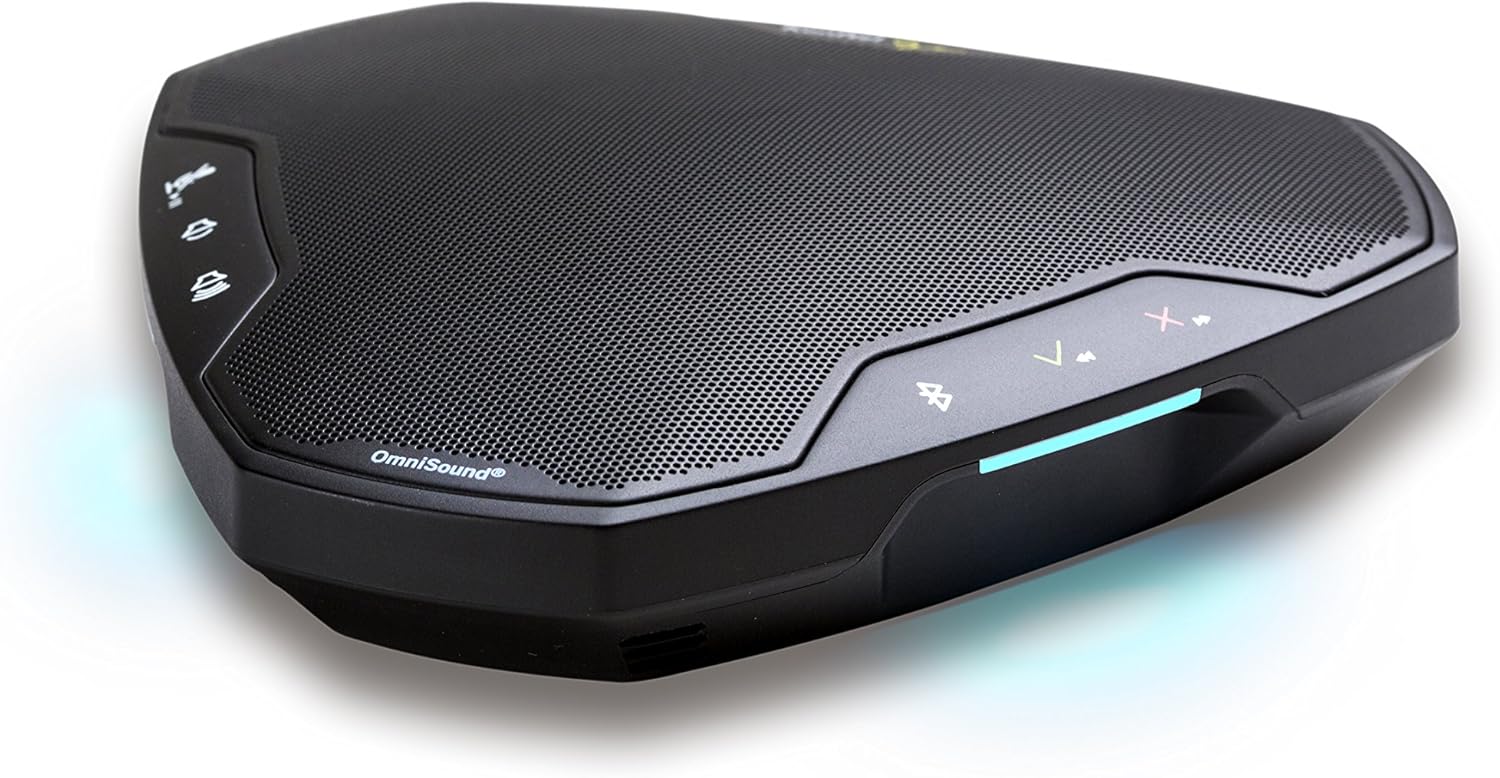
Image: The Konftel EGO in use during a small group meeting, demonstrating its portability and ease of integration into various environments.
Kutuda Neler Var?
- Konftel EGO Conferencing Unit
- Taşıma Çantası
- USB kablosu
- Kullanım Kılavuzu (bu belge)
Ürün Bittiview
The Konftel EGO features intuitive controls and essential ports for connectivity. Familiarize yourself with the device's layout before use.

Resim: Üst view of the Konftel EGO, highlighting the touch-sensitive control panel and OmniSound branding.

Resim: Arka view of the Konftel EGO, displaying the headset port, USB connection, and power button.
Temel Bileşenler:
- Dokunmatik Kontroller: For call answer/end, volume up/down, mute, Bluetooth pairing.
- LCD Ekran: Durum bilgilerini görüntüler.
- USB Bağlantı Noktası: For connecting to a computer and charging.
- Kulaklık Bağlantı Noktası: For connecting a personal headset (disables internal microphone).
- Güç Düğmesi: Cihazı açmak/kapatmak için.
- NFC Tag: Uyumlu cihazlarla hızlı Bluetooth eşleştirmesi için.
Kurmak
1. Cihazın Şarj Edilmesi
Before first use, fully charge your Konftel EGO. Connect the supplied USB cable to the USB port on the device and to a computer or a USB power adapter (not included). The LCD screen will indicate charging status. A full charge provides approximately 12 hours of talk time.
2. USB üzerinden bağlantı
- Connect the Konftel EGO to your computer using the supplied USB cable.
- The device will be recognized as an audio device. Select "Konftel EGO" as your speaker and microphone in your computer's audio settings or conferencing application.
- The device will draw power from the USB connection during use.
3. Bluetooth ile eşleştirme
The Konftel EGO supports Bluetooth pairing with mobile phones and other compatible devices.
Standart Bluetooth Eşleştirme:
- Ensure the Konftel EGO is powered on.
- Basılı tutun Bluetooth düğmesi on the device until the Bluetooth indicator flashes.
- On your mobile device, go to Bluetooth settings and select "Konftel EGO" from the list of available devices.
- Eşleştirme tamamlandıktan sonra Bluetooth göstergesi sürekli olarak yanacaktır.
NFC Pairing (Near Field Communication):
- Mobil cihazınızda NFC özelliğinin etkinleştirildiğinden emin olun.
- Tap your NFC-enabled mobile device against the NFC tag on the Konftel EGO (located near the "Konftel Ego" logo).
- Confirm the pairing request on your mobile device.
Operating the Konftel EGO
Çağrı Yönetimi:
- Cevap Çağrısı: Basın Cevap düğmesi (green phone icon).
- Çağrı Sonu: Basın Çağrı Sonlandırma düğmesi (red phone icon).
- Mikrofonun Sesini Kapat: Basın Sessize alma düğmesi (microphone icon). Press again to unmute.
- Ses Ayarı: Kullanın Sesi Aç (+) Ve Sesi kıs (-) düğmeler.
Müzik akışı:
When connected via Bluetooth, the Konftel EGO can stream music in HD quality from your mobile device. Use your mobile device's controls for playback (play, pause, skip tracks).
Using a Headset:
Connect a 3.5mm headset to the headset port on the Konftel EGO for private conversations. When a headset is connected, the internal microphone and speaker of the EGO are disabled.
Bakım
Temizlik:
Wipe the device with a soft, dry cloth. Do not use liquid cleaners or abrasive materials, as these can damage the surface and internal components.
Pil Bakım:
- Pilin sık sık tamamen boşaltılmasından kaçının.
- Uzun süre kullanılmayacaksa cihazı serin ve kuru bir yerde saklayın.
- Charge the device periodically if stored for a long time to maintain battery health.
Sorun giderme
| Sorun | Olası Neden | Çözüm |
|---|---|---|
| Ses yok veya düşük ses seviyesi |
|
|
| Bluetooth üzerinden bağlanılamıyor |
|
|
| Mikrofon sesi almıyor |
|
|
Özellikler
- Model Numarası: 910101081
- Ürün Ölçüleri: 5.71 x 5.31 x 1.26 inç
- Ürün Ağırlığı: 8.1 ons
- Pil: 1 Lityum İyon pil (dahil)
- Bağlantı: Bluetooth with NFC, USB
- Ses Teknolojisi: OmniSound with HD audio
- Üretici: Konftel
Garanti ve Destek
Garanti bilgileri ve teknik destek için lütfen resmi Konftel web sitesine başvurun. website or contact your local Konftel reseller. Keep your proof of purchase for warranty claims.
Official Konftel Webalan: www.konftel.com