
1. Giriş
Satın aldığınız için teşekkür ederizasing the Forever BS600 Bluetooth Speaker. This portable wireless speaker combines powerful audio with versatile playback options, including Bluetooth, FM radio, USB, and SD card support. It also features a built-in microphone for hands-free calling. Please read this manual carefully to ensure proper use and maintenance of your device.
Dahil Bileşenler:
- Forever BS600 Bluetooth Speaker
- 3.5 mm Jak Kablosu
- USB Şarj Kablosu
- Lithium Battery (pre-installed)

Image 1.1: Forever BS600 speaker with its accompanying 3.5mm audio cable and USB charging cable.
2. Güvenlik Bilgileri
Güvenli ve optimum çalışma sağlamak için lütfen aşağıdaki önlemlere uyun:
- Cihazı aşırı sıcaklıklara, doğrudan güneş ışığına veya yüksek neme maruz bırakmayın.
- Hoparlörü düşürmekten veya sert darbelere maruz bırakmaktan kaçının.
- Cihazı kendiniz sökmeyin, tamir etmeyin veya üzerinde değişiklik yapmayın. Tüm servis işlemlerini yetkili personele yaptırın.
- Hoparlörü su ve diğer sıvılardan uzak tutun. Su geçirmez değildir.
- Yalnızca ürünle birlikte verilen veya onaylanmış şarj kablolarını kullanın.
- Dispose of batteries according to local regulations. Do not expose batteries to excessive heat.
3. Ürün Bittiview
Hoparlörün kontrollerini ve bağlantı noktalarını tanıyın:
Kontrol Düğmeleri:
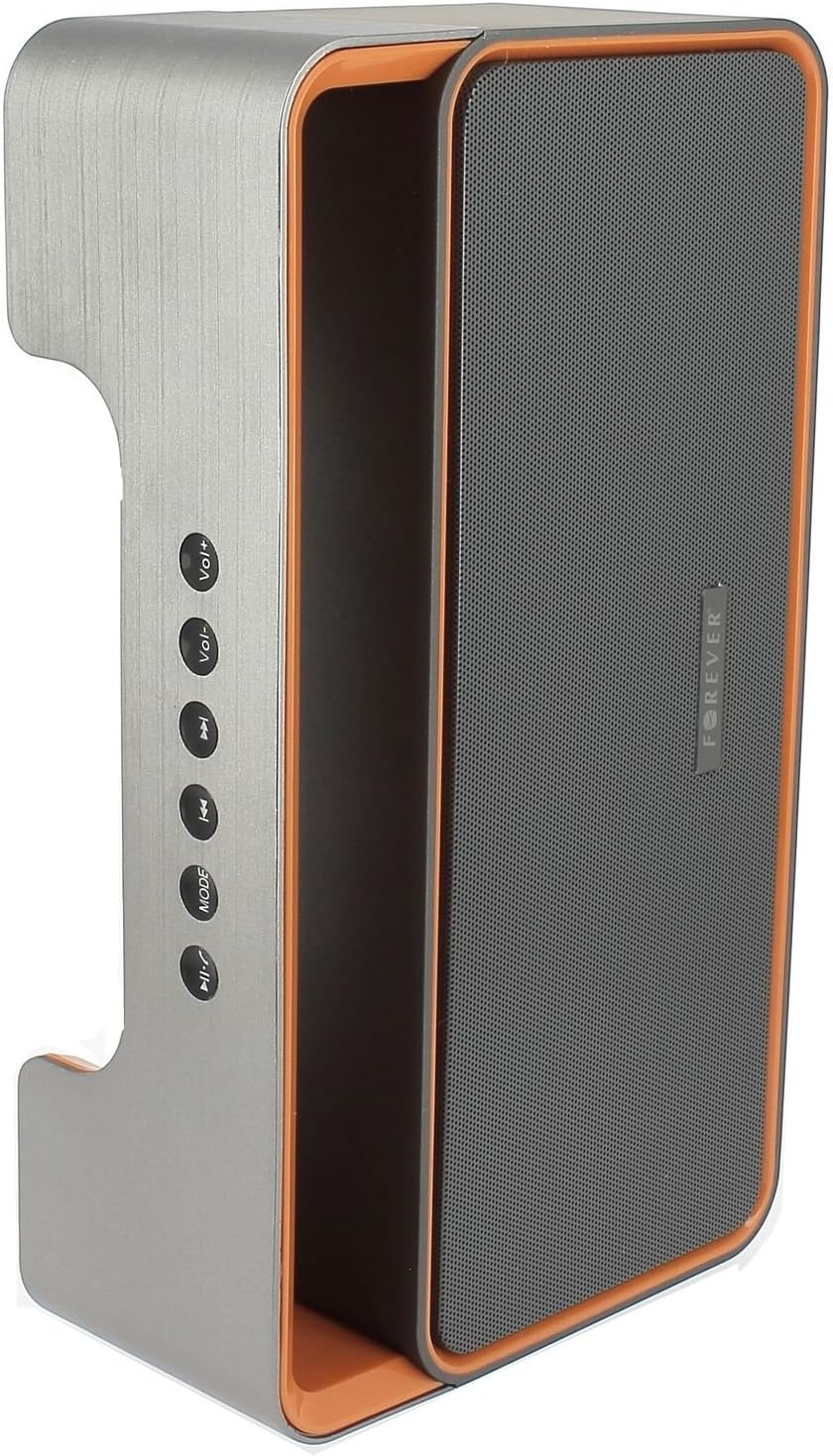
Image 3.1: Side panel with control buttons.
- Cilt+ / Cilt-: Adjust volume.
- Önceki Parça / Sonraki Parça: Navigate between tracks in playback modes or stations in FM mode.
- MOD: Switch between Bluetooth, FM Radio, USB, SD Card, and AUX modes.
- Oynat/Duraklat: Play or pause audio. Answer or end calls.
Bağlantı Noktaları ve Konektörler:

Image 3.2: Rear panel with ports and power switch.
- AUX Girişi: For connecting external audio devices via 3.5mm cable.
- Micro SD Kart Yuvası: For playing music from a Micro SD card.
- USB Bağlantı Noktası: For playing music from a USB flash drive.
- Mikro USB Şarj PortuHoparlörün dahili pilini şarj etmek için.
- AÇIK/KAPALI Anahtarı: To power the speaker on or off.
4. Kurulum
4.1 Hoparlörü Şarj Etme
- Connect the small end of the USB charging cable to the Micro USB port on the back of the speaker.
- USB kablosunun büyük ucunu bir USB güç adaptörüne (dahil değildir) veya bir bilgisayarın USB portuna bağlayın.
- Şarj gösterge ışığı yanarak (rengi değişebilir) hoparlörün şarj olduğunu gösterecektir.
- Tamamen şarj olduğunda gösterge ışığı değişecek veya sönecektir. Şarj kablosunu çıkarın.
Note: For first-time use, fully charge the speaker for approximately 3-4 hours.
4.2 Açma/Kapatma
- To power on, slide the ON/OFF switch on the rear panel to the 'ON' position. You will hear an audible prompt.
- Cihazı kapatmak için, AÇMA/KAPATMA düğmesini 'KAPALI' konumuna getirin.
5. Kullanım Talimatları
5.1 Mod Seçimi
Basın MOD button repeatedly to cycle through the available modes: Bluetooth, FM Radio, USB, SD Card, and AUX.
5.2 Bluetooth Eşleştirme
- Hoparlörü açın. Yanıp sönen bir LED ışığı ve sesli bir uyarı ile belirtildiği gibi, otomatik olarak Bluetooth eşleştirme moduna girecektir.
- Mobil cihazınızda (akıllı telefon, tablet, bilgisayar) Bluetooth'u etkinleştirin.
- Arama available Bluetooth devices. You should find "BS600" in the list.
- Select "BS600" to connect. Once paired, the LED light will stop flashing, and you will hear a confirmation sound.
- Artık cihazınızdaki sesleri hoparlörünüz aracılığıyla oynatabilirsiniz.
5.3 FM Radyo Modu
- Hoparlörü aşağıdaki komutları kullanarak FM Radyo moduna geçirin. MOD düğme.
- Basılı tutun Oynat/Duraklat button to initiate an automatic scan for FM stations. The speaker will save all found stations.
- Kullanın Önceki Parça Ve Sonraki Parça Kaydedilen istasyonlar arasında gezinmek için düğmeler.
5.4 USB/SD Kart Oynatma
- Bir USB flash sürücü veya MP3 ses dosyası içeren bir Micro SD kart takın. files) arka paneldeki ilgili porta takın.
- The speaker will automatically switch to USB or SD card mode and begin playing music. If not, press the MOD Doğru modu seçmek için düğmeye basın.
- Kullanın Önceki Parça, Sonraki Parça, Ve Oynat/Duraklat oynatmayı kontrol etmek için düğmeler.
5.5 AUX Modu
- 3.5 mm ses kablosunun bir ucunu hoparlördeki AUX giriş portuna bağlayın.
- Connect the other end of the cable to the headphone jack of your external audio device.
- Switch the speaker to AUX mode using the MOD düğme.
- Harici ses cihazınızdan oynatmayı kontrol edin.
5.6 Çağrı Yönetimi (Bluetooth Modu)
- Cevap Çağrısı: When a call comes in during Bluetooth mode, press the Oynat/Duraklat button once to answer.
- Çağrı Sonu: During a call, press the Oynat/Duraklat button once to end the call.
- Çağrıyı Reddet: When a call comes in, press and hold the Oynat/Duraklat aramayı reddetmek için düğmesine basın.
5.7 Ses Kontrolü
Basın Cilt+ Sesi artırmak için düğmeye basın ve Cilt- Sesi azaltmak için düğmesine basın.
6. Bakım
6.1 Temizlik
- Temizlemeden önce hoparlörün kapalı olduğundan ve herhangi bir güç kaynağından ayrıldığından emin olun.
- Hoparlörün dış yüzeylerini silmek için yumuşak, kuru ve tüy bırakmayan bir bez kullanın.
- Yüzey kaplamasına veya iç bileşenlere zarar verebileceğinden, aşındırıcı temizleyiciler, çözücüler veya kimyasal spreyler kullanmayın.
6.2 Depolama
- Uzun süre kullanılmayacaksa hoparlörü serin, kuru, doğrudan güneş ışığından ve aşırı sıcaklıklardan uzak bir yerde saklayın.
- It is recommended to charge the battery at least once every three months to maintain its lifespan.
7. Sorun Giderme
| Sorun | Olası Neden | Çözüm |
|---|---|---|
| Hoparlör açılmıyor. | Pil bitmiş. | Hoparlörü USB kablosu kullanarak şarj edin. |
| Ses yok. | Ses seviyesi çok düşük; yanlış mod seçildi; cihaz bağlı değil. | Increase volume; press MODE button to select correct source; ensure Bluetooth/AUX connection is active. |
| Bluetooth eşleştirme başarısız. | Speaker not in pairing mode; device too far; Bluetooth not enabled on source. | Ensure speaker is in Bluetooth mode and flashing; move device closer; enable Bluetooth on your device. |
| FM radyo alımı zayıf. | Zayıf sinyal; çevresel parazit. | Hoparlörü daha iyi sinyal alan bir yere taşıyın. |
| USB/SD kart çalışmıyor. | Yanlış file format; card/drive not inserted correctly; corrupted media. | Emin olmak files are MP3 format; reinsert media; try a different USB drive/SD card. |
8. Özellikler
| Model Adı | BS600 |
| Marka | Sonsuza kadar |
| Bağlantı Teknolojisi | Bluetooth, Yardımcı, USB |
| Hoparlör Tipi | Taşınabilir Bluetooth Hoparlör |
| Özel Özellikler | FM Radio, USB Reader, SD Card Reader |
| Maksimum Çıkış Gücü | 10 Watt (2 x 5W) |
| Ses Çıkışı Modu | Mono |
| Güç Kaynağı | Pil ile Çalışır (Lityum-iyon) |
| Kontrol Yöntemi | Dokunmatik Düğmeler |
| Boyutlar (yaklaşık) | Yükseklik: 13 cm, Genişlik: 24 cm |
| Renk | Gri / Turuncu |
| Su geçirmez | HAYIR |
9. Garanti Bilgileri
The Forever BS600 Bluetooth Speaker comes with a limited warranty. Please refer to the warranty card included with your purchase or contact your retailer for specific terms and conditions. This warranty typically covers manufacturing defects but does not cover damage caused by misuse, accidents, unauthorized modifications, or normal wear and tear.
10. Destek
If you encounter any issues not covered in the troubleshooting section or require further assistance, please contact the retailer where you purchased the product or visit the official Forever website for support resources. Please have your product model (BS600) and purchase details ready when seeking support.