
giriiş
This manual provides detailed instructions for the setup, operation, maintenance, and troubleshooting of your EZCAP284 HD 1080P Capture HDMI YPbPr Recorder. Please read this manual thoroughly before using the device to ensure proper functionality and to prevent damage.
Güvenlik Bilgileri
- Cihazı neme, yağmura veya aşırı sıcaklıklara maruz bırakmayın.
- Cihazı düşürmekten veya güçlü darbelere maruz bırakmaktan kaçının.
- Yalnızca belirtilen güç adaptörünü kullanın.
- Cihazı sökmeye veya üzerinde değişiklik yapmaya çalışmayın. Bu, garantiyi geçersiz kılacaktır.
- Cihazı çocuklardan uzak tutunuz.
Paket İçeriği
Paketinizde tüm öğelerin mevcut olduğundan emin olun:
- EZCAP284 HD 1080P Capture Device
- Uzaktan kumanda
- Güç Adaptörü (açıkça listelenmemiş ancak çalıştırılması için ima edilmiştir)
- Kullanım Kılavuzu (bu belge)
Ürün Bittiview
The EZCAP284 is a standalone HD video capture device designed for recording gameplay and other HDMI/YPbPr sources directly to a USB storage device without the need for a PC. It features HDMI pass-through for real-time viewIng.

Şekil 1: Üst view of the EZCAP284 device, featuring a prominent record button.

Şekil 2: Ayrıntılı view of the input and output ports on the EZCAP284.
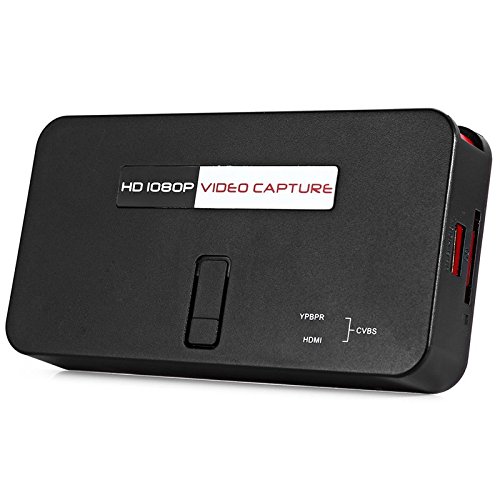
Şekil 3: Alt view of the EZCAP284 device, indicating model and certification information.
Kurmak
- Video Kaynağını Bağlayın: Connect your game console (e.g., PS3) or other video source to the HDMI IN or YPbPr IN port on the EZCAP284 using the appropriate cables.
- Ekranı Bağla: Televizyonunuzu veya monitörünüzü bağlayın. HDMI ÇIKIŞI port on the EZCAP284. This allows you to view your gameplay in real-time while recording.
- USB depolama aygıtını bağlayın: Insert a USB flash drive or external hard drive (formatted as FAT32 or NTFS) into the USB 2.0 port on the EZCAP284. This is where your recordings will be saved.
- Gücü bağlayın: Connect the power adapter to the DC IN port on the EZCAP284 and then plug it into a power outlet. The device will power on.
- Optional Audio Input: If you wish to record live commentary, connect a microphone to the 3.5mm Ses Girişi liman.
Kullanım Talimatları
Recording Gameplay
- Ensure all connections are secure as described in the Setup section.
- Turn on your video source (e.g., game console) and your display.
- Basın KAYIT button on the EZCAP284 device or the remote control to start recording. The indicator light will change to show recording is in progress.
- Basın KAYIT button again to stop recording. The indicator light will revert to its standby state.
- Your recorded video file will be saved to the connected USB storage device.
Adding Live Commentary
To record your voice along with the gameplay:
- Bir mikrofonu şuna bağlayın: 3.5mm Ses Girişi port before starting your recording.
- The device will automatically mix the microphone audio with the video source audio during recording.
Playback
İle view your recorded videos, safely remove the USB storage device from the EZCAP284 and connect it to a computer or a media player that supports the recorded video format.
Bakım
- Temizlik: Cihazın dış yüzeyini temizlemek için yumuşak, kuru bir bez kullanın. Sıvı temizleyiciler veya çözücüler kullanmayın.
- Depolamak: Cihazı kullanmadığınız zamanlarda serin, kuru ve doğrudan güneş ışığından ve aşırı sıcaklıklardan uzak bir yerde saklayın.
- Yazılım: Üreticinin kontrol edin webPerformansı artırabilecek veya özellikler ekleyebilecek herhangi bir ürün yazılımı güncellemesi için siteyi düzenli olarak kontrol edin.
Sorun giderme
| Sorun | Olası Neden | Çözüm |
|---|---|---|
| Ekranda video çıkışı yok. | Incorrect cable connection; input source not active; display input not selected. | Check HDMI/YPbPr connections. Ensure video source is on. Select correct input on your TV/monitor. |
| Kayıt işlemi başarısız oluyor veya beklenmedik şekilde duruyor. | USB storage full; USB drive not compatible; power interruption. | Ensure USB drive has sufficient space. Try a different USB drive (FAT32/NTFS). Check power connection. |
| No audio in recording. | Audio cables not connected; source audio muted; microphone not connected or faulty. | Verify audio connections from source. Ensure source audio is not muted. Check microphone connection and functionality. |
| Uzaktan kumanda çalışmıyor. | Batteries low or inserted incorrectly; IR sensor blocked. | Replace batteries. Ensure line of sight to the device's IR sensor. |
Özellikler
| Özellik | Tanım |
|---|---|
| Örnek | EZCAP284 |
| Tip | Adapter / Video Capture Device |
| Malzeme | Bakır (dahili bileşenler) |
| Arayüzler | 3.5mm Audio In, HDMI In, HDMI Out, YPbPr In, USB 2.0 |
| Video Yakalama Çözünürlüğü | 1080p'ye kadar |
| Platform Uyumluluğu | PlayStation (and other HDMI/YPbPr sources) |
| Dahil Bileşenler | Uzaktan kumanda |
| Renk | Siyah |
| Boyutlar (U x G x Y) | 14.00 x 7.40 x 2.00 cm (yaklaşık) |
| Ağırlık | 0.463 kg (yaklaşık paket ağırlığı) |
Garanti ve Destek
Garanti bilgileri ve teknik destek için lütfen satın alma işleminizle birlikte verilen belgelere bakın veya doğrudan satıcı/üretici ile iletişime geçin. Garanti talepleri için satın alma belgenizi saklayın.