
1. Giriş
The StarTech.com USB-C Multiport Adapter DKT30CHV is designed to expand the connectivity of your USB-C enabled laptop, tablet, or smartphone. This portable travel dock allows you to connect to a 4K HDMI or 1080p VGA display, a Gigabit Ethernet network, and a 5Gbps USB-A 3.0 peripheral, all through a single USB-C port on your host device. It is bus-powered, eliminating the need for an external power adapter, making it ideal for mobile use.
Temel Özellikler:
- 4-in-1 Portable Dock: Provides 4K 30Hz HDMI or 1080p VGA video output, one USB-A (USB 3.1 Gen 1 5Gbps) port, and Gigabit Ethernet.
- Geniş Cihaz Uyumluluğu: Compatible with USB-C and Thunderbolt 3 (TB3) devices from various brands including HP, Dell, Lenovo, Apple MacBook Pro/Air, and Chromebooks.
- Geniş İşletim Sistemi Uyumluluğu: Supports Windows, macOS, Ubuntu, and Chrome OS.
- Compact & Light Design: Easily fits into a laptop bag or pocket for travel.

Image 1: The StarTech.com USB-C Multiport Adapter DKT30CHV, a compact black device with various ports.
2. Paket İçeriği
- 1x USB-C Multiport Adapter (DKT30CHV)
- 1x Kullanım Kılavuzu
3. Kurulum
Follow these steps to set up your StarTech.com USB-C Multiport Adapter:
- Ana Bilgisayara Bağlan: Plug the integrated USB-C cable from the adapter into an available USB-C or Thunderbolt 3 port on your laptop, tablet, or smartphone. Ensure your host device's USB-C port supports video (DisplayPort Alternate Mode) for video output functionality.
- Ekranı Bağla: Connect an HDMI cable from your monitor to the adapter's HDMI port for up to 4K 30Hz resolution, or connect a VGA cable to the adapter's VGA port for up to 1080p resolution. The adapter supports one video output at a time.
- Ağa bağlan: Connect an Ethernet cable from your network router or switch to the adapter's Gigabit Ethernet port for a wired network connection.
- USB çevre birimlerini bağlayın: Plug your USB-A devices (e.g., mouse, keyboard, external hard drive) into the adapter's USB 3.0 (USB 3.1 Gen 1) port.

Resim 2: Yakın çekim view of the adapter's ports, including Gigabit Ethernet, USB-A 3.0, VGA, and HDMI.
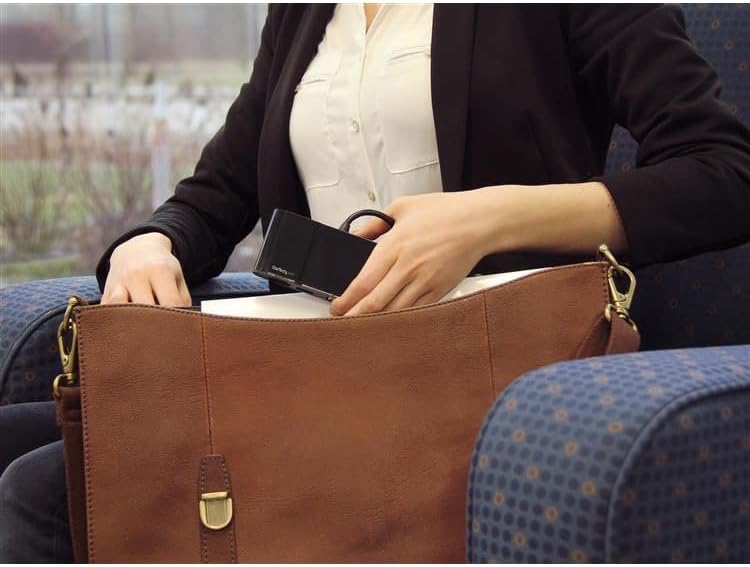
Image 3: The compact USB-C Multiport Adapter being stored in a bag, highlighting its portability.
4. Kullanım Talimatları
Once connected, the adapter functions as an extension of your host device's capabilities. Most operating systems provide native support, meaning drivers are often not required for basic functionality. However, for optimal performance, especially with the Gigabit Ethernet port, it is recommended to check the StarTech.com support webalan for the latest drivers specific to your operating system.
Görüntü Çıktısı:
The adapter supports either HDMI or VGA output, but not simultaneously. Your operating system should automatically detect the connected display. You can configure display settings (e.g., extended desktop, duplicate display) through your computer's display preferences.
USB 3.0 Bağlantı Noktası:
The USB 3.0 port provides 5Gbps data transfer speeds for connecting peripherals. It is backward compatible with USB 2.0 devices.
Gigabit-Ethernet:
The Gigabit Ethernet port provides a stable and fast wired network connection. Ensure the Ethernet cable is securely connected to both the adapter and your network device.
Video 1: An official StarTech.com video demonstrating the general benefits and ease of use of their docking stations and adapters for various professional scenarios.
5. Bakım
To ensure the longevity and optimal performance of your StarTech.com USB-C Multiport Adapter, follow these maintenance guidelines:
- Temizlik: Use a soft, dry cloth to clean the adapter. Avoid using harsh chemicals or abrasive cleaners.
- Depolamak: Adaptörü serin, kuru ve doğrudan güneş ışığından ve aşırı sıcaklıklardan uzak bir yerde saklayın.
- İşleme: Handle the adapter with care. Avoid dropping it or subjecting it to strong impacts. Do not pull on the integrated cable forcefully.
6. Sorun Giderme
If you encounter issues with your USB-C Multiport Adapter, refer to the following common troubleshooting steps:
- Görüntü Çıkışı Yok:
- Ensure your host laptop's USB-C port supports video (DisplayPort Alternate Mode). Not all USB-C ports have this capability.
- Verify that the video cable (HDMI or VGA) is securely connected to both the adapter and the display.
- Try connecting the display directly to your laptop (if possible) to rule out display or cable issues.
- Ana bilgisayarınızı yeniden başlatın.
- No Network Connection (Gigabit Ethernet):
- Ethernet kablosunun hem adaptöre hem de ağ cihazınıza güvenli bir şekilde bağlı olduğundan emin olun.
- Check your host device's network settings to ensure the Ethernet adapter is recognized and enabled.
- Ziyaret edin StarTech.com support webalan to download and install the latest Ethernet drivers for your operating system, if necessary.
- USB çevre birimleri tanınmıyor:
- Ensure the USB peripheral is properly connected to the adapter's USB 3.0 port.
- Try connecting the USB peripheral directly to your host device (if possible) to confirm it is functional.
- If connecting a high-power USB device, ensure your host device can provide sufficient power through its USB-C port. The DKT30CHV is bus-powered and does not support USB Power Delivery to charge other devices.
- Intermittent Connections or Performance Issues:
- Ensure all cables are firmly seated and not loose.
- Avoid excessive bending or strain on the integrated USB-C cable.
- Reduce the number of simultaneously active high-bandwidth devices if experiencing slowdowns, as all ports share the USB 3.0 bandwidth.
7. Özellikler

Image 4: Diagram showing the dimensions of the StarTech.com USB-C Multiport Adapter: 4.5 inches (11.4 cm) length, 2.1 inches (5.4 cm) width, and 0.7 inches (1.7 cm) height.
| Özellik | Şartname |
|---|---|
| Marka | StarTech.com |
| Model Numarası | DKT30CHV |
| Renk | Siyah |
| Donanım Arayüzü | Thunderbolt, USB, USB 2.0, USB 3.0, USB 3.1 Type C, USB Type C |
| Özel Özellik | Taşınabilir |
| Uyumlu Cihazlar | Audio/Video Device, Chromebook, Docking Station, Monitors, Network Device, Notebook, Projectors, Workstation |
| Toplam USB Bağlantı Noktaları | 1 (USB-A 3.0) |
| Veri Aktarım Hızı | Saniyede 5 Gigabit |
| Port Sayısı | 4 (HDMI, VGA, USB-A 3.0, Gigabit Ethernet) |
| İşletim Sistemi | Chrome OS, Linux, macOS, Windows |
| Muhafaza Malzemesi | Metal |
| Ürün Boyutları (U x G x Y) | 4.5"U x 2.1"G x 0.7"Y (11.4 cm x 5.4 cm x 1.7 cm) |
| Ürün Ağırlığı | 0.16 Pound (72.57 g) |
| UPC | 662919087369, 065030864695 |
8. Garanti ve Destek
The StarTech.com USB-C Multiport Adapter DKT30CHV is backed by a 3 yıllık garanti. StarTech.com also offers free lifetime technical support to assist you with any questions or issues you may encounter.
For technical assistance, product information, or to download drivers, please visit the official StarTech.com support webalan: www.startech.com/support