
1. Giriş
The AudioControl D-4.800 is a high-performance 4-channel Class D amplifier with an integrated Digital Signal Processor (DSP). It delivers up to 800 watts of power and features AccuBASS restoration, a 30-band equalizer, and flexible input/output matrixing. This amplifier is designed to enhance both OEM and aftermarket car audio systems by providing precise control over sound reproduction.
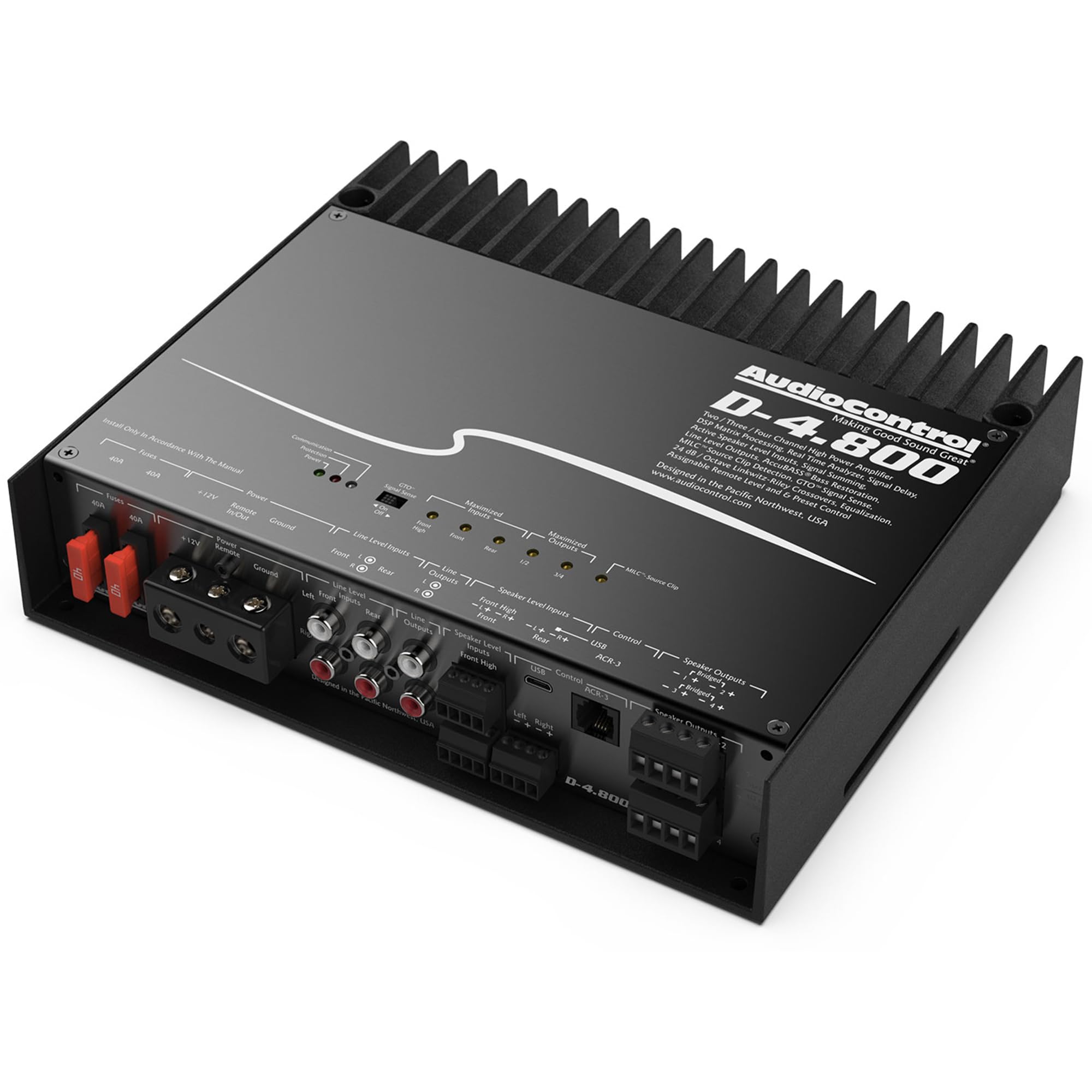
Figure 1: AudioControl D-4.800 Matrix DSP Amplifier. This image shows the top and side view of'un ampKompakt tasarımını ve ısı dağıtıcı kanatçıklarını vurgulayan bir yükseltici.
2. Güvenlik Bilgileri
- Profesyonel Kurulum Önerilen: Due to the complexity of car audio systems and electrical connections, professional installation is highly recommended.
- Güç Bağlantıları: Ensure all power connections are secure and properly fused to prevent electrical shorts and fire hazards. Disconnect the vehicle's battery before installation.
- Havalandırma: Binmek amplifier in a location that allows for adequate airflow to prevent overheating. Do not cover the heat sinks.
- Neme Maruz Kalma: monte etmekten kaçının amplifier in areas prone to moisture or direct water exposure.
- Kablolama: Use appropriate gauge wiring for power, ground, and speakers as specified in the installation section to ensure optimal performance and safety.
3. Paket İçeriği
Paketin içinde tüm öğelerin mevcut olduğundan emin olun:
- AudioControl D-4.800 4-Channel Matrix DSP Ampcankurtaran
- Hoparlör Konektörleri
- Sigortalar
- Kullanım Kılavuzu (bu belge)
4. Ürün Özellikleri
- Çok Kanallı Esneklik: The amplifier can be configured for 4-channel, 3-channel, or 2-channel operation to suit various car audio system designs.
- OEM & Aftermarket Integration: Features 6 speaker-level inputs, 4 balanced RCA analog line-level preamp inputs, and 2 assignable preamp outputs. Input/output Real-Time Analyzers (RTAs) assist in identifying and summing factory speaker signals for precise tuning.
- Powerful Matrix DSP Capabilities: Allows selection of outputs from any combination of inputs, with customizable crossovers, filters, and equalization. The DM Smart App provides control over processor settings via an intuitive graphical user interface.
- D Sınıfı Ampkaldırıcı Teknoloji: Delivers up to 800W of power (4 x 125W @ 4Ω, 4 x 200W @ 2Ω, 2 x 400W @ 4Ω Bridged).
- AccuBASS Restoration: Corrects bass roll-off often present in factory head units due to built-in processing.
- Built-in Diagnostic Codes: Provides insight into amplifier status and potential issues.
- GTO Signal Sensing: Otomatik olarak döner amplifier on when an audio signal is detected on inputs 1 and 2, and turns off after a period of silence.
- MILC Clip Detection with LED Indicator: Prevents clipping and potential distortion by indicating when the input signal is too high.
- Selectable Crossovers: Offers high-pass, low-pass, and band-pass crossovers (12/24 dB/octave Linkwitz-Riley or 18 dB/octave Butterworth) to direct correct frequencies to speakers.
- Graphic and Parametric Equalizers: Includes a 30-band graphic EQ and a 10-band parametric EQ per output channel for detailed sound tuning.
5. Kurulum ve Kablolama
5.1 Montajı Ampcankurtaran
Select a mounting location that is dry, well-ventilated, and secure. Ensure sufficient space around the amplifier for air circulation to prevent overheating. Avoid mounting near heat sources or in direct sunlight.
5.2 Kablo Bağlantıları
Refer to the diagram below for proper wiring connections. Always disconnect the vehicle's negative battery terminal before making any electrical connections.

Figure 2: Rear panel of the AudioControl D-4.800 amplifier, showing power, ground, remote, line-level inputs, speaker-level inputs, line outputs, and speaker outputs.
- Güç (+12V): Connect to the vehicle's positive battery terminal using appropriate gauge power wire and an inline fuse.
- Zemin (GND): Connect to a clean, solid metal point on the vehicle chassis. Ensure a good electrical connection.
- Remote (REMOTE): Connect to the remote turn-on output of your head unit. If using GTO signal sensing, this connection may not be required.
- Hat Seviyesi Girişleri (RCA): Araçtaki ana ünitenin ön çıkışından RCA kablolarını bağlayın.amp çıktılar amplifier's Line Level Inputs (Front, Rear).
- Hoparlör Seviyesi Girişleri: Connect speaker wires from your head unit's speaker outputs or factory amplifier outputs to the amplifier's Speaker Level Inputs (Front, Rear).
- Hoparlör Çıkışları: Hoparlörlerinizi amplifier's Speaker Outputs. Observe correct polarity and impedance (2Ω min Stereo, 4Ω min Bridged).
- USB Bağlantı Noktası: Used for connecting a computer to configure the DSP settings.
- ACR-3 Port: For connecting the optional AudioControl ACR-3 wired remote control.
6. DSP Software Setup and Configuration
The D-4.800's digital signal processing is configured using AudioControl's Smart-User DSP software on a laptop (PC or Mac). This software provides comprehensive control over all audio parameters.

Figure 3: AudioControl D-4.800 amplifier connected to a laptop running the DSP configuration software. The software interface shows input/output views, RTA, and various tuning parameters.
6.1 Yazılım Kurulumu
- Download the latest Smart-User DSP software from the official AudioControl webalan.
- Install the software on your PC or Mac.
- Connect the D-4.800 amplifier to your computer using a USB cable.
- Launch the Smart-User DSP software. The software should detect the ampcankurtaran.
6.2 Key DSP Functions
- Geçişler: Set high-pass, low-pass, and band-pass filters for each channel. Choose between Linkwitz-Riley (12 or 24 dB/octave) or Butterworth (18 dB/octave) slopes.
- Eşitleme: Utilize the 30-band graphic equalizer or 10-band parametric equalizer per output channel for precise frequency adjustments.
- Time Delay/Alignment: Adjust the signal delay for each output to ensure proper sound staging ve görüntüleme.
- Faz Düzeltme: Correct phase issues between channels or speakers.
- AccuBASS: Enable and adjust AccuBASS to restore low-frequency information lost due to factory audio system processing.
- Input/Output RTAs: Use the real-time analyzers to visually monitor input and output signals, aiding in accurate tuning and signal summing.
- Input Matrixing: Assign any input signal to any output channel, allowing for flexible system designs.
7. Operasyon
7.1 GTO (Great Turn On) Signal Sensing
The D-4.800 features GTO signal sensing, which automatically turns the amplifier on when an audio signal is detected on inputs 1 and 2. The amplifier will turn off after a period of no audio signal. This eliminates the need for a separate remote turn-on wire in many installations.
7.2 LED Göstergeleri
The amplifier includes LED indicators to provide operational status:
- Optimized Signal Flow LEDs: Indicate when input and output signals are at optimal levels.
- MILC Clip Detection LED: Illuminates when the input signal is clipping, indicating potential distortion. Reduce the input level if this LED is active.
- Koruma LED'i: Eğer amplifier detects a fault condition (e.g., overheating, short circuit).
7.3 Optional ACR-3 Remote Control
An optional ACR-3 wired remote controller can be connected to the amplifier. This remote allows for control over source selection, output levels, and recalling saved DSP presets from the driver's seat.
8. Bakım
- Temizlik: Periyodik olarak temizleyin amplifier'in dış yüzeyini yumuşak ve kuru bir bezle silin. Sert kimyasallar veya aşındırıcı temizleyiciler kullanmaktan kaçının.
- Havalandırma: Şunların sağlanmasını temin edin: amplifier's heat sinks remain free of dust and debris to maintain proper cooling.
- Bağlantılar: Tüm kablo bağlantılarının güvenli ve korozyondan arınmış olduğundan emin olmak için düzenli olarak kontrol edin.
9. Sorun Giderme
If you experience issues with your D-4.800 amplifier, consult the following table:
| Sorun | Olası Neden | Çözüm |
|---|---|---|
| Güç Yok | Blown fuse, loose power/ground connection, no remote turn-on signal, GTO not enabled/working. | Check fuses, verify power and ground connections, check remote wire connection or GTO setting. |
| Ses Yok | Incorrect input/output wiring, muted channels in DSP, low gain settings, faulty speakers. | Verify all audio connections, check DSP settings for muted channels or low gain, test speakers. |
| Çarpıtma | Input signal clipping (MILC LED active), gain set too high, incorrect EQ settings, speaker impedance mismatch. | Reduce input gain, adjust EQ settings, ensure correct speaker impedance for ampcankurtaran. |
| Amplifier in Protection Mode | Overheating, shorted speaker wire, low voltage, dahili arıza. | Ensure adequate ventilation, check speaker wiring for shorts, verify vehicle voltage, consult AudioControl support if problem persists. |
10. Özellikler
| Şartname | Değer |
|---|---|
| Örnek | D-4.800 |
| Çıkış Gücü | 800 Watts (4 x 125W @ 4Ω, 4 x 200W @ 2Ω, 2 x 400W @ 4Ω Bridged) |
| Kanal Sayısı | 4 |
| Minimum Tedarik Hacmitage | 12 Volt (DC) |
| Maksimum Arz Hacmitage | 14.1 Volt |
| Ürün Boyutları (U x G x Y) | 16 x 12 x 5 inç |
| Ürün Ağırlığı | 5 Pound |
| Malzeme Türü | Alüminyum |
| Montaj Tipi | Yüzey Montajı |
| GTIN / UPC | 855814005792 |
11. Garanti ve Destek
11.1 Garanti Bilgileri
The AudioControl D-4.800 ampLifier aşağıdakilerle birlikte gelir: 1 Yıl Üretici Garantisi. Please retain your proof of purchase for warranty claims. For specific terms and conditions, refer to the warranty card included with your product or visit the official AudioControl webalan.
11.2 Teknik Destek
For technical assistance, troubleshooting, or questions regarding your AudioControl D-4.800 amplifier, please contact AudioControl customer support. You can find contact information and additional resources on the official AudioControl webalan: www.audiocontrol.com