
1. Giriş
Satın aldığınız için teşekkür ederizasing the Silverlit Xion FPV Camera Drone 84765. This drone is designed for outdoor use and offers an exciting First-Person View (FPV) flying experience with its integrated camera. Please read this manual thoroughly before operating the drone to ensure safe and optimal performance. Keep this manual for future reference.

Image 1.1: The Silverlit Xion FPV Camera Drone 84765.
2. Güvenlik Bilgileri
UYARI: Bu talimatlara uyulmaması yaralanmaya veya ürünün hasar görmesine neden olabilir.
- Always operate the drone in open, clear areas, away from people, animals, buildings, and power lines.
- Şiddetli rüzgarlarda veya olumsuz hava koşullarında uçmayın.
- Ellerinizi, yüzünüzü ve bol giysilerinizi dönen pervanelerden uzak tutun.
- Ensure the drone battery and remote control batteries are fully charged before each flight.
- Şarj halindeki pilleri asla gözetimsiz bırakmayın.
- This product is intended for children. Adult supervision is recommended.
- Drone'u veya parçalarını değiştirmeyin veya sökmeyin.
- Kullanmadığınız zamanlarda drone ve uzaktan kumandayı mutlaka kapatın.
3. Paket İçeriği
Paketin içinde tüm öğelerin mevcut olduğundan emin olun:
- Silverlit Xion FPV Camera Drone 84765
- Uzaktan kumanda
- FPV Gözlükler
- Şarj Edilebilir Drone Bataryası
- USB Charging Cable (for drone battery)
- Yedek Pervaneler
- Kullanıcı Kılavuzu

Image 3.1: The Silverlit Xion FPV Drone product box, showing the drone and FPV goggles.
4. Kurulum
4.1. Uzaktan Kumanda Pilinin Kurulumu
- Uzaktan kumandanın arkasındaki pil yuvasını açın.
- Insert the required batteries (not included) according to the polarity indicators.
- Pil bölmesini sıkıca kapatın.
4.2. Drone Pilinin Kurulumu
- Drone'un kapalı olduğundan emin olun.
- Drone'un pil bölmesini bulun.
- Carefully insert the charged drone battery, ensuring it is properly seated and connected.
- Pil bölmesinin kapağını kapatın.
4.3. Pervane Montajı (gerekirse)
If propellers are not pre-installed, attach them according to the markings (e.g., A and B) on the propellers and motor shafts. Ensure they are securely fastened.
4.4. Remote Control and Drone Pairing
- Uçağı düz, düz bir yüzeye yerleştirin.
- Drone'u açın. Gösterge ışıkları yanıp sönecektir.
- Uzaktan kumandayı açın.
- Move the left joystick (throttle) fully up, then fully down. The drone's indicator lights will become solid, indicating successful pairing.
4.5. FPV Goggle Setup
Connect the FPV goggles to your smartphone (if applicable) or power them on as per their specific instructions. Ensure a stable connection for live video feed.

Image 4.1: The remote control and FPV goggles for the Silverlit Xion Drone.
5. Drone Pilinin Şarj Edilmesi
The drone's battery requires charging before use. A USB charging cable is included, but a compatible USB power adapter (not included) is required.
- USB şarj kablosunu drone bataryasına bağlayın.
- Plug the other end of the USB cable into a suitable USB power adapter (e.g., a smartphone charger or computer USB port).
- The charging indicator light will show the charging status (refer to the cable's specific instructions for light behavior).
- Charging typically takes 80-100 minutes for a full charge.
- After a flight, allow the battery to cool down for 10-15 minutes before recharging to prolong battery life.
Note: A fully charged battery provides approximately 4-5 minutes of flight time.
6. İHA'nın Çalıştırılması
6.1. Uçuş Öncesi Kontrol Listesi
- İHA ve uzaktan kumanda pillerinin tam şarjlı olduğundan emin olun.
- Pervanelerin güvenli bir şekilde takılı ve hasarsız olduğunu kontrol edin.
- Verify the flight area is clear of obstacles, people, and animals.
- Confirm successful pairing between the drone and remote control.
6.2. Kalkış ve İniş
- Uçağı düz, düz bir yüzeye yerleştirin.
- Drone'un yükselmesini sağlamak için sol kumanda kolunu (gaz kolunu) yavaşça yukarı doğru itin.
- To land, slowly pull the left joystick (throttle) downwards until the drone gently touches the ground.
6.3. Temel Uçuş Kontrolleri
- Sol Joystick (Gaz Kolu): İrtifa kontrolü için Yukarı/Aşağı.
- Sol Joystick (Yaw): Drone'u yatay olarak döndürmek için Sol/Sağ düğmeleri.
- Sağ Joystick (Eğim/Yuvarlanma): Up/Down for moving forward/backward; Left/Right for moving left/right (sideways).
6.4. Kamera Kullanımı ve FPV
The drone features a 1080p video recording capability and 0.3 MP effective still resolution. Refer to the remote control diagram for specific camera buttons.
- Video Kaydı: Press the designated video button on the remote control to start/stop recording.
- Fotoğraf Yakalama: Press the designated photo button to take a still image.
- FPV Canlı Yayın: Once the FPV goggles are set up and connected, you will see the live video feed from the drone's camera, enhancing your flying experience.
7. Bakım
- Temizlik: Drone ve uzaktan kumandayı temizlemek için yumuşak, kuru bir bez kullanın. Sert kimyasallar veya çözücüler kullanmayın.
- Pervane Muayenesi: Regularly check propellers for cracks, bends, or damage. Replace any damaged propellers with spare parts provided.
- Depolamak: Store the drone and its components in a cool, dry place, away from direct sunlight and extreme temperatures. Remove batteries from the remote control if storing for extended periods.
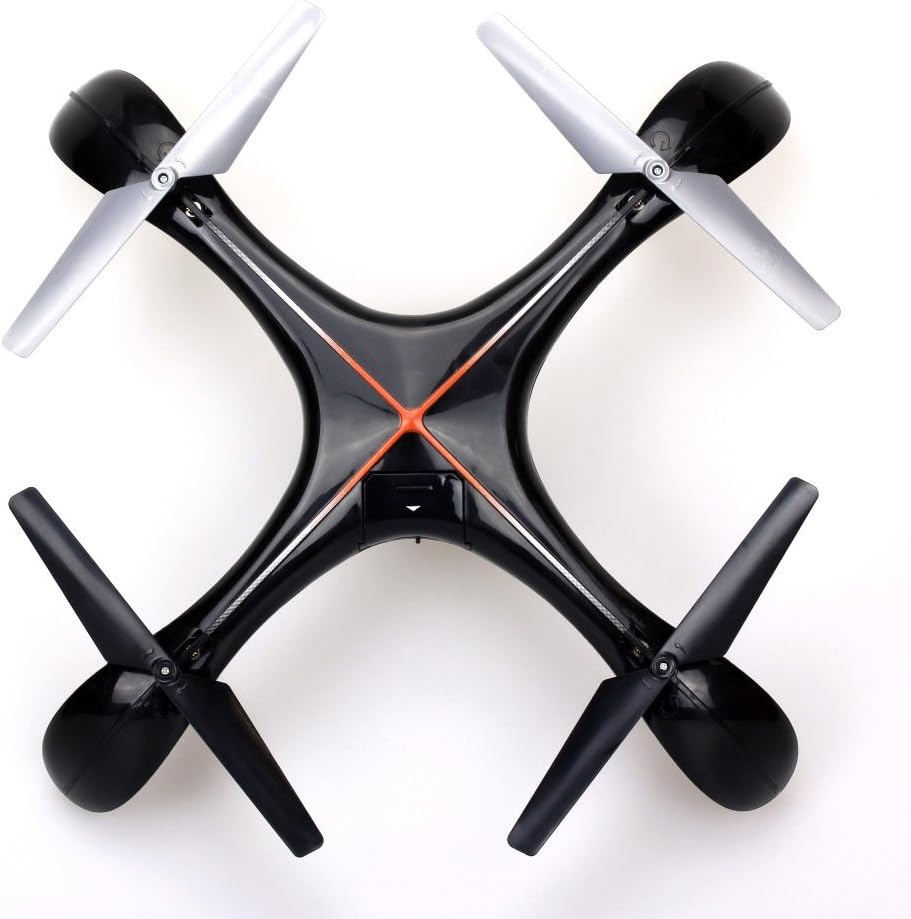
Resim 7.1: Üst view of the Silverlit Xion FPV Drone, showing propeller orientation.
8. Sorun Giderme
| Sorun | Olası Neden | Çözüm |
|---|---|---|
| Drone uzaktan kumandaya yanıt vermiyor. | Drone veya uzaktan kumandanın pili düşük; doğru şekilde eşleştirilmemiş. | Charge drone battery, replace remote control batteries, re-attempt pairing process. |
| Drone düzensiz uçuyor veya sürükleniyor. | Drone not calibrated on a flat surface; damaged propeller. | Ensure drone is placed on a level surface during pairing/initialization. Check and replace damaged propellers. Refer to manual for calibration steps if available. |
| Video kalitesi düşük veya FPV görüntüsü yok. | Weak signal; FPV goggles not connected properly. | Ensure drone is within range. Check FPV goggle connection and battery. |
| Kısa uçuş süresi. | Pil tam şarjlı değil; eski pil. | Ensure battery is fully charged (80-100 minutes). Consider replacing the battery if it's old and performance has degraded. |
9. Özellikler
- Marka: gümüş ışıklı
- Model Adı: 84765
- Yaş Aralığı: Çocuk
- Video Kayıt Çözünürlüğü: 1080p
- Etkili Fotoğraf Çözünürlüğü: 0.3 MP
- Yetenek Seviyesi: Professional (Note: This may refer to advanced features, but basic operation is suitable for children with supervision)
- Kontrol Türü: Uzaktan kumanda
- Piller Dahil: Hayır (uzaktan kumanda için)
- Uzaktan Kumanda Dahil: Evet
- Ürün Ağırlığı: 1.5 Kilogram
10. Garanti ve Destek
For warranty information or technical support, please refer to the documentation provided with your purchase or contact Silverlit customer service. Keep your proof of purchase for any warranty claims.