
1. Giriş
This manual provides detailed instructions for the setup, operation, and maintenance of your Enover TS18 7-Day Programmable Digital Timer. This device is designed to automate the control of electrical appliances by setting specific ON/OFF times throughout the week, offering convenience and energy management.
2. Ürün Özellikleri
- Esnek Çalışma Programı: Program up to 10 distinct ON/OFF cycles within a 7-day period. Each program repeats weekly.
- Enerji Yönetimi: Automatically controls lamps, holiday lights, humidifiers, and other electrical devices. Includes a feature to protect devices from overcharge.
- Security Function: Features a random ON/OFF option to vary lighting times, simulating occupancy when away from home.
- Kullanıcı Dostu Arayüz: Equipped with a large LCD display for clear visibility and a manual override switch for immediate control adjustments.
- Pil Yedekleme: An integrated battery retains programmed settings during power outages, eliminating the need for reprogramming.

Image: Enover TS18 Digital Timer highlighting key features for easy home automation.
3. Paket İçeriği
Paketin içeriği şu şekildedir:
- 1 x Enover Digital Timer Switch (Model TS18)
- 1 x Kullanım Kılavuzu

Image: Contents of the Enover TS18 Digital Timer package, including the timer and manual.
4. Ürün Bittiview
The Enover TS18 Digital Timer features a clear LCD display and intuitive buttons for easy programming. It plugs directly into a standard electrical outlet.

Resim: Ön view of the Enover TS18 Digital Timer, displaying the time and control buttons.
Düğme Fonksiyonları:
- HAFTA: Sets the day(s) for programs.
- SAAT: Adjusts the hour for time and program settings.
- DAKİKA: Adjusts the minute for time and program settings.
- RES/RCL: Resets or recalls settings.
- SAAT: Enters or exits clock setting mode.
- ZAMANLAYICI: Cycles through program settings (P1 ON, P1 OFF, P2 ON, etc.).
- AÇIK/OTOMATİK/KAPALI: Selects operating mode (Always ON, Automatic, Always OFF).
- RASTGELE: Activates or deactivates the random ON/OFF function.
- SIFIRLA: Small button (requires a pointed object) to clear all settings and reset the device.
Video: A brief demonstration of the Enover Digital Timer's basic functions and display.
5. Kurulum
5.1 İlk Ücretlendirme
Before first use, plug the timer into an electrical outlet for approximately 5-10 minutes to charge the internal battery. This ensures the display is active and settings can be retained.
5.2 Geçerli Saati ve Günü Ayarlamak
- Basılı tutun SAAT düğme.
- Tutarken SAAT, tuşuna basın HAFTA button repeatedly to set the current day of the week.
- Tutarken SAAT, tuşuna basın SAAT button repeatedly to set the current hour (AM/PM will display).
- Tutarken SAAT, tuşuna basın DAKİKA button repeatedly to set the current minute.
- Serbest bırak SAAT düğmesine basarak ayarları kaydedin.
6. Kullanım Talimatları
6.1 Açma/Kapama Döngülerinin Programlanması
Zamanlayıcı, 10 adede kadar açma/kapama programı ayarlamanıza olanak tanır. Bir program ayarlamak için şu adımları izleyin:
- Basın ZAMANLAYICI Düğmeye bir kez basın. Ekranda "1 ON" yazısı görünecektir.
- Basmak HAFTA to select the day(s) for this program (e.g., MO, TU, WE, TH, FR, SA, SU, MO TU WE TH FR, SA SU, MO TU WE TH FR SA SU, etc.).
- Basmak SAAT İstenilen çalışma saatini ayarlamak için.
- Basmak DAKİKA İstenilen AÇIK kalma süresini ayarlamak için.
- Basın ZAMANLAYICI button again. The display will show "1 OFF".
- Repeat steps 2-4 to set the desired OFF time for Program 1. Ensure the correct day(s) are selected for the OFF time.
- Basmaya devam et ZAMANLAYICI to cycle through and set additional programs (2 ON, 2 OFF, up to 10 ON, 10 OFF).
- İstediğiniz tüm programları ayarladıktan sonra, tuşuna basın. SAAT Geçerli saat ekranına geri dönmek için düğme.
- Zamanlayıcının açık olduğundan emin olun. OTOMATİK mode for programs to execute. Press AÇIK/OTOMATİK/KAPALI bisiklet sürmek OTOMATİK.
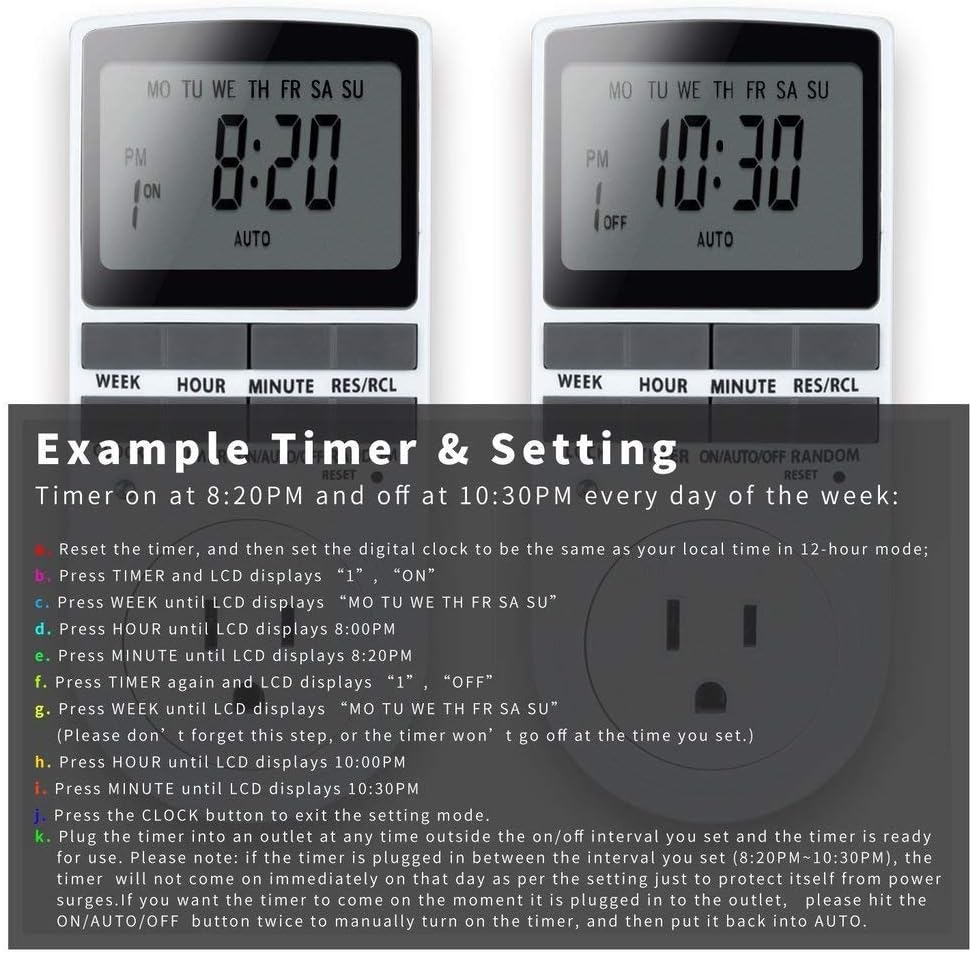
Image: Visual guide for setting an example timer program (ON at 8:20 PM, OFF at 10:30 PM daily).
6.2 Random Function (Anti-theft)
To activate the random ON/OFF feature:
- Basın RASTGELE button. The word "RANDOM" will appear on the display.
- In random mode, the timer will turn ON and OFF at varying times within a set period, typically around the programmed ON/OFF times, to simulate occupancy.
- To deactivate, press the RASTGELE Tekrar düğmeye basın.

Image: The anti-theft random feature of the Enover TS18 Digital Timer, designed to deter intruders.
6.3 Manuel Geçersiz Kılma
To manually switch the timer's output without affecting programmed settings:
- Basın AÇIK/OTOMATİK/KAPALI modlar arasında geçiş yapmak için düğme: ON (her zaman açık), OTOMATİK (follows programs), KAPALI (always off).
- Select the desired temporary mode. The timer will revert to OTOMATİK mode at the next programmed ON/OFF event.
Video: A detailed demonstration of setting programs and using the manual override function on the Enover Digital Timer.
7. Uygulamalar
The Enover TS18 Digital Timer can be used to automate various household devices, enhancing convenience and energy efficiency.
- Coffee Makers: Program your coffee maker to start brewing before you wake up.
- Aquarium Lights/Pumps: Automate the lighting and filtration cycles for your aquarium.
- Indoor Grow Lights: Maintain consistent light schedules for plants.
- Tatil Süslemeleri: Set festive lights to turn on and off automatically.
- Fans/Humidifiers: Control environmental devices to operate only when needed.

Resim: Eskiamples of automating daily routines with the Enover TS18 Digital Timer, such as a coffee maker and aquarium.
8. Özellikler
| Model Numarası | TS18 |
| Marka | Enover |
| Renk | Beyaz |
| Malzeme | Plastik |
| Ayar Sayısı | 10 (AÇMA/KAPATMA programları) |
| Cilttage | 120 Volt |
| Netage | 1800 watt |
| Ampkapasite | 15 Amps |
| Kurulum Yöntemi | Eklenti |
| Montaj Tipi | Tak ve Çalıştır Montajı |
| Fiş Biçimi | B - Topraklı fişli ABD tipi |
| Özel Özellikler | 3-wire grounded plug and 3-prong grounded outlet |
| Kullanım | Sadece iç mekanda kullanılabilir |
| Ürün Ağırlığı | 6.4 ons |
| Paket Boyutları | 5.67 x 3.31 x 2.6 inç |
| Pil Hücresi Tipi | NiMH |
| Pil Ömrü | 100 days (backup) |
9. Sorun Giderme
- Zamanlayıcı programlandığı gibi AÇILIP KAPANMIYOR:
- Zamanlayıcının açık olduğundan emin olun. OTOMATİK mod.
- Saatin ve günün doğru ayarlanmış olduğundan emin olun.
- Check that the ON and OFF times for the specific program are correctly entered and assigned to the desired days.
- Confirm the appliance connected to the timer is switched ON.
- Ekran boş veya loş:
- Plug the timer into an active electrical outlet for 5-10 minutes to charge the internal battery.
- All settings lost after power outage:
- The internal battery may not be sufficiently charged. Ensure the timer is regularly plugged in to maintain battery charge.
- To clear all settings:
- Use a pointed object (like a pen tip) to press the SIFIRLAMA button. This will clear all programs and reset the clock. You will need to re-enter all settings.
10. Garanti ve Destek
For warranty information or technical support, please refer to the contact details provided on the product packaging or the official Enover webalan. Garanti talepleri için satın alma makbuzunuzu saklayın.