
giriiş
The OpenBox V8 Combo is a versatile satellite and terrestrial receiver designed to provide high-definition entertainment. It supports DVB-S2 and DVB-T2 standards, offering a wide range of channels and multimedia capabilities. This manual will guide you through the setup, operation, and maintenance of your device.

Şekil 1: Ön view of the OpenBox V8 Combo receiver.
Paket İçeriği
Kuruluma başlamadan önce lütfen pakette tüm öğelerin mevcut olduğundan emin olun:
- OpenBox V8 Combo Receiver
- Remote Control (Note: Remote control may not be included with all packages, as per product specifications.)
- Power Adapter (Please ensure you have the correct plug type for your region.)
- HDMI Kablosu
- Kullanım Kılavuzu (Bu belge)
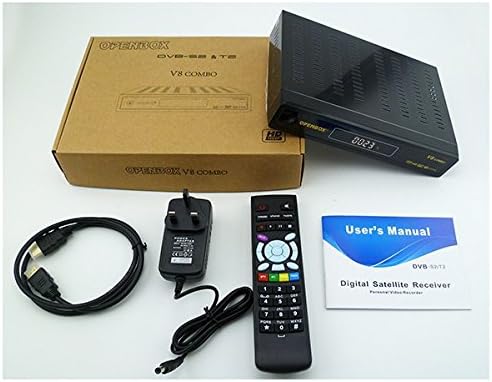
Figure 2: Contents typically included with the OpenBox V8 Combo package, including the receiver, remote, power adapter, HDMI cable, and user manual.
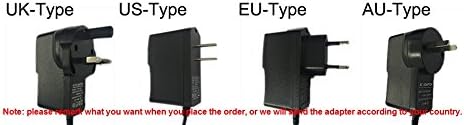
Figure 3: Various power adapter plug types (UK, US, EU, AU) that may be supplied with the device. Ensure you have the correct type for your region.
Kurulum Kılavuzu
Follow these steps to set up your OpenBox V8 Combo receiver:
- Televizyona bağlanın: Use the provided HDMI cable to connect the HDMI OUT port on the receiver to an HDMI IN port on your television.
- Connect to Antenna/Dish:
- For Satellite (DVB-S2): Connect your satellite dish LNB cable to the "LNB IN" port on the receiver.
- For Terrestrial (DVB-T2): Connect your terrestrial antenna cable to the "RF IN" port on the receiver.
- Ağa Bağlan (İsteğe bağlı):
- Kablolu Bağlantı: Yönlendiricinizden alıcının LAN portuna bir Ethernet kablosu bağlayın.
- Kablosuz Bağlantı: The device supports Wi-Fi. Refer to the "Network Settings" section in Operating Guide for Wi-Fi setup.
- Gücü bağlayın: Plug the power adapter into the DC IN port on the receiver, then plug the adapter into a wall outlet.
- Güç Açık: Turn on your television and select the correct HDMI input source. The receiver should power on automatically or can be turned on using the power button on the front panel or remote control.

Figure 4: Illustrative diagram showing connections for the OpenBox V8 Combo, including HDMI to TV and network connections.
Kullanım Kılavuzu
İlk Kurulum ve Kanal Taraması
- Upon first power-on, the receiver may guide you through an initial setup wizard. Follow the on-screen prompts.
- Uzaktan kumandayı kullanarak "Kurulum" veya "Kanal Arama" menüsüne gidin.
- Select your satellite or terrestrial antenna type and perform an automatic or manual channel scan. The receiver supports automatic, manual, and network search for channels.
- Tarama tamamlandıktan sonra kanalları kaydedin.
Temel Fonksiyonlar
- Kanal Gezinmesi: Uzaktan kumandadaki CH+/CH- düğmelerini kullanarak kanalları değiştirebilirsiniz. Kanal numaralarını doğrudan sayısal tuş takımını kullanarak girin.
- Ses Kontrolü: Use the VOL+/VOL- buttons to adjust volume.
- Menü Erişimi: Press the "MENU" button to access the main menu for settings and features.
- Elektronik Program Rehberi (EPG): Press the "EPG" button to view 7 güne kadar süren program planları.
- Ekran Dili: The On-Screen Display (OSD) supports multiple languages including English, German, French, Portuguese, Spanish, Italian, Russian, Turkish, Polish, Arabic, and Farsi. Adjust this in the system settings.
Multimedya Oynatma
The OpenBox V8 Combo features a USB input for playing multimedia files from external storage devices such as USB disks or mobile hard drives. It supports various video and image formats.
- Desteklenen Video Formatları: MPEG2/MPEG1, AVS, AVI, MKV, MP4, FLV, F4V, TS, M2TS, MOV, 3GP, MP3, AAC.
- Desteklenen Görüntü Formatları: JPEG, BMP, PNG, GIF.

Figure 5: Visual representation of supported media formats and compatible storage devices like mobile hard disks, USB disks, and SD cards (with adapter).
Gelişmiş Özellikler
- Wi-Fi Bağlantısı: Connect to your home network wirelessly for internet-based features.
- DLNA Support: Stream media content from compatible devices (e.g., smartphones, tablets) to your TV via the receiver.
- PVR (Kişisel Video Kaydedici): Record TV programs to an external USB storage device.
- Ebeveyn Kontrolü: Set up parental controls for channels to restrict access to certain content.
- Yazılım güncellemesi: Alıcının yazılımını USB üzerinden güncelleyin.
Bakım
To ensure the longevity and optimal performance of your OpenBox V8 Combo receiver, follow these maintenance guidelines:
- Temizlik: Alıcının dışını temizlemek için yumuşak ve kuru bir bez kullanın. Sıvı temizleyiciler veya aşındırıcı malzemeler kullanmayın.
- Havalandırma: Alıcının iyi havalandırılan bir alana yerleştirildiğinden emin olun. Havalandırma açıklıklarını kapatmayın.
- Kapat: Alıcı cihaz uzun süre kullanılmayacaksa, elektrik prizinden çıkarın.
- Donanım Yazılımı Güncellemeleri: Periodically check for and install firmware updates via USB to improve performance and add new features.
Sorun giderme
If you encounter issues with your OpenBox V8 Combo, refer to the following common problems and solutions:
| Sorun | Olası Neden / Çözüm |
|---|---|
| Güç Yok |
|
| No Signal / No Picture on TV |
|
| Uzaktan Kumanda Çalışmıyor |
|
| Wi-Fi'ye bağlanılamıyor |
|
Özellikler
Key technical specifications for the OpenBox V8 Combo receiver:
| Özellik | Detay |
|---|---|
| Marka | Bilinmeyen |
| Uyumlu Cihazlar | Televizyon |
| Özel Özellikler | HD Compatible, Full HD, Wi-Fi, USB Input |
| Bağlantı Teknolojisi | USB, Ethernet, LAN, HDMI |
| ASIN | B01D8TGI5U |
| UPC | 802483886894 |
| Video Kod Çözme | MPEG-2 MP@HL, MPEG4/H.264 BP MP&HP@L4.1, AVS profile@L6.1/4.0/2.0 |
| Kanal Sayısı | 10000 channels TV and Radio programmable |
| OSD Dili | English, German, French, Portuguese, Spanish, Italian, Russian, Turkish, Polish, Arabic, Farsi |
| EPG | Fully support to 7 days Electronic Program Guide(EPG); XML EPG |
| Resim Biçimleri | JPEG, BMP, PNG, GIF Supported |
| Zamanlayıcı | 5 event timers, off/Once/Daily/Weekly Mode |
| Altyazı | Altyazı desteği |
| Teletekst | Teletext, CC ve WSS için VBI ekleme |
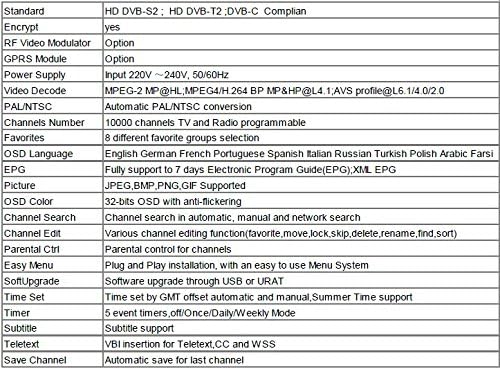
Figure 6: Detailed technical specifications table for the OpenBox V8 Combo receiver.
Garanti ve Destek
For warranty information, please refer to the documentation provided at the time of purchase or contact your retailer. For technical support, please reach out to the product manufacturer or your point of sale.
This product is designed for reliable operation. Should you require assistance beyond the scope of this manual, professional support is recommended.