
giriiş
This manual provides detailed instructions for the setup, operation, and maintenance of your A4tech Bloody Light Strike B314 Gaming Keyboard. Please read this manual thoroughly before using the product to ensure optimal performance and longevity.
Temel Özellikler
- Bloody 4 Light Strike Mechanical Switches: Experience ultra-fast response times of 0.2ms with infrared optic switches, providing a competitive edge in gaming.
- Gelişmiş Dayanıklılık: Designed for intensive use, featuring A,S,D,W silicon keys with a convex shape for improved control and longevity.
- Neon Glare System LED Backlighting: Customize your gaming environment with vibrant LED backlighting, making keys easy to locate in low-light conditions.
- 9 Programlanabilir Tuş: Personalize your gaming experience by assigning custom functions to 9 individually programmable keys.
- Double Secure Water-Resistance: The keyboard is electronically sealed with a water drain hole, protecting it from accidental spills and extending its lifespan.
Paket İçeriği
Paketin içinde tüm öğelerin mevcut olduğundan emin olun:
- Bloody Light Strike B314 Gaming Keyboard
- Kullanım Kılavuzu (bu belge)

Image: The retail packaging for the Bloody Light Strike B314 Gaming Keyboard, showing the keyboard with LED backlighting and key features highlighted.
Kurulum Kılavuzu
- Klavyeyi Bağlayın: Klavyenin USB bağlantısını bilgisayarınızdaki boş bir USB portuna takın.
- Sürücü Kurulumu: The keyboard is typically plug-and-play. Your operating system should automatically detect and install the necessary drivers. If prompted, follow the on-screen instructions.
- Yazılım Kurulumu (Opsiyonel): For advanced customization, including programming keys and managing backlighting, download and install the official Bloody software from the A4tech webalan.
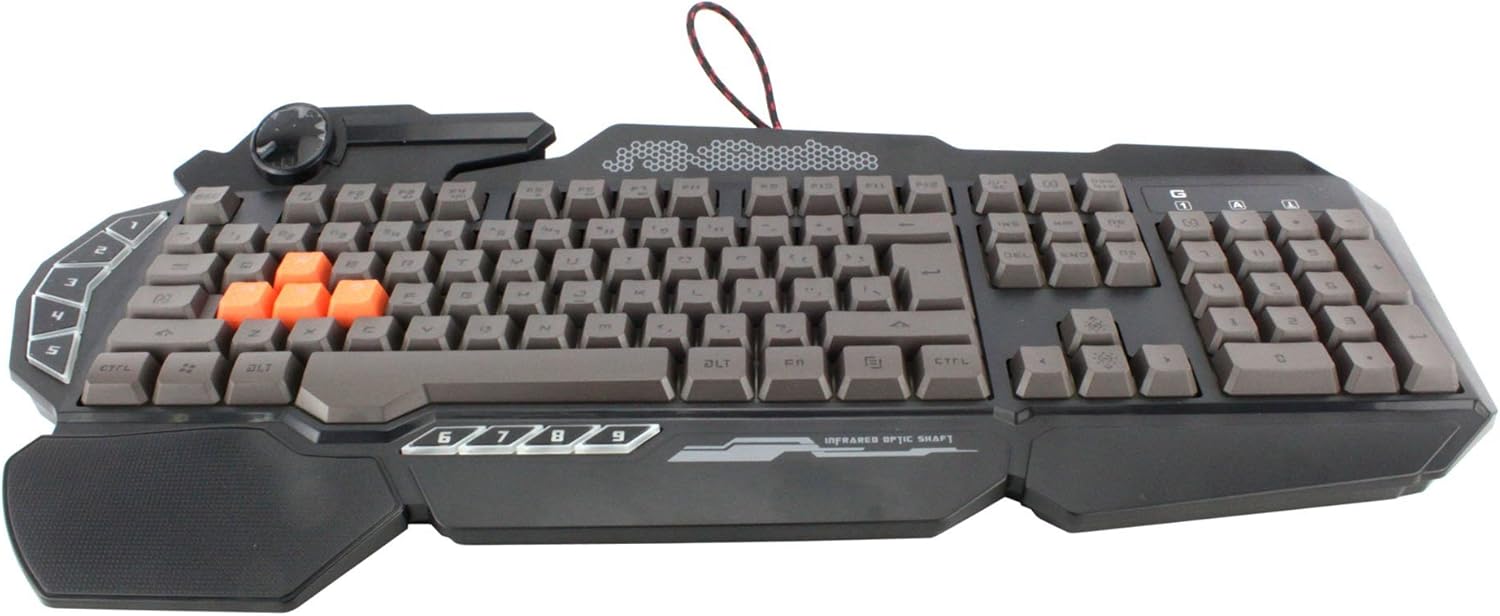
Resim: Yukarıdan aşağıya view of the Bloody Light Strike B314 Gaming Keyboard, showcasing the full QWERTY layout with orange WASD keys and dedicated macro keys on the left.
Kullanım Talimatları
Temel Kullanım
The Bloody B314 functions as a standard QWERTY keyboard for everyday typing and gaming. Its infrared mechanical switches provide a fast and responsive typing experience.
Programlanabilir Tuşlar
The keyboard features 9 programmable keys, typically located on the left side. To customize these keys:
- Install the official Bloody software from the A4tech webalan.
- Launch the software and navigate to the key customization section.
- Select the desired programmable key (e.g., G1-G9 or similar).
- Assign macros, key functions, or multimedia controls as needed.
- Profesyonelinizi kaydedinfile Değişiklikleri uygulamak için.
LED Backlighting Control
The Neon Glare System LED backlighting can be adjusted using function key combinations:
- Fn+F12: Cycle through different backlighting modes (e.g., static, breathing, off).
- Fn + Yukarı/Aşağı Ok Tuşu: Arka ışık parlaklığını ayarlayın.
- Fn + Sol/Sağ Ok: Adjust backlight speed or direction (if applicable to the mode).
Oyun Modu
Activate Game Mode to disable the Windows key and prevent accidental interruptions during gameplay.
- Fn+F8: Oyun Modunu aç/kapat.

Resim: Açılı bir view of the Bloody Light Strike B314 Gaming Keyboard, highlighting the ergonomic wrist rest and the distinct orange WASD keys.
Bakım
Temizlik
- Temizlemeden önce klavyeyi bilgisayarınızdan ayırın.
- Yumuşak bir d kullanınamp cloth to wipe the surface of the keyboard. Avoid harsh chemicals or abrasive materials.
- Tuşlar arasındaki toz ve pislikleri temizlemek için basınçlı hava kullanın.
- The water-resistant design helps protect against spills, but it is still recommended to clean up liquids promptly.
Depolamak
Uzun süre kullanılmayacaksa klavyeyi serin, kuru ve doğrudan güneş ışığından ve aşırı sıcaklıklardan uzak bir yerde saklayın.
Sorun giderme
Klavye Yanıt Vermiyor
- USB kablosunun hem klavyeye hem de bilgisayara güvenli bir şekilde takılı olduğundan emin olun.
- Klavyeyi farklı bir USB portuna takmayı deneyin.
- Bilgisayarınızı yeniden başlatın.
- Check if the keyboard is recognized in your computer's Device Manager (Windows) or System Information (macOS).
Arka Aydınlatma Çalışmıyor
- Ensure the backlighting is not turned off using the Fn + F12 combination.
- Adjust brightness using Fn + Up Arrow.
- Özel bir profesyonel kullanıyorsanızfiles, ensure the backlighting settings are correctly configured in the Bloody software.
Programmable Keys Not Working
- Verify that the Bloody software is installed and running.
- Ensure your custom profiles are loaded and active within the software.
- Check for any software updates for the Bloody keyboard utility.
Özellikler
| Özellik | Detay |
|---|---|
| Marka | A4tech |
| Model Numarası | A4TKLA45173 |
| Bağlantı Teknolojisi | Kızılötesi |
| Klavye Açıklaması | Mekanik |
| Anahtar Türü | Mechanical (Light Strike Optic) |
| Özel Özellik | Backlit, Programmable Keys, Water Resistant |
| Renk | Siyah |
| Klavye Arka Aydınlatma Renk Desteği | RGB (Neon Glare System) |
| Anahtar Sayısı | 104 |
| Programlanabilir Düğmeler | 9 |
| Su Direnç Seviyesi | Su geçirmez |
| Ürün Ağırlığı | 2.9 Pound |
Garanti ve Destek
Garanti bilgileri ve teknik destek için lütfen resmi A4tech web sitesine başvurun. website veya doğrudan müşteri hizmetleriyle iletişime geçin. Garanti talepleri için satın alma kanıtı olarak satın alma makbuzunuzu saklayın.
Resmi A4tech Webalan: www.a4tech.com