
Bluestone Automatic Wrist Blood Pressure Monitor User Manual
Model: 80-5103
1. Giriş
Thank you for choosing the Bluestone Automatic Wrist Blood Pressure Monitor. This device is designed to provide quick and accurate measurements of your systolic and diastolic blood pressure, as well as your pulse rate. Regular monitoring can help you track your heart health over time. Please read this manual thoroughly before using the device to ensure correct operation and accurate results.
2. Güvenlik Bilgileri
- This device is intended for adult home use only. Consult your physician for interpretation of blood pressure measurements.
- Do not use this device on infants, children, or individuals who cannot express their consent.
- Hareket halindeki bir araçta veya fiziksel aktivite sırasında ölçüm yapmaktan kaçının.
- Do not self-diagnose or self-medicate based on the measurement results. Always consult a healthcare professional.
- Cihazınızı güçlü elektromanyetik alanlardan uzak tutun.
- Do not disassemble or attempt to repair the device. Contact customer support if issues arise.
3. Ürün Bittiview
The Bluestone Automatic Wrist Blood Pressure Monitor is a compact and portable device designed for ease of use. It features a large LCD screen for clear readings and a memory function to store past measurements.
3.1 Bileşenler
- Wrist Blood Pressure Monitor with integrated cuff
- Depolama Kasası
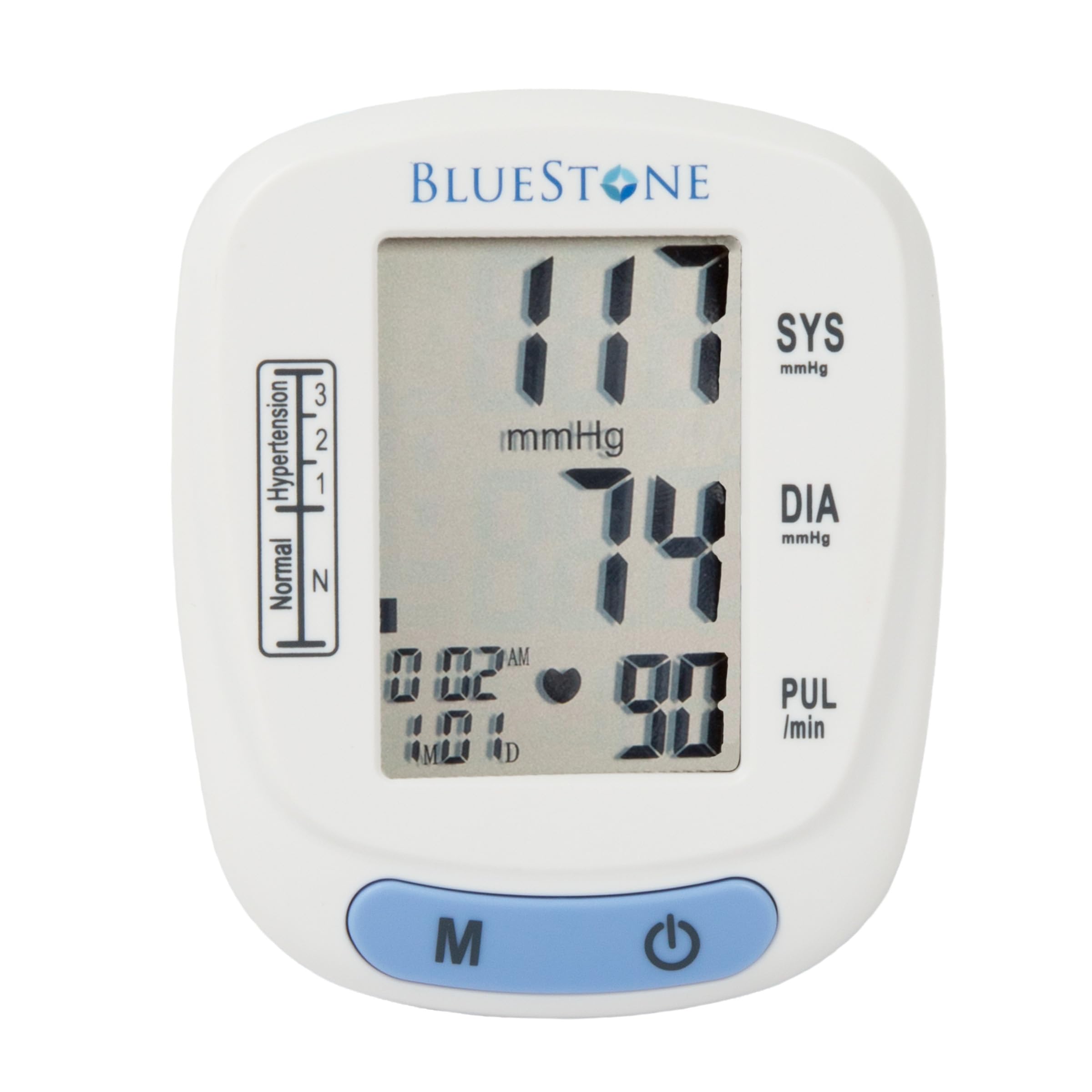
Image 3.1: Bluestone Automatic Wrist Blood Pressure Monitor on a user's wrist.
3.2 Cihaz Özellikleri

Image 3.2: Labeled diagram highlighting the monitor's display elements and buttons.
- Büyük LCD Ekran: Displays systolic, diastolic, pulse, date, and time.
- Blood Pressure Level Bar: Indicates blood pressure classification (Normal, Hypertension levels 1, 2, 3).
- Hafıza Düğmesi (M): Accesses stored readings.
- Açma/Kapama Düğmesi: Cihazı açıp kapatır ve ölçümleri başlatır.
- Adjustable Cuff: Designed to fit wrists up to 10 inches in circumference.
4. Kurulum
4.1 Pil Kurulumu
- Monitörün arkasındaki pil bölmesi kapağını açın.
- İki adet AAA pil (dahil değildir) takın ve doğru kutuplara (+/-) dikkat edin.
- Pil bölmesi kapağını sıkıca kapatın.
4.2 Manşet Yerleşimi
- Remove any tight clothing from your wrist.
- Monitörü ekranı yukarı bakacak şekilde sol bileğinize yerleştirin. Bileklik, bilek ekleminizin yaklaşık 1-2 cm yukarısında konumlandırılmalıdır.
- Fasten the cuff snugly around your wrist. Ensure it is not too tight or too loose.
- Rest your arm on a table or flat surface so that the monitor is at the same level as your heart. Keep your palm open and relaxed.
5. Kullanım Talimatları
5.1 Bir Ölçüm Yapma
- Ensure the cuff is correctly placed on your wrist and your arm is positioned at heart level.
- Press the On/Off button to power on the device. The display will show all symbols briefly, then '00'.
- Manşet otomatik olarak şişecek ve ölçüm başlayacaktır. Ölçüm sırasında hareketsiz ve sessiz kalın.
- Once the measurement is complete, the systolic pressure, diastolic pressure, and pulse rate will be displayed on the screen. The device will automatically store this reading.
- Press the On/Off button again to turn off the device, or it will automatically shut off after approximately one minute of inactivity.
5.2 Sonuçların Yorumlanması
The monitor displays your systolic (SYS) and diastolic (DIA) blood pressure in mmHg, and your pulse (PUL) in beats per minute. The blood pressure level bar on the left side of the display indicates your reading's classification according to World Health Organization (WHO) guidelines:
- Normal: Optimal blood pressure.
- Hypertension (Levels 1, 2, 3): Indicates elevated blood pressure. Consult a healthcare professional for advice.

Image 5.1: Monitor displaying a sample reading and highlighting key features.
6. Hafıza İşlevi
The monitor can store up to 120 measurements with date and time stamps, allowing you to track your blood pressure trends.
6.1 Storing Readings
Each successful measurement is automatically stored in the device's memory.
6.2 Recalling Readings
- Cihaz kapalıyken 'M' (Bellek) düğmesine basın.
- The most recent reading will be displayed first.
- Press the 'M' button repeatedly to scroll through previous measurements.
- To exit memory mode, press the On/Off button or wait for the device to automatically shut off.
7. Bakım
7.1 Temizlik
- Monitörü ve manşeti yumuşak, kuru bir bezle silin.
- Aşındırıcı temizleyiciler kullanmayın ve cihazı suya batırmayın.
7.2 Depolama
- Store the monitor in its included protective case when not in use.
- Cihazınızı serin, kuru, doğrudan güneş ışığından ve aşırı sıcaklıklardan uzak bir yerde saklayınız.
- Cihaz uzun süre kullanılmayacaksa, sızıntıyı önlemek için pilleri çıkarın.

Image 7.1: Monitor stored in its protective case.
8. Sorun Giderme
| Sorun | Olası Neden | Çözüm |
|---|---|---|
| Açıldığında görüntü yok | Piller bitmiş veya yanlış takılmış. | Pilleri yeni AAA pillerle değiştirin ve kutupların doğru olmasına dikkat edin. |
| Error message (e.g., 'Err') | Movement during measurement, improper cuff placement, or device malfunction. | Remain still and silent. Re-apply cuff correctly. If error persists, contact support. |
| Tutarsız okumalar | Improper posture, talking during measurement, or recent physical activity. | Ensure proper technique (see Section 5.1). Take measurements at the same time each day. |
9. Özellikler

Image 9.1: Dimensions of the Bluestone Blood Pressure Monitor.
| Özellik | Detay |
|---|---|
| Model Numarası | 80-5103 |
| Ürün Boyutları | 3" U x 2.5" G x 2.5" K |
| Ürün Ağırlığı | 8.3 ons |
| Manşet Çevresi | Fits up to 10" wrists |
| Güç Kaynağı | 2 x AAA Piller (dahil değildir) |
| Görüntü Türü | Dijital lcd |
| Bellek Kapasitesi | Up to 120 readings with date/time stamp |
10. Garanti ve Destek
Bluestone products are manufactured with quality and care. For warranty information or technical support, please refer to the contact details provided with your purchase documentation or visit the official Bluestone webLütfen garanti talepleriniz için satın alma belgenizi saklayın.