
1. Giriş
The ArtSound RI60 is a versatile internet radio adapter designed to provide access to over 10,000 radio stations worldwide, alongside traditional FM radio. Featuring Wi-Fi connectivity and an integrated alarm clock, the RI60 offers a comprehensive audio experience. This manual provides essential information for the safe and efficient use of your device, covering setup, operation, maintenance, and troubleshooting.
2. Güvenlik Talimatları
- Cihazı çalıştırmadan önce tüm talimatları dikkatlice okuyunuz.
- Cihazı sudan, nemden ve doğrudan ısı kaynaklarından uzak tutun.
- Üniteyi kendiniz açmaya veya onarmaya çalışmayın. Tüm servis işlemlerini kalifiye personele yaptırın.
- Yalnızca üniteyle birlikte verilen güç adaptörünü kullanın.
- Aşırı ısınmayı önlemek için cihazın çevresinde uygun havalandırma olduğundan emin olun.
- Cihazınızı sadece kuru ve yumuşak bir bezle temizleyiniz.
3. Paket İçeriği
Lütfen paketin içindeki tüm ürünlerin eksiksiz olduğundan emin olun:
- ArtSound RI60 Internet Radio Unit
- Güç Adaptörü
- Uzaktan kumanda
- Kullanım Kılavuzu (bu belge)
4. Ürün Bittiview
The ArtSound RI60 features a compact design with an intuitive display and controls. Below are images illustrating the device's appearance and dimensions.
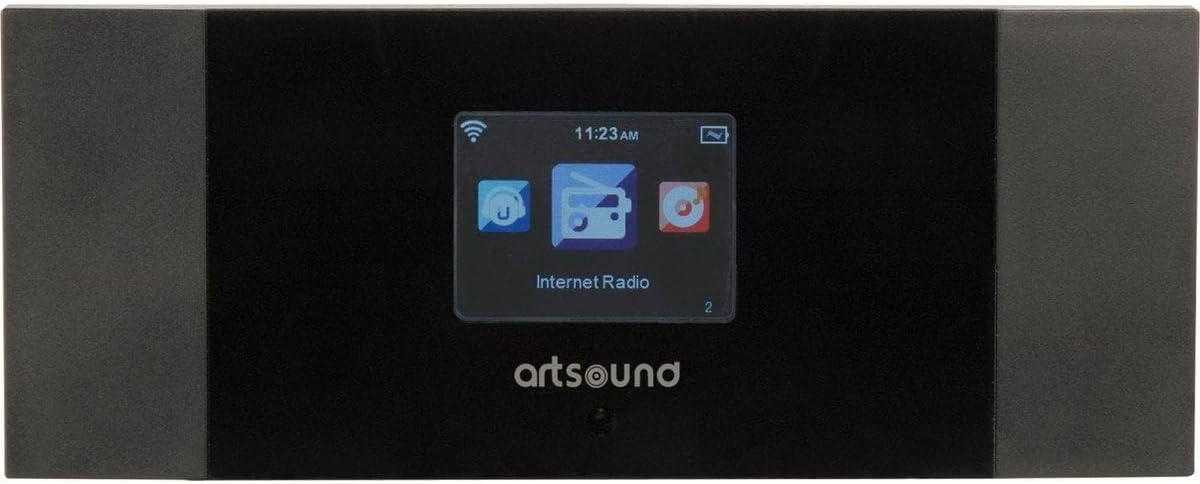
Şekil 4.1: Ön View of ArtSound RI60
This image displays the front panel of the ArtSound RI60 Internet Radio. It features a central display screen showing 'Internet Radio' and icons for Wi-Fi signal, time, and battery. The 'artsound' logo is visible below the screen. The unit has a sleek black finish with dark grey side panels.

Figure 4.2: ArtSound RI60 Dimensions
This image illustrates the physical dimensions of the ArtSound RI60 Internet Radio. The width is indicated as 190 mm and the height as 75 mm, providing a clear understanding of the device's compact size.
5. Kurulum
5.1. Güç Bağlantısı
- Connect the supplied power adapter to the DC IN port on the rear of the RI60 unit.
- Güç adaptörünü standart bir duvar prizine takın.
- The unit will power on automatically or enter standby mode.
5.2. Initial Setup and Network Configuration
Upon first power-on, the RI60 will guide you through the initial setup process.
- Dil Seçimi: Use the navigation buttons to select your preferred language on the display and confirm.
- Ağ bağlantısı: The device will prompt you to connect to a Wi-Fi network.
- Ağları Tara: Select 'Scan' to find available Wi-Fi networks.
- Ağ Seçin: Listeden ev Wi-Fi ağınızı seçin.
- Şifreyi Girin: Use the on-screen keyboard and navigation buttons to enter your Wi-Fi password (WPA/WPA2). Confirm your entry.
- Bağlantı Onayı: Once connected, the device will display a confirmation message and the Wi-Fi icon will appear on the screen.
6. Çalıştırma
6.1. Temel Kontroller
- Güç Düğmesi: Cihazı açmak veya kapatmak (bekleme moduna geçirmek) için basın.
- Ses Düğmesi: Rotate to adjust the volume level. Press to mute/unmute.
- Yön tuşları: Use these buttons (Up, Down, Left, Right, OK) to navigate menus and select options on the display.
- Geri Düğmesi: Önceki menüye veya ekrana döner.
6.2. İnternet Radyosu
The RI60 provides access to over 10,000 internet radio stations.
- From the main menu, select 'Internet Radio'.
- İstasyonları konuma, türe göre inceleyebilir veya belirli istasyonları arayabilirsiniz.
- To save a station as a preset, tune into the desired station, then press and hold the 'Preset' button (or equivalent on remote/app) until the display confirms it's saved. The RI60 supports 5 programmable presets.
- To recall a preset, press the 'Preset' button and select the desired number.
6.3. FM Radyo
To listen to traditional FM broadcasts:
- Ana menüden 'FM Radyo'yu seçin.
- Use the navigation buttons to manually tune to a frequency or initiate an auto-scan for available stations.
- Save preferred FM stations as presets using the same method as Internet Radio.
6.4. Alarm Saati Fonksiyonu
The RI60 includes an alarm clock feature.
- Access the 'Alarm' settings from the main menu.
- Set the alarm time, duration, and desired alarm source (e.g., buzzer, internet radio station, FM station).
- Enable or disable the alarm as needed.
6.5. Remote Control and AirMusic Control App
The RI60 can be controlled using the included remote control or the free AirMusic Control app available for smartphones and tablets.
- Uzaktan kumanda: Use the remote for convenient access to functions like power, volume, navigation, and presets.
- AirMusic Control App: Download the app from your device's app store. Ensure your smartphone/tablet is connected to the same Wi-Fi network as the RI60. The app allows for station browsing, selection, and device control from your mobile device.
7. Bakım
7.1. Temizlik
To maintain the appearance and functionality of your RI60:
- Temizlemeden önce cihazın kapalı ve fişinin çekilmiş olduğundan emin olun.
- Dış yüzeyleri silmek için yumuşak, kuru ve tüy bırakmayan bir bez kullanın.
- Do not use liquid cleaners, aerosols, or abrasive materials, as these can damage the finish or internal components.
7.2. Yazılım Güncellemeleri
Periodically check for software updates through the device's system settings menu. Updates can improve performance and add new features. Follow the on-screen instructions carefully during any update process.
8. Sorun Giderme
If you encounter issues with your ArtSound RI60, refer to the following common problems and solutions:
| Sorun | Olası Neden | Çözüm |
|---|---|---|
| Güç yok | Güç adaptörü bağlı değil veya priz arızalı. | Ensure the power adapter is securely connected to the unit and a working power outlet. Try a different outlet. |
| Wi-Fi bağlantısı yok | Incorrect Wi-Fi password, router issues, or device too far from router. | Verify the Wi-Fi password. Restart your Wi-Fi router. Move the RI60 closer to the router. Check router settings for MAC address filtering. |
| Cannot find internet radio stations | No active internet connection, or station server is down. | Ensure Wi-Fi is connected and has internet access. Try accessing other internet services on your network. Some stations may be temporarily unavailable. |
| Zayıf FM alımı | Zayıf sinyal, parazit. | Adjust the position of the unit. Ensure the FM antenna (if external) is properly connected and extended. Move away from other electronic devices that may cause interference. |
| Uzaktan kumanda çalışmıyor | Dead batteries, obstruction, or remote not pointed correctly. | Replace the batteries in the remote control. Ensure there are no obstructions between the remote and the RI60. Point the remote directly at the unit's sensor. |
9. Özellikler
| Özellik | Detay |
|---|---|
| Marka | SanatSes |
| Model Numarası | RI.60 |
| Renk | Siyah |
| Bağlantı Teknolojisi | Wifi |
| Özel Özellikler | Wi-Fi, Alarm Clock |
| Desteklenen Radyo Bantları | FM, İnternet Radyosu |
| Ayarlama Teknolojisi | Dijital |
| Güç Kaynağı | Powered by mains (via adapter) |
| Bileşenler Dahil | Remote Control, AirMusic Control application |
| Uyumlu Cihazlar | Smartphone, Tablet (for app control), Remote Control |
| Önerilen Kullanımlar | Listening to music, staying informed with news, listening to radio shows |
10. Garanti ve Destek
ArtSound is committed to providing FREE & PROFESSIONAL assistance to its customers. Our dedicated support team is available to help with any questions or issues you may encounter, whether large or small. You can reach our support team via telephone or email.
For specific warranty details, please refer to the warranty card included with your product or visit the official ArtSound webSite. Satın alma belgenizi garanti talepleriniz için saklayın.