
1. Giriş
Satın aldığınız için teşekkür ederizasing the ipega PG-9057 Wireless Game Controller. This manual provides detailed instructions for setting up, operating, and maintaining your device. Please read this manual carefully before use to ensure optimal performance and longevity of your controller.
2. Ürün Özellikleri
- Kablosuz bağlantı: Enjoy gaming freedom with wireless connection technology.
- Çoklu Platform Uyumluluğu: Supports Android devices (smartphones, tablets, TV boxes) and Windows PCs.
- High Durability Buttons: Equipped with high-quality, durable buttons for extended gaming sessions.
- Hassas Kontroller: Features a D-pad with pressure sensitivity and a 360-degree joystick with no dead zone for accurate input.
- Ergonomik Tasarım: Designed for comfortable grip and prolonged use.
- Entegre Telefon Tutucu: Conveniently mount your smartphone for mobile gaming.
3. Paket İçeriği
Lütfen kutuyu açtığınızda paket içeriğini kontrol edin:
- ipega PG-9057 Kablosuz Oyun Kumandası
- USB Şarj Kablosu
- User Manual (Japanese version included)
4. Kurulum
4.1. Kontrol Cihazının Şarj Edilmesi
Before first use, fully charge the controller using the provided USB cable. Connect the small end of the USB cable to the controller's charging port and the other end to a USB power source (e.g., PC, USB wall adapter).
4.2. Device Compatibility Overview
The ipega PG-9057 controller supports various devices and connection methods as shown below:

This image displays the ipega PG-9057 Wireless Game Controller, highlighting its compatibility with various devices including smartphones, tablets, personal computers, and VR headsets.
4.3. Connection Methods and System Environment
The controller offers multiple connection options depending on your device and operating system. Refer to the table below for detailed compatibility.

This table outlines the system requirements and connection methods for the ipega PG-9057 controller, detailing compatibility with Android smartphones, tablets, and TV boxes via Bluetooth 4.0 or USB, and PCs via USB.
4.3.1. Bluetooth Connection (Android Devices)
- Kontrol cihazının şarjlı olduğundan emin olun.
- Basılı tutun EV düğme ve A button simultaneously until the indicator light flashes rapidly. This puts the controller into pairing mode.
- Android cihazınızda Bluetooth ayarlarına gidin ve Bluetooth'u açın.
- Arama available devices and select "ipega PG-9057" (or similar name) from the list.
- Once paired, the indicator light on the controller will become solid.
4.3.2. USB Wired Connection (Windows PC / Android Devices)
- Connect the controller to your Windows PC or Android device using the USB cable.
- The device should automatically recognize the controller. No special drivers are usually required for basic functionality.
5. Kullanım Talimatları
5.1. Temel Kontroller
The ipega PG-9057 features standard gamepad controls for intuitive gaming.

Ayrıntılı view of the ipega PG-9057 controller's D-pad, joystick, and A/B/X/Y buttons, illustrating their high sensitivity and precise input capabilities.
- Yön Düğmesi: For directional input, offering pressure sensitivity.
- Sol/Sağ Joystick'ler: 360-degree movement with no dead zone for precise control.
- A/B/X/Y Düğmeleri: Standard action buttons with zero delay response.
- L1/R1, L2/R2 Triggers: Oyun içi çeşitli eylemler için omuz düğmeleri ve tetikleyiciler.
- SEÇ/BAŞLAT Düğmeleri: For in-game menu navigation and actions.
- Ana menü tuşu: To power on/off the controller or return to the main menu.
5.2. Using with a Smartphone
The controller includes an integrated holder for smartphones, allowing for a portable gaming experience.
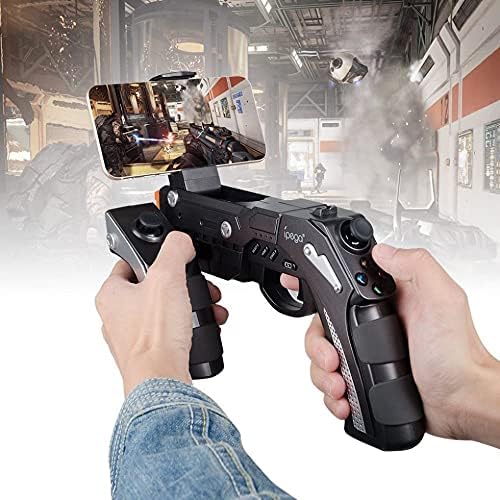
A user is shown holding the ipega PG-9057 Wireless Game Controller with a smartphone securely attached, actively engaged in mobile gaming.
- Extend the phone holder located on the top of the controller.
- Akıllı telefonunuzu dikkatlice tutucuya yerleştirin ve sağlam bir şekilde kavradığından emin olun.
- Connect the controller to your smartphone via Bluetooth as described in Section 4.3.1.
- Launch your desired game and configure controller settings if necessary.
6. Bakım
To ensure the longevity and optimal performance of your ipega PG-9057 controller, follow these maintenance guidelines:
- Temizlik: Use a soft, dry cloth to wipe the surface of the controller. Do not use harsh chemicals or abrasive cleaners.
- Depolamak: Kontrol cihazını serin, kuru ve doğrudan güneş ışığından ve aşırı sıcaklıklardan uzak bir yerde saklayın.
- Damlalardan Kaçının: Protect the controller from drops and impacts, as this can damage internal components.
- Şarj: Do not overcharge the battery. Disconnect the charging cable once the controller is fully charged.

The ipega PG-9057 Wireless Game Controller is shown, emphasizing its construction from high-quality, durable ABS material.
7. Sorun Giderme
If you encounter issues with your controller, please refer to the following common solutions:
- Kontrolör bağlanmıyor:
- Kontrol cihazının tam şarjlı olduğundan emin olun.
- Verify that Bluetooth is enabled on your device and the controller is in pairing mode.
- Hem kontrol cihazını hem de cihazınızı yeniden başlatmayı deneyin.
- If using USB, ensure the cable is securely connected and try a different USB port.
- Düğmeler veya joystickler yanıt vermiyor:
- Kumandanın cihazınıza doğru şekilde bağlı olup olmadığını kontrol edin.
- Kontrol cihazını yeniden başlatın ve yeniden bağlantı kurun.
- Oynadığınız oyunun harici kontrol cihazlarını desteklediğinden emin olun.
- Gecikme veya giriş gecikmesi:
- Ensure there are no obstructions or excessive distance between the controller and your device.
- Diğer kablosuz cihazlardan kaynaklanan paraziti en aza indirin.
- For critical gaming, consider using a wired USB connection if supported by your device.
8. Özellikler
| Şartname | Değer |
|---|---|
| Marka | ipega |
| Örnek | PG-9057 |
| Uyumlu Cihazlar | Android, Windows |
| Denetleyici Türü | Oyun Pedi |
| Bağlantı Teknolojisi | Kablosuz |
| Özellikler | Kablosuz |
| Uyumlu Ürünler | Android, Windows |
| Bağlantı Yöntemi | Kablosuz |
| Özel Özellikler | Kablosuz |
| Donanım Platformu | Set üstü kutu |
| Güç Kaynağı | Pil ile çalışır |
| Number of Package Items | 1 |
| UPC | 602747571722 |
| ASIN | B018TSBFE4 |
| GTIN | 602747571722 |
9. Garanti ve Destek
For warranty information and customer support, please refer to the documentation provided with your purchase or visit the official ipega webSite. Satın alma belgenizi herhangi bir garanti talebi için saklayın.