
1. Giriş
This manual provides essential instructions for the installation, operation, maintenance, and troubleshooting of the APC Smart-UPS SRT3000RMXLT 3kVA 208V Rackmount Uninterruptible Power Supply (UPS). Please read this manual thoroughly before installing or operating the equipment to ensure proper usage and safety.
2. Güvenlik Bilgileri
Bu kılavuzdaki tüm uyarıları ve kullanım talimatlarını dikkate alın. Aksi takdirde yaralanma veya ekipman hasarı meydana gelebilir.
- Elektriksel Güvenlik: Bu ünite tehlikeli volüm içerirtages. Do not attempt to disassemble the UPS. Servicing should only be performed by qualified personnel.
- Pil Güvenliği: Batteries can present a risk of electrical shock and high short-circuit current. Remove watches, rings, or other metal objects before handling batteries. Use tools with insulated handles.
- Ağırlık: UPS cihazı ağırdır. Kurulum sırasında uygun kaldırma tekniklerini kullanın ve yeterli desteği sağlayın.
- Çevre: Install the UPS indoors in a controlled environment, free from excessive dust, moisture, and extreme temperatures.
3. Paket İçeriği
Carefully unpack the UPS and inspect for shipping damage. The package should contain the following items:
- APC Smart-UPS SRT3000RMXLT Unit
- Power Supply (Built-In)
- Raf montaj donanımı
- Belgeleme CD'si
- USB kablosu
- Seri kablo
4. Kurulum
4.1 Fiziksel Kurulum
The SRT3000RMXLT is designed for rack installation. Ensure the rack is stable and capable of supporting the UPS weight (approximately 69 pounds).
- Mount the UPS into a standard 19-inch rack using the provided rack-mounting hardware.
- Ünitenin etrafında yeterli hava akışı olduğundan emin olun. Havalandırma açıklıklarını kapatmayın.

Şekil 4.1: Ön view of the APC Smart-UPS SRT3000RMXLT. This image shows the front panel with the display and ventilation grille.
4.2 UPS'in bağlanması
Connect the UPS to the utility power and your equipment.
- Connect the UPS input power cord to a dedicated 208V AC outlet. The UPS uses a Type B - 3 pin (North American) power plug.
- Connect your equipment to the output receptacles on the rear of the UPS. The unit provides 12 IEC 320 C13/C14 outlets.
- For communication, connect the USB cable or serial cable from the UPS to your computer or network management card.
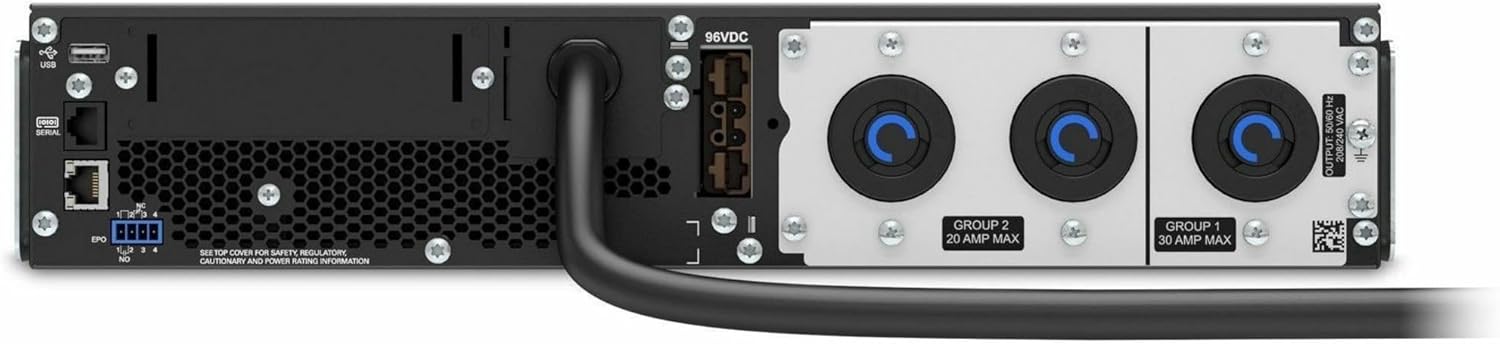
Şekil 4.2: Arka view of the APC Smart-UPS SRT3000RMXLT. This image displays the various input and output ports, including USB, serial, EPO, and the 12 output receptacles, along with the main power input.
4.3 İlk Güçlendirme
After all connections are secure:
- UPS'i açmak için ön paneldeki güç düğmesine basın.
- The UPS will perform a self-test and the display will show the current status.
- Allow the batteries to charge for at least 6 hours before relying on them for extended backup time.
5. UPS'in çalıştırılması
5.1 Ön Panel Ekranı ve Kontrolleri
The front panel features an LCD display and control buttons for monitoring and configuring the UPS.
- LCD Ekran: Shows real-time status, load, battery charge, input/output voltage, and event logs.
- ESC Düğmesi: Geçerli menüden çıkar veya bir işlemi iptal eder.
- Tamam Düğmesi: Bir seçimi onaylar veya bir menüye girer.
- Yukarı/Aşağı Oklar: Menü seçenekleri arasında gezinin veya ayarları değiştirin.
5.2 Temel İşlemler
- Açılıyor: Ekran ışığı yanana kadar güç düğmesini basılı tutun.
- Kapatma: Press and hold the power button until the UPS powers down. Ensure all connected equipment is safely shut down first.
- Pil Modu: Bir elektrik kesintisi durumundatage, the UPS will automatically switch to battery power. The display will indicate 'On Battery'.
- Kendi kendini test: Initiate a manual self-test through the front panel menu to verify battery and UPS functionality.
6. Bakım
6.1 Pil Değişimi
The UPS uses sealed lead-acid batteries. Battery life is typically 3-5 years, depending on environmental conditions and usage. Replace batteries when the UPS indicates a 'Battery Fault' or 'Replace Battery' warning.
- Contact APC support or a certified service technician for battery replacement.
- Always use genuine APC replacement battery cartridges (RBCs) to ensure compatibility and optimal performance.
- Eski pilleri sorumlu bir şekilde geri dönüştürün.
6.2 Temizlik
Keep the UPS free from dust and debris to ensure proper ventilation.
- Use a soft, dry cloth to clean the exterior of the UPS.
- Sıvı temizleyiciler veya çözücüler kullanmayın.
- Havalandırma açıklıklarının engellerden arındırılmış olduğundan emin olun.
7. Sorun Giderme
Bu bölümde sık karşılaşılan sorunlara çözümler sunulmaktadır. Daha karmaşık sorunlar için teknik destek ekibiyle iletişime geçin.
| Sorun | Olası Neden | Çözüm |
|---|---|---|
| UPS açılmıyor. | No input power; Battery disconnected or discharged | Check power cord connection; Ensure utility power is present; Allow batteries to charge. |
| UPS sürekli bip sesi çıkarıyor. | On battery power; Overload condition | Check utility power; Reduce connected load. |
| 'Replace Battery' indicator | Pil ömrünün sonuna yaklaşıyor | Order and replace the battery cartridge. |
| UPS not providing power to outlets | Output circuit breaker tripped; UPS in fault mode | Reset circuit breaker; Check display for fault codes and consult manual. |
8. Özellikler
Key technical specifications for the APC Smart-UPS SRT3000RMXLT.
| Özellik | Şartname |
|---|---|
| Model Numarası | SRT3000RMXLT |
| Marka | APC |
| Çıkış Gücü Kapasitesi | 3000 VA / 2700 Watt |
| Nominal Çıkış Hacmitage | 208V AC |
| Nominal Giriş Hacmitage | 208V AC / 230V AC |
| Giriş Frekansı | 60 Hz |
| Çıkış Bağlantıları | 12 x IEC 320 C13/C14 |
| Pil Türü | Kurşun Asit |
| Tipik Şarj Süresi | 6 Saat |
| Tipik Yedekleme Süresi (Tam Yük) | 4 dakikadır. |
| Form Faktörü | Raf |
| Boyutlar (Y x G x D) | 9 x 23 x 34 inç |
| Ağırlık | 69 Pound |
| Çalışma Sıcaklığı | 0 - 40 °C (32 - 104 °F) |
9. Garanti ve Destek
9.1 Garanti Bilgileri
APC provides a standard warranty for this product. Please refer to the warranty card included with your product or visit the official APC webBölgenize özgü ayrıntılı garanti şartları ve koşulları için siteyi ziyaret edin.
9.2 Teknik Destek
For technical assistance, product information, or troubleshooting beyond the scope of this manual, please contact APC customer support. Have your model number (SRT3000RMXLT) and serial number ready when contacting support.
- Resmi APC sitesini ziyaret edin. webDestek kaynakları, SSS ve iletişim bilgileri için site.
- Online resources often include updated manuals, firmware, and diagnostic tools.