
1. Ürün Bittiview
The FSP300-60FAG is an industrial-grade switching power supply designed for reliable performance. It delivers a total power capacity of up to 300 Watts and features a unique active Power Factor Correction (PFC) circuit. This design, combined with high-load electrical components, makes it suitable for industrial environments, servers, workstations, communication systems, and other automation applications. The power supply supports a full range of input and output electrical features and complies with the latest safety and EMC standards globally.
Temel Özellikler
- 80 PLUS Gold Certified 300W PSU for high energy efficiency.
- Supports AMD/INTEL CPU Systems.
- High quality single, 40mm ball-bearing fan provides controlled airflow.
- Vacuum-impregnated transformer for enhanced durability.
- Heavy-duty protections, including Over Voltage Protection (OVP), Line input fuse protection, and resettable power shut down.
- Global Safety Certifications: CE, FCC, cUL, CCC, TUV, CB.

Image 1.1: The FSP FSP300-60FAG 300W Flex ATX 80 Plus Gold Power Supply. This image shows the overall appearance of the power supply unit.
2. Önemli Güvenlik Talimatları
Please read and follow these safety instructions carefully to prevent injury or damage to the product and other components.
- Güç kaynağı ünitesini açmayın. yüksek hacimtages are present inside, which can cause severe electric shock. There are no user-serviceable parts inside.
- Güç kaynağının iyi havalandırılan bir alana kurulduğundan emin olun. Havalandırma açıklıklarını hiçbir şekilde kapatmayın.
- Use only the power cord provided or a suitable replacement that meets local electrical standards.
- Güç kaynağını topraklı bir elektrik prizine bağlayın.
- Avoid operating the power supply in environments with high humidity, extreme temperatures, or excessive dust.
- If the power supply is damaged, emits smoke, or makes unusual noises, immediately disconnect it from the power outlet and contact customer support.
- Keep the power supply away from liquids and heat sources.
3. Paket İçeriği
Paketin içinde tüm öğelerin mevcut olduğundan emin olun:
- FSP300-60FAG 300W Flex ATX Power Supply
- AC Güç Kablosu
- Mounting Screws (typically included with PC cases or PSU)

Image 3.1: Contents of the FSP300-60FAG package, showing the power supply, power cord, and various cables alongside the packaging box.
4. Kurulum ve Kurulum
Fiziksel Boyutlar
The FSP300-60FAG is a Flex ATX form factor power supply. Ensure your computer case supports this form factor and has adequate space for installation.
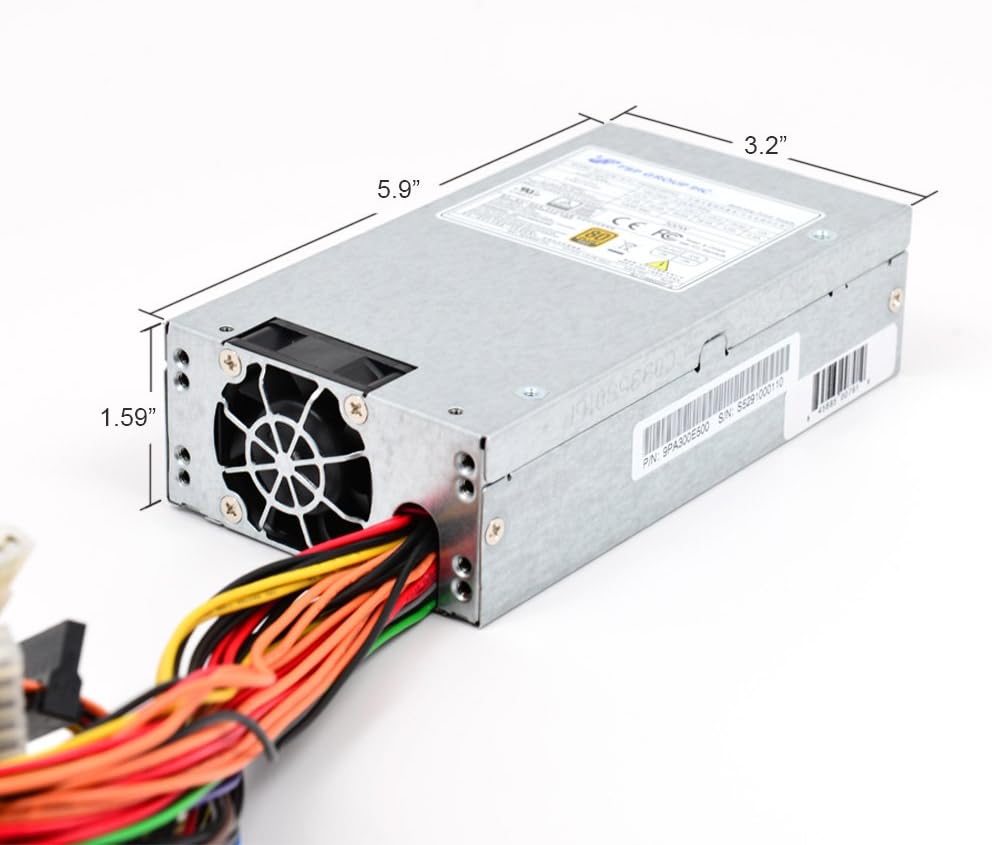
Image 4.1: Dimensions of the FSP300-60FAG power supply, measuring approximately 5.9 inches (L) x 3.2 inches (W) x 1.59 inches (H).
Kurulum Adımları
- Sisteminizi hazırlayın: Turn off your computer and disconnect the AC power cord from the wall outlet. Open your computer case.
- Eski güç kaynağını çıkarın (varsa): Disconnect all cables from the old power supply to the motherboard and other components. Unscrew and remove the old PSU from the case.
- Install the FSP300-60FAG: Carefully slide the new FSP300-60FAG power supply into the designated Flex ATX bay in your computer case. Align the screw holes and secure the PSU with the provided mounting screws.
- AC Güç Kablosunu bağlayın: Ensure the power supply is securely mounted before connecting the AC power cord to the PSU's input socket.
Bağlantı Kabloları
Connect the power supply cables to your motherboard and other components. Refer to your motherboard manual for specific connector locations.
- 20+4 Pin ATX Main Power Connector: Connect this to the main power socket on your motherboard. Ensure both sections (20-pin and 4-pin) are securely latched.
- 4-Pin 12V CPU Power Connector: Connect this to the CPU power socket on your motherboard, usually located near the CPU socket.
- SATA Güç Bağlantıları: Use these to power SATA hard drives, SSDs, and optical drives.
- Molex (4-Pin Peripheral) Connectors: Use these for older peripherals or case fans that require Molex power.

Resim 4.2: Üzeriview of the FSP300-60FAG's various power cables and connectors for motherboard and peripheral connections.

Image 4.3: Rear panel of the FSP300-60FAG, featuring the AC power input and exhaust fan grille.
5. Operating Your Power Supply
Once all connections are made and verified, close your computer case. Connect the AC power cord to a wall outlet and turn on your computer. The FSP300-60FAG will automatically provide stable power to your system. Its 80 PLUS Gold certification ensures high energy efficiency, reducing wasted heat and electricity consumption.
6. Bakım ve Özen
Doğru bakım, güç kaynağınızın uzun ömürlü olmasını ve optimum performans göstermesini sağlar.
- Havalandırma deliklerini açık tutun: Ensure that the intake and exhaust vents of the power supply are not obstructed by dust, cables, or other objects. Blocked vents can lead to overheating.
- Toz Temizleme: Periodically clean the exterior of the power supply and its fan grille using compressed air. Do not open the power supply unit for internal cleaning.
- Çevresel Koşullar: Operate the power supply within recommended temperature and humidity ranges. Avoid direct sunlight or placement near heat sources.
7. Sorun Giderme Kılavuzu
Güç kaynağınızla ilgili sorunlarla karşılaşırsanız, aşağıdaki yaygın sorunlar ve çözümlere bakın:
| Sorun | Olası Neden | Çözüm |
|---|---|---|
| Sistem açılmıyor. | Loose power connections, faulty power cord, PSU switch off, insufficient power. | Check all power cable connections (AC cord, 20+4 pin, 4-pin 12V). Ensure the PSU's main power switch is ON. Verify wall outlet functionality. |
| Sistem açılıyor ancak beklenmedik bir şekilde kapanıyor. | Overheating, overloaded PSU, component short circuit. | Ensure proper ventilation and clear PSU fan. Reduce system load if possible. Check for any loose components or short circuits. |
| Güç kaynağı ünitesinden alışılmadık bir ses geliyor. | Fan obstruction, faulty fan bearing. | Inspect the fan for any obstructions and carefully remove them if present. If the noise persists, contact customer support. |
| Peripherals (HDD/SSD) not detected. | Loose SATA power cable. | Ensure SATA power cables are securely connected to both the PSU and the peripheral device. |
8. Teknik Özellikler
Detailed specifications for the FSP300-60FAG power supply:
| Özellik | Şartname |
|---|---|
| Model Adı | FSP300-60FAG |
| Marka | FSP |
| Form Faktörü | Flex ATX |
| Çıkış Watttage | 300 Watt |
| Yeterlik | 80 PLUS Altın Sertifikalı |
| AC Girişi | 100-240V~, 4-2A, 60-50Hz |
| DC Çıkış | +3.3V@14.0A, +5V@16.0A, +12V1@16.0A, +12V2@16.0A, +5Vsb@3.0A, -12V@0.5A |
| Soğutma Yöntemi | Air (1x 40mm Ball-Bearing Fan) |
| Boyutlar (U x G x Y) | 5.9 x 3.2 x 1.6 inç (150 x 81.5 x 40.5 mm) |
| Ürün Ağırlığı | 1.8 Pound |
| Çalışma Sıcaklığı | 50 santigrat dereceye kadar |
| Korumalar | OVP (Hacim Fazlasıtage Protection), Line input fuse protection, Resettable power shut down |
| Güvenlik Sertifikaları | CE, FCC, cUL, CCC, TUV, CB |
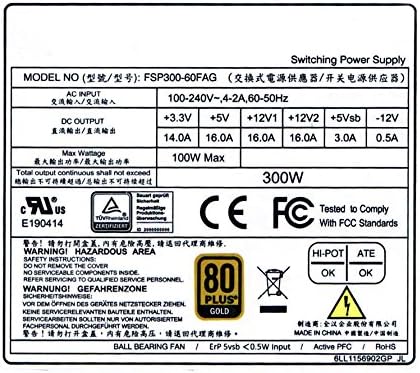
Image 8.1: The FSP300-60FAG specification label, showing detailed electrical ratings and compliance marks.
9. Garanti ve Müşteri Desteği
Garanti Bilgileri
The FSP300-60FAG power supply comes with a 3 yıllık garanti Satın alma tarihinden itibaren geçerlidir. Bu garanti, normal kullanım koşullarındaki malzeme ve işçilik kusurlarını kapsar. Garanti talepleriniz için lütfen satın alma belgenizi saklayın.
Müşteri Desteği
For technical assistance, troubleshooting beyond this guide, or warranty inquiries, please contact FSP customer support. You can find more information and contact details on the official FSP websitesinden veya Amazon mağaza sayfasından satın alabilirsiniz.
Visit the FSP Store: FSP Group USA Amazon Store


