
giriiş
This manual provides instructions for the installation, operation, and maintenance of your StarTech.com ST1030USBM 10-Port USB 3.0 Industrial Hub. This robust hub is designed for demanding environments, offering ten independent USB 3.0 (5Gbps) ports with advanced ESD and surge protection.
The ST1030USBM is built with a durable metal casing and offers versatile mounting options, including DIN rail, wall, or desk mounting, making it suitable for server rooms and industrial applications.
Kutuda Neler Var?
- 1 - 10-port industrial USB 3.0 hub
- 1 - USB 3.0 host cable
- 1 - DIN rail mounting kit
- 1 - terminal block (2 wire)
- 1 - instruction manual
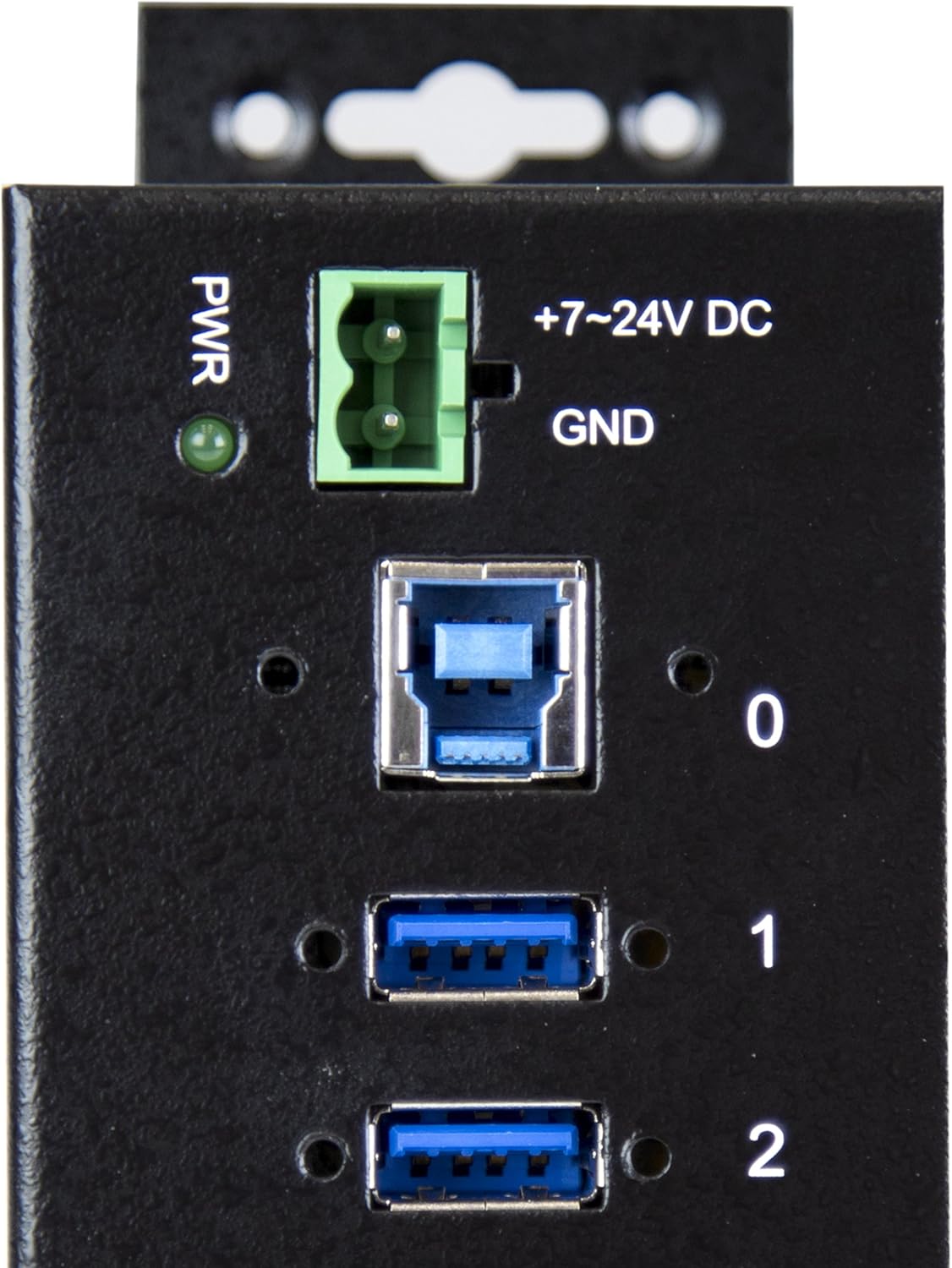
Image: Contents of the ST1030USBM package, including the hub, USB cable, DIN rail mounting kit, terminal block, and instruction manual.
Kurmak
Güç Bağlantısı
The ST1030USBM hub requires external power. It operates with a 7-24V DC input via the included terminal block. An optional 65W external power adapter (not included) can also be used. Ensure the power source meets the specified voltage aralığı.
- If using the terminal block connector, ensure it is already inserted into the hub.
- Loosen the two screws on the terminal block connector using a small flat-head screwdriver.
- Connect the positive and ground wires from your DC power source to the proper terminal block connections and fasten the screws. Ensure correct polarity for proper function.

Image: Detail of the power input terminal block (+7-24V DC, GND) and the upstream USB 3.0 port (Port 0) on the hub.
Ana Bilgisayar Bağlantısı
Connect the included USB 3.0 host cable from the upstream port (Port 0) on the hub to an available USB 3.0 port on your host computer.
Montaj Seçenekleri
The hub can be mounted in various ways using the built-in mounting brackets or the included DIN rail mounting kit.
- Wall/Desk Mounting: Use the integrated mounting flanges on the sides of the hub to secure it to a flat surface with appropriate screws (not included).
- DIN Ray Montajı: Attach the provided DIN rail clips to the hub using the included screws, then clip the hub onto a standard DIN rail.

Image: The ST1030USBM hub shown mounted on a DIN rail, illustrating a typical installation scenario in an industrial or server environment.
Operating the Hub
Once the hub is powered and connected to your host computer, it is ready for use. The hub is plug-and-play, requiring no additional drivers for most operating systems (Windows, macOS, Linux).
- Connect your USB devices to any of the ten available USB 3.0 ports (Ports 1-10).
- The hub supports USB 3.0 (5Gbps) data transfer rates, as well as backward compatibility with USB 2.0 and USB 1.1 devices.
- The hub provides 15kV Air and 8kV contact ESD protection, along with 350W surge protection on both downstream and upstream USB ports, safeguarding your connected devices.
- The power LED indicator will illuminate when the hub is receiving power.

Resim: Ön view of the ST1030USBM hub, showing the power input, upstream USB port (0), and ten downstream USB 3.0 ports (1-10).
Bakım
To ensure optimal performance and longevity of your USB hub, follow these general maintenance guidelines:
- Cihazınızı temiz ve tozdan uzak tutun. Temizlik için yumuşak ve kuru bir bez kullanın.
- Hub'ı aşırı sıcaklıklara, neme veya doğrudan güneş ışığına maruz bırakmaktan kaçının.
- Ensure proper ventilation around the hub, especially if it is installed in an enclosed space.
- Tüm kablo bağlantılarının sağlam olduğundan emin olmak için düzenli olarak kontrol edin.
Sorun giderme
If you encounter issues with your StarTech.com ST1030USBM hub, refer to the following common troubleshooting steps:
- Güç Yok:
- Verify that the power source is connected correctly to the terminal block and provides 7-24V DC.
- Check the polarity of the power connection if using the terminal block.
- Ensure the power source itself is functional.
- Devices Not Recognized:
- Ensure the hub is properly powered and the power LED is illuminated.
- Verify the USB 3.0 host cable is securely connected between the hub and the computer.
- Çalışır durumda olup olmadığını doğrulamak için USB aygıtını doğrudan bilgisayara bağlamayı deneyin.
- Test the device on a different port on the hub.
- Bilgisayarınızı yeniden başlatın.
- Yavaş Veri Aktarımı:
- Ensure both the host computer's USB port and the connected device support USB 3.0 (5Gbps) for optimal speeds.
- Check the USB cable quality; using a high-quality USB 3.0 cable is recommended.
- Avoid connecting too many high-bandwidth devices simultaneously if experiencing performance issues.
Özellikler
| Özellik | Detay |
|---|---|
| Model Numarası | ST1030USBM |
| USB Standart | USB 3.0 (USB 3.2 Gen 1) |
| Veri Aktarım Hızı | 5 Gbps |
| Port Sayısı | 10 (USB-A Downstream) + 1 (USB-A Upstream) |
| ESD Koruması | 15kV Air, 8kV Contact |
| Aşırı Gerilim Koruması | 350W (Downstream & Upstream) |
| Güç Kaynağı | Terminal Bloğu (7-24V DC) |
| Malzeme | Metal Casing |
| Montaj Seçenekleri | DIN Rail, Wall, Desk |
| İşletim Sistemi Uyumluluğu | Linux, macOS, Windows |
| Boyutlar (UxGxY) | 7.8 x 2.2 x 1.2 inç (19.8 x 5.6 x 3.0 cm) |
| Ürün Ağırlığı | 12.6 ons (357.2 gram) |
Garanti Bilgileri
The StarTech.com ST1030USBM 10-Port USB 3.0 Industrial Hub is backed by a 2 Yıllık Garanti. This warranty covers defects in materials and workmanship under normal use. For specific terms and conditions, please refer to the official StarTech.com webalan.
Teknik Destek
StarTech.com offers free lifetime 24/5 multi-lingual technical assistance. For support, visit the official StarTech.com websiteye gidin veya doğrudan müşteri hizmetleriyle iletişime geçin.
Çevrimiçi Kaynaklar: StarTech.com Product Page (ST1030USBM)