
1. Giriş
This manual provides detailed instructions for the installation, operation, and maintenance of your Zmodo ZM-KW1001-O4-1TB HD Camera System. Please read this manual thoroughly before using the product to ensure proper setup and functionality. Keep this manual for future reference.
2. Ürün Bittiview
2.1 Temel Özellikler
- 720p HD video for clear and sharp images.
- Smartlink wireless configuration for quick setup.
- Motion detection alerts to notify you of activity.
- IP66 rated outdoor cameras for weather resistance.
- Infrared night vision for surveillance in low-light conditions.
- Integrated 1TB hard drive for local video storage.
2.2 Sistem Bileşenleri
The Zmodo ZM-KW1001-O4-1TB system typically includes the following components:
- Wireless Network Video Recorder (NVR) with 1TB HDD
- HD Wireless Cameras (quantity may vary, typically 4)
- NVR ve Kameralar için Güç Adaptörleri
- Ethernet kablosu
- Montaj Vidaları ve Ankrajları
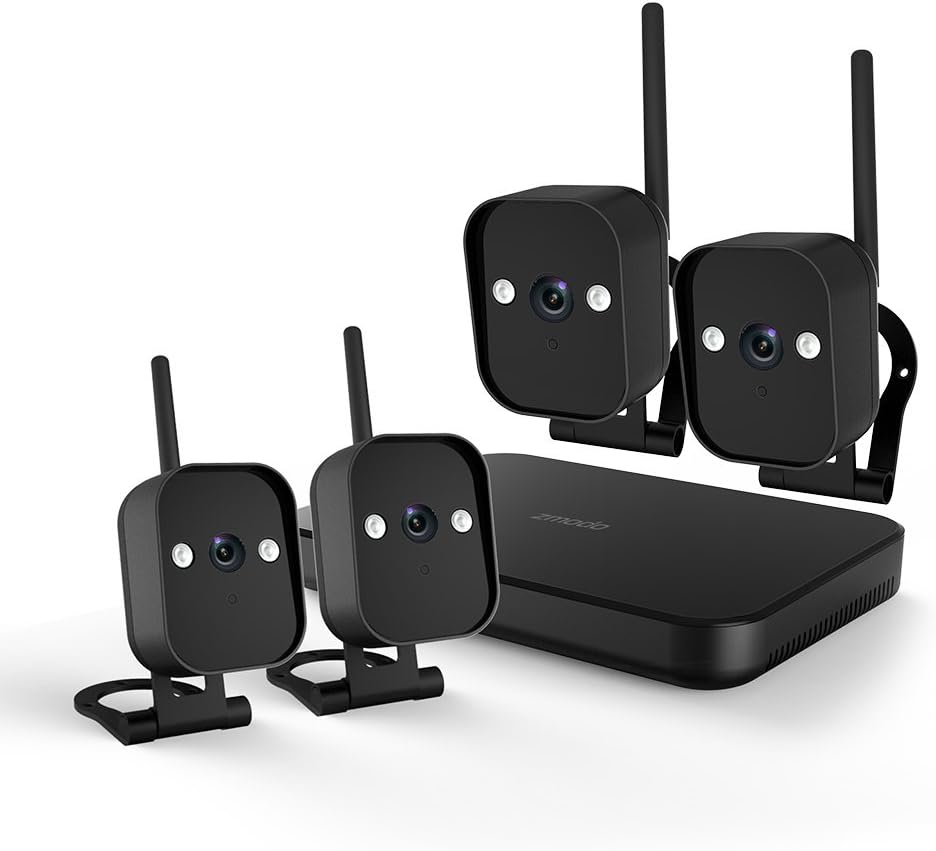
Şekil 1: Üzerindeview of the Zmodo ZM-KW1001-O4-1TB HD Camera System, showing the NVR unit and four wireless cameras.
3. Kurulum Talimatları
3.1 Kutudan Çıkarma ve İlk İnceleme
Carefully unpack all components and verify that all items listed in Section 2.2 are present and undamaged. If any items are missing or damaged, contact customer support.
3.2 NVR Bağlantısı
- Verilen güç adaptörünü kullanarak NVR'yi bir elektrik prizine bağlayın.
- For initial setup and optimal performance, connect the NVR to your router using the supplied Ethernet cable.
- Connect the NVR to a monitor via HDMI or VGA cable (not included) if local viewedilmesi arzu edilir.

Şekil 2: The Zmodo Network Video Recorder (NVR) unit, which stores recordings and manages camera connections.
3.3 Kamera Kurulumu ve Eşleştirme
The cameras are designed for both indoor and outdoor use with an IP66 weather-resistant rating. Ensure cameras are placed within range of the NVR's wireless signal.
- Kameraları Açın: Her kamerayı kendi güç adaptörüne bağlayın ve elektrik prizine takın.
- Smartlink Pairing: The cameras should automatically attempt to pair with the NVR. Follow the on-screen prompts on the connected monitor or use the Zmodo app for Smartlink setup. If pairing fails, refer to the troubleshooting section.
- Montaj: Choose suitable locations for your cameras. Use the provided screws and anchors to securely mount the cameras. Ensure a clear line of sight and optimal viewaçı.

Şekil 3: A Zmodo wireless camera shown with its wall-mounting bracket, suitable for outdoor installation.

Şekil 4: A Zmodo wireless camera shown with its stand mount, ideal for indoor placement on flat surfaces.
3.4 Mobile App Configuration
- Download the Zmodo app from the App Store (iOS) or Google Play Store (Android).
- Yeni bir hesap oluşturun veya mevcut bir hesaba giriş yapın.
- Follow the in-app instructions to add your Zmodo NVR system. This typically involves scanning a QR code on the NVR or manually entering device details.
- Eklendikten sonra şunları yapabilmelisiniz: view Kameralarınızdan canlı yayınlar.
4. Kullanım Talimatları
4.1 Canlı View
Access the Zmodo app or the NVR's local interface to view live video streams from your cameras. You can typically select individual cameras or view multiple feeds simultaneously.
4.2 Hareket Algılama ve Uyarılar
The system is equipped with motion detection capabilities. When motion is detected, the system can record footage and send alerts to your mobile device.
- Yapılandırma: In the Zmodo app or NVR settings, navigate to the motion detection section. You can customize detection zones, sensitivity levels, and alert schedules.
- Uyarılar: Ensure push notifications are enabled for the Zmodo app on your mobile device to receive timely alerts.
4.3 Kayıt ve Oynatma
The NVR includes a 1TB hard drive for continuous or motion-activated recording.
- Kayıt Ayarları: Configure recording modes (continuous, scheduled, motion-activated) via the NVR's local interface or the Zmodo app.
- Playback: Yırttıview kaydedilmiş footage, access the playback feature in the Zmodo app or directly on the NVR. Select the desired date and time to view olaylar.
4.4 Gece Görüşü
The cameras feature infrared night vision, allowing them to capture clear video in low-light or complete darkness. The system automatically switches to night vision mode when ambient light levels are insufficient.
5. Bakım
- Kamera Temizliği: Periyodik olarak fotoğraf makinesi lenslerini yumuşak bir bezle temizleyin.amp Net görüntü kalitesi sağlamak için bezle silin. Aşındırıcı temizleyicilerden kaçının.
- Donanım Yazılımı Güncellemeleri: Check the Zmodo app or website regularly for firmware updates. Keeping your system updated ensures optimal performance and security.
- Sabit Disk Yönetimi: 1 TB'lık sabit disk, en eski dosyaların üzerine otomatik olarak yazacaktır.tage when full. If you need to preserve specific recordings, back them up to an external device before they are overwritten.
- Güç Kaynağı: Ensure all power adapters are securely connected and free from damage.
6. Sorun Giderme
- Video yayını yok:
- Check if the NVR and cameras are powered on.
- Verify network connectivity for the NVR.
- Ensure cameras are within wireless range of the NVR.
- Re-pair cameras if they have lost connection.
- Hareket Algılama Bildirimleri Alınmadı:
- Uygulama ayarlarında hareket algılama özelliğinin etkinleştirildiğinden emin olun.
- Check motion detection zones and sensitivity.
- Ensure push notifications are enabled for the Zmodo app on your mobile device.
- Kötü Görüntü Kalitesi:
- Kamera lensini temizleyin.
- Kameranın görüş alanında herhangi bir engel olmadığından emin olun view.
- Check for strong interference if using wireless connection.
- Cameras Not Connecting to Wi-Fi:
- Ensure the NVR's Wi-Fi is enabled and functioning.
- Move cameras closer to the NVR to improve signal strength.
- Reset cameras and attempt Smartlink pairing again.
7. Özellikler
| Özellik | Şartname |
|---|---|
| Model Numarası | ZM-KW1001-O4-1TB |
| Video Çözünürlüğü | 720p HD |
| Bağlantı Teknolojisi | Kablosuz |
| Kanal Sayısı | 4 |
| Depolama Kapasitesi | 1 TB (Terabayt) |
| Özel Özellikler | Wireless, Motion Detection, Night Vision, IP66 Weatherproof |
| İşletim Sistemi Uyumluluğu | Android, iOS |
| Güç Kaynağı | Wireless (Power Adapters for components) |
| Renk | Siyah |
| Paket Boyutları | 26.8x20x16 cm |
| Ürün Ağırlığı | 1.5 Kilogram |
8. Garanti ve Destek
For warranty information and technical support, please refer to the official Zmodo website or contact Zmodo customer service directly. Details regarding warranty periods and service procedures are typically available on the manufacturer's support pages.
Çevrimiçi destek: Visit the Zmodo official webSSS'ler, sorun giderme kılavuzları ve iletişim bilgileri için site.
Destek Ekibiyle İletişime Geçin: If you require further assistance, please have your product model number (ZM-KW1001-O4-1TB) and purchase details ready when contacting support.