
giriiş
This manual provides detailed instructions for the Inateck Bluetooth 4.1 Sport Headset, Model P20 (BH1001). Please read this guide thoroughly before using the product to ensure proper operation and to maximize your listening experience. This headset is designed for active lifestyles, offering wireless audio with a secure fit and integrated microphone.
1. Kurulum
1.1 Paket İçeriği
Paketin içinde tüm öğelerin mevcut olduğundan emin olun:
- Inateck Bluetooth Sport Headset (P20 / BH1001)
- USB Şarj Kablosu
- Çeşitli boyutlarda silikon kulaklık uçları.
- Taşıma Kesesi
- Kullanım Kılavuzu (bu belge)
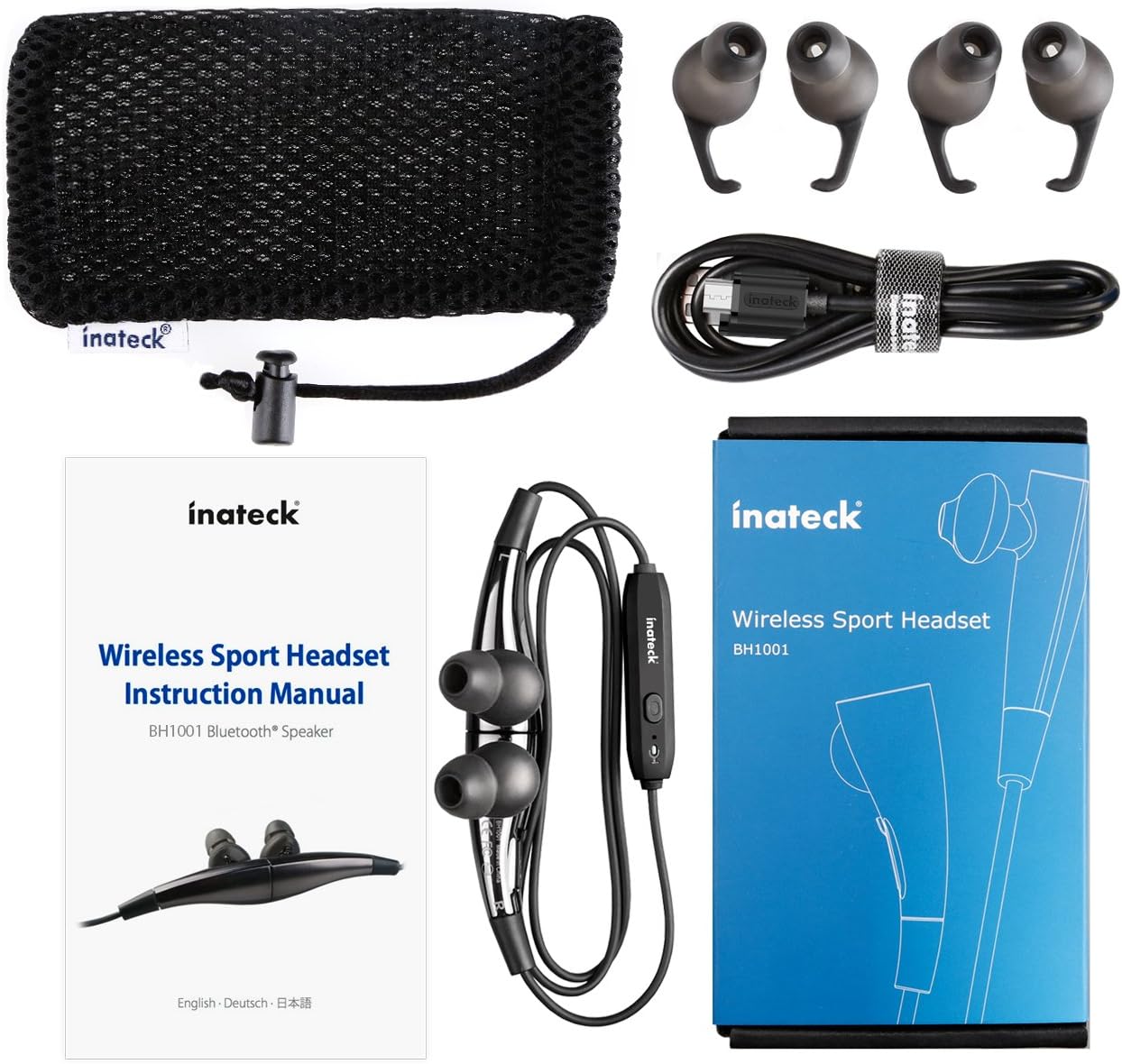
Şekil 1.1: Contents of the Inateck Bluetooth Sport Headset package.
1.2 Kulaklığın Şarj Edilmesi
Before first use, fully charge the headset. A full charge takes approximately 3 hours and provides at least 8 hours of music playback.
- Locate the Micro USB charging port on the headset.
- Connect the small end of the provided USB charging cable to the headset's Micro USB port.
- USB kablosunun daha büyük ucunu bir USB güç kaynağına (örneğin, bilgisayarın USB portuna, USB duvar adaptörüne) bağlayın.
- The status indicator light will illuminate during charging. It will change color or turn off once charging is complete.

Şekil 1.2: Charging the Inateck Bluetooth Sport Headset via Micro USB.
1.3 Bluetooth Cihazıyla Eşleştirme
Kulaklığınızı akıllı telefona veya Bluetooth özellikli başka bir cihaza bağlamak için:
- Kulaklığın kapalı olduğundan emin olun.
- Press and hold the Multifunction Key (MFB) on the inline control unit for approximately 5-7 seconds until the status indicator light flashes red and blue alternately. This indicates pairing mode.
- Bluetooth cihazınızda Bluetooth'u etkinleştirin ve yeni cihazları arayın.
- Select "Inateck BH1001" or "Inateck P20" from the list of available devices.
- Once paired, the status indicator light on the headset will flash blue slowly, and you may hear an audible confirmation.
- The headset will automatically attempt to reconnect to the last paired device when turned on.

Şekil 1.3: Inateck Headset paired with a mobile device for music playback.
2. Kullanım Talimatları
2.1 Kulaklık Kontrolleri
The inline control unit provides easy access to various functions:

Şekil 2.1: Üzerindeview of the Inateck Headset control unit.
- Multifunction Key (MFB):
- Basılı tutun (5-7 sn): Güç Açma/Kapatma, Eşleştirme Moduna Girme
- Kısa basma: Müziği oynat/duraklat, Aramayı cevapla/sonlandır
- Long press (during incoming call): Reject call
- Sesi Aç (+) / Sonraki Parça:
- Kısa basma: Sesi artırır
- Uzun basma: Sonraki parçaya atla
- Sesi Azalt (-) / Önceki Parça:
- Kısa basma: Sesi azaltır
- Long press: Go to previous track
- Mikro USB Bağlantı Noktası: Kulaklığı şarj etmek için.
- Durum Göstergesi: Güç, eşleştirme ve şarj durumunu gösterir.
- Mikrofon: Eller serbest görüşmeler için.
2.2 Kulaklığın Takılması
Select the ear tips that provide the most comfortable and secure fit for your ears. The headset is designed to be worn with the cable behind your neck, ensuring stability during physical activity.

Şekil 2.2: Proper wearing of the Inateck Sport Headset for active use.
2.3 Magnetic Earbuds Feature
The earbuds feature integrated magnets. When not in use, you can connect the two earbuds together, forming a necklace around your neck. This action automatically pauses music playback and prevents the headset from falling off.

Şekil 2.3: Magnetic earbuds feature for secure wearing around the neck.

Şekil 2.4: Headset worn as a necklace using the magnetic feature.
3. Bakım
- Temizlik: Kulaklığı yumuşak, kuru bir bezle silin. Aşındırıcı temizleyiciler veya çözücüler kullanmayın.
- Kulak İpuçları: Regularly remove and clean the silicone ear tips with mild soap and water. Ensure they are completely dry before reattaching.
- Depolamak: When not in use, store the headset in the provided carrying pouch to protect it from dust and damage. Avoid extreme temperatures.
- Suya Dayanıklılık: The headset is designed to be water-resistant for sports and exercise (e.g., sweat, light rain). Do not submerge it in water or expose it to heavy rain.
4. Sorun Giderme
4.1 Güç Açılamıyor
Ensure the headset is fully charged. Connect it to a power source using the USB cable and allow it to charge for at least 30 minutes before attempting to power on again.
4.2 Cihazla Eşleştirme Yapılamıyor
- Ensure the headset is in pairing mode (status indicator flashing red and blue alternately).
- Cihazınızda Bluetooth'un etkinleştirildiğinden ve menzil içinde (genellikle 10 metre veya 33 fit) olduğundan emin olun.
- Turn off and on the Bluetooth function on your device.
- If previously paired, try "forgetting" or "unpairing" the headset from your device's Bluetooth settings and then re-pair.
- Başka hiçbir Bluetooth cihazının bağlantıyı engellemediğinden emin olun.
4.3 Ses Yok veya Ses Kalitesi Düşük
- Hem kulaklığınızın hem de bağlı cihazınızın ses seviyesini kontrol edin.
- Ensure the headset is properly paired and connected to your device.
- Move closer to your device to reduce potential interference or range issues.
- Ensure the ear tips are correctly seated in your ears for optimal sound delivery.
- Hem kulaklığı hem de bağlı cihazınızı yeniden başlatın.
4.4 Kesintili Bağlantı
- Kulaklık ile cihazınız arasında herhangi bir fiziksel engel olmadığından emin olun.
- Avoid placing your device in areas where the signal might be blocked (e.g., deep pockets, behind thick walls).
- Diğer kablosuz cihazlardan (Wi-Fi yönlendiriciler, diğer Bluetooth cihazları) kaynaklanan parazitleri en aza indirin.
- Keep the headset and your device within the recommended Bluetooth range.
5. Özellikler
| Marka | İnatçı |
| Model Adı | P20 |
| Model Numarası | BH1001 |
| Bağlantı Teknolojisi | Bluetooth 4.1 |
| Form Faktörü | Kulak içi |
| Kulak Yerleşimi | Intra-aural |
| Kulaklık girişi | USB (şarj için) |
| Su Direnç Seviyesi | Waterproof (suitable for sweat/light rain) |
| Özel Özellikler | Sports and exercise, integrated microphone, magnetic earbuds |
| Ürün Ağırlığı | 78 Gram |
| Kontrol Türü | Volume Control, Multifunction Button |
| Malzeme | Plastik |
6. Garanti Bilgileri
Inateck products typically come with a limited warranty. For specific warranty terms and conditions applicable to your Inateck Bluetooth Sport Headset, please refer to the warranty card included in your product packaging or visit the official Inateck webSite. Satın alma belgenizi garanti talepleriniz için saklayın.
7. Müşteri Desteği
If you encounter any issues not covered in this manual or require further assistance, please contact Inateck customer support. You can usually find contact information, FAQs, and additional resources on the official Inateck webalan:
Webalan: www.inateck.com
Please have your product model (P20 / BH1001) and purchase details ready when contacting support.