
1. Giriş
This manual provides essential information for the setup, operation, and maintenance of your Proscan PLDED3280A 32-Inch 720p LED TV. Please read this manual thoroughly before operating your television and retain it for future reference.
Temel Özellikler:
- 32-Inch LED HD TV with Built-in ATSC Tuner
- Multiple Connectivity Options: HDMI, VGA, YPbPr, AV Audio/Video, PC Audio, Headphone, Coaxial Out, RF
- 60Hz Refresh Rate for smooth motion
- 16:9 Aspect Ratio for widescreen viewinmek
- Slim Bezel Design for a modern aesthetic
2. Kutuda Neler Var?
Paketi açtığınızda tüm malzemelerin mevcut olduğundan emin olun:
- Proscan PLDED3280A 32-Inch 720p LED TV
- Uzaktan kumanda
- TV Sehpası (2 adet)
- Kullanım Kılavuzu (bu belge)

Figure 2.1: Proscan PLDED3280A 32-Inch 720p LED TV.
3. Kurulum
3.1 Standın Takılması
- Çizilmeleri önlemek için televizyonunuzu ekranı alta gelecek şekilde yumuşak ve temiz bir yüzeye dikkatlice yerleştirin.
- Ayaklık parçalarını televizyonun altındaki montaj delikleriyle hizalayın.
- Birlikte verilen vidaları kullanarak standı sabitleyin. Çok fazla sıkmayın.
3.2 Gücün Bağlanması
Plug the power cord into the AC IN port on the back of the TV, then plug the other end into a standard electrical outlet (AC 120V, 60Hz).
3.3 Harici Cihazların Bağlanması
Your Proscan TV offers various input ports for connecting external devices such as cable boxes, DVD/Blu-ray players, gaming consoles, and computers.
- HDMI: For high-definition audio and video. Connect up to three HDMI devices.
- VGA: For connecting a PC.
- YPbPr (Component): Analog yüksek çözünürlüklü video için.
- AV (Kompozit): For standard definition video and stereo audio.
- RF (Anten/Kablo): Anten veya kablolu TV bağlantısı için.
- Bilgisayar Sesi: For audio input from a PC.
- Kulaklık: Kulaklık bağlamak için.
- Koaksiyel Çıkış: Dijital ses çıkışı için.
Ensure all cables are securely connected to the correct ports on both the TV and the external device.
4. TV'nin çalıştırılması
4.1 Güç Açma/Kapatma
Basın GÜÇ button on the remote control or the power button on the side of the TV to turn the television on or off. A blue indicator light on the front of the TV signifies it is powered on.
4.2 Giriş Kaynağı Seçimi
Bağlı cihazlar arasında geçiş yapmak için tuşuna basın. GİRİŞ button on the remote control or the side of the TV. A menu will appear on screen, allowing you to select from available inputs such as TV, AV, Component, HDMI1, HDMI2, HDMI3, PC, or USB Media Player.
4.3 Ses Kontrolü
Kullanın HACİM+ Ve cilt buttons on the remote control or the side of the TV to adjust the volume level. A volume bar with a numerical indicator will appear on the screen.
4.4 Kanal Seçimi
If an antenna or cable is connected to the RF input, use the ÇİN+ Ve Ç- buttons on the remote control or the side of the TV to change channels.
4.5 Menü Navigasyonu
Basın MENÜ button on the remote control or the side of the TV to access the on-screen display (OSD) menu. Use the arrow buttons to navigate through options and the OK or GİRMEK Seçimleri onaylamak için düğmesine basın.
5. Bakım
Proper care ensures the longevity of your Proscan TV:
- Ekranın Temizlenmesi: Ekranı yumuşak, tiftiksiz bir bezle nazikçe silin. İnatçı lekeler için hafifçe silin.ampBezi su veya özel bir ekran temizleyici ile temizleyin. Sert kimyasallardan veya aşındırıcı malzemelerden kaçının.
- Kabinin Temizlenmesi: TV sehpasını temizlemek için yumuşak ve kuru bir bez kullanın.
- Havalandırma: Televizyonun etrafında yeterli havalandırma olduğundan emin olun. Havalandırma açıklıklarını kapatmayın.
- Güç Kablosu: Güç kablosunu düzenli olarak hasar açısından kontrol edin. Hasarlıysa, hemen değiştirin.
- Depolamak: If storing the TV for an extended period, disconnect it from power and store it in a cool, dry place.
6. Sorun Giderme
Müşteri desteğiyle iletişime geçmeden önce, sık karşılaşılan sorunlar için aşağıdaki çözümleri deneyin:
| Sorun | Olası Neden / Çözüm |
|---|---|
| Güç Yok | Ensure the power cord is securely plugged into both the TV and the outlet. Check if the outlet is working. |
| Görüntü Yok / Sinyal Yok | Verify the correct input source is selected (e.g., HDMI1, AV). Check all cable connections between the TV and external devices. |
| Ses Yok | Ses seviyesini kontrol edin ve televizyonun sesinin kısılmadığından emin olun. Ses kablosu bağlantılarını doğrulayın. |
| Uzaktan Kumanda Çalışmıyor | Uzaktan kumandanın pillerini değiştirin. Uzaktan kumanda ile televizyonun kızılötesi sensörü arasında herhangi bir engel olmadığından emin olun. |
| Kötü Görüntü Kalitesi | Adjust picture settings (brightness, contrast, color). Ensure the input source is providing a high-quality signal. |
7. Özellikler
| Özellik | Detay |
|---|---|
| Marka | PROSCAN |
| Model Numarası | PLDED3280A |
| Ekran Boyutu | 32 inç |
| Ekran Teknolojisi | NEDEN OLMUŞ |
| Çözünürlük | 720p |
| Yenileme Hızı | 60Hz |
| En Boy Oranı | 16:9 |
| Bağlantı Teknolojisi | HDMI, VGA, YPbPr, AV, PC Audio, Headphone, Coaxial Out, RF |
| Ürün Ağırlığı | 13.7 Pound |
| Ürün Boyutları | 8"D x 28.8"G x 19.1"Y |
| Renk | Siyah |
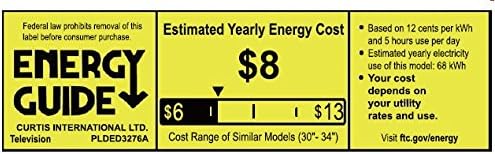
Figure 7.1: Estimated Yearly Energy Cost for similar models.
8. Garanti ve Destek
For detailed warranty information and customer support, please refer to the official Proscan websiteye veya Kullanım Kılavuzunun PDF dosyasına bakın.
Tam Kullanıcı Kılavuzunu (PDF) indirebilirsiniz Burada.
Daha fazla yardım için şu adresi ziyaret edin: PROSCAN Store on Amazon.