
1. Giriş
This manual provides essential information for the proper installation, operation, and maintenance of the Other AV-547/AV547 Diplexer Dual NAV Aircraft Antenna Coupler. The AV-547 is designed to efficiently feed two NAV receivers from a single VOR-type navigation antenna, optimizing space and simplifying wiring in aircraft.
Please read these instructions thoroughly before attempting any installation or operation to ensure safe and correct usage of the device.
2. Ürün Bittiview
The AV-547/AV547 Diplexer Dual NAV Aircraft Antenna Coupler is a passive electronic device engineered for aviation applications. Its primary function is to split the signal from a single VOR navigation antenna, allowing it to be simultaneously used by two separate NAV receivers. This eliminates the need for a second VOR antenna, reducing drag and installation complexity.
- İşlev: Feeds two NAV receivers from one VOR type navigation antenna.
- Frekans Aralığı: Operates within the 108-136 MHz band.
- Empedans: 50 Ohm impedance for optimal signal transfer.
- Alternatif Parça Numarası: CI-502.
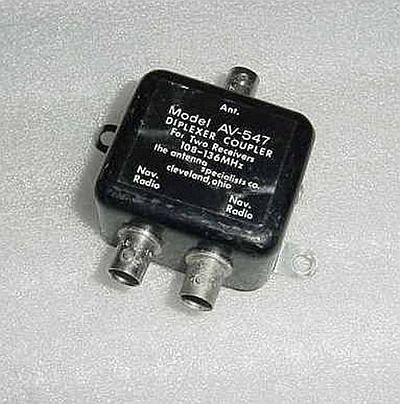
Figure 1: The AV-547/AV547 Diplexer Dual NAV Aircraft Antenna Coupler. This image shows the compact design of the coupler with its input and output connectors, designed to integrate seamlessly into an aircraft's avionics system.
3. Kurulum ve Kurulum
Installation of the AV-547/AV547 coupler should be performed by qualified avionics technicians in accordance with aircraft manufacturer specifications and applicable aviation regulations. Improper installation can lead to system malfunction or safety hazards.
- Montaj Yeri: Select a suitable mounting location within the aircraft that is protected from environmental elements, vibration, and extreme temperatures. Ensure adequate space for cable routing and ventilation.
- Anten Bağlantısı: Connect the single VOR navigation antenna cable to the input port of the AV-547 coupler. Ensure the connection is secure and properly shielded.
- Alıcı Bağlantıları: Connect the two output ports of the AV-547 coupler to the respective NAV receiver input ports. Use high-quality coaxial cables with appropriate connectors (e.g., BNC, TNC) to maintain 50 Ohm impedance throughout the system.
- Topraklama: Ensure the coupler is properly grounded to the aircraft's airframe in accordance with avionics installation standards to prevent interference and ensure electrical safety.
- Kurulum Sonrası Kontroller: After installation, perform thorough system checks to verify proper signal reception and functionality of both NAV receivers. Consult the aircraft's maintenance manual for specific testing procedures.
Not: Always refer to the aircraft's specific wiring diagrams and avionics installation manuals for detailed instructions pertinent to your aircraft model.
4. Kullanım Talimatları
The AV-547/AV547 Diplexer Dual NAV Aircraft Antenna Coupler is a passive device that requires no direct user interaction once properly installed. Its operation is automatic and transparent to the user.
- Upon power-up of the aircraft's avionics system, the coupler will begin distributing the VOR antenna signal to both connected NAV receivers.
- Ensure that both NAV receivers are powered on and configured correctly according to their respective operating manuals.
- Monitor the performance of both NAV receivers during flight operations to confirm consistent and accurate signal reception.
No adjustments or settings are required on the coupler itself.
5. Bakım
The AV-547/AV547 coupler is designed for reliability and requires minimal maintenance. However, periodic inspection is recommended as part of routine aircraft avionics checks.
- Görsel Muayene: Periodically inspect the coupler and its connections for any signs of physical damage, corrosion, loose cables, or wear.
- Temizlik: If necessary, gently clean the exterior of the unit with a soft, dry, lint-free cloth. Do not use abrasive cleaners or solvents.
- Çevre Koruma: Ensure the mounting location remains dry and free from excessive dust or moisture.
- Kablo Bütünlüğü: Check all coaxial cables connected to the coupler for kinks, fraying, or damaged insulation. Replace any compromised cables immediately.
Herhangi bir onarım veya dahili bakım işlemi yalnızca yetkili servis personeli tarafından yapılmalıdır.
6. Sorun Giderme
If you experience issues with your NAV receivers after the installation of the AV-547/AV547 coupler, consider the following troubleshooting steps:
- Sinyal Yok veya Zayıf Sinyal:
- Verify all cable connections to the antenna, coupler, and receivers are secure and correctly seated.
- Inspect cables for damage (cuts, pinches, severe bends).
- Ensure the VOR antenna itself is intact and free from damage or obstruction.
- Check the power supply to the NAV receivers.
- Kesintili Sinyal:
- This could indicate a loose connection or a faulty cable. Re-seat all connections.
- Check for environmental factors like moisture ingress at connection points.
- Discrepancy Between Receivers:
- If one receiver performs significantly worse than the other, swap the output cables from the coupler to the receivers (if feasible) to determine if the issue lies with the receiver or the coupler's output port.
- Ensure both receivers are tuned to the same frequency and operating correctly independently.
If troubleshooting steps do not resolve the issue, it is recommended to consult a certified avionics technician for further diagnosis and repair.
7. Özellikler
| Özellik | Şartname |
|---|---|
| Model Numarası | AV-547 / AV547 |
| Alternatif Parça Numarası | CI-502 |
| İşlev | Diplexer Dual NAV Aircraft Antenna Coupler |
| Frekans Aralığı | 108-136 MHz |
| Empedans | 50 Ohm |
| Ürün Ağırlığı | 1 pound (yaklaşık) |
| Üretici | Diğer |
8. Garanti ve Destek
Warranty information for the AV-547/AV547 Diplexer Dual NAV Aircraft Antenna Coupler should be obtained directly from the original seller or manufacturer at the time of purchase. Please retain your proof of purchase for any warranty claims.
For technical support, installation guidance, or service inquiries, please contact the avionics specialist who performed the installation or the authorized distributor from whom the product was acquired. Always provide the model number (AV-547 or AV547) and any relevant purchase details when seeking support.


