
1. Giriş
Thank you for choosing the Mabe HMM70SW Microwave Oven. This manual provides important information for the proper installation, operation, and maintenance of your appliance. Please read these instructions carefully before using the microwave oven and keep them for future reference.
2. Güvenlik Talimatları
Cihazınızı kullanırken yangın, elektrik çarpması, yaralanma veya aşırı mikrodalga enerjisine maruz kalma riskini azaltmak için aşağıdakiler de dahil olmak üzere temel önlemleri izleyin:
- Cihazı kullanmadan önce tüm talimatları okuyun.
- Fırının kapağı açıkken çalıştırmayı denemeyin, bu mikrodalga enerjisine zararlı bir şekilde maruz kalmanıza neden olabilir.
- Fırının ön yüzü ile kapağı arasına herhangi bir nesne koymayın veya sızdırmazlık yüzeylerinde toprak veya temizlik maddesi artıklarının birikmesine izin vermeyin.
- Fırın hasarlıysa çalıştırmayın. Fırın kapağının düzgün bir şekilde kapanması ve (1) kapak (eğik), (2) menteşeler ve mandallar (kırılmış veya gevşemiş), (3) kapak contaları ve sızdırmazlık yüzeylerinde herhangi bir hasar olmaması özellikle önemlidir.
- Fırının ayarı ve onarımı yetkili servis personeli dışında hiç kimse tarafından yapılmamalıdır.
- Ünitenin çevresinde yeterli havalandırma olduğundan emin olun. Havalandırma açıklıklarını hiçbir şekilde kapatmayın.
- Bu cihazda aşındırıcı kimyasallar veya buharlar kullanmayın.
- Patlama olasılığı bulunduğundan sıvıları veya diğer gıdaları kapalı kaplarda ısıtmayın.
- Her zaman mikrodalgaya uygun pişirme kapları kullanın.
3. Ürün Bittiview
The Mabe HMM70SW is a compact and efficient microwave oven designed for residential use. It features a 0.7 cubic feet (20 L) capacity, 10 power levels, and a variety of quick-cook functions.
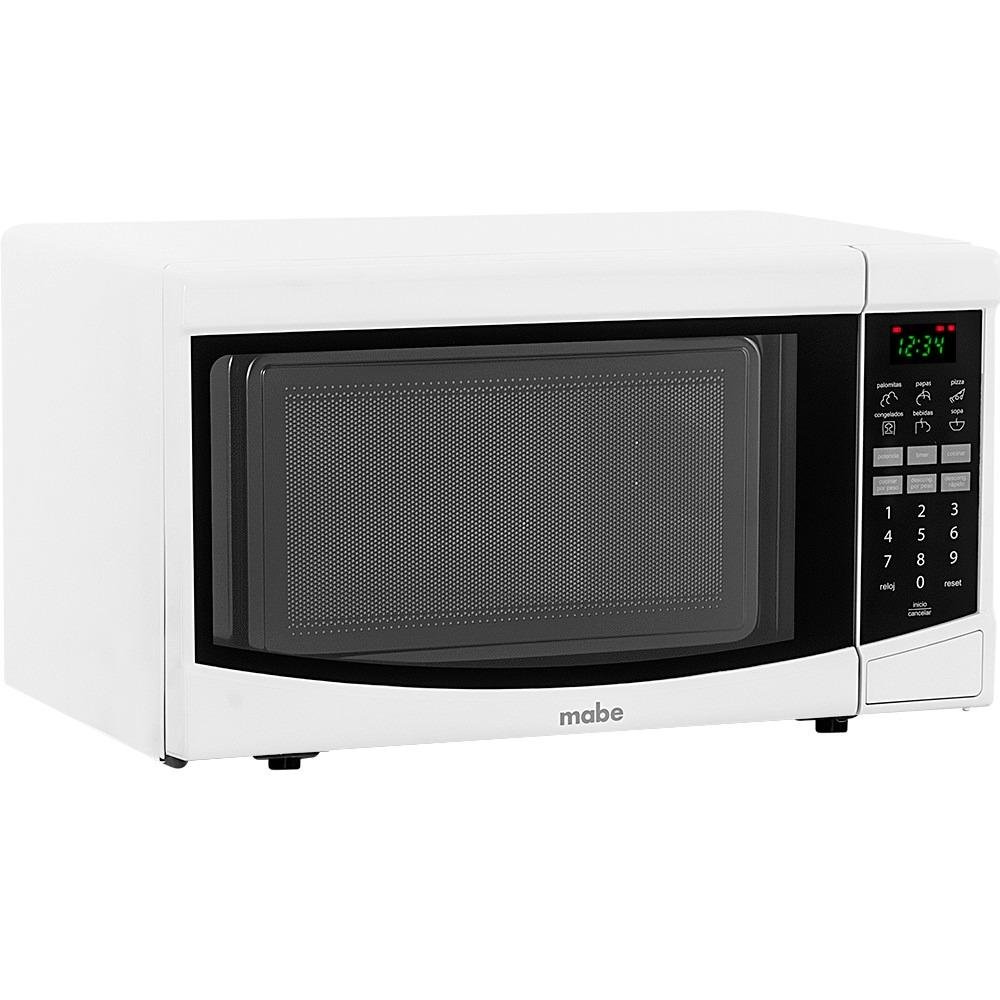
Şekil 1: Mabe HMM70SW Microwave Oven. The image displays the microwave with approximate dimensions labeled: Height 33cm, Width 45.2cm, and Depth 33cm. Please refer to the specifications section for precise product dimensions.
Kontrol Paneli
The control panel features a digital display and touch-sensitive buttons for various functions. Key features include:
- Dijital gösterge: Saati, güç seviyesini ve pişirme durumunu gösterir.
- Sayısal Tuş Takımı (1-9, 0): Used to enter cooking times, clock settings, and quantities.
- Hızlı Fonksiyonlar: Dedicated buttons for common items like Popcorn, Potatoes, Pizza, Beverages, Frozen Food, and Soup.
- Clock (Reloj): Geçerli saati ayarlamak için.
- Start/Cancel (Inicio/Cancelar): To start or stop cooking.
- Reset: To clear settings.
The interior includes a rotating glass turntable to ensure even cooking.
4. Kurulum ve Kurulum
Paket açma
Carefully remove the microwave oven from its packaging. Remove all packing materials, including any protective film or tape. Check the oven for any damage, such as dents or a misaligned door. Do not operate the oven if it is damaged.
Atama
- Mikrodalga fırını, ağırlığını taşıyabilecek düz ve sağlam bir yüzeye yerleştirin.
- Ensure there is adequate space around the oven for proper ventilation. Leave at least 4 inches (10 cm) of space on the top, back, and sides.
- Do not place the oven near heat sources such as a range or oven.
- Parazit oluşmasını önlemek için fırını radyo ve televizyonlardan uzak tutun.
Elektriksel bağlantı
Plug the microwave oven into a grounded 120V, 60Hz electrical outlet. Do not use an extension cord or adapter. Ensure the electrical circuit is adequately rated for the appliance's power consumption.
5. Kullanım Talimatları
Saati Ayarlamak
- Basın Saat (Reloj) düğme.
- Geçerli saati girmek için sayısal tuş takımını kullanın (örneğin, 12:30).
- Basın Saat (Reloj) Onaylamak için tekrar düğmeye basın.
Temel Mikrodalga Pişirme
- Place food in a microwave-safe container on the turntable. Close the door securely.
- Enter the desired cooking time using the number pad (e.g., 1 for 1 minute, 30 for 30 seconds).
- Basın Başlama button. The oven will begin cooking at full power.
- To adjust power level: After entering time, press the Güç Seviyesi button (if available, or refer to specific model instructions for power level adjustment) and then enter a number from 1 to 10 (10 being full power). Then press Başlama.
Using Quick Functions
Your microwave oven includes 6 quick functions for convenient cooking:
- Patlamış mısır: Press the Popcorn button once for standard popcorn bags.
- Potatoes (Papas): Press the Potatoes button and select the quantity (e.g., 1 for one potato, 2 for two).
- Pizza: Press the Pizza button and select the quantity/size.
- Beverages (Bebidas): Press the Beverages button and select the number of servings.
- Frozen Food (Congelados): Press the Frozen Food button and select the type/weight.
- Soup (Sopa): Press the Soup button and select the quantity.
For each quick function, the oven will automatically set the appropriate cooking time and power level. Follow the on-screen prompts or refer to the specific function details in your full manual.
Automatic Defrost (Descongelado Automático)
- Dondurulmuş gıdayı döner tabla üzerine yerleştirin.
- Basın Defrost (Descongelado) düğme.
- Sayısal tuş takımını kullanarak yiyeceğin ağırlığını girin.
- Basın Başlama button. The oven will calculate the defrosting time and power level automatically.
6. Bakım ve Temizlik
Mikrodalga fırınınızın uzun ömürlü olmasını ve optimum performans göstermesini sağlamak için düzenli temizlik ve bakımını yapın.
Dış Temizlik
Dış yüzeyleri yumuşak, damp Bez ve hafif deterjan kullanın. Aşındırıcı temizleyicilerden veya ovma pedlerinden kaçının.
İç Temizlik
Clean the interior cavity regularly. For stubborn food splatters, place a bowl of water with lemon slices inside and microwave for 2-3 minutes. The steam will loosen food particles, making them easier to wipe away with a damp cloth. Do not use harsh detergents or abrasive materials.
Turntable Cleaning
Cam döner tabla ve silindir halkası temizlik için çıkarılabilir. Bunları ılık, sabunlu suda veya bulaşık makinesinde yıkayın. Fırına geri yerleştirmeden önce tamamen kuruduklarından emin olun.
7. Sorun Giderme
Mikrodalga fırınınızda sorun yaşıyorsanız, aşağıdaki yaygın sorunlara ve çözümlere bakın:
| Sorun | Olası Neden | Çözüm |
|---|---|---|
| fırın başlamıyor | Güç kablosu takılı değil; Kapı düzgün kapatılmamış; Sigorta atmış veya devre kesici devreye girmiş. | Elektrik kablosunun prize sağlam bir şekilde takılı olduğundan emin olun; Kapıyı sıkıca kapatın; Evdeki sigortayı kontrol edin veya devre kesiciyi sıfırlayın. |
| Yiyecekler ısınmıyor | Yanlış pişirme süresi veya güç seviyesi ayarlanmış; Mikrodalgaya uygun pişirme kapları kullanılmamış. | Adjust cooking time and power level; Use appropriate microwave-safe dishes. |
| Döner tabla dönmüyor | Turntable or roller ring not correctly placed; Obstruction under the turntable. | Ensure turntable and roller ring are correctly seated; Remove any obstructions. |
| Ampul çalışmıyor | Ampulün değiştirilmesi gerekiyor. | Ampul değişimi için yetkili servis personeli ile iletişime geçiniz. |
If the problem persists after trying these solutions, please contact Mabe customer service or a qualified technician.
8. Özellikler
| Özellik | Şartname |
|---|---|
| Marka | Mabe |
| Model Numarası | HMM70SW |
| Renk | Beyaz |
| Kapasite | 0.7 fit küp (20 L) |
| Ürün Boyutları (Y x G x D) | 26.2 cm x 45.2 cm x 33 cm (10.3 inç x 17.8 inç x 13 inç) |
| Güç | 110 Watt |
| Cilttage | 120 Volt |
| Malzeme | Paslanmaz çelik |
| Özel Özellikler | Rotating Plate, Quick Access Keys |
| Ürün Ağırlığı | 10.5 Kilogram (23.1 lbs) |
| Denetleyici Türü | Dokunmak |
| Önerilen Kullanım | yerleşim |
| Kurulum Türü | Tezgah |
| Dahil Bileşenler | Warranty, Microwave Oven, User Manual |
| ASIN | B00XD4MRC4 |
| İlk Mevcut Tarih | 8 Mayıs 2015 |
9. Garanti ve Destek
Your Mabe HMM70SW Microwave Oven comes with a manufacturer's warranty. Please refer to the warranty card included with your product for specific terms and conditions. For technical support, service, or to inquire about replacement parts, please contact Mabe customer service through their official webSiteyi veya garanti belgelerinizde yer alan iletişim bilgilerini kullanın.