giriiş
Thank you for choosing the Coby Portable CD Player CD191. This device is designed to provide a versatile and enjoyable audio experience, combining classic CD playback with modern features like FM radio and MP3 compatibility. Its compact and shockproof design makes it ideal for both home use and on-the-go listening. Please read this manual thoroughly to understand the proper operation and maintenance of your new CD player.

Bir ön view of the Coby Portable CD Player, showcasing its compact design, LCD display, control buttons, and the included wired earbuds and Micro USB charging cable.
Güvenlik Bilgileri
Güvenli çalışmayı sağlamak ve hasarı önlemek için lütfen aşağıdaki önlemlere uyun:
- Üniteyi yağmura, neme veya aşırı sıcaklıklara maruz bırakmayın.
- Avoid dropping or subjecting the unit to strong impacts, as this may damage internal components.
- Cihazı sökmeyin. Tüm servis işlemlerini yetkili personele yaptırın.
- Use only the specified battery type (2 AA batteries) and ensure correct polarity.
- İşitme hasarını önlemek için uzun süre aşırı yüksek ses seviyelerinde dinlemekten kaçının.
- Keep the CD compartment clean and free of dust or debris.
Paket İçeriği
Paketin içinde tüm öğelerin mevcut olduğundan emin olun:
- Coby Portable CD Player CD191
- Stereo Kulaklıklar
- Mikro USB Kablosu

The high-fidelity wired stereo earbuds that come with the CD player, providing a personal listening experience.
Ürün Bittiview
Bileşenler ve Kontroller
Familiarize yourself with the main components and controls of your CD player:
- LCD Ekran: Shows track number, time, mode, and battery status.
- CD Bölmesi: Where the CD is inserted.
- Oynat/Duraklat Düğmesi: Oynatmayı başlatır veya duraklatır.
- Durdurma düğmesi: Oynatmayı durdurur.
- Atla/Ara Düğmeleri (◀◀ / ▶▶): Parçaları atlar veya ileri/geri sarar.
- Mod Düğmesi: Switches between CD, FM, and MP3 modes.
- Program Düğmesi: Programlama sırasındaki parça sıralamasını belirlemek için kullanılır.
- Ses +/- Düğmeleri: Ses çıkış seviyesini ayarlar.
- Kulaklık Jakı (3.5 mm): Kulaklık veya harici ses cihazlarını bağlamak için.
- Mikro USB Bağlantı Noktası: Harici güç kaynağı için.
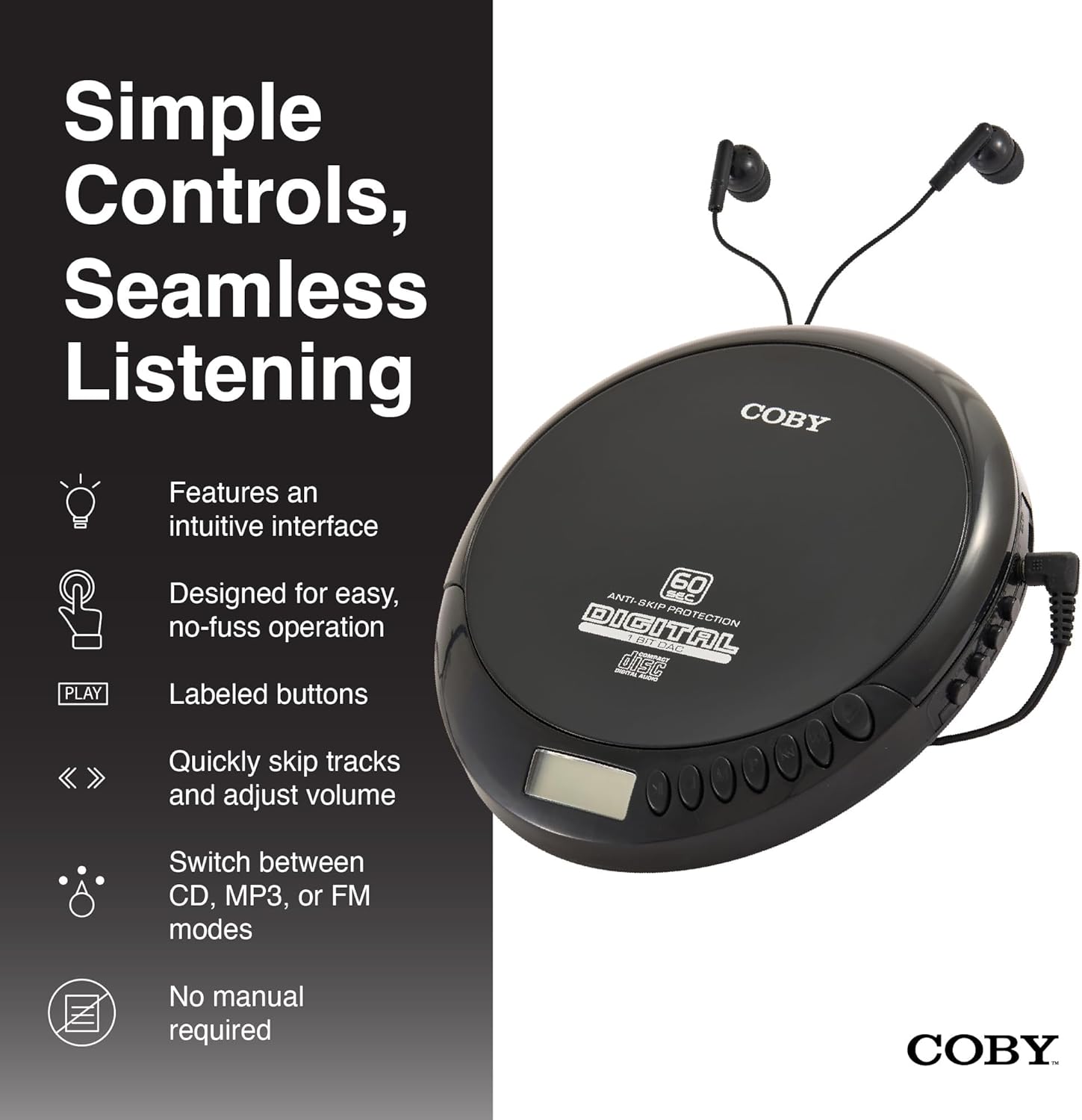
An illustration of the Coby CD Player highlighting its simple controls and intuitive interface.

Ayrıntılı view of the player's LCD screen, which displays the current track number, elapsed time, and battery status.

A close-up of the player's intuitive control buttons, including Play/Pause, Stop, Skip/Search, Mode, and Program functions, designed for easy operation.
Kurmak
Cihazın Güçlendirilmesi
The Coby CD Player can be powered by 2 AA batteries (not included) or via the included Micro USB cable.
- Pil Montajı: Open the battery compartment cover on the back of the unit. Insert 2 AA batteries, ensuring correct polarity (+/-). Close the cover securely.
- USB Gücü: Connect the Micro USB cable to the Micro USB port on the CD player and the other end to a USB power source (e.g., USB wall adapter, computer USB port).

An image showing a user enjoying music with the Coby CD player, highlighting its versatility with both battery and USB power options.

The included Micro USB cable, used for powering the CD player when not using batteries.
Kulaklık Bağlama
Insert the 3.5mm plug of your headphones into the headphone jack on the side of the CD player.
CD takma
- CD bölmesi kapağını açmak için OPEN düğmesine basın.
- Carefully place the CD onto the center spindle with the label side facing up.
- CD'yi yerine oturana kadar yavaşça bastırın.
- CD bölmesinin kapağını yerine oturana kadar sıkıca kapatın.
Kullanım Talimatları
CD Çalma
- Insert a CD (CD, CD-R, CD-RW, or CD-MP3).
- Basın OYNAT/DURDUR button to begin playback. The LCD display will show the track number and elapsed time.
- Oynatmayı duraklatmak için OYNAT/DURDUR Tekrar basın. Devam etmek için bir kez daha basın.
- Çalmayı durdurmak için DURMAK düğme.
The player features 60-second anti-skip protection to ensure continuous audio during movement.
Navigasyonu İzle
- Basmak ▶▶ Bir sonraki parçaya geçmek için.
- Basmak ◀◀ to return to the beginning of the current track. Press it twice quickly to go to the previous track.
- Basılı tutun ▶▶ to fast-forward through the current track.
- Basılı tutun ◀◀ to rewind through the current track.
Ses Kontrolü
Kullanın SES + Ve HACİM - Ses seviyesini rahat bir düzeye ayarlamak için düğmeler.
FM Radyo İşlemi
- Basın MOD button until 'FM' appears on the LCD display.
- The player will automatically scan and tune to available FM stations.
- Kullanın ◀◀ Ve ▶▶ buttons to manually tune to specific frequencies or to scan for the next/previous strong station.

This image illustrates the built-in FM radio feature of the Coby CD player, allowing users to tune into their favorite radio stations.
MP3 Çalma
The Coby CD Player supports MP3 files burned onto CD-R or CD-RW discs. When an MP3 CD is inserted, the player will automatically detect the format and begin playback.
Connecting to External Audio Systems
You can connect your Coby CD Player to external speakers or a car audio system using a 3.5mm AUX cable (not included).
- Connect one end of the 3.5mm AUX cable to the headphone jack on the CD player.
- Connect the other end to the AUX input of your external speaker or car audio system.
- Ensure the external device is set to its AUX input mode.

The CD player connected to an external speaker, demonstrating its ability to deliver enhanced sound with features like Super Bass and Crystal Clear Sound when connected to compatible audio systems.

The portable CD player integrated into a car's audio system via an AUX connection, allowing for on-the-go music playback through car speakers.
Bakım
Ünitenin Temizlenmesi
- Cihazın dış yüzeyini yumuşak, kuru bir bezle silin. Aşındırıcı temizleyiciler veya çözücüler kullanmayın.
- To clean the CD lens, use a specialized CD lens cleaning disc (not included).
Pil Bakımı ve Depolama
- Ünite uzun süre kullanılmayacaksa, sızıntıyı önlemek için pilleri çıkarın.
- Üniteyi serin, kuru ve doğrudan güneş ışığından ve aşırı sıcaklıklardan uzak bir yerde saklayın.
Sorun giderme
| Sorun | Olası Neden | Çözüm |
|---|---|---|
| Ünite açılmıyor. | Batteries are dead or incorrectly inserted. USB cable not connected properly. | Replace batteries with new ones, ensuring correct polarity. Check USB cable connection. |
| Disc skipping or distorted sound. | Disc is dirty, scratched, or damaged. Unit is subjected to excessive vibration. | Clean the disc with a soft, lint-free cloth. Try a different disc. Ensure the anti-skip protection is active. Avoid strong impacts. |
| Kulaklıktan ses gelmiyor. | Headphones not fully plugged in. Volume is too low. Headphones are faulty. | Ensure headphones are fully inserted into the jack. Increase the volume. Try a different pair of headphones. |
| FM radyoda parazit veya zayıf sinyal. | Zayıf sinyal. Girişim. | Adjust the position of the unit. Try moving to a different location. |
| MP3 CD not recognized. | Disc format not supported or disc is corrupted. | MP3'ü sağlayın files are properly encoded and the disc is finalized. Try a different MP3 CD. |
Özellikler
| Özellik | Detay |
|---|---|
| Ürün Boyutları | 5.5 x 1 x 5 inç |
| Ürün Ağırlığı | 7 ons |
| Model Numarası | CD-191-BLK |
| Güç Kaynağı | 2 AA batteries (not included), Micro USB |
| Bağlantı Teknolojisi | Yardımcı, USB |
| Özel Özellik | Portable, FM Radio, MP3 Compatible |
| Atlamayı Önleyici Koruma | 60 saniye |
| Uyumlu Disk Formatları | CD, CD-R, CD-RW, CD-MP3 |
Resmi Ürün Videosu
Resmi bir ürün tanıtım videosu.asing the features and benefits of the Coby Portable CD Player with Stereo Earbuds.
Garanti ve Destek
Garanti bilgileri ve müşteri desteği için lütfen satın alma işleminizle birlikte gelen belgelere bakın veya resmi Coby web sitesini ziyaret edin. website. Contact details for support are typically found on the manufacturer's product page or in the warranty card.
Coby Resmi Webalan: Amazon'daki Coby Mağazasını ziyaret edin.