
giriiş
This manual provides essential information for the safe and efficient use of your Sharp LC-48LE653U 48-Inch 1080p 60Hz Smart LED TV. Please read these instructions thoroughly before operating the television and retain them for future reference. This television offers reliable performance with AquoMotion 120 technology for smooth motion, reduced blur, and access to SmartCentral Apps for various streaming services. It features an ultra-narrow bezel, a sleek modern design, Wallpaper Mode, three HDMI inputs (including MHL support), and built-in 20W audio.
Kutuda Neler Var?
Kurulum işlemine başlamadan önce tüm bileşenlerin mevcut olduğundan emin olun.
- Sharp LC-48LE653U 48-Inch Smart LED TV
- Uzaktan kumanda
- Televizyon sehpası
- AA Piller (2)
- Güç Kablosu
- Belgeler (Hızlı Başlangıç Kılavuzu, Garanti Kartı)
Kurmak
1. Paketin Açılması ve Yerleştirilmesi
Carefully remove the television from its packaging. Place the TV on a stable, level surface or mount it on a wall using a compatible VESA mount (sold separately). Ensure adequate ventilation around the television.
2. Standın Takılması
If using the included stand, align the stand with the mounting holes on the bottom of the TV. Secure it with the provided screws. Refer to the diagram below for proper orientation.

Figure 1: Television with stand and dimensions (10.55"D x 42.56"W x 26.28"H).
3. Cihazları Bağlama
Connect your external devices (e.g., cable box, Blu-ray player, gaming console) to the appropriate ports on the back or side of the TV. The TV features 3 HDMI inputs (one with MHL support), 1 USB port, and component/composite video inputs.

Figure 2: Detail of TV input ports.
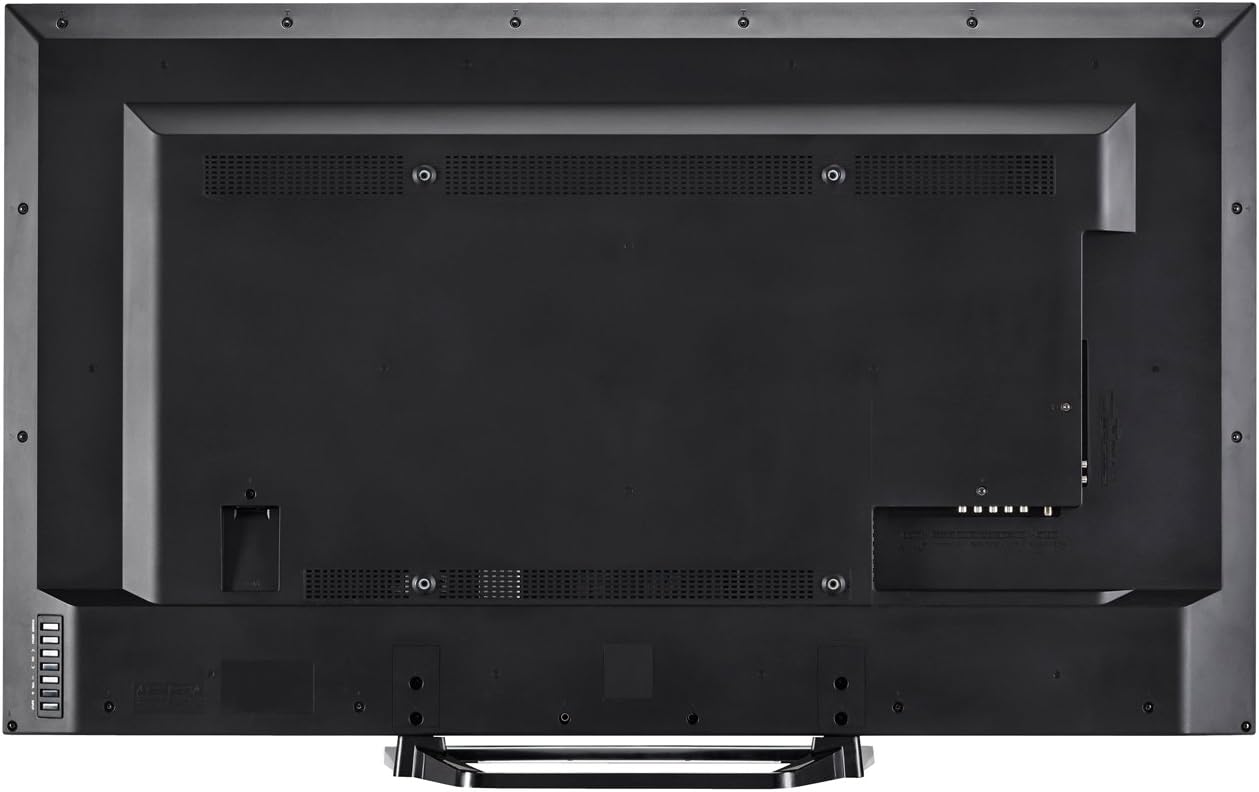
Şekil 3: Arka view of the television with all connections.
4. Güç Bağlantısı
Plug the power cord into the TV's power input, then into a standard electrical outlet (110 VAC, 60 Hz).
5. İlk Güç Açma ve Kurulum Sihirbazı
Press the Power button on the TV or remote control. Follow the on-screen instructions to complete the initial setup, including language selection, network connection (Wi-Fi or Ethernet), and channel scanning.
Kullanım Talimatları
1. Uzaktan Kumanda İşlevleri
The included remote control allows you to navigate menus, change channels, adjust volume, and access smart features. Insert the two AA batteries into the remote control, observing polarity.

Şekil 4: Uzaktan Kumanda Düzeni.
- Güç: Televizyonu açar veya kapatır.
- Giriş: Selects the input source (HDMI, Component, etc.).
- Hacim (+/-): Ses seviyesini ayarlar.
- Kanal (CH +/-): Kanalları değiştirir.
- Akıllı: Accesses SmartCentral Apps.
- Menü: Ana ayarlar menüsünü açar.
- Gezinti Düğmeleri (Yukarı/Aşağı/Sol/Sağ/Enter): Menülerde gezinir ve seçimleri onaylar.
- Netflix, YouTube, Pandora, Vudu: Bu yayın hizmetlerine hızlı erişim için özel düğmeler.
2. SmartCentral Apps
Your Sharp Smart LED TV comes with built-in Wi-Fi and SmartCentral Apps, providing access to popular streaming services and a web browser. Press the 'Smart' button on your remote or select the SmartCentral Apps icon from the home screen.

Figure 5: SmartCentral Apps Interface.
- Uygulamalara Erişim: Use the navigation buttons on the remote to select and launch applications like Netflix, Hulu Plus, Pandora, Vudu, and YouTube.
- Web Tarayıcı: Yerleşik olanı kullanın web browser for general internet browsing.
- Ağ bağlantısı: Ensure your TV is connected to a stable internet connection via Wi-Fi or Ethernet for optimal Smart TV functionality.
3. Görüntü ve Ses Ayarları
Access the TV's menu to customize picture and sound settings. Adjust brightness, contrast, color, and sharpness for picture quality. For audio, select sound modes or adjust bass/treble settings.
4. Duvar Kağıdı Modu
When the TV is turned off, Wallpaper Mode allows it to display virtually any image, transforming your TV into a large-format display for photos or artwork. Configure this feature through the TV's settings menu.
Bakım
1. Ekranın Temizlenmesi
Ekranı yumuşak, kuru ve tüy bırakmayan bir bezle nazikçe silin. İnatçı lekeler için, hafifçe silin.ampBezi su veya özel bir ekran temizleyici ile temizleyin. Sert kimyasallardan veya aşındırıcı malzemelerden kaçının.
2. Dolabın Temizlenmesi
Televizyon sehpasını yumuşak, kuru bir bezle silin. Sıvı temizleyicileri doğrudan sehpaya uygulamayın.
3. Yazılım Güncellemeleri
Periodically check for software updates through the TV's settings menu to ensure optimal performance and access to the latest features. A stable internet connection is required for updates.
Sorun giderme
Televizyonunuzla ilgili sorunlarla karşılaşırsanız, aşağıdaki yaygın çözümlere başvurabilirsiniz:
- Güç Yok: Ensure the power cord is securely plugged into both the TV and the electrical outlet. Test the outlet with another device.
- Görüntü/Ses Yok: Verify the correct input source is selected. Check all cable connections to external devices. If using an antenna, ensure it is properly connected and channels are scanned.
- No Sound (intermittent): If sound occasionally cuts out, try unplugging the TV from the power outlet for a few minutes, then plugging it back in. This can reset internal components.
- Kötü Görüntü Kalitesi: Görüntü ayarlarını (parlaklık, kontrast, keskinlik) düzenleyin. Giriş kaynağının yüksek kaliteli bir sinyal sağladığından emin olun.
- Ağ Bağlantı Sorunları: Check your Wi-Fi router or Ethernet cable connection. Restart your router and the TV. Ensure Wi-Fi settings on the TV are correctly configured.
- Uzaktan Kumanda Çalışmıyor: Pilleri değiştirin. Uzaktan kumanda ile televizyonun kızılötesi sensörü arasında herhangi bir engel olmadığından emin olun.
For persistent issues, contact Sharp customer support.
Özellikler
| Özellik | Şartname |
|---|---|
| Model Numarası | LC-48LE653U |
| Ekran Boyutu | 48 inç |
| Ekran Teknolojisi | LED Arkadan Aydınlatmalı LCD |
| Çözünürlük | 1080p (1920x1080) |
| Yenileme Hızı | 60 Hz (AquoMotion 120) |
| Bağlantı | Built-in Wi-Fi, Ethernet |
| HDMI Bağlantı Noktaları | 3 (one with MHL) |
| USB Bağlantı Noktaları | 1 |
| Desteklenen İnternet Hizmetleri | Hulu Plus, Netflix, Pandora, Vudu, YouTube |
| Ses Çıkış Gücü | 20 Watt |
| Ürün Boyutları (D x G x Y) | 10.55" x 42.56" x 26.28" |
| Ürün Ağırlığı | 21 Pound |
| Cilttage | 110VAC 60Hz |
Garanti Bilgileri
This Sharp LC-48LE653U television is covered by a 1 yıllık sınırlı garanti from the date of purchase. This warranty covers manufacturing defects in materials and workmanship under normal use. It does not cover damage caused by misuse, accidents, unauthorized modifications, or external causes. Please retain your proof of purchase for warranty claims.
Destek
For technical assistance, troubleshooting beyond this manual, or warranty service, please contact Sharp customer support. Refer to the contact information provided in your product documentation or visit the official Sharp webalan.
Çevrimiçi destek: www.sharpusa.com/support
Telefon Desteği: Refer to your warranty card or Sharp's official webEn güncel iletişim numaraları için siteyi ziyaret edin.