
1. Giriş
The Argox AS8520 is a high-performance cordless imager designed for efficient barcode scanning. It features advanced wireless communication technology, allowing for a data transmission range of up to 100 meters. Equipped with a long-lasting Li-ion battery and an IP42 sealing level, the AS8520 is built for durability and mobility across various environments, including offices, supermarkets, warehouses, and manufacturing facilities.
2. Ürün Bittiview
The AS8520 barcode scanner is designed for comfortable handling and robust performance. Key components include the scanning window, trigger button, and ergonomic grip.
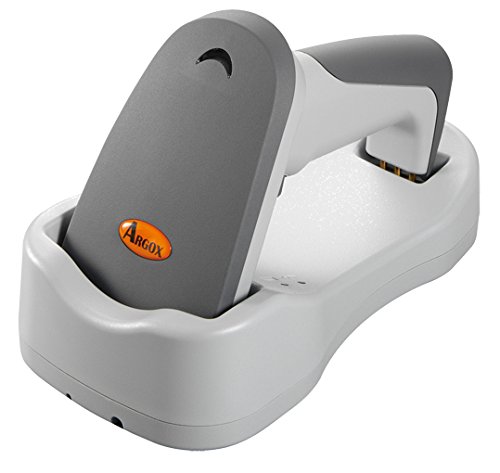
Şekil 2.1: Taraf view of the Argox AS8520 Barcode Scanner, showing the ergonomic handle and trigger button.
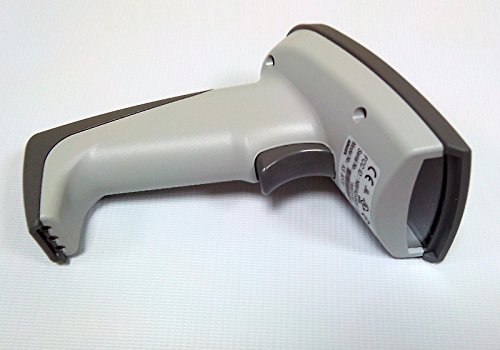
Şekil 2.2: Ön view of the Argox AS8520 Barcode Scanner, highlighting the scanning window and product labels.
3. Kurulum Kılavuzu
3.1. Pilin Takılması ve Şarj Edilmesi
- Ensure the scanner is powered off before installing or removing the battery.
- Tarayıcı kolundaki pil bölmesini bulun.
- Insert the Li-ion battery pack, ensuring correct polarity.
- Pil bölmesini sıkıca kapatın.
- Connect the scanner to its charging base or power adapter using the provided cable. Allow the battery to fully charge before first use.
3.2. Connecting to a Host Device
The Argox AS8520 can connect wirelessly to various host devices, including desktops, laptops, and smartphones. Refer to the separate quick start guide for specific pairing instructions for your operating system or device type.
4. Kullanım Talimatları
4.1. Temel Tarama
- Tarayıcının açık olduğundan ve ana cihazınızla başarıyla eşleştirildiğinden emin olun.
- Tarama penceresini taramak istediğiniz barkoda doğru tutun.
- Press and hold the trigger button. A red LED light source (630nm Visible Red LED) will illuminate the barcode.
- Position the scanner at an appropriate distance (the AS8520 offers superior depth of field up to 40 inches on 40-mil codes) until the barcode is successfully read. A successful scan is typically indicated by an audible beep and/or a visual indicator.
- Tetiği bırakın.
4.2. Gelişmiş Tarama Özellikleri
- Rapid Scan Rate: The AS8520 provides a rapid scan rate of 450 scans/sec for efficient data capture.
- Barcode Symbology Support: Supports GS1 Databar (RSS) and CS (Composite Symbology) barcodes.
- Güneş Işığında Okunabilirlik: Designed to be readable under direct sunlight conditions.
5. Bakım
5.1. Tarayıcının Temizlenmesi
- Temizlemeden önce tarayıcının kapalı olduğundan emin olun.
- Hafifçe yumuşak, tüy bırakmayan bir bez kullanın.ampened with water or a mild cleaning solution to wipe the exterior of the scanner.
- Tarama penceresi için, çizikleri önlemek amacıyla lens temizleme bezi kullanın.
- Do not use abrasive cleaners, solvents, or immerse the scanner in liquid. The IP42 sealing level protects against dust and light water splashes, but not full immersion.
5.2. Pil Bakımı
- To maximize battery life, avoid fully discharging the Li-ion battery frequently.
- Uzun süre kullanılmayacaksa tarayıcıyı serin ve kuru bir yerde saklayın.
- If the battery performance degrades significantly, consider replacing it with an authorized Argox replacement battery.
6. Sorun Giderme
| Sorun | Olası Neden | Çözüm |
|---|---|---|
| Tarayıcı açılmıyor. | Pil boşalmış veya doğru şekilde takılmamış. | Pili şarj edin. Pilin yuvasına doğru şekilde yerleştirildiğinden emin olun. |
| Tarayıcı barkodları okumuyor. | Barcode is damaged, scanner is too far/close, or incorrect symbology settings. | Ensure the barcode is clear. Adjust scanning distance. Check scanner programming for supported barcode types. |
| No data transmitted to host device. | Scanner not paired or out of range. | Re-pair the scanner with the host device. Ensure the scanner is within the 100-meter transmission range. |
| Scanner is unresponsive. | Geçici yazılım hatası. | Perform a soft reset by powering off and then on the scanner. If issues persist, consult the manufacturer's support. |
7. Teknik Özellikler
| Özellik | Şartname |
|---|---|
| Örnek | AS8520 |
| Tarama Hızı | 450 tarama/sn |
| Işık kaynağı | 630nm Visible Red LED |
| Tarama Performansı | Starting at 0.1mm (4 mil) |
| Alan Derinliği | Up to 40 inches on 40-mil codes |
| Veri İletim Aralığı | 100 meters (wireless) |
| Uyumlu Cihazlar | Masaüstü, Dizüstü, Akıllı Telefon |
| Güç Kaynağı | Battery Powered (Li-ion battery pack) |
| Çalışma Sıcaklığı | 0°C ila 50°C (32°F ila 122°F) |
| Depolama Sıcaklığı | -20°C ila 70°C (-4°F ila 158°F) |
| Nem | %10 ila %90 bağıl nem, yoğuşmasız |
| Işık Seviyesi | 70,000 lükse kadar |
| Current - Operating | 225 mA @ 4.2 VDC |
| Current - Standby | 32 mA @ 4.2 VDC |
| Power - Operating | 900 mW |
| Power - Standby | 150 mW |
| Reliability (Trigger) | 1,000,000 kez |
| Reliability (Cable) | 320,000 times (90° bend) |
| Bırakma Spesifikasyonu | 1.5 metre |
| Sealing Level | IP42 |
| Ürün Ağırlığı | 1.3 kilo |
| GTIN/UPC | 702563636336 |
8. Garanti ve Destek
For detailed warranty information, please refer to the warranty card included with your product or visit the official Argox website. For technical support, service, or replacement parts, please contact your authorized Argox reseller or Argox customer service directly.


