
giriiş
Satın aldığınız için teşekkür ederizasing the Soundmaster DAB500SI Portable Digital Radio. This manual provides essential information for the safe and efficient operation of your device. Please read it thoroughly before use and retain it for future reference.
Ürün Bittiview
The Soundmaster DAB500SI is a compact and versatile digital radio, offering both DAB/DAB+ and FM reception. It features a clear display, intuitive controls, and a headphone output for personal listening. Its portable design allows for use in various locations.
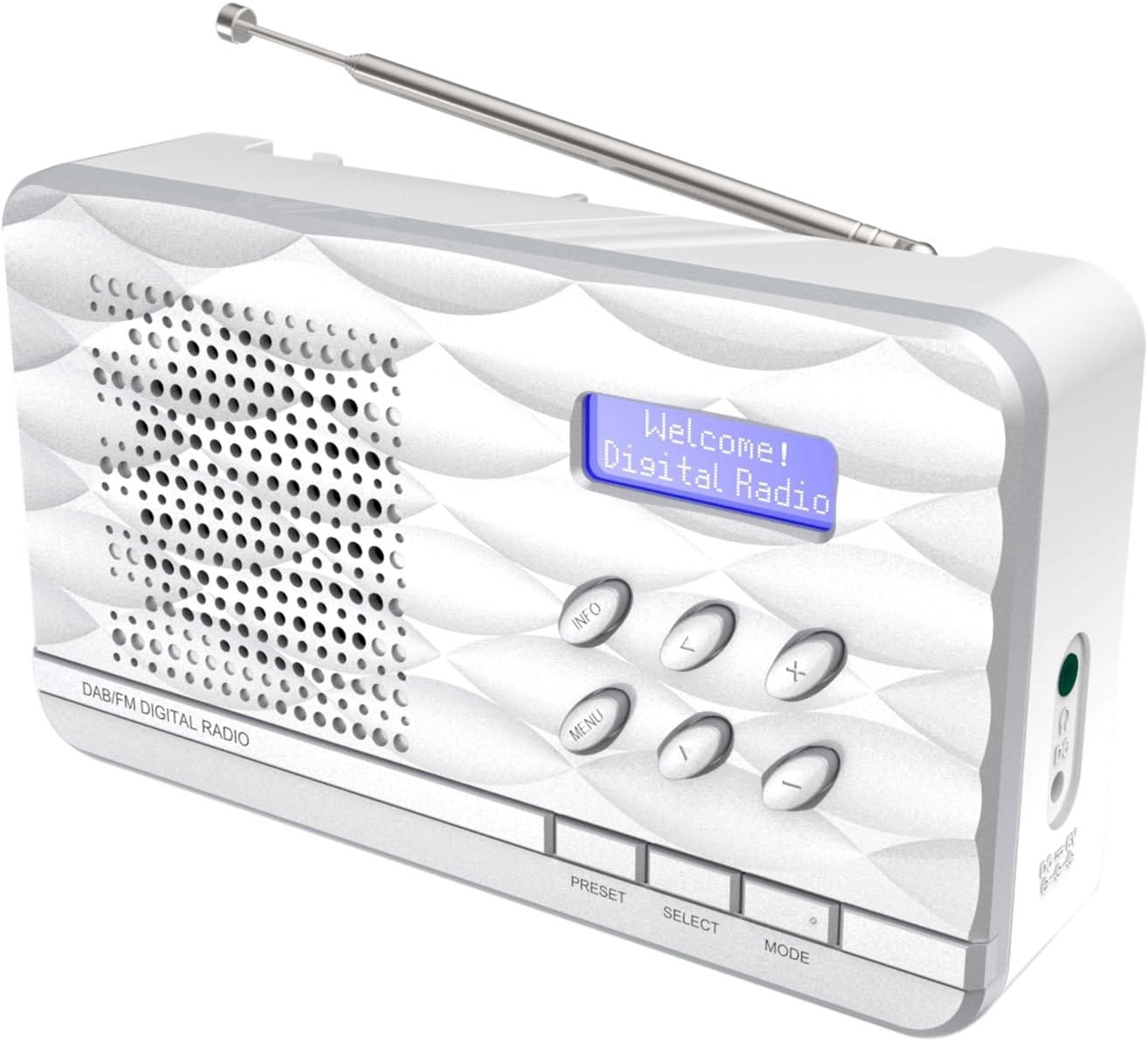
Şekil 1: Soundmaster DAB500SI Portable Digital Radio. The image shows the silver radio with its extendable antenna, front speaker grille, blue backlit display showing "Welcome! Digital Radio", and control buttons labeled INFO, MENU, PRESET, SELECT, MODE, and navigation arrows. Dimensions are indicated as 19cm (width), 11cm (height), and 7cm (depth).
Kurmak
1. Paketten çıkarma
Carefully remove the radio from its packaging. Ensure all components are present: the DAB500SI radio unit and this user manual.
2. Güç Bağlantısı
The DAB500SI is powered by mains electricity. Locate the DC IN port on the side of the unit. Connect the provided power adapter to this port and then plug it into a standard wall outlet.
Alternatively, the unit can be powered by 4x AA batteries (not included) for portable use. Open the battery compartment on the rear of the unit and insert the batteries, observing correct polarity.
3. Anten Ayarı
Extend the telescopic antenna fully for optimal DAB/DAB+ and FM reception. Adjust its position to achieve the best signal quality.
Kullanım Talimatları
1. Güç Açma/Kapatma
Basın GÜÇ button (usually combined with the MODE button or a dedicated button) to turn the radio on or off.
2. Mode Selection (DAB/FM)
Basın MOD button to switch between DAB/DAB+ and FM radio modes.
3. DAB/DAB+ Radyo Kullanımı
- İlk Kurulum: When first powered on in DAB mode, the radio will automatically perform a full scan for available stations. This may take a few minutes.
- İstasyon Seçimi: Kullanın SOL/SAĞ navigation buttons (labeled < and > on the device) to browse through the list of available DAB stations. Press SEÇME Seçiminizi onaylamak için.
- Manuel Tarama: If you move the radio to a new location or wish to update the station list, press MENÜ, then navigate to "Full Scan" or "Auto Scan" and press SEÇME.
- Bilgi Ekranı: Basın BİLGİ button repeatedly to cycle through various information displays such as program type, signal strength, time, date, and DLS (Dynamic Label Segment) text.
4. FM Radyonun Çalıştırılması
- Otomatik tarama: FM modunda, tuşuna basın ve basılı tutun. SEÇME button to perform an auto scan. The radio will scan and store available stations.
- Manuel Ayarlama: Kullanın SOL/SAĞ navigation buttons (labeled < and > on the device) to manually tune the frequency in small increments.
- RDS Information: If available, RDS (Radio Data System) information such as station name and program type will be displayed. Press BİLGİ Mevcut RDS verileri arasında geçiş yapmak için.
5. Ön ayarlar
The radio supports up to 20 preset stations for both DAB and FM modes.
- Storing a Preset: İstediğiniz istasyona ayarlayın. Basılı tutun. ÖN AYAR button until "Preset Store" appears on the display. Use the navigation buttons to select a preset number (1-20) and press SEÇME onaylamak için.
- Bir Ön Ayarı Geri Çağırma: Basın ÖN AYAR button briefly. Use the navigation buttons to select the desired preset number and press SEÇME ona uyum sağlamak için.
6. Ses Kontrolü
Kullanın +/- buttons (labeled + and - on the device) to adjust the volume level.
7. Kulaklık Kullanımı
Connect standard 3.5mm headphones to the headphone jack on the side of the unit for private listening. The internal speaker will be muted automatically.
Bakım
1. Temizlik
Wipe the radio with a soft, dry cloth. Do not use abrasive cleaners, waxes, or solvents as they may damage the finish. Ensure the unit is unplugged before cleaning.
2. Depolama
If storing the radio for an extended period, remove the batteries to prevent leakage. Store in a cool, dry place away from direct sunlight and extreme temperatures.
3. Pil Değişimi
When using batteries, replace all four AA batteries simultaneously when the low battery indicator appears or audio quality degrades. Ensure correct polarity when inserting new batteries.
Sorun giderme
| Sorun | Olası Neden | Çözüm |
|---|---|---|
| Güç yok | Güç adaptörü bağlı değil veya arızalı; piller bitmiş veya yanlış takılmış. | Check power adapter connection and wall outlet. Replace batteries, ensuring correct polarity. |
| Zayıf DAB/FM alımı | Anten uzatılmamış veya yanlış konumlandırılmış; sinyal alanı zayıf. | Fully extend and adjust the telescopic antenna. Try repositioning the radio. Perform a full scan in DAB mode. |
| Hoparlörden ses gelmiyor | Ses seviyesi çok düşük; kulaklık takılı. | Increase volume. Disconnect headphones if not desired. |
| Radyo donuyor veya yanıt vermez hale geliyor. | Geçici yazılım hatası. | Disconnect power for a few seconds, then reconnect. If using batteries, remove and reinsert them. |
Özellikler
- Model Numarası: DAB500SI
- Marka: Ses ustası
- Desteklenen Radyo Bantları: AM, DAB, DAB+, FM
- Önceden Ayarlanmış İstasyonlar: 20 (DAB/FM)
- Maksimum Hoparlör Çıkış Gücü: 1 Vat
- Bağlantı Teknolojisi: Yardımcı giriş (3.5 mm kulaklık girişi)
- Güç Kaynağı: Mains (AC adapter) or 4x AA Batteries (not included)
- Görüntülemek: Arka aydınlatmalı LCD
- Ürün Ağırlığı: 400 Gram
- Boyutlar (yaklaşık): 19 cm (Genişlik) x 11 cm (Yükseklik) x 7 cm (Derinlik)
- Renk: Gümüş
- Dahil Bileşenler: Radio unit, User Manual
Garanti ve Destek
Garanti Bilgileri
Please refer to the warranty card included with your product for detailed warranty terms and conditions. Keep your purchase receipt as proof of purchase for any warranty claims.
Müşteri Desteği
For technical assistance, troubleshooting, or spare parts inquiries, please contact your retailer or the Soundmaster customer service department. Contact details can typically be found on the manufacturer's official websitede veya ürün ambalajında yer almamaktadır.
Note: Spare parts availability information is not provided by the manufacturer. Software updates are not guaranteed.