
giriiş
This manual provides instructions for the Goldmaster RCU 881 Universal Remote Control. This device is designed to control various television sets using infrared technology, offering a convenient replacement or alternative to multiple original remote controls.
Güvenlik Bilgileri
- Pilleri çocukların erişemeyeceği yerlerde saklayın.
- Eski ve yeni pilleri veya farklı pil türlerini karıştırmayın.
- Do not expose the remote control to extreme temperatures, direct sunlight, or moisture.
- Kullanılmış pilleri yerel çevre düzenlemelerine uygun şekilde bertaraf edin.
- Avoid disassembling the remote control; this may void any warranty.
Paket İçeriği
- 1 x Goldmaster RCU 881 Universal Remote Control
- Note: Batteries are not included and must be purchased separately (2x AAA batteries required).
Ürün Bittiview
The Goldmaster RCU 881 is a universal infrared remote control featuring a sleek silver design and a comprehensive button layout for intuitive control of compatible devices, primarily televisions.
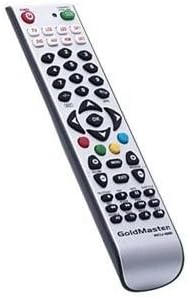
Resim: Ön view of the Goldmaster RCU 881 Universal Remote Control, showing its silver finish and button layout.

Image: The official Goldmaster brand logo.
Kurmak
1. Pil Kurulumu
- Uzaktan kumandanın arkasındaki pil bölmesi kapağını bulun.
- Slide the cover off in the direction indicated by an arrow (if present).
- Insert two AAA batteries, ensuring correct polarity (+ and - symbols match the markings inside the compartment).
- Pil bölmesi kapağını yerine tam oturana kadar kapatın.
2. Uzaktan Kumandayı Programlama
The Goldmaster RCU 881 is a universal remote. Programming typically involves entering a code specific to your TV brand or using an automatic search function. Refer to the included code list (if available with your purchase) or follow these general steps:
- Turn on the device you wish to control (e.g., your television).
- Basılı tutun AYARLAMAK button (or a similar button, if present) on the remote until the indicator light turns on and remains lit.
- Enter the 3 or 4-digit code for your TV brand using the number buttons. If the indicator light turns off, the code has been accepted.
- Kumandayı test etmek için tuşuna basın. GÜÇ button or other function buttons. If the device responds, the programming is successful.
- If the code does not work, or if the indicator light flashes and turns off without controlling the device, repeat steps 2-4, trying other codes listed for your brand.
- If no code works, or if a code list is not provided, use the automatic search function:
- Basılı tutun AYARLAMAK Gösterge ışığı yanana kadar düğmeye basın.
- Basın GÜÇ button once. The indicator light will begin to flash slowly.
- Point the remote at your TV and repeatedly press the GÜÇ düğme (veya ÇİN+ button) slowly, allowing a few seconds between presses, until the TV turns off.
- Televizyon kapandıktan hemen sonra, AYARLAMAK Kodu kaydetmek için düğmeye basın. Gösterge ışığı sönecektir.
- Test the remote. If it controls your TV, programming is complete. If not, repeat the automatic search process.
Note: Specific programming steps and available codes may vary. Consult the original packaging or manufacturer's website for a comprehensive code list or detailed instructions for your specific device model.
Kullanım Talimatları
Once programmed, the Goldmaster RCU 881 functions like your original remote control for the assigned device. Below are common button functions:
- Güç Düğmesi: Cihazı açar veya kapatır.
- Kanal Düğmeleri (CH+/CH-): Kanalları yukarı veya aşağı değiştirir.
- Ses Seviyesi Düğmeleri (VOL+/VOL-): Ses seviyesini ayarlar.
- Sessiz tuşu: Sesi kapatır veya açar.
- Sayı Düğmeleri (0-9): Used for direct channel input.
- Menu/Settings Buttons: Accesses device menus and settings.
- Gezinme Düğmeleri (Yukarı/Aşağı/Sol/Sağ/Tamam): Menülerde gezinir ve seçimleri onaylar.
- Giriş/Kaynak Düğmesi: Changes the input source (e.g., HDMI 1, AV, Component).
Button layout and specific functionality may vary based on the programmed device and the universal code used.
Bakım
- Clean the remote control with a soft, dry cloth. Do not use liquid cleaners, abrasive materials, or chemical solvents.
- If the remote control will not be used for an extended period (e.g., one month or more), remove the batteries to prevent potential leakage and damage.
- Avoid dropping the remote control or exposing it to strong impacts, which can damage internal components.
- Uzaktan kumandayı serin, kuru ve doğrudan güneş ışığından uzak bir yerde saklayın.
Sorun giderme
Programlamadan sonra uzaktan kumanda çalışmıyor:
- Ensure batteries are inserted correctly with the correct polarity and are not depleted. Replace if necessary.
- Re-attempt the programming process, trying different codes for your device brand.
- Uzaktan kumanda ile cihazın kızılötesi alıcısı arasında herhangi bir engel bulunmadığından emin olun.
- The remote control may not be compatible with all functions of your specific device model.
Bazı düğmeler çalışmıyor:
- This can occur if the programmed code does not fully support all functions of your device. Try a different code.
- Ensure the buttons are clean and free from debris.
Indicator light not turning on:
- Check battery installation and ensure batteries have sufficient charge. Replace batteries if needed.
Özellikler
| Özellik | Detay |
|---|---|
| Marka | Altın Usta |
| Örnek | RCU-881 |
| Bağlantı Teknolojisi | Kızılötesi |
| Uyumlu Cihazlar | Televizyon |
| Renk | Gümüş |
| Giriş Yöntemi | Düğme |
| Piller Dahil | HAYIR |
| Model Yılı | 2014 |
| ASIN | B00PUIXRRA |
Garanti ve Destek
Specific warranty information for the Goldmaster RCU 881 Universal Remote Control is not provided in the product details. For warranty claims, technical support, or further assistance, please contact GoldMaster customer service directly or refer to the documentation included with your original purchase.
You can often find up-to-date support information and contact details on the official GoldMaster webalan.