
1. Giriş
This manual provides essential information for the safe and efficient operation, installation, and maintenance of your Carrier Durakool Plus 42KGL-024D+51MSG-024RD Split Air Conditioner. Please read this manual thoroughly before using your AC unit and retain it for future reference. Proper use and maintenance will ensure optimal performance and longevity of your appliance.
2. Güvenlik Bilgileri
Önemli Güvenlik Talimatları: Yangın, elektrik çarpması veya yaralanma riskini azaltmak için her zaman temel güvenlik önlemlerine uyun.
- Installation must be performed by qualified personnel in accordance with all applicable national wiring standards.
- Güç kaynağının ses seviyesiyle eşleştiğinden emin oluntagÜnitenin isim plakasında belirtilen e.
- Do not operate the AC unit with wet hands or when standing on a wet surface.
- Çocukları cihazdan ve uzaktan kumandadan uzak tutun.
- Hava giriş ve çıkış noktalarına herhangi bir cisim sokmayın.
- Temizlik veya herhangi bir bakım işlemine başlamadan önce güç kaynağını kapatın.
- In case of abnormal operation (e.g., burning smell), immediately turn off the unit and disconnect the power supply. Contact a qualified service technician.
3. Ürün Bittiview
The Carrier Durakool Plus 42KGL-024D+51MSG-024RD is a 2 Ton, 2 Star rated split air conditioner designed for residential use. It features a robust rotary compressor and an anti-bacterial filter for improved air quality.
Temel Özellikler:
- 2 Ton Capacity, 2 Star Energy Rating
- Rotary Compressor for efficient cooling
- Anti Bacterial Filter and Electrostatic Dust Filter for cleaner air
- Sleep Mode and Auto Restart functions
- LCD Remote Control and LED Panel Display
- Auto Fan Speed, Auto Swing, Real Time Clock, Auto Mode, Turbo Mode
Dahil Bileşenler:
- 1 x Main Unit (Indoor Unit)
- 1 x Outdoor Unit (Required, not explicitly listed in "whats_in_the_box" but implied by "Split AC" and "Is Outdoor Unit Required: Yes")
- 1 x Uzaktan Kumanda
- 1 x Garanti Kartı
- Kullanım Kılavuzu (bu belge)
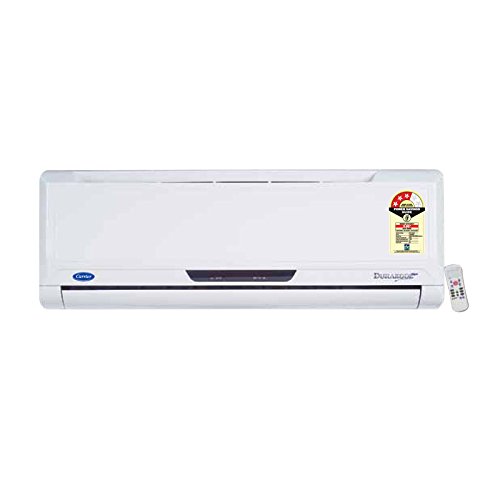
Figure 3.1: Carrier Durakool Plus Split AC Indoor Unit. This image shows the white indoor unit of the air conditioner, typically mounted on a wall.
4. Kurulum
The Carrier Durakool Plus is a split system air conditioner, requiring both an indoor and an outdoor unit. Professional installation is mandatory to ensure proper functioning, safety, and warranty validity.
4.1 Profesyonel Kurulum
Due to the complexity of refrigerant handling, electrical connections, and structural mounting, installation must be carried out by a certified HVAC technician. Attempting self-installation may void your warranty and pose significant safety risks.
4.2 Site Seçimi
- İç Ünite: Select a location that allows for even air distribution throughout the room, away from direct sunlight or heat sources. Ensure sufficient space around the unit for maintenance.
- Dış ünite: Choose a well-ventilated area, free from obstructions, and away from direct sunlight or excessive dust. Ensure the unit is placed on a stable, level surface. The outdoor unit should be easily accessible for maintenance.
4.3 Elektrik Bağlantısı
The unit requires a dedicated power circuit. The electrical wiring must comply with local and national electrical codes. Ensure the power source is properly grounded. Refer to the wiring diagram provided with the outdoor unit for specific connection details.
5. Kullanım Talimatları
Your Carrier Durakool Plus AC unit is controlled via an LCD remote control. Familiarize yourself with the remote's functions for optimal use.
5.1 Uzaktan Kumanda İşlevleri
The remote control allows you to adjust temperature, fan speed, operating mode, and set timers. An LED display on the indoor unit will show current settings. Refer to the remote control's specific user guide for detailed button functions and display indicators.
- Güç Düğmesi: Üniteyi AÇIK veya KAPALI konuma getirir.
- Mod Düğmesi: Cycles through operating modes: Auto, Cool, Dry, Fan, Heat (if applicable).
- Sıcaklık Düğmeleri (▲/▼): İstenilen oda sıcaklığını ayarlar.
- Fan Hızı Düğmesi: Fan hızını seçer (Otomatik, Düşük, Orta, Yüksek).
- Salıncak Düğmesi: Activates or deactivates the automatic vertical air swing.
- Uyku modu: Konforlu bir uyku ve enerji tasarrufu için sıcaklığı ve fan hızını optimize eder.
- Zamanlayıcı AÇIK/KAPALI: Sets a specific time for the unit to turn ON or OFF.
- Turbo mod: Provides rapid cooling by operating at maximum fan speed and cooling capacity.
- Otomatik yeniden başlat: If power is interrupted, the unit will automatically restart with previous settings once power is restored.
6. Bakım
Düzenli bakım, klimanızın verimli çalışmasını sağlar ve ömrünü uzatır. Herhangi bir bakım işlemi yapmadan önce daima elektriği kesin.
6.1 Hava Filtresi Temizliği
The unit is equipped with an electrostatic dust filter and an active carbon filter. Clean these filters regularly (every 2-4 weeks, depending on usage and air quality) to maintain cooling efficiency and air quality.
- Turn off the AC unit and disconnect the power supply.
- İç ünitenin ön panelini açın.
- Hava filtrelerini dikkatlice çıkarın.
- Filtreleri elektrikli süpürgeyle temizleyin veya ılık su ve yumuşak bir deterjanla yıkayın. İyice durulayın.
- Filtreleri tekrar takmadan önce gölgeli bir alanda tamamen kurumaya bırakın.
- Ön paneli kapatın ve gücü tekrar açın.
6.2 Genel Temizlik
- İç ünitenin dışını yumuşak bir bezle silin.amp bez. Sert kimyasallar veya aşındırıcı temizleyiciler kullanmayın.
- Ensure the outdoor unit's coils are free from debris, leaves, and dirt. Use a soft brush or vacuum to clean the fins.
6.3 Mevsimsel Bakım
It is recommended to have your AC unit professionally serviced annually, especially before the cooling season, to check refrigerant levels, electrical connections, and overall system performance.
7. Sorun Giderme
Servise başvurmadan önce lütfen aşağıdaki yaygın sorunları kontrol edin:
| Sorun | Olası Neden | Çözüm |
|---|---|---|
| Ünite başlamıyor | No power supply; Remote control batteries depleted; Circuit breaker tripped. | Güç bağlantısını kontrol edin; Uzaktan kumanda pillerini değiştirin; Devre kesiciyi sıfırlayın. |
| Yetersiz soğutma | Dirty air filters; Doors/windows open; Temperature setting too high; Outdoor unit obstructed. | Hava filtrelerini temizleyin; Kapıları/pencereleri kapatın; Sıcaklık ayarını düşürün; Dış ünitenin önündeki engelleri kaldırın. |
| Olağandışı gürültü | Gevşek parçalar; Ünite düz değil; Fanda kalıntı var. | Ensure unit is securely mounted; Check for and remove debris. If noise persists, contact service. |
| İç üniteden su sızıntısı | Tıkalı gider borusu; Yanlış montaj. | Clear drain pipe obstruction; Contact professional for inspection. |
If the problem persists after attempting these solutions, please contact Carrier customer support or a qualified service technician.
8. Özellikler
| Özellik | Detay |
|---|---|
| Marka | Taşıyıcı |
| Model Adı | Durakool Plus 42KGL-024D+51MSG-024RD |
| Kapasite | 2 Ton |
| Soğutma Gücü | 6741 Watt |
| Enerji Verimliliği | 2 Yıldızlı BEE Derecelendirmesi |
| Özel Özellikler | Anti Bacterial Filter, Electrostatic Dust Filter, Sleep Mode, Auto Restart, Auto Swing, Turbo Mode |
| Renk | Beyaz |
| Gürültü Seviyesi (Kapalı Alan) | 47 Desibel |
| İnverter Tipi | İnvertör Yok |
| Kurulum Türü | Bölme sistemi |
| Kompresör Tipi | Döner Kaydırma |
| Çekirdek Malzeme | Bakır |
| Güç Kaynağı | Kablolu Elektrik |
| Önerilen Zemin Alanı | 180 Metrekare |
| Kontrol Yöntemi | Uzaktan kumanda |
9. Garanti ve Destek
9.1 Garanti Bilgileri
Your Carrier Durakool Plus AC unit comes with a limited warranty:
- 1 yıl garanti Ürün üzerinde.
- 5 yıl garanti kompresör üzerinde.
Please retain your purchase receipt and warranty card for any warranty claims. The warranty terms and conditions are detailed on the warranty card included with your product.
9.2 Müşteri Desteği
For technical assistance, service requests, or further inquiries, please contact Carrier customer support. Refer to your warranty card or the official Carrier webGüncel iletişim bilgileri için siteyi ziyaret edin.
You can also visit the official Carrier store for more information: Carrier Store on Amazon.in