
1. Giriş
This manual provides essential information for the safe and efficient operation of your LD Systems Road LDRJ8 Portable PA System. Please read this manual thoroughly before using the device to ensure proper setup, operation, and maintenance. Keep this manual for future reference.
The LD Systems Road LDRJ8 is an 8-channel portable PA system designed for versatile audio applications. It features battery-powered operation for mobility and offers multiple connectivity options including XLR, Speakon, Auxiliary, and USB. The system is equipped with a 15-inch Faital Pro neodymium woofer and a 1.4-inch BMS compression driver, delivering a powerful 1400 Watts output. Advanced features include a 1ms predictive peak limiter for distortion-free sound, state-of-the-art analog/digital converters, and an 80-degree x 50-degree rotatable asymmetrical horn flare. Its robust steel construction and integrated wheels make it suitable for various portable sound reinforcement needs.

Şekil 1: Ön view of the LD Systems Road LDRJ8 Portable PA System with its retractable handle extended, showcasing the main speaker grille and control panel.
2. Güvenlik Talimatları
- Güç Kaynağı: Connect the device only to the specified voltage and frequency. Ensure the power cord is not damaged.
- Havalandırma: Havalandırma açıklıklarını kapatmayın. Aşırı ısınmayı önlemek için ünitenin etrafında yeterli hava akışı olduğundan emin olun.
- Nem: Do not expose the device to rain or moisture. Avoid placing liquid-filled objects on the unit.
- Temizlik: Disconnect from power before cleaning. Use a dry cloth. Do not use liquid cleaners or aerosols.
- Servis: Tüm servis işlemlerini yetkili servis personeline yaptırın. Cihazı kendiniz tamir etmeye çalışmayın.
- Atama: Place the unit on a stable, level surface. Avoid extreme temperatures, direct sunlight, and strong vibrations.
- Pil Güvenliği: The unit is battery-powered. Follow all instructions regarding battery charging and usage. Do not expose batteries to excessive heat.

Figure 2: Rear panel of the LD Systems Road LDRJ8, showing the power input, fuse compartment, voltage selector, and the "SOUNDSYSTEM BATTERY LEVEL" indicator with three LEDs.
3. Paket İçeriği
Please check the package contents immediately after unpacking to ensure all components are present and undamaged.
- 1 x LD Systems Road LDRJ8 Portable PA System
- 1 x Güç Kablosu
- 1 x Kullanım Kılavuzu (bu belge)
Not: If any components are missing or damaged, please contact your dealer immediately.
4. Ürün Bittiview
4.1. Kontrol Paneli

Şekil 3: Ayrıntılı view of the LDRJ8 control panel, featuring input channels (CH 1, CH 2, CH 3/AUX), level controls, EQ (LOW, HIGH), ECHO, MASTER VOL, MP3 player controls, and a display screen.
- CH 1 Input: XLR/TRS combo jack for microphone or line-level sources.
- CH 1 Level: Adjusts the input level for Channel 1.
- CH 2 Input: TRS/TS jack for instrument or line-level sources.
- CH 2 Level: Adjusts the input level for Channel 2.
- CH 3 / AUX Input: RCA stereo input for external audio devices.
- CH 3 / AUX Level: Adjusts the input level for Channel 3 / AUX.
- DÜŞÜK EQ: Bass frequency adjustment.
- YÜKSEK EQ: Treble frequency adjustment.
- YANKI: Controls the echo effect level.
- ANA SES: Overall volume control for the system.
- GÜÇ: Güç gösterge LED'i.
- MP3 Player Section:
- Görüntülemek: Shows track information and settings.
- TARİFİ: Switches between MP3, AUX, Bluetooth, and SD card modes.
- USB GİRİŞİ: Medya oynatma için USB bağlantı noktası.
- SD Kart Yuvası: SD kart medya oynatma için.
- Oynatma Kontrolleri: Play/Pause, Stop, Previous/Next Track.
4.2. Arka Panel
Figure 4: Rear panel of the LDRJ8, detailing the power switch, AC input, fuse, voltage selector, and battery level indicators.
- KAPALI/AÇIK Anahtarı: Ünitenin ana güç anahtarı.
- Şarj Göstergesi: Pil şarj durumunu gösteren LED.
- AC Girişi: Güç kablosu için konnektör.
- SİGORTA: Sigorta tutucu.
- CİLTTAGE Selector: 115V ve 230V çalışma voltajları arasında seçim yapmak için anahtarı çevirin.
- SOUNDSYSTEM BATTERY LEVEL: LED indicators for battery charge status (LOW, 1, 2, 3).
4.3. Taşınabilirlik Özellikleri

Şekil 5: Yan view of the LDRJ8, illustrating the retractable handle fully extended and the integrated wheels for easy transport.
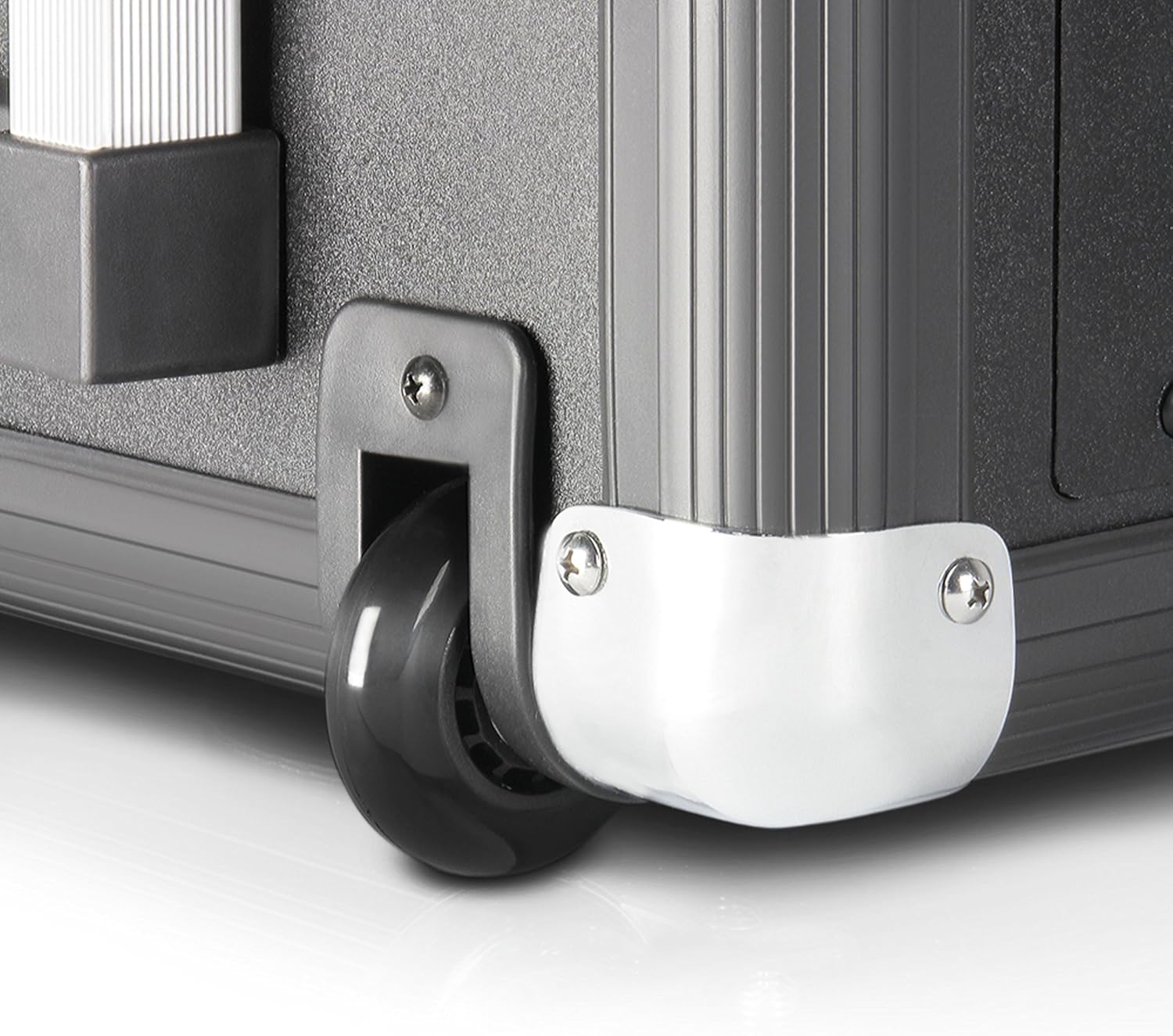
Figure 6: Close-up of one of the durable wheels and a metal corner protector, highlighting the robust construction designed for portability.
The LDRJ8 is designed for easy transport with integrated wheels and a retractable handle, similar to luggage. This allows for convenient movement of the system to various locations.
5. Kurulum
5.1. İlk Çalıştırma ve Şarj Etme
- Ensure the unit's power switch (OFF/ON) on the rear panel is in the KAPALI konum.
- VOL değerini doğrulayın.TAGE selector on the rear panel matches your local power supply (115V or 230V).
- Connect the supplied power cable to the AC Input on the rear panel and then to a suitable power outlet.
- The ŞARJ ETMEK indicator LED will illuminate, indicating the battery is charging. Allow sufficient time for a full charge before initial battery-powered use.
5.2. Ses Kaynaklarını Bağlama
- Mikrofonlar/Enstrümanlar: Connect microphones to CH 1 (XLR) and instruments to CH 2 (TRS/TS). Adjust the respective LEVEL knobs.
- External Audio Devices (e.g., CD Player, Mixer): Connect to CH 3 / AUX using RCA cables. Adjust the CH 3 / AUX LEVEL knob.
- USB/SD Kart: Insert a USB drive into the USB IN port or an SD card into the SD Card Slot for media playback.
- Bluetooth: Refer to the "Operating" section for Bluetooth pairing instructions.
6. Operating the PA System
6.1. Temel İşlem
- After connecting your audio sources, switch the unit's power to ON. The POWER LED will illuminate.
- Slowly increase the MASTER VOL to a desired listening level.
- Adjust individual channel LEVEL knobs for a balanced mix.
- Use the LOW and HIGH EQ knobs to adjust the bass and treble frequencies of the overall mix.
- Apply ECHO effect as desired using the ECHO knob.
6.2. MP3 Player / Bluetooth Operation
- Basın MOD button to cycle through available input modes: MP3 (USB/SD), AUX, Bluetooth.
- USB/SD Oynatma:
- MP3 içeren bir USB sürücüsü veya SD kartı takın files.
- Select MP3 mode. The display will show track information.
- Use the Play/Pause, Stop, Previous/Next Track buttons to control playback.
- Bluetooth Eşleştirme:
- Select Bluetooth mode. The display will indicate "BT" or "Pairing".
- Akıllı telefonunuzda veya tabletinizde Bluetooth'u etkinleştirin ve kullanılabilir cihazları arayın.
- Select "LD Systems LDRJ8" (or similar) from the list to pair.
- Once paired, you can stream audio wirelessly to the PA system.
7. Bakım
- Temizlik: Cihazın dış yüzeyini temizlemek için yumuşak, kuru bir bez kullanın. Aşındırıcı temizleyiciler, çözücüler veya cilalar kullanmayın.
- Depolamak: Uzun süre kullanılmadığı zamanlarda, cihazı kuru, serin bir yerde, doğrudan güneş ışığından ve aşırı sıcaklıklardan uzakta saklayın.
- Pil Bakım: For optimal battery life, avoid fully discharging the battery frequently. Recharge the battery regularly, even if the unit is not in use, to maintain its capacity.
- Sigorta Değişimi: If the unit does not power on, check the fuse on the rear panel. Replace it only with a fuse of the identical type and rating (e.g., T 1 AL / 250V or T 500mA L / 250V).
8. Sorun Giderme
| Sorun | Olası Neden | Çözüm |
|---|---|---|
| Güç yok |
|
|
| Ses çıkışı yok |
|
|
| Bluetooth eşleştirmiyor |
|
|
| Bozuk ses |
|
|
9. Özellikler
| Özellik | Detay |
|---|---|
| Örnek | LDRJ8 |
| Marka | LD Sistemleri |
| Montaj Tipi | Ayakta |
| Güç Kaynağı | Pil ile çalışır |
| Bağlayıcı Türleri | XLR, Speakon, Auxiliary, USB |
| Malzeme | Çelik |
| Ürün Ağırlığı | 30 Pound (yaklaşık 13.6 kg) |
| Kanal Sayısı | 8 |
| Ses Girişi | Various audio input devices |
| Çıkış Watttage | 1400 Watt (RMS) |
| Woofer | 15-inch Faital Pro neodymium |
| Sıkıştırma Sürücüsü | 1.4-inch BMS |
| Dağılım | 80 Degree x 50 Degree (rotatable asymmetrical horn flare) |
| Boyutlar (U x G x Y) | 11 x 15 x 17 inç (yaklaşık 27.9 x 38.1 x 43.2 cm) |
| Bağlantı Teknolojisi | Various (including Bluetooth) |
| Uyumlu Cihazlar | Smartphone, Tablet, Microphones, Instruments |
| Özel Özellikler | 1ms predictive peak limiter, State-of-the-art analog/digital converters |
10. Garanti Bilgileri
Specific warranty details for the LD Systems Road LDRJ8 Portable PA System are typically provided at the point of purchase or within separate documentation included with the product. Please refer to your purchase receipt or the official LD Systems webEn doğru ve güncel garanti şartları ve koşulları için lütfen bu siteyi ziyaret edin.
Generally, warranties cover manufacturing defects under normal use. Damage resulting from misuse, accidents, unauthorized modifications, or improper maintenance is usually not covered. Keep your proof of purchase for any warranty claims.
11. Destek
For technical support, service, or further inquiries regarding your LD Systems Road LDRJ8 Portable PA System, please contact your authorized LD Systems dealer or visit the official LD Systems webalan.
- Çevrimiçi Kaynaklar: www.ld-systems.com
- Bayi İrtibatı: Refer to your purchase documentation for local dealer contact information.
