
giriiş
This manual provides instructions for the setup, operation, and maintenance of your DIRECTV Universal Remote Control, model RC65. This remote is designed to operate your DIRECTV receiver and can be programmed to control other audio/video devices such as televisions and sound systems.
Please read this manual thoroughly before using your remote control to ensure proper functionality and to maximize your viewDeneyim.
Ürün Bittiview
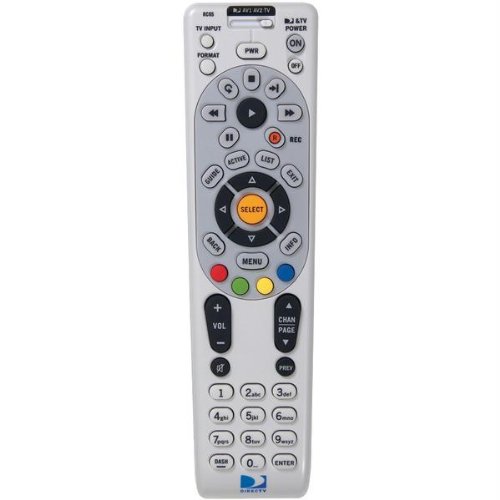
Resim: Ön view of the DIRECTV Universal Remote Control RC65. This image displays the remote's ergonomic design and the layout of its primary control buttons, including the directional pad, channel and volume controls, and various function keys. The remote is black with white button labels.
The DIRECTV RC65 remote control is a universal remote capable of controlling multiple devices. Its design focuses on ease of use and compatibility with a wide range of audio/video equipment.
Kurmak
1. Pil Kurulumu
- Uzaktan kumandanın arkasındaki pil bölmesini bulun.
- Sekmeye bastırın ve pil kapağını kaydırarak çıkarın.
- İki (2) adet AA pil takın ve pozitif (+) ve negatif (-) kutupların bölmenin içindeki işaretlerle hizalandığından emin olun.
- Pil kapağını güvenli bir şekilde yerine oturana kadar yerine kaydırın.
Not: Uzaktan kumandaya piller dahil değildir.
2. Programming for DIRECTV Receiver
The remote is typically pre-programmed to operate your DIRECTV receiver. If it does not work, or if you are setting up a new remote, follow these steps:
- Point the remote at your DIRECTV receiver.
- Basılı tutun SESSİZ Ve SEÇME Kumandanın üst kısmındaki yeşil ışık iki kez yanıp sönene kadar düğmelere aynı anda basın.
- Kodu girin 961. The green light will flash twice.
- Basın KANAL YUKARI button. The green light will flash twice.
- Basın SEÇME button. The green light will flash twice.
- Test the remote by changing channels or adjusting volume.
3. Programming for Other Devices (TV, Audio)
To program the remote to control your television or other audio/video devices, you will need the device's brand code. Refer to the code list provided with your DIRECTV system or search online for "DIRECTV remote codes [your device brand]".
- Programlamak istediğiniz cihazı (örneğin televizyonunuzu) açın.
- Basılı tutun SESSİZ Ve SEÇME Kumandanın üst kısmındaki yeşil ışık iki kez yanıp sönene kadar düğmelere aynı anda basın.
- Press the mode button for the device you are programming (e.g., TV for television, AV1 or AV2 for audio/video devices). The green light will flash once.
- Enter the 5-digit code for your device's brand. The green light will flash twice if the code is accepted.
- Uzaktan kumandayı cihaza doğrultun ve tuşuna basın GÜÇ Düğmeye basın. Cihaz kapanırsa, programlama başarılı olmuştur.
- If the device does not turn off, repeat steps 1-5 with another code for your device's brand.
Tip: If you cannot find a code, try the "Code Search" method: After step 3, instead of entering a code, press KANAL YUKARI repeatedly until the device turns off, then press SEÇME.
Kullanım Talimatları
The DIRECTV RC65 remote control features a standard layout for easy navigation and control of your entertainment system.
- MODE Buttons (DIRECTV, TV, AV1, AV2): Select the device you want to control. Press the corresponding button before issuing commands for that device.
- GÜÇ: Seçili cihazı açar veya kapatır.
- SES YUKARI/AŞAĞI: Adjusts the volume of the selected audio device (usually TV or AV receiver).
- KANAL YUKARI/AŞAĞI: Changes channels on the DIRECTV receiver.
- SESSİZ: Sesi kapatır veya açar.
- REHBER: Displays the DIRECTV program guide.
- MENÜ: Accesses the DIRECTV system menu.
- SELECT/OK: Seçimleri onaylar veya menülere girer.
- ARROW Buttons (UP, DOWN, LEFT, RIGHT): Navigate through menus and guides.
- KAYIT: Records the current program on your DIRECTV DVR.
- PLAY, PAUSE, STOP, REW, FF, SKIP: Control playback of recorded content or live TV (with DVR).
- BİLGİ: Geçerli programla ilgili bilgileri görüntüler.
- ÇIKIŞ: Exits menus or guides.
Note: Specific button functions may vary slightly depending on your DIRECTV receiver model and programmed devices.
Bakım
Uzaktan Kumandayı Temizleme
- Uzaktan kumandanın yüzeyini silmek için yumuşak ve kuru bir bez kullanın.
- İnatçı kirler için hafifçeampBezi su veya hafif, aşındırıcı olmayan bir temizleyiciyle ıslatın. Temizleyiciyi doğrudan kumandaya püskürtmeyin.
- Kumandanın yüzeyine veya iç bileşenlerine zarar verebileceğinden, sert kimyasallar, çözücüler veya aşındırıcı temizleme pedleri kullanmaktan kaçının.
Pil Değişimi
Replace batteries when the remote's response becomes sluggish or if the green light at the top does not flash when a button is pressed. Refer to the "Battery Installation" section under Setup for detailed instructions.
- Her iki pili her zaman aynı anda değiştirin.
- Use new AA alkaline batteries for optimal performance.
- Eski pilleri yerel yönetmeliklere uygun şekilde atın.
Sorun giderme
Uzaktan Kumanda Yanıt Vermiyor
- Pilleri Kontrol Edin: Pillerin doğru takıldığından ve tamamen bitmediğinden emin olun. Gerekirse değiştirin.
- Görüş Hattı: Make sure there are no obstructions between the remote and the device you are trying to control. The remote uses infrared (IR) signals, which require a clear line of sight.
- Doğru Mod: Verify that the correct mode button (DIRECTV, TV, AV1, AV2) is pressed for the device you intend to control.
- Uzaktan Kumandayı Sıfırla: Remove batteries, press all buttons a few times to discharge any residual power, then reinsert batteries.
Device Not Responding After Programming
- Kodu Doğrula: Double-check that you entered the correct 5-digit code for your device's brand. Try other codes listed for your brand.
- Kod Arama: Attempt the "Code Search" method described in the "Programming for Other Devices" section.
- Cihaz Uyumluluğu: While the remote has an extensive code library, some older or very new devices may not be fully compatible.
Volume/Channel Control Issues
- Ses Kilidi: Ensure the volume is not locked to the DIRECTV receiver if you want to control the TV volume. To unlock, press and hold SESSİZ Ve SEÇME until the green light flashes twice, then enter 993. Basmak SEÇME.
- Kanal Kontrolü: Ensure the remote is in DIRECTV mode to change channels on the receiver.
Özellikler
| Özellik | Detay |
|---|---|
| Marka | DOĞRUDANTV |
| Model Adı / Numarası | RC65 |
| Özel Özellik | Evrensel |
| Renk | Siyah |
| Uyumlu Cihazlar | Television, DIRECTV Receiver, Audio/Video Devices |
| Bağlantı Teknolojisi | Kızılötesi (IR) |
| Denetleyici Türü | Düğme Kontrolü |
| Pil Türü | 2 x AA Pil (dahil değildir) |
| Ürün Ağırlığı | Yaklaşık 0.52 Pound |
Garanti Bilgileri
This DIRECTV Universal Remote Control (Model RC65) comes with a limited warranty against defects in materials and workmanship under normal use. The warranty period typically covers 90 days from the date of purchase. Please retain your proof of purchase for warranty claims.
This warranty does not cover damage caused by misuse, accident, unauthorized modification, or use with non-DIRECTV approved accessories. For specific warranty terms and conditions, please refer to the documentation included with your DIRECTV system or visit the official DIRECTV support webalan.
Müşteri Desteği
If you require further assistance with your DIRECTV Universal Remote Control, please contact DIRECTV customer support:
- Çevrimiçi destek: DIRECTV'nin resmi destek sayfasını ziyaret edin. website for FAQs, troubleshooting guides, and programming code lists.
- Telefon Desteği: Refer to your DIRECTV service agreement or bill for the most current customer service phone number.
When contacting support, please have your DIRECTV account information and the remote control model number (RC65) ready.