
1. Giriş
The Tivoli Audio Albergo is a compact and versatile Bluetooth clock radio designed to provide high-fidelity audio, AM/FM radio reception, and convenient alarm clock functionalities. This manual provides detailed instructions for setting up, operating, and maintaining your Albergo unit.
2. Güvenlik Talimatları
- Üniteyi çalıştırmadan önce tüm talimatları okuyun.
- Bu talimatları ileride başvurmak üzere saklayın.
- Ürün üzerinde ve kılavuzda yer alan tüm uyarıları dikkate alın.
- Bu cihazı su veya nem yakınında kullanmayın.
- Sadece kuru bezle temizleyin.
- Havalandırma açıklıklarını kapatmayın. Üreticinin talimatlarına uygun şekilde kurulum yapın.
- Radyatörler, kalorifer ızgaraları, sobalar veya diğer cihazlar (dahil) gibi herhangi bir ısı kaynağının yakınına kurmayın. amp(ısı üreten)
- Güç kablosunun üzerine basılmasını veya sıkışmasını önleyin.
- Sadece üretici tarafından belirtilen aparatları/aksesuarları kullanın.
- Yıldırımlı havalarda veya uzun süre kullanılmayacaksa bu cihazın fişini çekin.
- Tüm bakımları yetkili servis personeline yaptırın.
3. Paket İçeriği
Paketinizin aşağıdaki öğeleri içerdiğini doğrulayın:
- Tivoli Audio Albergo Bluetooth Clock Radio Unit
- Güç Adaptörü
- Uzaktan kumanda
- FM Anteni
4. Ürün Bittiview
Ön Panel Kontrolleri ve Ekran
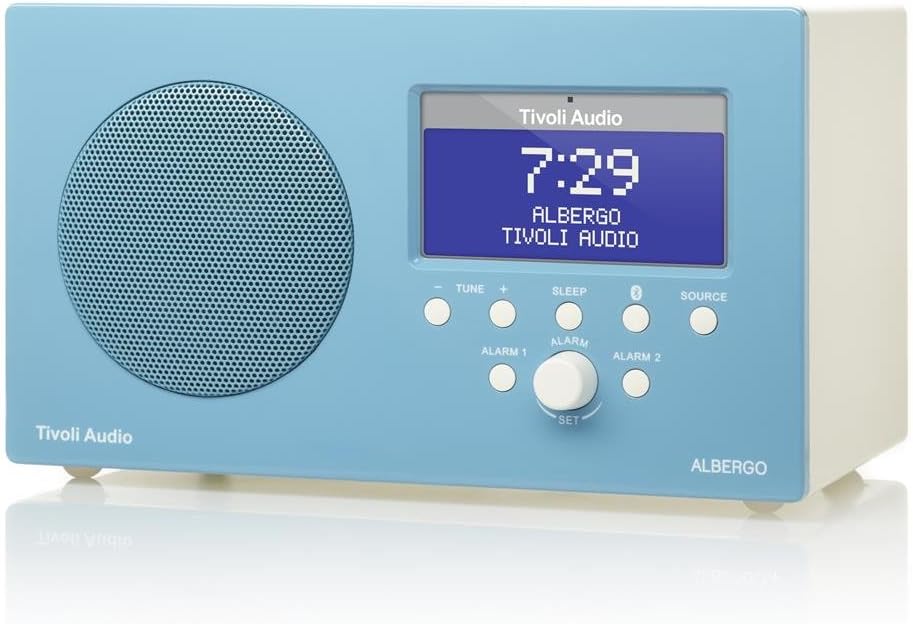
Şekil 4.1: Ön view of the Albergo unit. The front panel features a speaker grille, a digital display, and control buttons for tuning, sleep, Bluetooth, source selection, and alarm settings.
- Görüntülemek: Shows time, station, source, and menu information.
- Tune - / Tune +: Adjusts radio frequency or navigates menu options.
- Uyumak: Uyku zamanlayıcısını etkinleştirir.
- Bluetooth Düğmesi: Bluetooth eşleştirme modunu başlatır.
- Kaynak: Cycles through available audio sources (FM, AM, Bluetooth, Auxiliary).
- Alarm 1 / Alarm 2: Activates or sets Alarm 1 or Alarm 2.
- Set Knob: Rotates to adjust values and presses to confirm selections.
Taraf View and Rear Connections

Şekil 4.2: Açılı view of the Albergo unit. The rear panel typically includes connections for power, external antenna, and auxiliary input.
The rear panel of the Albergo unit contains the following connections:
- DC Girişi: Birlikte verilen güç adaptörünü bağlamak için.
- FM Anten Girişi: Harici FM antenini bağlamak için.
- Yardımcı Giriş: For connecting external audio devices via a 3.5mm cable (not included).
- Kulaklık Çıkışı: Özel dinleme için.
5. Kurulum
5.1 Güç Bağlantısı
- Insert the small end of the power adapter into the DC Input jack on the rear of the Albergo unit.
- Güç adaptörünün diğer ucunu duvar prizine takın.
- Ünite açılacak veya bekleme moduna girecektir.
5.2 Anten Bağlantısı
- For FM reception, connect the included external FM antenna to the FM Antenna Input on the rear of the unit.
- En iyi alımı elde etmek için anteni tamamen açın.
- For AM reception, the Albergo has a built-in internal AM antenna. If reception is poor, try repositioning the unit.
6. Kullanım Talimatları
6.1 Güç Açma/Kapatma
- Basın Güç button (usually integrated with the Set knob or a dedicated button on the remote) to turn the unit on or off.
- When powered off, the clock display will remain active.
6.2 Radyo Kullanımı (AM/FM)
- Basın Kaynak Ekranda "FM" veya "AM" görünene kadar düğmeye basın.
- Kullanın Ayarla - or Akort + Frekansı manuel olarak ayarlamak için düğmeler.
- Bir sonraki müsait istasyonu otomatik olarak taramak için basılı tutun. Ayarla - or Akort +.
- The Albergo supports FM RDS (Radio Data System) where available, displaying station information.
6.3 Bluetooth Çalışması
- Basın Kaynak button until "Bluetooth" appears on the display.
- The unit will enter pairing mode, indicated by a flashing Bluetooth icon on the display.
- Bluetooth özellikli cihazınızda (örneğin, akıllı telefon, tablet) Bluetooth'u etkinleştirin ve kullanılabilir cihazları arayın.
- Select "Tivoli Albergo" from the list of devices.
- Once paired, the Bluetooth icon on the Albergo display will stop flashing and remain solid. You can now stream audio wirelessly.
6.4 Saat ve Alarm Ayarları
Many clock and alarm settings are best accessed and adjusted using the included remote control.
- Zamanın Ayarlanması:
- Bekleme modunda, tuşuna basın ve basılı tutun. Ayarlamak düğme veya Menü Uzaktan kumandadaki düğmeye basın.
- Navigate to "Time Set" using the Ayar +/- buttons or remote arrows.
- Basmak Ayarlamak or Girmek on the remote to confirm.
- Saatleri ve dakikaları ayarlayın Ayar +/- or remote arrows, confirming each with Ayarlamak or Girmek.
- Setting Alarms (Alarm 1 / Alarm 2):
- Basın Alarm 1 or Alarm 2 Ön paneldeki veya uzaktan kumandadaki düğme.
- Follow the on-screen prompts to set the alarm time, source (buzzer, FM, AM), and volume.
- Confirm each setting using the Ayarlamak knob or remote's Girmek düğme.
- Erteleme İşlevi: Alarm çaldığında, tuşuna basın. Kestirmek düğme (genellikle Uyumak button or a dedicated button on the remote) to temporarily silence the alarm for a set period.
- Uyku Zamanlayıcısı: Basın Uyumak button repeatedly to cycle through available sleep timer durations (e.g., 15, 30, 45, 60 minutes, Off). The unit will automatically turn off after the selected time.
6.5 Uzaktan Kumanda Kullanımı
The included full-function remote control provides access to all features and settings, including those not directly available on the front panel. Ensure the remote has working batteries and is pointed towards the front of the Albergo unit during use.
7. Bakım
- Temizlik: Cihazı temizlemek için yumuşak, kuru bir bez kullanın. Aşındırıcı temizleyiciler, cilalar veya çözücüler kullanmayın.
- Atama: Cihazı doğrudan güneş ışığına, ısı kaynaklarının yakınına veya yüksek nemli ya da tozlu alanlara yerleştirmekten kaçının.
- Anten: Handle the FM antenna carefully to prevent damage.
8. Sorun Giderme
| Sorun | Olası Neden | Çözüm |
|---|---|---|
| Güç yok | Güç adaptörü bağlı değil veya priz arızalı. | Güç adaptörünün cihaza ve çalışan bir duvar prizine güvenli bir şekilde bağlı olduğundan emin olun. |
| Zayıf radyo alımı | Antenna not properly connected or positioned; weak signal. | Extend the FM antenna fully. Reposition the unit for better AM reception. Try a different location. |
| Bluetooth cihazı eşleşmiyor | Albergo not in pairing mode; device too far; previously paired device connected. | Ensure Albergo is in Bluetooth source mode and flashing. Move device closer. Disconnect from other Bluetooth devices. |
| Saat yanlış zamanı gösteriyor. | Zaman doğru ayarlanmamış; elektrik kesintisi. | Refer to Section 6.4 to reset the time. Unplug and replug the unit to reset if necessary. |
| Alarm çalmıyor | Alarm not activated; volume too low; incorrect alarm source. | Verify Alarm 1 or Alarm 2 is enabled. Check alarm volume. Ensure correct alarm source (buzzer/radio) is selected. |
| Uzaktan kumanda çalışmıyor | Dead batteries; obstruction; not pointed correctly. | Replace remote control batteries. Ensure no obstructions between remote and unit. Point remote directly at the unit. |
9. Özellikler
- Marka: Tivoli Ses
- Model Numarası: ALBERGO
- Bağlantı Teknolojisi: Bluetooth
- Ayarlayıcı Teknolojisi: AM, FM (with RDS where available)
- Özel Özellikler: Digital Clock, Dual Alarms, Sleep Timer, Snooze
- Güç Kaynağı: AC Güç Adaptörü
- Görüntüleme Türü: Dijital lcd
- Dahil Bileşenler: Uzaktan kumanda
- Ürün Ağırlığı: Yaklaşık 2.3 Pound (1.04 kg)
- UPC: 815097015581
10. Garanti ve Destek
For warranty information and technical support, please refer to the documentation provided with your purchase or visit the official Tivoli Audio webSite. Satın alma belgenizi garanti talepleriniz için saklayın.