
Ürün Bittiview
The BANDAI Kamen Rider Gaim Sound Lock Seed Series 2 Beast Lock Seed is a collectible accessory designed for use with compatible Kamen Rider Gaim DX series toys, such as the DX Sengoku Driver (sold separately). This Lock Seed features unique sound effects when activated, enhancing the play experience by simulating transformations and attack sequences from the Kamen Rider Gaim series.

Image: The Beast Lock Seed, a golden padlock-like device with a detailed faceplate featuring a golden beast-like helmet design.
Kurmak
1. Kutudan Çıkarma ve İlk İnceleme
Carefully remove the Beast Lock Seed from its packaging. Inspect the item for any visible damage or missing parts. Ensure all components are present before proceeding.
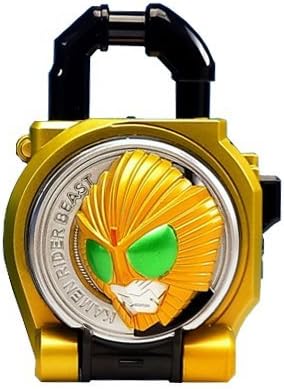
Image: The Beast Lock Seed product packaging, a golden box displaying the Lock Seed and a Kamen Rider Gaim character.
2. Pil Kurulumu
The Beast Lock Seed requires batteries for its sound functions. Locate the battery compartment, typically on the back or bottom of the unit. Use a small screwdriver to open the compartment. Insert the required batteries (e.g., LR44 button cells, not included) according to the polarity indicators (+/-). Securely close the battery compartment.
- Pillerin doğru kutuplara yerleştirildiğinden emin olun.
- Eski ve yeni pilleri veya farklı pil türlerini karıştırmayın.
- Ürün uzun süre kullanılmayacaksa pilleri çıkarın.
Kullanım Talimatları
1. Standalone Sound Activation
To activate the basic sound effects of the Beast Lock Seed, locate the small button or switch on the side or back of the unit. Pressing this button will trigger various sound effects unique to the Beast Lock Seed.
2. Using with a Compatible Driver (e.g., DX Sengoku Driver)
- Prepare the Driver: Ensure your compatible DX Sengoku Driver (or similar device) is powered on and ready for Lock Seed insertion.
- Insert the Lock Seed: Open the Lock Seed's latch mechanism. Carefully insert the Beast Lock Seed into the designated slot on the DX Sengoku Driver until it clicks into place.
- Activate Transformation: Close the driver's faceplate or perform the specific action required by your driver to activate the transformation sequence. The Beast Lock Seed will interact with the driver to produce unique transformation sounds and phrases.
- Activate Attack Sounds: After transformation, further actions with the driver (e.g., cutting the Lock Seed with the blade) will trigger additional attack sounds and finishing moves.
- Remove the Lock Seed: To remove, press the release button on the driver and carefully pull the Lock Seed out.
Bakım
Temizlik
To clean the Beast Lock Seed, gently wipe the surface with a soft, dry cloth. For stubborn dirt, a slightly damp cloth can be used, followed immediately by a dry cloth. Do not use harsh chemicals, abrasive cleaners, or excessive moisture, as these can damage the product's finish or electronic components.
Depolamak
Store the Lock Seed in a cool, dry place away from direct sunlight and extreme temperatures. If storing for an extended period, remove the batteries to prevent leakage and potential damage to the electronics.
Sorun giderme
- Ses Yok:
- Check if batteries are correctly installed with the proper polarity.
- Eski veya bitmiş pilleri yenileriyle değiştirin.
- Pil bölmesinin güvenli bir şekilde kapatıldığından emin olun.
- Bozuk veya Zayıf Ses:
- Bu genellikle pil gücünün düşük olduğunu gösterir. Pilleri değiştirin.
- Lock Seed Not Activating in Driver:
- Ensure the Lock Seed is fully inserted and clicked into place in the driver.
- Verify that the driver itself is powered on and functioning correctly.
- Check for any obstructions in the Lock Seed slot of the driver.
Özellikler
| Marka | BANDAI |
| Örnek | Beast Lock Seed Series 2 |
| ASIN | B00HGAUP3E |
| Ürün Ağırlığı | 0.1 Ons |
| Parça Sayısı | 1 |
| Piller Gerekli | Yes (Type not specified, typically LR44 button cells, not included) |