
Ürün Bittiview
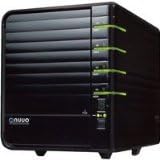
Şekil 1: The NUUO NV-4080S NVRmini, showcasing its compact design and front-facing drive bays. This device serves as a central hub for network video surveillance.
The NUUO NVRmini platform, featuring a Linux-embedded system, provides a highly stable, open, and user-friendly installation experience. It is designed to be free from PC crashes and virus attacks, making it an ideal solution for various environments including factories, buildings, retail stores, homes, banks, hotels, and city surveillance.
The NVRmini supports up to 4 hard drives and up to 8 IP cameras. Its open platform architecture ensures continuous expansion of compatibility with new IP camera brands in the future. Installation is straightforward, requiring no specific software or hardware; simply connect the device, and it is ready for operation. Users can access live view and playback functions from any computer using Internet Explorer.
Designed for specialized applications, the NVRmini offers a simpler and more cost-effective solution compared to traditional standalone NVRs. It incorporates RAID technology to enhance data transfer speeds and ensure continuous system operation, even in the event of a disk drive failure.
Temel Özellikler
- Linux Embedded System: Ensures stability and protection against PC crashes and virus attacks.
- Server-Client Architecture: Facilitates robust and scalable surveillance solutions.
- IP Camera Management: Capable of managing 2, 4, 8, or 16 IP cameras (NV-4080S manages 8).
- Online GUI Recording Schedule: Provides flexible and intuitive scheduling for video recording.
- Web-Tabanlı Yönetim: Allows convenient remote access and control via a web tarayıcı.
- SATA HDD Bays: Equipped with 2 or 4 embedded SATA HDD bays (NV-4080S has 4).
- Multi-Monitor Live Display: Supports live display of up to 128 channels across multiple monitors.
- RAID Technology Support: Enhances data transfer speed and ensures continuous system operation with RAID 0, 1, 5, 10.
Kurulum Kılavuzu
Setting up your NUUO NV-4080S NVRmini is designed to be straightforward. Follow these general steps for initial installation:
- Paketin açılması: Carefully remove the NVRmini from its packaging. Ensure all components are present.
- Sabit Sürücü Kurulumu: The NVRmini supports up to 4 SATA II hard drives. Open the drive bays and securely install your hard drives. Refer to the specific drive bay instructions for proper alignment and connection.
- Ağ bağlantısı: Connect the NVRmini to your network using an Ethernet cable (RJ45) to the LAN port. Ensure your network provides DHCP or assign a static IP address as needed.
- Güç Bağlantısı: Connect the power adapter to the NVRmini and then to a power outlet. The device will power on automatically or via a power button.
- IP Camera Connection: Connect your IP cameras to the same network as the NVRmini. The NVRmini will discover and manage up to 8 IP cameras.
- İlk Erişim: From a computer on the same network, open Internet Explorer and enter the NVRmini's IP address to access its webDaha fazla yapılandırma için -tabanlı yönetim arayüzü.

Şekil 2: Ayrıntılı view of the NVRmini, highlighting its robust casing and design for optimal ventilation, crucial for stable operation.
Operasyon
The NUUO NV-4080S NVRmini offers intuitive web-based management for all operational aspects:
- Canlı View: Access real-time video feeds from all connected IP cameras through the web arayüz.
- Playback: Review kaydedilmiş footage by selecting specific dates and times. The system supports efficient search and playback functionalities.
- Kayıt Programı: Configure recording schedules for each camera, including continuous, motion-triggered, or alarm-based recording.
- Sistem yapılandırması: Manage network settings, user accounts, storage settings (including RAID configuration), and system logs.
- Etkinlik Yönetimi: Set up alerts and notifications for various events, such as motion detection, camera disconnection, or disk errors.
Bakım
To ensure the longevity and optimal performance of your NUUO NV-4080S NVRmini, consider the following maintenance guidelines:
- Çevresel Koşullar: Operate the NVRmini within the specified temperature range of 5°C to 35°C (41°F to 95°F) and humidity range of 10% to 85%. Avoid direct sunlight, excessive dust, and extreme temperatures.
- Havalandırma: Ensure adequate airflow around the device. Do not block ventilation openings.
- Donanım Yazılımı Güncellemeleri: Periodically check the official NUUO webÜrün yazılımı güncellemeleri için site. Ürün yazılımını güncel tutmak performansı artırabilir, yeni özellikler ekleyebilir ve güvenlik açıklarını giderebilir.
- Veri Yedekleme: Regularly back up critical surveillance footage to external storage, especially if not utilizing RAID for redundancy.
- RAID İzleme: If RAID is configured, regularly monitor the health of your hard drives through the NVRmini's web interface to detect and address potential drive failures promptly.
- Temizlik: Cihazın dış yüzeyini yumuşak, kuru bir bezle nazikçe temizleyin. Sıvı temizleyiciler veya aerosoller kullanmayın.
Sorun giderme
This section provides general guidance for common issues. For detailed troubleshooting, refer to the official NUUO support resources.
- Güç Yok: Ensure the power adapter is securely connected to both the NVRmini and a working power outlet. Check the power indicator light on the device.
- Ağ Bağlantısı Yok: Verify the Ethernet cable is properly connected to the NVRmini and the network router/switch. Check network settings (IP address, subnet mask, gateway) in the NVRmini's configuration.
- Erişilemiyor Web Arayüz: Confirm the NVRmini's IP address is correct and your computer is on the same network segment. Try clearing your browser's cache or using a different browser.
- IP Cameras Not Displaying: Ensure IP cameras are powered on and properly connected to the network. Verify camera IP addresses and credentials are correctly configured in the NVRmini's settings.
- Kayıt Sorunları: Check hard drive status and available storage space. Verify recording schedules and event triggers are correctly set.
- RAID Degraded/Failed: If a RAID array shows a degraded or failed status, identify the faulty drive and replace it immediately. The system should rebuild the array automatically.
If you encounter persistent issues, it is recommended to consult the comprehensive online documentation or contact NUUO technical support.
Teknik Özellikler
| Özellik | Şartname |
|---|---|
| Marka | YENİ |
| Model Numarası | NB39 (NV-4080S) |
| Uyumlu Cihazlar | Kamera |
| Kanal Sayısı | 8 |
| Medya Formatı: Dijital Video | Sabit disk sürücüsü |
| Sürücü Bölmesi Sayısı | 4x SATA II |
| RAID Seviye Desteği | RAID 0, 1, 5, 10 |
| G/Ç Arayüzü | 2 adet USB 2.0 |
| LAN Transfer Speed | 10/100/1000 Mbps (RJ45) |
| Cilttage | 100 – 230 V |
| Boyutlar (U x G x Y) | 188.2x152.5x227.6 mm |
| Weight (without drives) | 2.5 kg (5.5 lbs) |
| Çalışma Sıcaklığı | 5°C ila 35°C (41°F ila 95°F) |
| Çalışma Nemi | %10 - %85 |
| Bağlantı Teknolojisi | USB |
| İlk Mevcut Tarih | 14 Aralık 2013 |
Garanti ve Destek
Specific warranty details for the NUUO NV-4080S NVRmini are typically provided at the point of purchase or within the product packaging. For the most accurate and up-to-date warranty information, please refer to the documentation included with your device or visit the official NUUO webalan.
For technical support, software updates, and additional resources, please visit the official NUUO support portal. Their website provides comprehensive FAQs, downloads, and contact information for customer service.
Bu kılavuz yalnızca bilgilendirme amaçlıdır. Özellikler ve teknik detaylar önceden haber verilmeksizin değiştirilebilir.