
1. Giriş
This manual provides essential instructions for the proper setup, operation, and maintenance of your AmazonBasics 10-Port USB 3.0 Hub. Please read this manual thoroughly before using the product to ensure optimal performance and safety. Keep this manual for future reference.
2. Güvenlik Talimatları
- Cihazı neme, aşırı sıcaklıklara veya doğrudan güneş ışığına maruz bırakmayın.
- Cihazı sökmeye veya üzerinde değişiklik yapmaya çalışmayın. Bu, garantiyi geçersiz kılabilir ve güvenlik riski oluşturabilir.
- Use only the provided power adapter. Using an incompatible power adapter may damage the device or connected peripherals.
- Cihazı çocuklardan uzak tutunuz.
- Ensure proper ventilation around the hub during operation.
3. Paket İçeriği
Aşağıda listelenen tüm öğelerin paketinizde mevcut olduğundan emin olun:
- AmazonBasics 10-Port USB 3.0 Hub
- Güç Adaptörü (DC 15V)
- USB 3.0 Veri Kablosu
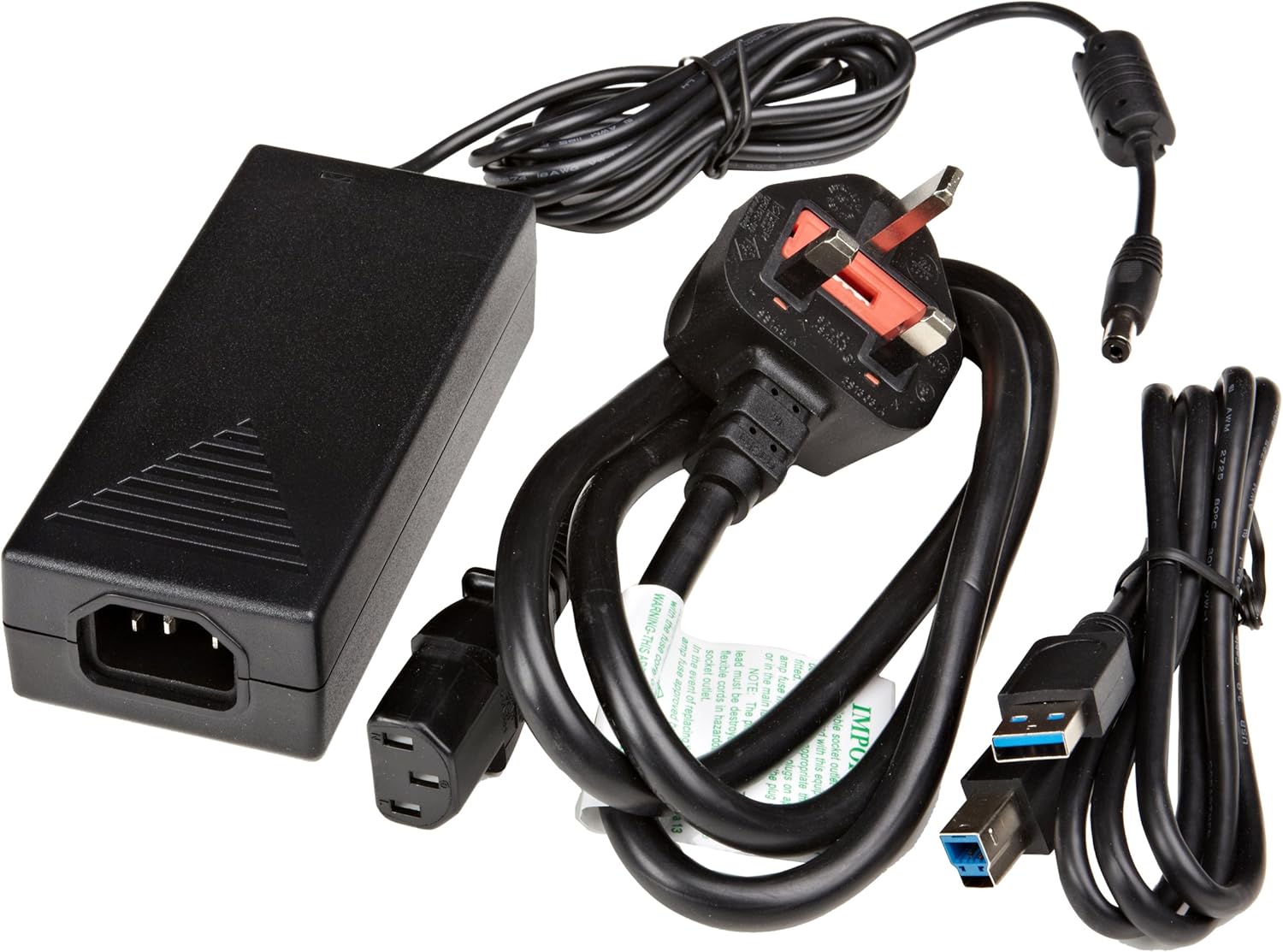
Şekil 3.1: The image displays the AmazonBasics 10-Port USB 3.0 Hub, its power adapter, and a USB 3.0 data cable, which are the typical contents found in the product packaging.
4. Ürün Bittiview
The AmazonBasics 10-Port USB 3.0 Hub expands your computer's connectivity, offering ten USB 3.0 ports for various peripherals. It supports high-speed data transfer and is backward compatible with USB 2.0 devices.
4.1 Ön ve Yan View

Şekil 4.1: This image shows the front and left side of the USB hub. On the front, three USB 3.0 ports are visible, two of which are labeled 'Fast'. The left side features the upstream USB 3.0 port for connecting to a computer and the DC 15V power input.
4.2 Top and Rear View

Şekil 4.2: Bu görüntü yukarıdan aşağıya bir görünüm sunuyor view of the USB hub, highlighting five additional USB 3.0 ports located on the rear panel. An 'ON/OFF' switch is also visible on the side, allowing users to power the hub on or off.
4.3 Alt View

Şekil 4.3: Alt kısım view of the hub shows four rubber feet for stability and a product label containing regulatory information and the model number.
5. Kurulum Kılavuzu
Follow these steps to set up your USB 3.0 hub:
- Güç Adaptörünü bağlayın: Plug the provided power adapter into the DC 15V input port on the side of the USB hub. Then, plug the power adapter into a standard electrical outlet.
- Bilgisayara Bağlan: Use the supplied USB 3.0 data cable to connect the upstream USB 3.0 port on the hub (located on the side) to an available USB 3.0 port on your computer.
- Güç Açık: If the hub has an ON/OFF switch (refer to Figure 4.2), ensure it is in the 'ON' position.
- Çevre Birimlerini Bağlayın: You can now connect your USB devices (e.g., external hard drives, keyboards, mice, flash drives) to any of the ten available USB 3.0 ports on the hub.
The hub supports automatic switching between self-power and bus-power mode. For optimal performance with multiple high-power devices, ensure the power adapter is connected.
6. Operasyon
Once connected, the AmazonBasics 10-Port USB 3.0 Hub operates automatically. Your computer should recognize connected devices without requiring additional drivers for most operating systems.
- USB 3.0 Speed: The hub supports SuperSpeed (5 Gbps), High Speed (480 Mbps), Full Speed (12 Mbps), and Low Speed (1.5 Mbps) data transfer rates, depending on the connected device and your computer's USB port capabilities.
- Cihaz Uyumluluğu: The hub is compatible with both USB 3.0 and USB 2.0 specifications, allowing you to connect a wide range of USB devices.
- Güç yönetimi: The hub intelligently manages power distribution to connected devices. For devices requiring more power, ensure the external power adapter is connected.
7. Sorun Giderme
If you encounter issues with your USB hub, refer to the following common problems and solutions:
| Sorun | Olası Çözüm |
|---|---|
| Devices are not recognized. |
|
| Yavaş veri aktarım hızları. |
|
| Hub is not powering on. |
|
| Intermittent device connection. |
|
8. Özellikler
- Model Numarası: HU37A0V1-UK
- Limanlar: 10 adet USB 3.0
- Veri Aktarım Hızı: 5 Gbps'ye kadar (USB 3.0 SuperSpeed)
- Geriye Dönük Uyumluluk: USB 2.0, USB 1.1
- Güç Girişi: DC 15V (dahil edilen güç adaptörü aracılığıyla)
- Boyutlar (UxGxY): Yaklaşık 5.71 x 2.96 x 1.06 inç (14.5 x 7.5 x 2.7 cm)
- Ağırlık: Yaklaşık 1.29 pound (0.58 kg)
- İşletim Sistemi Uyumluluğu: Windows, macOS, Linux (driver-free for most systems)
9. Bakım ve Onarım
- Göbek kısmını yumuşak, kuru bir bezle temizleyin. Sıvı temizleyiciler veya aerosoller kullanmayın.
- Havalandırma açıklıklarını tıkamaktan kaçının.
- Kullanmadığınız zamanlarda göbeği serin ve kuru bir yerde saklayın.
10. Geri Dönüşüm Bilgileri
Dispose of this product according to local regulations. Do not dispose of it with general household waste. For more information on recycling electronic waste, contact your local authorities or the retailer where you purchased the product.
11. Garanti ve Destek
For warranty information or technical support, please refer to the AmazonBasics support page or contact Amazon customer service directly. Details can typically be found on the Amazon webSitenin 'Yardım' veya 'Müşteri Hizmetleri' bölümlerine bakın.