
1. Giriş
This manual provides comprehensive instructions for the safe and efficient operation, setup, and maintenance of your HSM Classic 90.2 Cross Cut Paper Shredder. Please read this manual thoroughly before using the device and retain it for future reference.
2. Önemli Güvenlik Talimatları
To reduce the risk of injury or damage, always follow basic safety precautions when using this product.
- Keep hands, hair, loose clothing, ties, and jewelry away from the paper entry slot.
- Do not allow children or pets near the shredder.
- Kullanılmadığı zamanlarda veya temizlik, taşıma veya atık haznesini boşaltma işlemlerinden önce kağıt öğütücünün fişini çekin.
- Do not shred metal objects, large paper clips, or adhesive labels. Small staples and paper clips may be shredded, but it is recommended to remove them to prolong blade life.
- Parçalama makinesinin içine aerosol veya yağlayıcı sprey sıkmayın.
- Operate the shredder on a flat, stable surface.
- Güç kablosu hasarlıysa çalıştırmayın.
3. Paket İçeriği
Paketin içinde tüm öğelerin mevcut olduğundan emin olun:
- HSM Classic 90.2 Shredder Unit
- Çöp Kutusu
- Güç Kablosu
- Kullanım Kılavuzu (bu belge)
4. Kurulum
- Parçalayıcıyı ambalajından çıkarın: Tüm bileşenleri ambalajından dikkatlice çıkarın. Ambalajı, ilerideki taşıma veya depolama için saklayın.
- Position the Waste Bin: Place the shredder head securely onto the provided waste bin. Ensure it is seated correctly to activate the safety switch (if applicable).
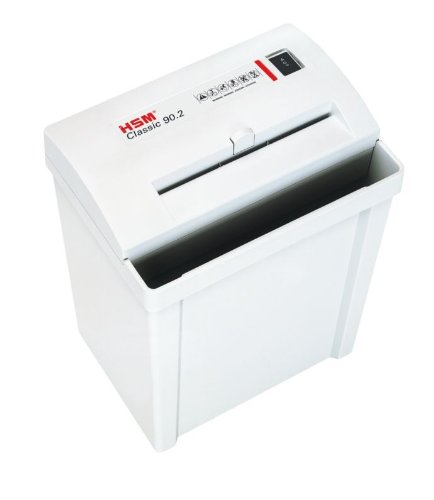
Image 1: HSM Classic 90.2 shredder with head properly seated on the waste bin. This shows the complete unit ready for operation.
- Gücü bağlayın: Plug the power cord into the shredder's power inlet, then into a standard electrical outlet.
5. Kullanım Talimatları
- Güç Açık: Locate the power switch on the shredder head. Set it to the "ON" or "AUTO" position. The shredder is now ready for use.
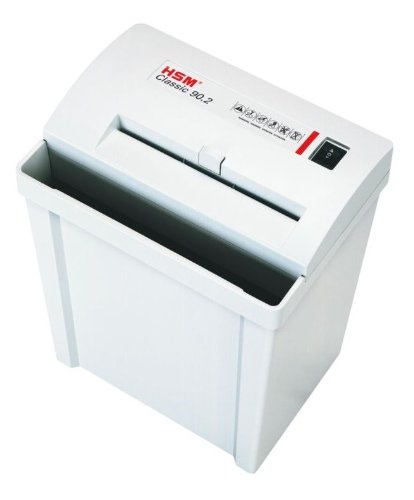
Resim 2: Üst view of the shredder, highlighting the paper entry and control switch. The switch is typically located near the paper entry.
- Shredding Documents: Insert paper into the paper entry slot. The shredder will automatically start when paper is detected and stop once shredding is complete. Do not exceed the maximum sheet capacity (refer to specifications).
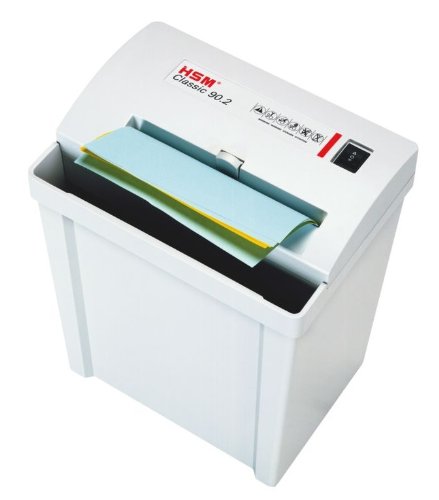
Image 3: Paper being fed into the shredder. This illustrates the correct method for inserting documents for shredding.
- Çöp Kutusunun Boşaltılması: When the waste bin is full, the shredder may stop operating. Unplug the shredder, carefully lift the shredder head off the bin, empty the shredded material, and then replace the head securely.
- Kapat: When finished shredding, set the power switch to the "OFF" position and unplug the unit from the power outlet.
6. Bakım
- Shredder Oiling: For optimal performance and longevity of cross-cut shredders, regular oiling is recommended. Apply shredder oil (specifically designed for paper shredders) across the paper entry slot. Run a few sheets of paper through the shredder immediately after oiling to distribute the lubricant. Refer to the shredder oil product instructions for frequency.
- Temizlik: Unplug the shredder before cleaning. Use a soft, dry cloth to wipe the exterior surfaces. Do not use abrasive cleaners or solvents.
- Clearing Paper Jams: If a paper jam occurs, switch the shredder to the "REV" (reverse) position to attempt to clear the paper. If unsuccessful, unplug the shredder and carefully remove the jammed paper manually. Exercise extreme caution to avoid injury.
7. Sorun Giderme
| Sorun | Olası Neden | Çözüm |
|---|---|---|
| Kağıt öğütücü çalışmıyor. |
|
|
| Kağıt sıkışması. |
|
|
| Shredder runs continuously. |
|
|
8. Özellikler
- Marka: HSM
- Modeli: Klasik 90.2
- Model Numarası: SHDESM90CC
- Kesim Tipi: Çapraz kesim
- Güvenlik Seviyesi: P-4 & F-1 (according to DIN 66399)
- Çalışma Modu: Otomatik
- Ürün Boyutları (UxGxY): 30.5 x 23.5 x 41.9 cm (yaklaşık 12 x 9.25 x 16.5 inç)
- UPC: 633726615823
9. Garanti ve Destek
For warranty information, technical support, or service inquiries, please refer to the official HSM webSatın alma belgesi olarak satın alma fişinizi saklayın veya yerel yetkili satıcınızla iletişime geçin.