
1. Giriş
The Brother DCP-J132W is a compact and versatile multifunction inkjet printer designed for home and small office use. It offers printing, scanning, and copying functionalities, along with wireless connectivity for convenient use from various devices. This manual provides essential information to help you get the most out of your printer.
2. Güvenlik Bilgileri
Please read these safety instructions carefully before using the printer to prevent injury and damage to the machine.
- Yazıcıyı her zaman düz ve sabit bir yüzeye yerleştirin.
- Havalandırma deliklerini kapatmayın veya üzerlerini örtmeyin.
- Yalnızca yazıcıyla birlikte verilen güç kablosunu kullanın.
- Yazıcıyı suya veya aşırı neme maruz bırakmayın.
- Mürekkep kartuşlarını çocukların erişemeyeceği yerlerde saklayın.
- Temizlemeden veya bakım yapmadan önce yazıcının fişini prizden çekin.
3. Kutuda Neler Var?
Ambalajda tüm bileşenlerin mevcut olduğunu doğrulayın:
- Brother DCP-J132W Multifunction Printer
- Ink Cartridges (Starter Set)
- Güç Kablosu
- Kurulum CD-ROM'u
- Hızlı Kurulum Kılavuzu
Note: A USB cable is not typically included and may need to be purchased separately if you prefer a wired connection.
4. Kurulum
4.1 Paketin Açılması ve İlk Yerleştirme
- Yazıcıyı ambalajından çıkarın ve tüm koruyucu bantları ve ambalaj malzemelerini çıkarın.
- Yazıcıyı, elektrik prizine yakın, sabit ve düz bir yüzeye yerleştirin.
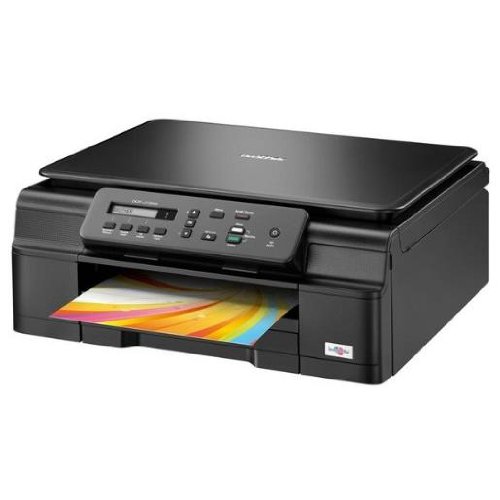
Şekil 4.1: Ön view of the Brother DCP-J132W printer, showing the paper output tray with a colorful document.
4.2 Mürekkep Kartuşlarının Takılması
- Yazıcının ön tarafında bulunan mürekkep kartuşu kapağını açın.
- Unpack each ink cartridge (Black, Cyan, Magenta, Yellow).
- Insert each cartridge into its corresponding slot, pressing down until it clicks into place.
- Mürekkep kartuşu kapağını kapatın. Yazıcı mürekkep doldurma işlemine başlayacaktır.
4.3 Kağıt Yükleme
- Kağıt tepsisini yazıcıdan tamamen çıkarın.
- Adjust the paper guides to fit the paper size you are loading (e.g., A4).
- Load paper into the tray, print side down. Do not overfill.
- Kağıt tepsisini yerine oturana kadar yavaşça yazıcının içine doğru itin.
4.4 Gücün Bağlanması
- Güç kablosunu yazıcının güç girişine bağlayın.
- Güç kablosunun diğer ucunu bir duvar prizine takın.
- Yazıcıyı açmak için güç düğmesine basın.
4.5 Yazılım Kurulumu ve Ağ Bağlantısı
Install the printer drivers and software from the included CD-ROM or download the latest versions from the official Brother support webSiteye gidin. Kurulum için ekrandaki talimatları izleyin.
- Kablosuz kurulum: During software installation, select the wireless connection option and follow the prompts to connect your printer to your Wi-Fi network. You may need your network SSID and password.
- USB Bağlantısı: If using a USB cable (not included), connect it to the printer and your computer when prompted by the installation software.

Şekil 4.2: Açısal view of the Brother DCP-J132W printer, highlighting its compact design and control panel.
5. Yazıcının Çalıştırılması
5.1 Belgeleri Yazdırma
- Yazdırmak istediğiniz belgeyi veya resmi bilgisayarınızda veya mobil cihazınızda açın.
- Uygulamanın menüsünden "Yazdır" seçeneğini seçin.
- Choose "Brother DCP-J132W" as your printer.
- Adjust print settings (e.g., paper size, color/grayscale, number of copies) as needed.
- "Yazdır" seçeneğine tıklayın.
5.2 Belgelerin Taranması
- Place the document face down on the scanner glass, aligning it with the guide marks.
- Tarayıcı kapağını kapatın.
- On your computer, open the Brother ControlCenter software or a scanning application.
- Select "Scan" and choose your desired scan settings (e.g., resolution, color mode, destination).
- İşleme başlamak için "Tara"ya tıklayın.
5.3 Belgelerin Kopyalanması
- Belgeyi yüzü aşağı bakacak şekilde tarayıcı camına yerleştirin.
- Yazıcının kontrol panelinde "Kopyala" düğmesine basın.
- Use the arrow keys to select the number of copies or other settings (e.g., quality).
- Press "Start" (Color or Black & White) to begin copying.
6. Bakım
6.1 Mürekkep Kartuşlarının Değiştirilmesi
When an ink cartridge is low or empty, a message will appear on the printer's display or your computer. Use genuine Brother LC121 or LC123 series ink cartridges for optimal performance.
- Mürekkep kartuşu kapağını açın.
- Press the release lever for the empty cartridge and remove it.
- Unpack a new cartridge and insert it firmly into the correct slot until it clicks.
- Mürekkep kartuşu kapağını kapatın.
6.2 Baskı Kafasının Temizlenmesi
If print quality declines (e.g., missing lines, streaking), perform a print head cleaning from the printer's control panel or through the printer driver software on your computer. Refer to the on-screen instructions for the cleaning procedure.
6.3 Tarayıcı Camının Temizlenmesi
To ensure clear scans and copies, regularly clean the scanner glass with a soft, lint-free cloth moistened with a non-abrasive glass cleaner. Avoid spraying cleaner directly onto the glass.
7. Sorun Giderme
This section addresses common issues you might encounter with your Brother DCP-J132W printer.
- Yazıcı Açılmıyor:
- Yazıcının güç kablosunun hem yazıcıya hem de çalışan bir elektrik prizine güvenli bir şekilde bağlı olduğundan emin olun.
- Try plugging another device into the outlet to confirm it has power.
- Kağıt Sıkışmaları:
- Carefully open all covers and remove any jammed paper following the instructions on the printer's display or in the full user guide.
- Kağıt tepsisine kağıdın doğru şekilde yerleştirildiğinden ve aşırı doldurulmadığından emin olun.
- Kötü Baskı Kalitesi:
- Mürekkep seviyelerini kontrol edin ve düşük veya boş kartuşları değiştirin.
- Perform a print head cleaning and alignment from the printer's maintenance menu.
- Yazdırma ayarlarınız için uygun kağıt kullandığınızdan emin olun.
- Kablosuz Bağlantı Sorunları:
- Verify that the printer is within range of your Wi-Fi router.
- Yönlendiricinizi, bilgisayarınızı ve yazıcınızı yeniden başlatın.
- Re-run the wireless setup utility from the printer's control panel or the Brother software.
- Wi-Fi şifrenizin doğru girildiğinden emin olun.
For more detailed troubleshooting, refer to the comprehensive user manual available on the Brother support webalan.
8. Özellikler
| Özellik | Detay |
|---|---|
| Marka | Erkek kardeş |
| Model Adı | DCPJ132W |
| Bağlantı Teknolojisi | Wi-Fi, USB |
| Yazıcı Çıktısı | Renk |
| Maksimum Baskı Hızı (Renkli) | Dakikada 27 sayfa |
| Maksimum Baskı Hızı (Siyah Beyaz) | Dakikada 27 sayfa |
| Maksimum Baskı Çözünürlüğü (Renkli) | 1200 x 1200 dpi |
| Maksimum Baskı Çözünürlüğü (Siyah Beyaz) | 1200 x 1200 dpi |
| Ürün Boyutları (DxGxY) | 16.1 cm genişlik x 41 cm uzunluk x 16.1 cm yükseklik |
| Max Supported Paper Size | A4 |
| Printing Media Support | Plain paper, Glossy photo paper, Transparencies |
| Tarayıcı Türü | Düz yataklı |
| Tarayıcı Çözünürlüğü | 2400 dpi |
| Dubleks Baskı | Otomatik |
| Uyumlu Kartuşlar | LC121BK/C/M/Y & LC123BK/C/M/Y |
| Maksimum Giriş Sayfası Kapasitesi | 250 |
9. Garanti ve Destek
9.1 Garanti Bilgileri
The Brother DCP-J132W typically comes with a manufacturer's warranty. Please refer to the warranty card included with your product or visit the official Brother website for specific terms and conditions applicable in your region. The availability of spare parts in the EU is guaranteed for 1 year.
9.2 Müşteri Desteği
For technical assistance, driver downloads, or further information, please visit the official Brother support webSitede SSS, sorun giderme kılavuzları ve müşteri hizmetleri iletişim bilgileri bulabilirsiniz.
Kardeş Desteği Webalan: www.brother.eu/support