
1. Giriş
This manual provides detailed instructions for the safe and efficient operation of your VOLTCRAFT 8210 Function Generator. The 8210 is a versatile instrument combining a sweep function, function generator, pulse generator, and frequency counter into a single unit. It is designed for professional use, generating various waveforms with precision.
2. Güvenlik Talimatları
Please read these safety instructions carefully before operating the device to prevent injury and damage. Keep this manual for future reference.
- Cihazı her zaman topraklı bir elektrik prizine bağlayın.
- Cihazı ıslak veya nemli ortamlarda çalıştırmayın.amp koşullar.
- Aşırı ısınmayı önlemek için yeterli havalandırmayı sağlayın.
- Cihazı açmayınasing; İçinde kullanıcı tarafından onarılabilecek parça bulunmamaktadır. Bakım işlemlerini yetkili personele yaptırın.
- Disconnect power before cleaning or moving the unit.
- Hacim uygulamaktan kaçınıntages exceeding the specified maximum input ratings.
3. Ürün Bittiview
The VOLTCRAFT 8210 is a versatile 4-in-1 instrument designed for various electronic testing and development applications. It integrates the functionalities of a sweep function generator, a standard function generator, a pulse generator, and a frequency counter.
Temel Özellikler:
- Four-in-one functionality: Sweep function, function generator, pulse generator, and frequency counter.
- Frekans Aralığı: Generates signals from 0.1 Hz to 10 MHz.
- Frekans Sayacı: Measures frequencies from 2 Hz to 100 MHz.
- Waveform Generation: Produces professional-grade rectangular, triangular, and sawtooth signals.
- Çıktı Amplütuf: Maksimum amplitude of 20 Vpp (10 Vpp into 50 ohms).
Ürün Görselleri:
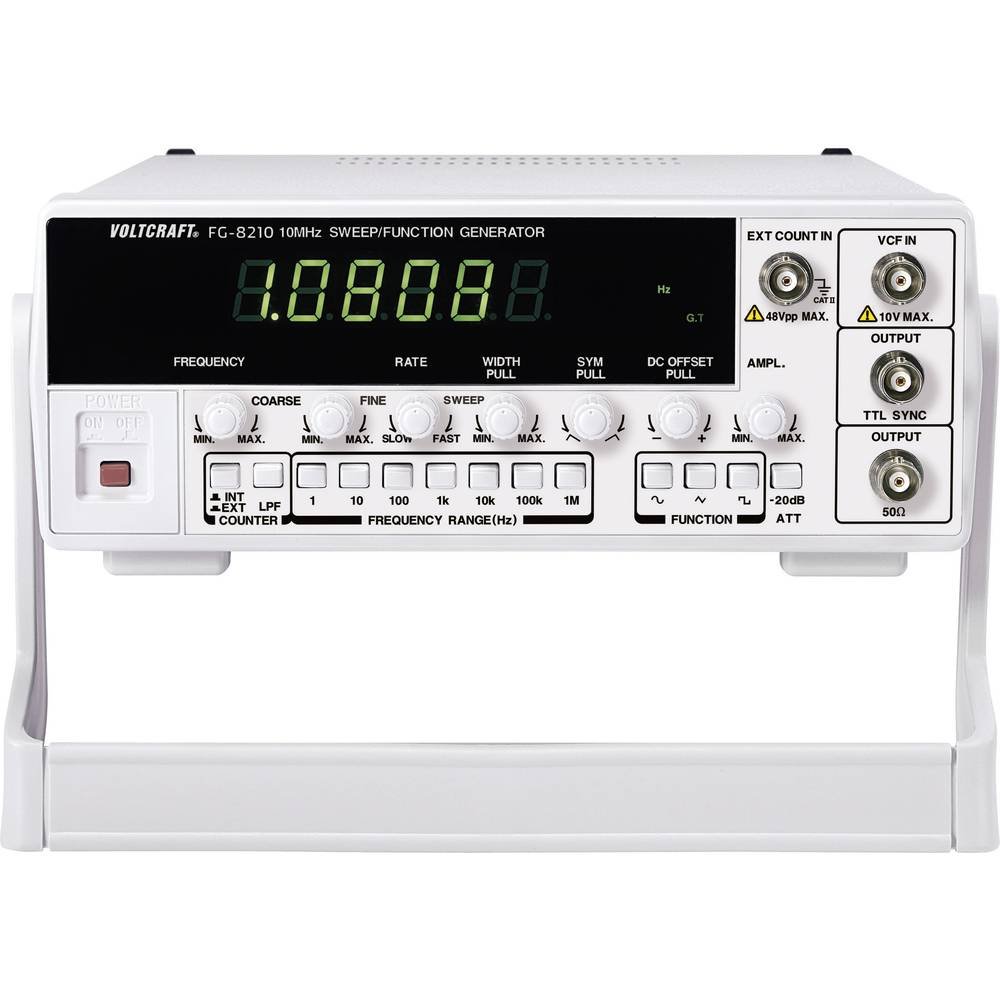


Resmi Ürün Videoları:
Satıcının resmi ürün videoları şu anda yerleştirilmeye hazır değil.
4. Kurulum
- Paketin açılması: Carefully remove the function generator from its packaging. Inspect the unit for any signs of damage during transit. Retain the packaging for future storage or transport.
- Atama: Place the unit on a stable, flat surface with adequate ventilation around it. Avoid placing it near heat sources or in direct sunlight.
- Güç Bağlantısı: Connect the provided power cord to the power input on the rear panel of the 8210 and then to a suitable grounded AC power outlet. Ensure the power switch is in the OFF position before connecting.
- İlk Güç Açma: Flip the power switch to the ON position. The display should illuminate, indicating the unit is receiving power.
- Çıkış Bağlantıları: Connect your test leads or cables to the appropriate output terminals (e.g., BNC connectors for main output, TTL output) on the front panel, depending on your application.
5. Kullanım Talimatları
This section details the basic operation of the VOLTCRAFT 8210 for its primary functions.
5.1. Function Generator Mode
- Dalga biçimini seçin: Use the dedicated buttons (e.g., Sine, Square, Triangle) on the front panel to select the desired output waveform.
- Frekansı Ayarla: Adjust the frequency using the frequency control knob and range buttons. The display will show the current frequency.
- Ayarlamak Amplütuf: Kullanın amplitude knob to set the desired output voltage peak-to-peak (Vpp). Monitor the output with an oscilloscope for precise adjustment.
- DC Ofseti: If available, use the DC offset control to add a DC bias to the output signal.
- Çıkışı Bağla: Connect the main output (e.g., BNC) to your circuit or device under test.
5.2. Sweep Function Mode
The sweep function allows the output frequency to vary automatically over a specified range.
- Activate Sweep: Press the "Sweep" button to enable this mode.
- Set Start/Stop Frequencies: Use the frequency controls to define the lower and upper limits of the sweep range.
- Adjust Sweep Rate: Set the sweep duration or rate using the dedicated control.
- Monitör Çıkışı: Observe the sweeping signal on an oscilloscope to verify the settings.
5.3. Frequency Counter Mode
The built-in frequency counter measures external signals.
- Select Counter Input: Connect the external signal to the designated frequency counter input terminal.
- Activate Counter: Press the "Counter" or "Freq. Meas." button to switch to frequency measurement mode.
- Read Frequency: The display will show the frequency of the input signal.
6. Bakım
Proper maintenance ensures the longevity and accuracy of your VOLTCRAFT 8210.
- Temizlik: Cihazın dış yüzeyini temizlemek için yumuşak, kuru bir bez kullanın. İnatçı kirler için, biraz daha yumuşak bir bez yeterli olacaktır.amp Cihaza sıvı girmemesine dikkat ederek hafif deterjanlı bir bez kullanabilirsiniz. Aşındırıcı temizleyiciler veya çözücüler kullanmayın.
- Depolamak: Uzun süre kullanılmadığı zamanlarda, cihazı kuru, tozsuz bir ortamda, tercihen orijinal ambalajında saklayın.
- Kalibrasyon: Periodic calibration by qualified service personnel is recommended to maintain measurement accuracy, especially for critical applications.
7. Sorun Giderme
If you encounter issues with your VOLTCRAFT 8210, refer to the following common problems and solutions:
| Sorun | Olası Neden | Çözüm |
|---|---|---|
| Güç yok/Ekran kapalı | Power cord disconnected, power switch off, faulty outlet. | Güç kablosunun bağlantısını kontrol edin, güç anahtarının açık olduğundan emin olun, prizi başka bir cihazla test edin. |
| Çıkış sinyali yok | Output cable disconnected, amplitude set to zero, incorrect function selected. | Verify output cable connection, increase amplitude, ensure correct waveform/function is selected. |
| Incorrect frequency reading (counter) | Signal too weak, incorrect input range, noisy signal. | Ensure signal amplitude is sufficient, check input range settings, use shielded cables. |
Bu çözümleri denedikten sonra sorun devam ederse, müşteri desteğiyle iletişime geçin.
8. Özellikler
The following are the technical specifications for the VOLTCRAFT 8210 Function Generator:
- Üretici: VOLTCRAFT
- Model Numarası: 8210
- Ürün Ağırlığı: 3 kilogram
- Number of items in package: 1
- Piller Dahil: HAYIR
- Gerekli Piller: HAYIR
- ASIN: B00EPLFP46
- First Available Date on Amazon.fr: 15 Şubat 2014
- Yedek Parça Bulunabilirliği: Yedek parçalar hakkında bilgi mevcut değil.
9. Garanti ve Destek
Information regarding specific warranty terms and conditions for the VOLTCRAFT 8210 Function Generator is not available in the provided product data. Please refer to the documentation included with your purchase or contact VOLTCRAFT customer support directly for warranty details and technical assistance.
For further support, visit the official VOLTCRAFT websiteyi ziyaret edin veya yetkili servis merkezlerine başvurun.


