
DIRECTV RC71 Uzaktan Kumanda Kullanım Kılavuzu
Modeli: RC71
giriiş
The DIRECTV RC71 Remote Control is designed for efficient access to functions for your DIRECTV system. This remote is compatible with various DIRECTV receivers and can also control your television's volume and power functions. It supports both Infrared (IR) and Radio Frequency (RF) communication modes.
In IR mode, the RC71 is compatible with all legacy and current DIRECTV receivers. In RF mode, it is specifically designed to work with the DIRECTV HR44 Genie and Genie clients C41 and C41W. When operating in RF mode, the remote utilizes the RF4CE protocol for enhanced speed and accuracy, confirming each button press to reduce missed inputs. For TV and AV functions, the remote will still use IR communication even when in RF mode for the receiver.
Kurmak
1. Pil Kurulumu
The RC71 remote control requires two (2) AA alkaline batteries for operation.
- Uzaktan kumandanın arkasındaki pil bölmesi kapağını bulun.
- Kapağı aşağı doğru kaydırın ve kaldırın.
- İki adet AA pil takın ve pozitif (+) ve negatif (-) kutupların bölmenin içindeki göstergelerle hizalandığından emin olun.
- Pil bölmesi kapağını yerine oturtmak için, güvenli bir şekilde yerine oturana kadar kaydırın.
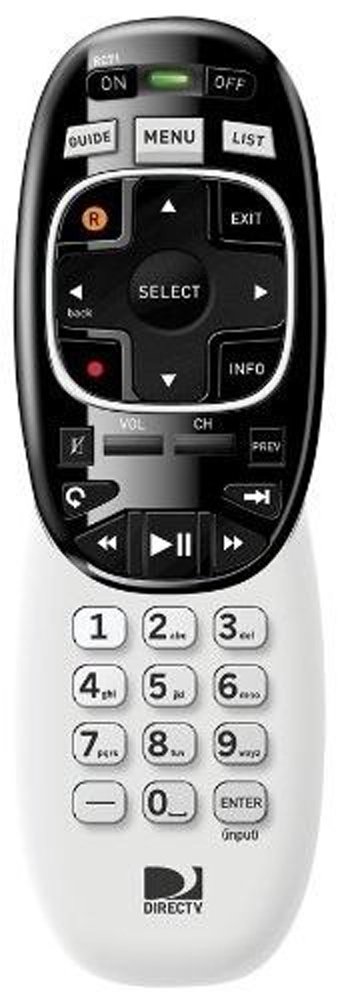
Image: The DIRECTV RC71 Remote Control, showing its ergonomic design and button layout.
2. Pairing with DIRECTV Receiver
The RC71 remote can operate in two modes: Infrared (IR) and Radio Frequency (RF).
IR Mode (for all DIRECTV receivers)
In IR mode, the remote requires a direct line of sight to the receiver. No special pairing is typically required; the remote should function immediately after battery installation.
RF Mode (for HR44 Genie, C41, C41W clients)
For RF mode functionality with compatible receivers, follow these steps:
- Ensure your DIRECTV receiver (HR44 Genie or C41/C41W client) is powered on.
- Point the RC71 remote at the receiver.
- Basılı tutun SESSİZ Ve GİRMEK Kumandanın üst kısmındaki yeşil ışık iki kez yanıp sönene kadar düğmelere aynı anda basın.
- Release the buttons. The remote is now attempting to pair in RF mode.
- Follow any on-screen prompts that may appear on your television to confirm the pairing.
3. Programming for TV/AV Functions
To control your television's volume and power, the remote needs to be programmed with your TV's code. This process typically involves using the receiver's on-screen menu.
- Basın MENÜ button on your RC71 remote.
- Şuraya git: Settings & Help, Daha sonra Ayarlarve nihayet Uzaktan kumanda.
- Seçme Uzaktan Programlama veya benzer bir seçenek.
- Follow the on-screen instructions to select your television brand and program the remote.
- Test the volume and power buttons to ensure successful programming.
Uzaktan Kumandayı Çalıştırma
The RC71 remote control features a streamlined button layout for intuitive operation.
- Güç Düğmesi: Toggles power for the DIRECTV receiver and, once programmed, for the television.
- Rehber: Program rehberini görüntüler.
- Liste: Accesses your recorded programs.
- Kanal Yukarı/Aşağı: Kanalları değiştirir.
- Sesi Aç/Kapat: Adjusts television volume (after programming).
- Sesini kapatmak: Mutes television audio (after programming).
- Directional Pad (Arrows) and SELECT: Menülerde gezinir ve seçenekleri seçer.
- REW, PLAY, FWD, PAUSE, STOP, RECORD: Controls playback of recorded content.
- Numbers (0-9): Doğrudan kanal numaralarını girer.
- BİLGİ: Program bilgilerini görüntüler.
- ÇIKIŞ: Exits menus or returns to live TV.
The ergonomic design of the RC71 is intended for comfortable handling during extended use.
Bakım
Pil Değişimi
Replace batteries when the remote's response becomes sluggish or the indicator light fails to flash. Always replace both AA batteries simultaneously with new ones to ensure optimal performance.
Temizlik
Kumandayı temizlemek için yüzeyini yumuşak, kuru bir bezle nazikçe silin. İnatçı kirler için, hafifçe kuru bir bez kullanın.amp cloth can be used, followed by immediate drying. Avoid using harsh chemicals or abrasive cleaners, as these can damage the remote's finish or internal components.
Sorun giderme
- Uzaktan kumanda yanıt vermiyor:
- Pilin kurulumunu kontrol edin ve gerekiyorsa değiştirin.
- Ensure a clear line of sight between the remote and the receiver/TV for IR functions.
- If in RF mode, ensure the remote is properly paired with the receiver. Repeat the pairing steps if needed.
- TV/AV functions not working:
- Verify that the remote has been correctly programmed for your television model. Re-program if unsure.
- Ensure the remote is pointed directly at the TV's IR sensor.
- Remote feels sluggish or inconsistent:
- Pilleri yenileriyle değiştirin.
- Consider resetting the remote to factory settings (consult your DIRECTV receiver's on-screen help or DIRECTV support for specific instructions, as this process can vary).
Özellikler
| Marka | DOĞRUDANTV |
| Model Adı | RC71 |
| Model Numarası | RC71 |
| Renk | Beyaz |
| Bağlantı Teknolojisi | Kızılötesi, Radyo Frekansı |
| Uyumlu Cihazlar | DIRECTV Receivers (all in IR, HR44 Genie/C41/C41W in RF), Television |
| Maximum Number of Supported Devices | 1 (DIRECTV Receiver) + 1 (Television) |
| Düğme Miktarı | 20 |
| Denetleyici Türü | Düğme Kontrolü |
| Maksimum Menzil | 10 Meters (RF) |
| Pil Türü | 2 AA Alkalin pil |
| Ürün Ağırlığı | 3.52 ons |
| Özel Özellik | Ergonomik tasarım |
Garanti Bilgileri
The DIRECTV RC71 Remote Control comes with a manufacturer warranty for 90 days from the date of purchase. Please retain your proof of purchase for warranty claims. For detailed terms and conditions, refer to the warranty documentation provided with your product or contact DIRECTV customer support.
Destek
For further assistance, technical support, or to inquire about specific programming codes for your television, please contact DIRECTV customer support. You can find contact information on the official DIRECTV website or through your DIRECTV service provider.