
giriiş
Thank you for choosing the Divoom Onbeat 200 Bluetooth Portable Speaker. This manual provides essential information for setting up, operating, and maintaining your speaker. Please read it thoroughly before use to ensure optimal performance and longevity of your device.
The Divoom Onbeat 200 is a compact and powerful portable speaker designed to deliver rich audio with the convenience of Bluetooth wireless connectivity. It features a built-in microphone for hands-free calling, making it versatile for both music playback and communication.
Paket İçeriği
Lütfen paketi aşağıdaki öğeler açısından kontrol edin:
- Divoom Onbeat 200 Bluetooth Portable Speaker
- USB Şarj Kablosu
- 3.5 mm Ses Kablosu
- Kullanıcı Kılavuzu
If any items are missing or damaged, please contact your retailer for assistance.
Ürün Bittiview
The Divoom Onbeat 200 features a sleek design with intuitive controls. Familiarize yourself with the speaker's components before use.
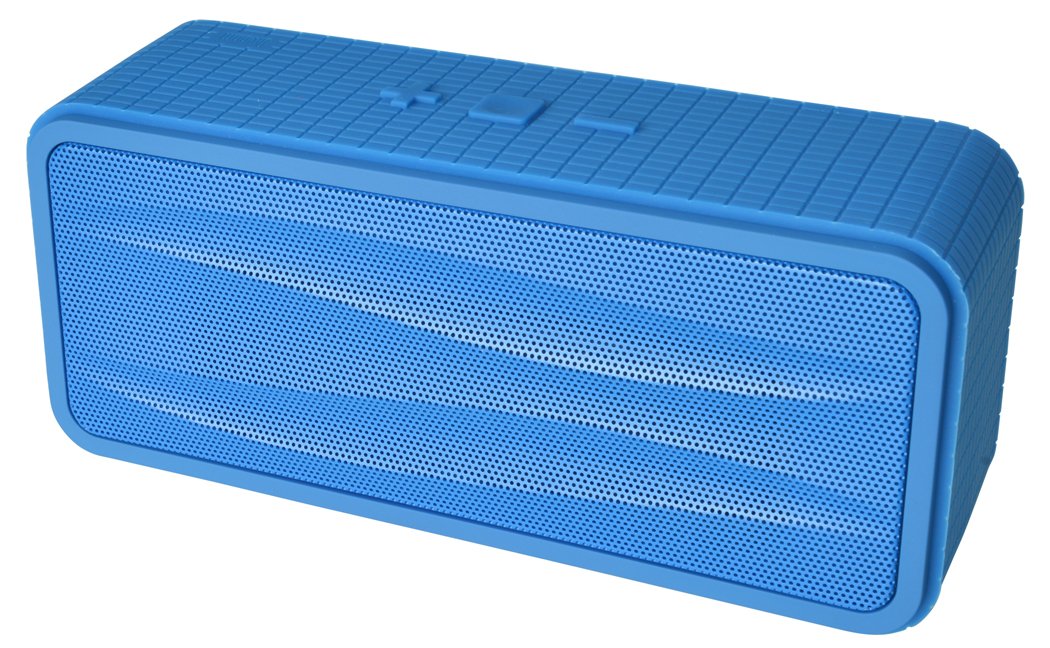
Şekil 1: Divoom Onbeat 200 Bluetooth Portable Speaker shown with various compatible smartphones, highlighting its wireless connectivity. The speaker is blue and rectangular with a mesh grille.
The speaker is equipped with dual drivers for stereo sound and a passive radiator for enhanced bass. The control panel typically includes power, volume, and Bluetooth pairing buttons. A built-in microphone is integrated for hands-free communication.

Şekil 2: Detailed dimensions of the Divoom Onbeat 200 speaker. The speaker measures approximately 16.5 cm in length, 7 cm in height, and 5.2 cm in depth.
Kurmak
1. Hoparlörü Şarj Etme
- USB şarj kablosunun küçük ucunu hoparlör üzerindeki şarj portuna takın.
- USB şarj kablosunun büyük ucunu bir USB güç adaptörüne (dahil değildir) veya bilgisayarın USB portuna bağlayın.
- Şarj sırasında şarj gösterge ışığı genellikle kırmızı renkte yanar.
- Once fully charged, the indicator light will change color or turn off (refer to specific LED behavior in the full manual if available). A full charge usually takes 2-3 hours.
Not: For first-time use, ensure the speaker is fully charged.
2. Bluetooth Eşleştirme
- Hoparlörün şarjının dolu ve kapalı olduğundan emin olun.
- Press and hold the Power button (or dedicated Bluetooth button) for a few seconds until you hear an audible prompt or see the Bluetooth indicator light flashing rapidly, indicating it's in pairing mode.
- Akıllı telefonunuzda, tabletinizde veya Bluetooth özellikli diğer cihazınızda Bluetooth ayarlarına gidin.
- Bluetooth'u etkinleştirin ve mevcut cihazları arayın.
- Select "Onbeat 200" from the list of devices.
- Once paired, you will hear a confirmation tone, and the Bluetooth indicator light will typically glow solid blue.
Uç: Hoparlör, açıldığında, Bluetooth özelliği etkin ve menzil dahilindeyse son eşleştirilen cihaza otomatik olarak yeniden bağlanmayı deneyecektir.
Kullanım Talimatları
Güç Açık/Kapalı
- Açmak için: Gösterge ışığı yanana kadar Güç düğmesini basılı tutun.
- Kapatmak için: Gösterge ışığı sönene kadar Güç düğmesini basılı tutun.
Ses Kontrolü
- To increase volume: Press the Volume Up (+) button.
- To decrease volume: Press the Volume Down (-) button.
You can also adjust the volume directly from your connected device.
Müzik Çalma
- Play/Pause: Press the Play/Pause button (often integrated with the Power or Bluetooth button).
- Next Track: Double-press the Volume Up (+) button (or a dedicated skip button).
- Previous Track: Double-press the Volume Down (-) button (or a dedicated skip button).
Not: Specific button functions may vary slightly. Refer to the physical markings on your speaker.
Yardımcı Giriş (AUX)
For devices without Bluetooth, you can use the 3.5mm audio cable:
- 3.5 mm ses kablosunun bir ucunu hoparlördeki AUX girişine bağlayın.
- Diğer ucunu ses cihazınızın kulaklık jakına bağlayın.
- The speaker will automatically switch to AUX mode, or you may need to press a mode button.
Çağrı Yapma ve Alma
The Divoom Onbeat 200 features a built-in microphone for hands-free calling when connected via Bluetooth to a smartphone.
- Bir Aramayı Cevaplama: When a call comes in, the music will pause. Press the Play/Pause button (or phone icon button) once to answer the call.
- Aramayı Bitirme: During a call, press the Play/Pause button (or phone icon button) once to end the call.
- Bir Aramayı Reddetme: Press and hold the Play/Pause button (or phone icon button) for approximately 2 seconds to reject an incoming call.
- Son aranan numara tekrar aranıyor: Double-press the Play/Pause button (or phone icon button) to redial the last number called.
Audio will be routed through the speaker, and your voice will be picked up by the built-in microphone.
Bakım
- Hoparlörü sudan, nemden ve aşırı sıcaklıklardan uzak tutun.
- Hoparlörü yumuşak ve kuru bir bezle temizleyin. Aşındırıcı temizleyiciler veya çözücüler kullanmayın.
- Hoparlörü düşürmekten veya sert darbelere maruz bırakmaktan kaçının.
- Uzun süre kullanılmadığı zamanlarda hoparlörü serin ve kuru bir yerde saklayın ve pil ömrünü korumak için düzenli olarak şarj edin.
Sorun giderme
| Sorun | Olası Çözüm |
|---|---|
| Hoparlör açılmıyor. | Hoparlörün tamamen şarj olduğundan emin olun. Bir güç kaynağına bağlayın ve tekrar deneyin. |
| Bluetooth üzerinden eşleştirme yapılamıyor. |
|
| Ses yok veya ses seviyesi düşük. |
|
| Ses bozulması. |
|
Özellikler
- Model Adı: Onbeat 200
- Ürün Model Numarası: Onbeat 200-Blue
- Marka: Divoom
- Hoparlör Tipi: Kitaplık
- Özel Özellikler: Built-in Microphone, Stereo
- Önerilen Kullanımlar: Müzik
- Uyumlu Cihazlar: Akıllı telefon
- Surround Ses Kanalı Yapılandırması: 2.0
- Renk: Mavi
- Ürün Ağırlığı: 544 g (1.2 Pound)
- Su Geçirmez mi: HAYIR
- Kontrol Yöntemi: App (Note: While listed, primary control is via physical buttons and connected device)
- Kablosuz İletişim Teknolojisi: Bluetooth
- Güç Kaynağı: Pille Çalışan (1 Lityum İyon pil dahil)
- Ürün Ölçüleri: 16.51x5.08x7.11 cm
- Hoparlör Maksimum Çıkış Gücü: 4 Watt
- Bağlantı Teknolojisi: Bluetooth
- Montaj Tipi: Masaüstü
- İlk Mevcut: 17 Mayıs 2013
Garanti ve Destek
The Divoom Onbeat 200 comes with a standard manufacturer's warranty. Please refer to the warranty card included in your package or visit the official Divoom webAyrıntılı garanti şartları ve koşulları için siteyi ziyaret edin.
For technical support, troubleshooting assistance, or service inquiries, please contact Divoom customer support through their official channels. Keep your purchase receipt and product model information handy when contacting support.