
Sungale PF1501
Sungale PF1501 14-Inch Digital Photo Frame User Manual
Modeli: PF1501
1. Giriş
This manual provides detailed instructions for the setup, operation, and maintenance of your Sungale PF1501 14-Inch Digital Photo Frame. This device is designed to display digital photos, play videos, and play music, offering a versatile way to enjoy your media.
Ürünün düzgün çalışmasını sağlamak ve kullanıcı deneyiminizi en üst düzeye çıkarmak için lütfen ürünü kullanmadan önce bu kılavuzu dikkatlice okuyun.
2. Paket İçeriği
Aşağıda listelenen tüm öğelerin paketinizde bulunduğunu doğrulayın:
- Sungale PF1501 14-Inch Digital Photo Frame
- AC Güç Adaptörü
- Uzaktan kumanda
- Hızlı Başlangıç Kılavuzu
- Limited Warranty Card
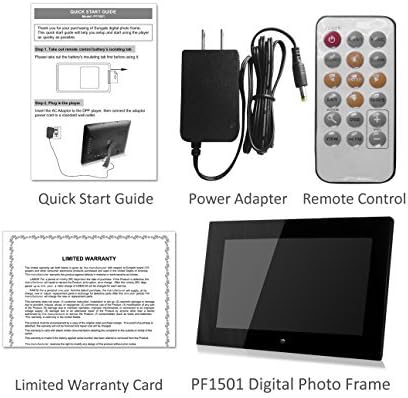
Image 2.1: Included accessories and the digital photo frame.
3. Ürün Bittiview
3.1 Ön View

Resim 3.1: Ön view of the digital photo frame.
3.2 Arka View ve Limanlar

Resim 3.2: Arka view with labeled ports and controls.
The rear of the frame features various ports and controls for connectivity and operation:
- Fonksiyon Tuşları: Buttons for navigation and control (Enter, Left, Right, Up, Down, Exit).
- Wall-mountable: Mounting points for wall installation.
- Dahili Hoparlör: Ses oynatma için.
- DC 12V Güç Bağlantı Noktası: AC güç adaptörünü buraya bağlayın.
- Removable Bracket: Stand for desktop placement.
- Güç Düğmesi: To turn the frame on or off.
- USB Ana Bilgisayar Bağlantı Noktası: USB flash sürücüleri bağlamak için.
- SD/SDHC Kart Yuvası: For inserting SD or SDHC memory cards.
- USB Aygıt Bağlantı Noktası: Bilgisayara bağlanmak için.
4. Kurulum
4.1 İlk Güçlendirme
- Gücü bağlayın: Insert the AC power adapter into the DC 12V Power Port on the back of the frame. Plug the other end into a standard electrical outlet.
- Güç Açık: Press the Power button located on the back of the frame. The frame will power on and display the initial setup screen or default content.
4.2 Hafıza Kartlarının veya USB Sürücülerinin Takılması
The frame supports SD/SDHC cards and USB flash drives (up to 32GB). It also has 4GB of internal memory.
- For SD/SDHC Card: Gently insert an SD or SDHC card into the SD/SDHC Card Slot until it clicks into place. Ensure the card is inserted in the correct orientation.
- For USB Flash Drive: Insert a USB flash drive into the USB Host Port.
The frame should automatically detect the inserted media and begin displaying content or prompt you to select a source.
4.3 Duvara Montaj (Opsiyonel)
The frame can be wall-mounted using the designated mounting points on the rear. Ensure appropriate wall anchors and screws are used for secure installation.
5. Kullanım Talimatları
The digital photo frame can be operated using the function keys on the back or the included remote control.
5.1 Uzaktan Kumanda İşlevleri
The remote control provides convenient access to all features. Point the remote control directly at the frame's sensor.
5.2 Menüde Gezinme
Use the directional buttons (Up, Down, Left, Right) to navigate through menu options. Press the "Enter" button to confirm a selection. The "Exit" button typically returns to the previous screen or the main menu.
5.3 Fotoğrafların Görüntülenmesi
The frame supports JPG and BMP photo file biçimleri.
- Kaynak Seç: From the main menu, select the desired media source (Internal Memory, SD Card, or USB Drive).
- Choose Photo Mode: Select "Photo" to enter photo display mode.
- Slayt gösterisi: The frame can automatically start a slideshow of all photos on the selected source. You can adjust transition effects and interval times in the settings.
- Single Photo Display: Navigate to a specific photo and press "Enter" to display it individually.
- Zoom and Rotate: Use the remote control or function keys to zoom in/out or rotate displayed photos.
5.4 Videoları Oynatma
The frame supports video playback. Note that some users have reported compatibility primarily with .AVI video files.
- Kaynak Seç: From the main menu, select the desired media source.
- Choose Video Mode: Select "Video" to enter video playback mode.
- Select Video: İstediğiniz videoya gidin file and press "Enter" to begin playback.
5.5 Müzik Çalma
The frame can play background music during photo slideshows or as standalone audio.
- Kaynak Seç: From the main menu, select the desired media source.
- Choose Music Mode: Select "Music" to enter music playback mode.
- Ses Seçin File: Navigate to the desired audio file and press "Enter" to begin playback.
- Arka Plan Müziği: In photo settings, you can enable background music to play during slideshows.
5.6 Calendar and Alarm Clock
Access the calendar and alarm clock functions through the main menu. Follow on-screen prompts to set the date, time, and alarm preferences.
6. Bakım
6.1 Ekranı Temizleme
- Turn off and unplug the frame before cleaning.
- Ekranı nazikçe silmek için mikrofiber bez gibi yumuşak, tüy bırakmayan bir bez kullanın.
- İnatçı lekeler için hafifçe silinampBezi suyla veya elektronik cihazlar için özel olarak tasarlanmış bir ekran temizleme solüsyonuyla ıslatın. Sıvıyı doğrudan ekrana püskürtmeyin.
- Avoid using abrasive cleaners, solvents, or alcohol-based solutions, as these can damage the screen surface.
6.2 Genel Bakım
- Keep the frame away from direct sunlight, heat sources, and excessive moisture.
- Çerçeveyi düşürmekten veya şiddetli darbelere maruz bırakmaktan kaçının.
- Do not block the ventilation openings on the back of the frame.
- Unplug the frame during lightning storms or when unused for extended periods.
7. Sorun Giderme
Dijital fotoğraf çerçevenizle ilgili sorunlarla karşılaşırsanız, aşağıdaki yaygın sorunlar ve çözümlerine göz atın:
| Sorun | Olası Neden / Çözüm |
|---|---|
| Çerçeve açılmıyor. |
|
| "File not supported" error or media not displaying. |
|
| Uzaktan kumanda çalışmıyor. |
|
| Photos are stretched or distorted. |
|
| Slideshow not playing randomly. |
|
8. Özellikler
| Özellik | Detay |
|---|---|
| Model Numarası | PF1501 |
| Ekran Boyutu | 14 inç |
| Çözünürlük | 1366x768 piksel |
| Dahili Bellek | 4 GB |
| Harici Bellek Desteği | SD/SDHC Card (up to 32GB), USB Flash Drive (up to 32GB) |
| Desteklenen Fotoğraf Formatları | JPG, BMP |
| Desteklenen Video Formatları | Primarily AVI (as reported by users) |
| Ses Çıkışı | 2 Channel Stereo Speakers |
| Ürün Boyutları | 13.8 x 1 x 9.5 inç |
| Ürün Ağırlığı | 2 pound |
| Renk | Siyah |
| Üretici | Güneşlenme alanı |
9. Garanti ve Destek
9.1 Sınırlı Garanti
This product comes with a Limited Warranty. Please refer to the "Limited Warranty Card" included in your package for detailed terms and conditions, including coverage period and claim procedures. Keep your proof of purchase for warranty claims.
9.2 Müşteri Desteği
For technical assistance, troubleshooting beyond this manual, or warranty inquiries, please contact Sungale customer support.
- Üretici: Güneşlenme alanı
- Webalan: Visit the Sungale Store on Amazon (genel marka bilgisi için)
- Specific contact information (phone, email) may be found on the warranty card or the official Sungale webalan.
İlgili belgelerPF1501


Ask a question about this manual
Ask about setup, troubleshooting, compatibility, parts, safety, or missing instructions. Manuals+ will review the question and use this page’s manual context to help answer it.