
GRUNDIG GKL0220
Grundig Sonoclock 220 Alarm Saatli Radyo, Uyandırma Işığı Özelliğiyle
Model: GKL0220
giriiş
The Grundig Sonoclock 220 is an elegantly designed alarm clock radio featuring a backlit display and a powerful RDS-UKW-PLL tuner with four station presets. It offers flexible wake-up options, allowing users to wake up to music or an alarm signal. The dynamic alarm tone ensures a gentle awakening, complemented by a dedicated Wake-up Light function designed to facilitate a more pleasant start to the day.
Güvenlik Talimatları
- Ensure the product is placed on a stable, flat surface to prevent accidental falls.
- Cihazı suya, neme veya aşırı sıcaklıklara maruz bırakmayın.
- Aşırı ısınmayı önlemek için havalandırma açıklıklarını tıkamaktan kaçının.
- Use only the provided power adapter. Disconnect from power during thunderstorms or when unused for extended periods.
- Cihazı kendiniz açmaya veya onarmaya çalışmayın. Tüm servis işlemlerini yetkili personele yaptırın.
- Çocukların erişemeyeceği yerde saklayınız.
Paket İçeriği
Lütfen tüm ürünlerin mevcut ve iyi durumda olduğundan emin olun:
- Grundig Sonoclock 220 Alarm Clock Radio
- Güç Adaptörü
- Kullanım Kılavuzu
Ürün Bittiview
Familiarize yourself with the various parts and controls of your Sonoclock 220.

Şekil 1: Ön View. This image displays the front of the Sonoclock 220, highlighting its large digital time display and the 'SNOOZE' button located on the top surface. The display shows the current time and the set alarm time.

Şekil 2: Yan Kontroller. Bu view shows the side panel of the device, featuring the ON/OFF button, the alarm setting button, and a vertical slider for selecting one of the four radio presets.
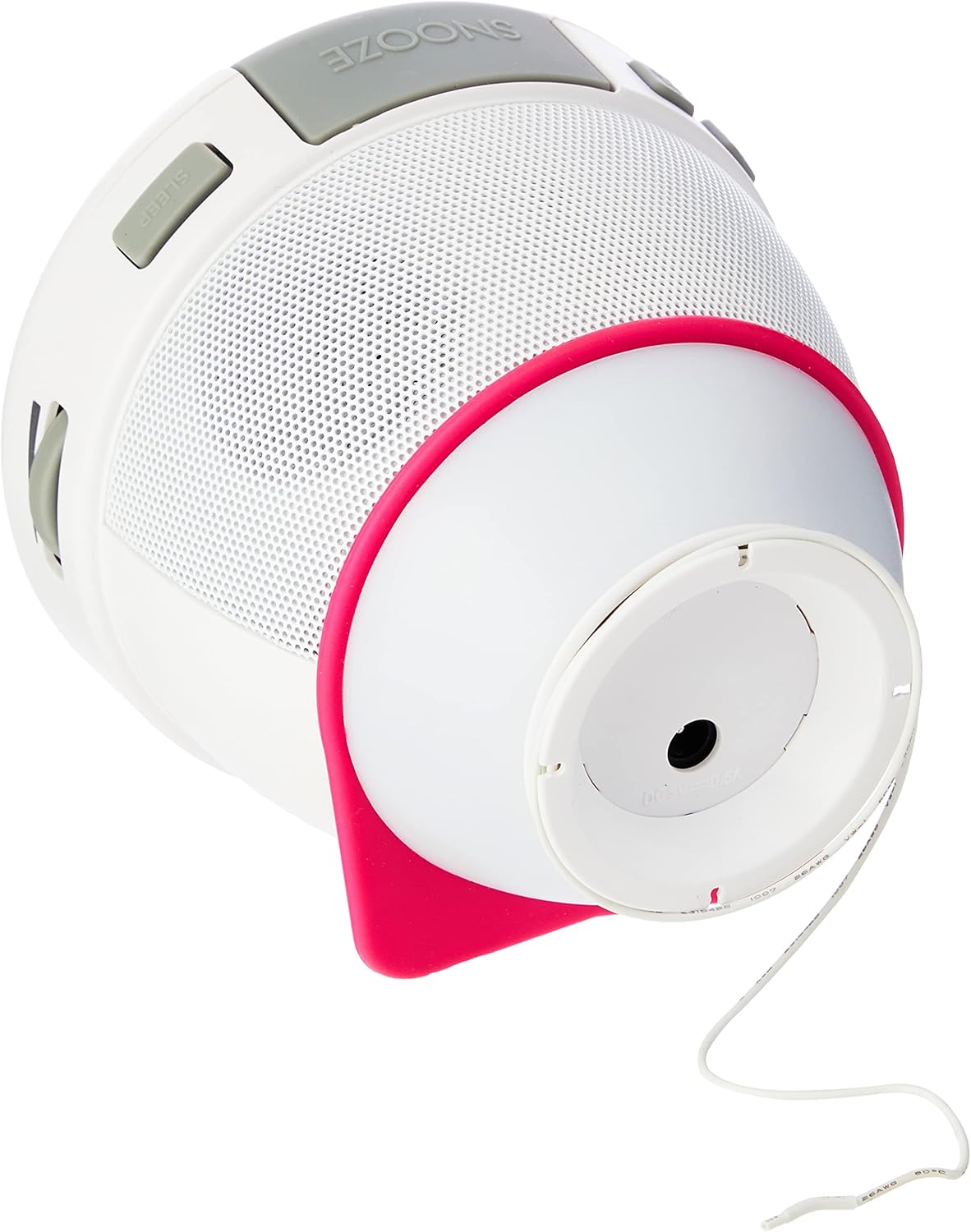
Figure 3: Wake-up Light and Base. This image illustrates the bottom of the Sonoclock 220, revealing the circular base which houses the wake-up light. The power cable is also visible, extending from this section.

Şekil 4: Güç Bağlantısı. This image shows the side of the alarm clock radio with the power adapter securely plugged into its input port, demonstrating how the device receives power.
Kurmak
1. Güç Bağlantısı
- Connect the provided power adapter to the DC input jack on the back of the Sonoclock 220.
- Güç adaptörünü standart bir duvar prizine takın.
- For battery backup (to retain time settings during power outages), insert 1 AA battery into the battery compartment located on the bottom of the unit.
2. Başlangıç Zaman Ayarı
Upon first power-up or after a complete power loss without battery backup, the display will flash. Refer to the "Setting the Time" section under Operating Instructions for detailed steps.
3. Anten Kurulumu
Extend the integrated FM wire antenna fully for optimal radio reception. Adjust its position for clearer sound.
Kullanım Talimatları
Zamanı Ayarlama
- Press and hold the "TIME SET" button (location may vary, typically on the back or side) until the hour digits begin to flash.
- Use the "HOUR" or "TUNING" buttons to adjust the hour.
- Press "TIME SET" again to confirm the hour and move to minute setting. The minute digits will flash.
- Use the "MINUTE" or "TUNING" buttons to adjust the minutes.
- Press "TIME SET" one more time to save the time and exit the setting mode.
Alarmı Ayarlama
The Sonoclock 220 allows you to set an alarm with either radio or buzzer sound, featuring a dynamically increasing volume for a gentle wake-up.
- Press and hold the "ALARM SET" button (refer to Figure 2 for typical location) until the alarm hour digits flash.
- Adjust the alarm hour using the appropriate buttons (e.g., "HOUR" or "TUNING").
- Press "ALARM SET" again to move to alarm minute setting.
- Adjust the alarm minutes.
- Press "ALARM SET" once more to select the alarm source (Radio or Buzzer). Use the adjustment buttons to toggle between options.
- Press "ALARM SET" to confirm and exit. The alarm icon will appear on the display, indicating the alarm is active.
To deactivate the alarm, press the "ALARM ON/OFF" button. The alarm icon will disappear from the display.
To use the Snooze function, press the large "SNOOZE" button on top of the unit when the alarm sounds. The alarm will pause for approximately 9 minutes and then sound again.
Radyo Operasyonu
- Press the "ON/OFF" button to turn on the radio.
- Use the "TUNING" buttons to manually tune to your desired FM station.
- To save a preset station: Tune to the desired station. Use the preset slider (1-4, refer to Figure 2) to select an empty preset slot. Press and hold the corresponding preset button until the display confirms the station is saved.
- To recall a preset station: Use the preset slider to select the desired preset number.
Wake-up Light Function
The Sonoclock 220 features a Wake-up Light to assist with a gentle awakening. This light illuminates from the base of the unit (refer to Figure 3).
- The Wake-up Light activates automatically when the alarm sounds.
- It provides a soft illumination to complement the audio alarm, creating a more natural wake-up experience.
- The light cannot be set to gradually brighten before the alarm time. It turns on simultaneously with the alarm.
Ekran Parlaklığı Ayarı
The display brightness can be adjusted to suit your preference, typically through a dedicated button or a combination of buttons. Consult the specific buttons on your device, often labeled "DIMMER" or integrated with the "SNOOZE" button for multiple presses to cycle through brightness levels.
Bakım
Temizlik
- Before cleaning, ensure the device is unplugged from the power outlet.
- Dış yüzeyleri yumuşak, kuru veya hafif nemli bir bezle silin.amp Kumaş.
- Cilaya zarar verebileceğinden aşındırıcı temizleyiciler, cilalar veya çözücüler kullanmayın.
Pil Değişimi
- If the time display is incorrect after a power outage, the backup battery may need replacement.
- Ünitenin altındaki pil bölmesini açın.
- Replace the old AA battery with a new one, observing correct polarity (+/-).
- Pil bölmesini sıkıca kapatın.
Sorun giderme
| Sorun | Olası Neden | Çözüm |
|---|---|---|
| Güç yok/Ekran kapalı | Güç adaptörü bağlı değil veya priz arızalı. | Ensure power adapter is securely plugged into the unit and a working wall outlet. Try a different outlet. |
| No sound from radio/alarm | Volume too low; Radio not tuned; Alarm source incorrect. | Increase volume. Tune to a strong radio station. Check alarm settings to ensure radio or buzzer is selected. |
| Zayıf radyo alımı | Anten doğru şekilde uzatılmamış veya konumlandırılmamış; Parazit. | Fully extend and reposition the FM wire antenna. Move the unit away from other electronic devices that may cause interference. |
| Alarm çalmıyor | Alarm not activated; Alarm time incorrect. | Ensure the alarm icon is visible on the display. Verify the alarm time is set correctly. |
| Geceleyin ekran çok parlak | Parlaklık ayarı çok yüksek. | Adjust the display brightness to a lower setting using the dedicated dimmer function. |
Özellikler
| Model Numarası | GKL0220 |
| Boyutlar (G x Y x D) | 10.8 x 10.5 x 10.8 cm (yaklaşık 4.25 x 4.13 x 4.25 inç) |
| Ağırlık | 480 gram (yaklaşık 1.06 lbs) |
| Güç Kaynağı | Mains power via adapter; 1 x AA battery for backup (not included) |
| Tuner Türü | RDS-UKW-PLL Tuner |
| Radyo Frekansları | FM |
| Ön Ayarlar | 4 istasyon ön ayarı |
| Bağlantı | USB (for power/charging, not data transfer) |
| Özel Özellikler | Wake-up Light, Backlit Display, Dynamic Alarm Tone |
Garanti ve Destek
This product comes with a manufacturer's warranty. For detailed information regarding warranty terms, conditions, and duration, please refer to the warranty card included in your package or visit the official Grundig webalan.
For technical support, troubleshooting assistance beyond this manual, or spare parts, please contact Grundig customer service. Contact information can typically be found on the Grundig websitede veya ürün ambalajında yer almamaktadır.
Çevrimiçi Kaynaklar: www.grundig.com