
giriiş
This manual provides detailed instructions for the safe and efficient operation, maintenance, and troubleshooting of your Carnation Mixed Denomination Bill Counter, model CR7. Please read this manual thoroughly before using the device to ensure proper functionality and to prevent damage.
Önemli Güvenlik Bilgileri
- Cihazı her zaman topraklı bir elektrik prizine bağlayın.
- Cihazı ıslak elle çalıştırmayınız.
- Cihazı sudan ve yüksek nemden uzak tutun.
- Çalışma sırasında makinenin çevresinde yeterli havalandırma sağlandığından emin olun.
- Herhangi bir temizlik veya bakım işlemi yapmadan önce cihazın fişini çekin.
- Cihazı kendiniz açmaya veya onarmaya çalışmayın. Yetkili servis personeline başvurun.
Paket İçeriği
Paketin içinde tüm öğelerin mevcut olduğundan emin olun:
- Carnation CR7 Mixed Denomination Bill Counter
- Güç Kablosu
- Kullanım Kılavuzu (bu belge)
- Temizleme Fırçası (dahil olabilir)
Kurmak
1. Paketin Açılması ve Yerleştirilmesi
Carefully remove the bill counter from its packaging. Place the machine on a stable, flat, and level surface. Ensure there is adequate space around the unit for proper ventilation and operation.
2. Güç Bağlantısı
- Connect the provided power cord to the power inlet on the rear of the bill counter.
- Güç kablosunun diğer ucunu uygun bir topraklı elektrik prizine takın.
- Locate the power switch on the rear of the machine and turn it to the 'ON' position. The display should illuminate.

Resim: Arka view of the Carnation CR7 bill counter, highlighting the power inlet and power switch for connection.
3. İlk Muayene
Before first use, visually inspect the bill counter for any signs of damage. Ensure all moving parts, such as the hopper and stacker, operate smoothly.
Kullanım Talimatları
1. Loading Bills
Fan out the bills and place them neatly into the hopper. Ensure the bills are aligned and not folded or creased. The machine will automatically start counting once bills are detected in the hopper.
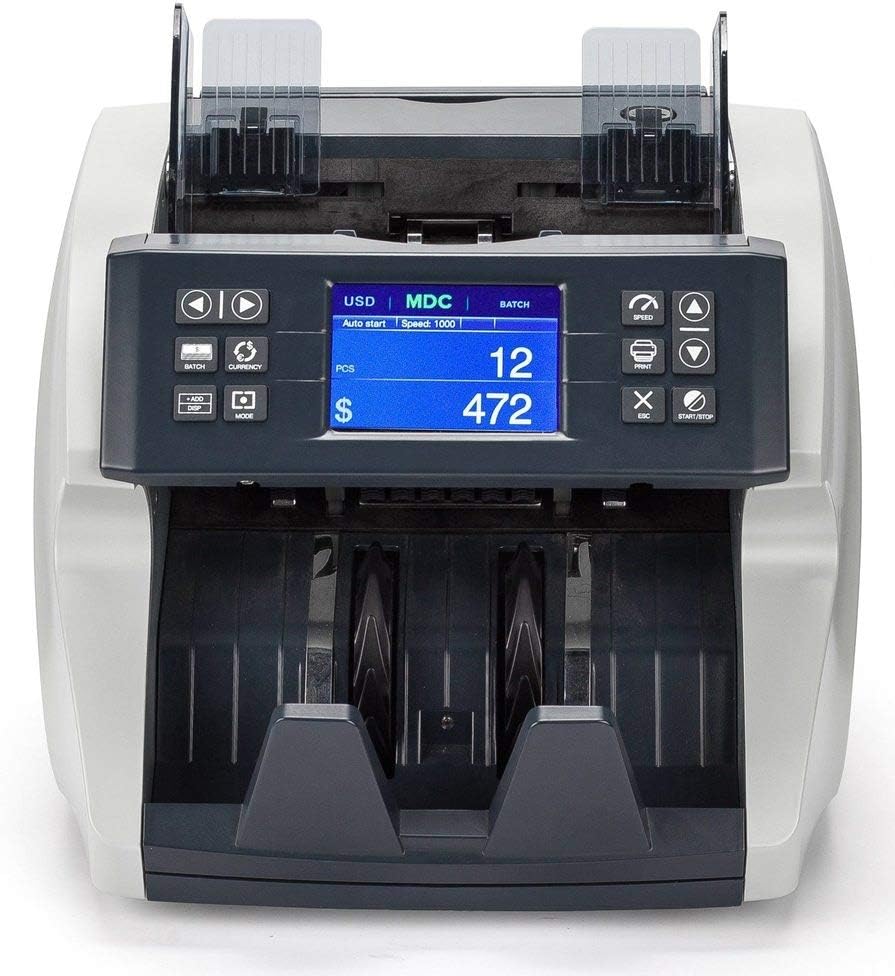
Resim: Ön view of the Carnation CR7 bill counter, showing the hopper where bills are loaded and the display panel.
2. Basic Counting Modes
- Sayım Modu: Banknot sayısını sayar.
- Mixed Denomination Mode (MDC): Counts and calculates the total value of mixed denomination bills. Select this mode using the appropriate button on the control panel.
- Toplu Mod: Allows the machine to stop counting once a preset number of bills is reached. Use the 'BATCH' button to set the desired batch quantity.
- Mod Ekle: Accumulates the total count from multiple counting operations. Activate 'ADD' mode to continuously sum counts.
3. Sahtecilik Tespiti
The CR7 is equipped with multiple detection methods to identify counterfeit currency:
- UV (Ultraviyole) Algılama: Checks for UV security features present in genuine banknotes.
- MG (Manyetik) Algılama: Scans for magnetic ink patterns on bills.
- MT (Magnetic Thread) Detection: Detects the magnetic security thread embedded in currency.
- IR (Kızılötesi) Algılama: Verifies infrared security features and patterns.
If a suspicious bill is detected, the machine will typically stop, alert the user, and display an error code. Remove the suspect bill and press 'START/STOP' to resume counting.
Bakım
Regular maintenance ensures the longevity and accuracy of your bill counter.
1. Temizlik
- Kapat: Temizlemeden önce mutlaka makineyi kapatın ve fişini çekin.
- Toz Giderimi: Use a soft brush or compressed air to remove dust and lint from the bill path, sensors, and rollers. Pay special attention to the detection sensors (UV, MG, IR) to ensure they are clear.
- Dış Temizlik: Dış yüzeyleri yumuşak, damp bezle silin. Aşındırıcı temizleyiciler veya çözücüler kullanmayın.
Sıklık: Clean the machine regularly, especially if used frequently or in dusty environments. Dust accumulation can lead to miscounts or detection errors.
2. Depolama
When not in use, cover the bill counter with a dust cover (if provided or purchased separately) to protect it from dust and debris. Store in a cool, dry place.
Sorun giderme
Bu bölüm, karşılaşabileceğiniz yaygın sorunları ele almaktadır. Burada listelenmeyen sorunlar için lütfen müşteri desteğiyle iletişime geçin.
| Sorun | Olası Neden | Çözüm |
|---|---|---|
| Makine açılmıyor. | Power cord not connected; power switch off; no power from outlet. | Ensure power cord is securely connected. Turn power switch ON. Check outlet with another device. |
| Miscounts or inaccurate counts. | Bills not properly aligned; dirty sensors; worn rollers; bills are too old/creased. | Align bills properly. Clean sensors and bill path (refer to Maintenance). Try new or less worn bills. |
| Faturalar sık sık sıkışıyor. | Overloaded hopper; bills are folded/creased; foreign objects in bill path; worn rollers. | Do not overload hopper. Straighten bills. Inspect bill path for obstructions. Clean rollers. |
| Counterfeit detection errors. | Dirty detection sensors; bills are extremely worn or damaged; incorrect currency settings. | Clean UV, MG, MT, IR sensors. Ensure bills are in good condition. Verify currency settings are correct for the bills being counted. |
Özellikler
| Model Numarası | CR7 |
| Marka | KARANFİL |
| Ürün Ağırlığı | 15.9 pound |
| Ürün Boyutları (U x G x Y) | 11.2 x 9.9 x 11.4 inç (285 mm x 252 mm x 289 mm) |
| Malzeme Türü | Metal, Plastik |
| Renk | Siyah |
| Algılama Yöntemleri | UV, MG, MT, IR |
| Üretici | Karanfil |
Garanti Bilgileri
The Carnation CR7 Mixed Denomination Bill Counter is covered by a manufacturer's warranty. Specific warranty terms and duration may vary by region and purchase date. Please retain your proof of purchase for warranty claims.
For detailed warranty information, including coverage and how to make a claim, please refer to the warranty card included with your product or visit the official Carnation webalan.
Müşteri Desteği
If you require assistance with your Carnation CR7 Bill Counter, have questions about its operation, or need technical support, please contact Carnation customer service.
- Çevrimiçi destek: Visit the official Carnation webSSS, destek kaynakları ve iletişim formları için site.
- E-posta Desteği: Ürün ambalajınıza veya resmi bilgilere bakın webMüşteri destek e-posta adresinin bulunduğu site.
- Telefon Desteği: Check the official Carnation webBölgesel müşteri hizmetleri telefon numaraları için site.
When contacting support, please have your model number (CR7) and purchase date available.