
giriiş
The Tivoli Audio Model One Bluetooth AM/FM Radio is designed to provide high-quality audio reception and reproduction. Featuring a classic design with a handmade wood cabinet, this radio integrates both traditional AM/FM tuning and modern Bluetooth connectivity. Its simple controls offer an intuitive user experience, delivering clear sound and reliable performance.
Kutuda Neler Var?
- (1) Model Bir BT Radyo
- (1) Owner's Manual
- (1) Güç Kaynağı
- (1) Harici FM Anteni
Kurmak
- Paketin açılması: Tüm bileşenleri dikkatlice ambalajından çıkarın.
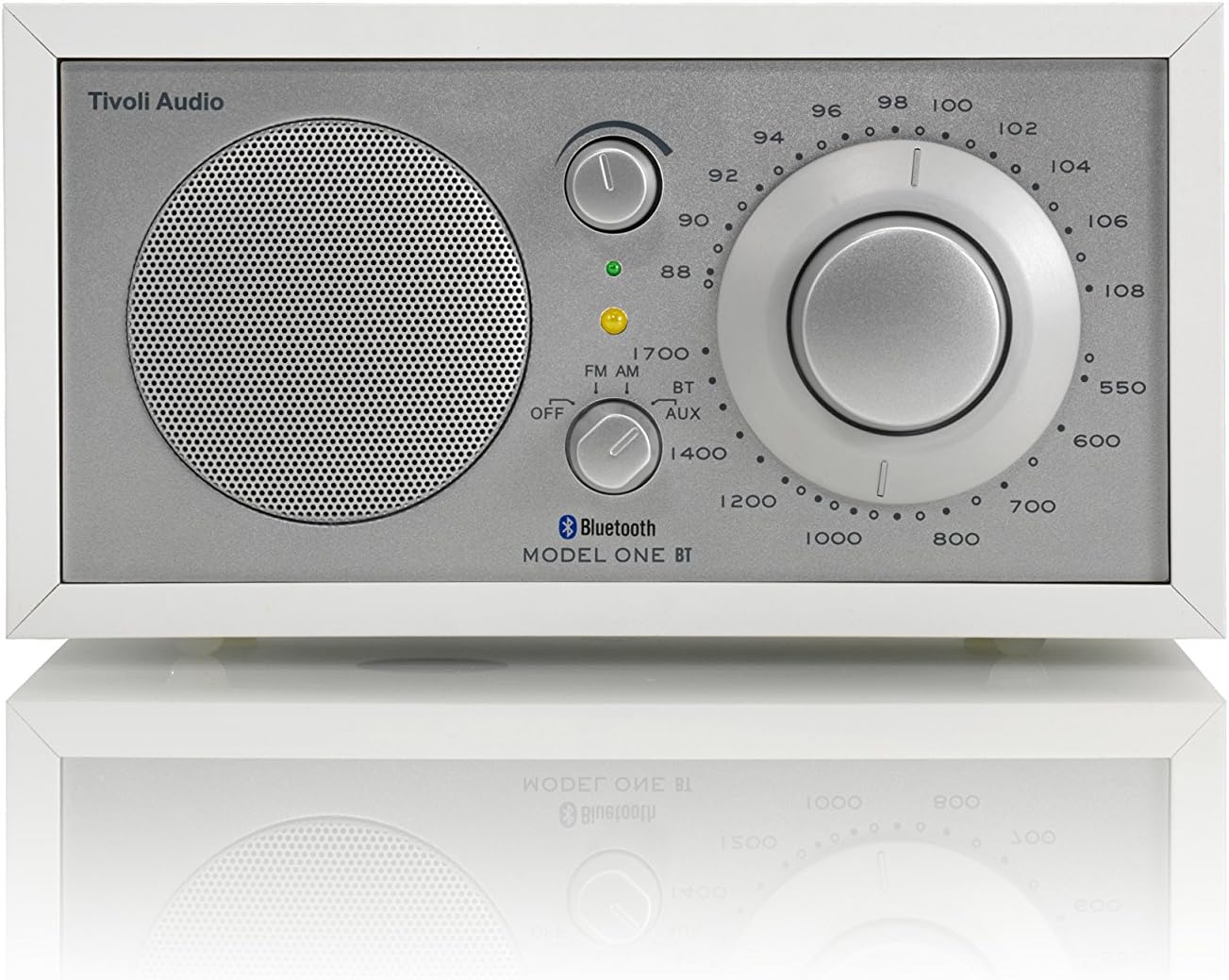
Şekil 1: Ön view of the Tivoli Audio Model One BT radio. - Güç Bağlantısı: Connect the power supply to the DC input on the rear of the radio and then plug it into a wall outlet.

Figure 2: Rear panel connections, including power input and external antenna port. - Anten Bağlantısı: For optimal FM reception, connect the included external FM antenna to the "FM-EXT" jack on the rear panel. For AM reception, the internal AM antenna is usually sufficient, but an external AM antenna can be connected if needed.
- Atama: Position the radio on a stable, flat surface away from direct sunlight, heat sources, or excessive moisture. Experiment with different locations to find the best reception for both AM and FM bands.
Kullanım Talimatları
1. Açma/Kapama ve Kaynak Seçimi
- Locate the three-position switch on the front panel.
- To turn the radio on, slide the switch from "OFF" to either "FM", "AM", "BT" (Bluetooth), or "AUX" (Auxiliary Input) depending on your desired source.
- To turn the radio off, slide the switch to "OFF".
2. AM/FM Radyo Ayarlaması
- Set the source switch to "FM" or "AM".
- Use the large tuning dial to scan for stations. The tuning indicator light will illuminate when a strong signal is received, indicating optimal tuning.
- Ses düğmesini kullanarak sesi ayarlayın.

3. Bluetooth Bağlantısı
- Set the source switch to "BT". The Bluetooth indicator light will begin to flash, indicating it is in pairing mode.
- On your Bluetooth-enabled device (e.g., smartphone, tablet), navigate to the Bluetooth settings and select "Tivoli Audio Model One BT" from the list of available devices.
- Once paired, the Bluetooth indicator light on the radio will glow solid, and you can stream audio from your device.
4. Yardımcı Giriş
- Connect an external audio device (e.g., MP3 player, CD player) to the "AUX IN" port on the rear panel using a 3.5mm audio cable (not included).
- Set the source switch to "AUX".
- Bağlı cihazınızdan oynatmayı ve ses seviyesini kontrol edin.
5. Resmi Ürün Videosu
Bakım
- Temizlik: Use a soft, dry cloth to clean the radio's cabinet and controls. Avoid abrasive cleaners or solvents, which can damage the finish.
- Ahşap Bakımı: The wood cabinet can be polished with a non-abrasive wood furniture polish as needed.
- Anten Bakımı: Ensure the external FM antenna is not bent or damaged.
Sorun giderme
- Güç Yok: Ensure the power supply is securely connected to both the radio and a working electrical outlet.
- Zayıf Radyo Sinyali:
- Verify the external FM antenna is properly connected and fully extended.
- Reposition the radio or antenna to improve signal strength.
- Diğer elektronik cihazlardan kaynaklanan yerel parazitleri kontrol edin.
- Bluetooth Eşleştirme Sorunları:
- Ensure the radio is set to "BT" mode and the indicator light is flashing.
- Make sure your device's Bluetooth is enabled and within range.
- Daha önce eşleştirildiyse, telefonunuzda cihazı "unutmayı" ve yeniden eşleştirmeyi deneyin.
- Yardımcı girişten ses gelmiyor:
- Confirm the radio is set to "AUX" mode.
- Check the audio cable connection at both the radio and the external device.
- Ensure the volume on both the radio and the external device is turned up.
Özellikler
| Marka | Tivoli Ses |
| Model Numarası | M1BTWHT |
| Ürün Boyutları | 8.3"U x 5.2"G x 4.4"Y (21.1 x 13.2 x 11.2 cm) |
| Ürün Ağırlığı | 4.1 pound (1.86 kg) |
| Bağlantı Teknolojisi | Bluetooth |
| Tuner Teknolojisi | AM/FM Analog |
| Desteklenen Radyo Bantları | Sabah/FM |
| Güç Kaynağı | AC (120V~60Hz) |
| Özel Özellikler | Auxiliary input, Stereo headphone output, Sensitive AM/FM analog tuner with large 5:1 ratio tuning dial |

Garanti ve Destek
For warranty information, product support, or service inquiries, please refer to the included Owner's Manual or visit the official Tivoli Audio webSite. Satın alma belgenizi garanti talepleriniz için saklayın.