
beyerdynamic 721360
Beyerdynamic Stegos TB Wireless Boundary Microphone User Manual
Modeli: 721360
giriiş
This manual provides comprehensive instructions for the setup, operation, and maintenance of your Beyerdynamic Stegos TB Wireless Boundary Microphone. Please read this manual thoroughly before using the device to ensure optimal performance and longevity.
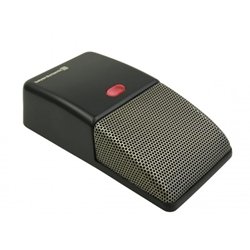
Image: Beyerdynamic Stegos TB Wireless Boundary Microphone. This image displays the compact, black wireless boundary microphone, designed for discreet placement on surfaces like conference tables.
Önemli Güvenlik Talimatları
- Cihazı suya veya aşırı neme maruz bırakmayın.
- Aşırı sıcaklıklardan kaçının.
- Cihazı açmaya veya değiştirmeye çalışmayın. Tüm servis işlemlerini yetkili personele yaptırın.
- Sadece belirtilen güç kaynaklarını ve aksesuarları kullanın.
- Çocukların erişemeyeceği yerde saklayınız.
Paket İçeriği
Paketin içinde tüm öğelerin mevcut olduğundan emin olun:
- Beyerdynamic Stegos TB Wireless Boundary Microphone
- USB Şarj Kablosu (Mikro USB)
- Kullanım Kılavuzu (bu belge)
Kurmak
1. Mikrofonun Şarj Edilmesi
- Connect the Micro USB end of the charging cable to the microphone's charging port.
- Connect the standard USB end of the cable to a powered USB port (e.g., computer, USB wall adapter).
- The LED indicator on the microphone will show charging status.
- Tamamen şarj olduktan sonra şarj kablosunu çıkarın.
2. Bir Cihaza Bağlanma
The Stegos TB microphone connects wirelessly to compatible devices, typically personal computers, for video conferencing applications.
- Mikrofonun şarjlı ve açık olduğundan emin olun.
- Activate Bluetooth on your personal computer or compatible device.
- Put the microphone into pairing mode (refer to the device's specific button combination, usually holding a power/pairing button). The LED indicator will typically flash to indicate pairing mode.
- On your computer, search for available Bluetooth devices. Select "Beyerdynamic Stegos TB" from the list.
- Once paired, the LED indicator on the microphone will show a solid light, indicating a successful connection.
- In your computer's sound settings or video conferencing software, select the "Beyerdynamic Stegos TB" as the input audio device.
Kullanım Talimatları
Güç Açık/Kapalı
- To power on: Press and hold the power button for approximately 3 seconds. The LED indicator will illuminate.
- To power off: Press and hold the power button for approximately 3 seconds. The LED indicator will turn off.
Sessiz İşlevi
The microphone features a mute function for privacy during calls.
- To mute: Press the mute button once. The LED indicator may change color or flash to indicate mute status.
- To unmute: Press the mute button again. The LED indicator will return to its normal operating state.
Placement for Optimal Performance
For best audio pickup, place the Stegos TB microphone on a flat surface in the center of the participants. Its omnidirectional polar pattern ensures 360-degree sound capture.
Bakım
Temizlik
- Wipe the microphone's exterior with a soft, dry, or slightly damp Kumaş.
- Sert kimyasallar, çözücüler veya aşındırıcı temizleyiciler kullanmayın.
- Ensure no liquid enters the microphone grille or ports.
Depolamak
When not in use for extended periods, store the microphone in a cool, dry place, away from direct sunlight and extreme temperatures. It is recommended to fully charge the battery before long-term storage and recharge it every few months to maintain battery health.
Sorun giderme
| Sorun | Olası Neden | Çözüm |
|---|---|---|
| Mikrofon açılmıyor. | Pil zayıf veya bitmiş. | Charge the microphone using the provided USB cable. |
| Kablosuz olarak bağlanılamıyor. | Bluetooth is off on the device; microphone not in pairing mode; out of range. | Ensure Bluetooth is enabled. Put microphone into pairing mode. Move microphone closer to the device. |
| No audio input from microphone. | Microphone is muted; incorrect audio input selected on computer/software. | Unmute the microphone. Select "Beyerdynamic Stegos TB" as the input device in your system settings or application. |
| Kötü ses kalitesi. | Microphone too far from speaker; environmental noise; interference. | Place microphone closer to speakers. Reduce background noise. Ensure no obstructions between microphone and receiving device. |
Özellikler
- Marka: Beyerdinamik
- Modeli: Stegos TB (721360)
- Bağlantı Teknolojisi: Wireless (USB for charging)
- Bağlantı Tipi: Mikro USB (şarj için)
- Özellik: Kablosuz
- Uyumlu Cihazlar: Kişisel Bilgisayar
- Renk: Siyah
- Kutup Deseni: Çok yönlü
- Güç Kaynağı: Pil ile çalışır
- Önerilen Kullanımlar: Video Konferans
Garanti Bilgileri
Beyerdynamic products are covered by a limited warranty. For specific warranty terms and conditions, please refer to the warranty card included with your product or visit the official Beyerdynamic webSite. Satın alma belgenizi garanti talepleriniz için saklayın.
Note: Warranty details are subject to change and may vary by region.
Destek ve İletişim
For further assistance, technical support, or service inquiries, please contact Beyerdynamic customer support through their official website veya ürün ambalajınızda yer alan iletişim bilgileri.
Resmi Webalan: www.beyerdinamik.com
Please have your model number (721360) and serial number ready when contacting support.
Ask a question about this manual
Ask about setup, troubleshooting, compatibility, parts, safety, or missing instructions. Manuals+ will review the question and use this page’s manual context to help answer it.