
giriiş
Thank you for choosing the KabelDirekt 4K HDMI Cable. This high-performance cable is engineered to deliver superior audio and video quality for your home theater, gaming, and professional AV setups. This manual provides essential information for setting up, operating, maintaining, and troubleshooting your HDMI cable to ensure optimal performance.
Ürün Özellikleri
- Yüksek Performans: Thanks to premium build quality, HDMI-to-HDMI cables of 20ft and longer support up to 4K@60Hz. Also supports HDR, 7.1 surround sound, ARC, and Ethernet for stunning image and sound quality.
- German-Engineered: Unlike standard HDMI cables, KabelDirekt cables feature a German-engineered multi-layer shielding system inside the connector. Gold-plated, break-resistant connectors and high-purity copper conductors ensure stable, interference-free transmission and long-lasting durability.
- Length Options for Every Setup: Available in a wide range of lengths from 0.5ft to 75ft. Ideal for home theaters, gaming setups, offices, and pro AV installations.
- Geniş Uyumluluk: Works perfectly with PCs, laptops, game consoles (PS5, Xbox, Switch/Switch 2), Blu-ray/DVD players, TVs, streaming devices, monitors, projectors, and all HDMI-enabled devices.
Kutuda Neler Var?
- 1x KabelDirekt - HDMI TOP Series - 25ft (7.6m)
Kurulum Talimatları
Follow these steps to connect your KabelDirekt 4K HDMI Cable:
- Bağlantı Noktalarını Belirleyin: Locate the HDMI output port on your source device (e.g., PC, game console, Blu-ray player) and the HDMI input port on your display device (e.g., TV, monitor, projector).
- Kabloyu bağlayın: Gently insert one end of the KabelDirekt HDMI cable into the HDMI output port of your source device.
- Ekrana Bağlan: Insert the other end of the HDMI cable into an available HDMI input port on your display device. Ensure both connections are secure.
- Cihazları Açma: Turn on both your source device and your display device.
- Girişi Seçin: On your display device, use the remote control or menu buttons to select the correct HDMI input source that corresponds to the port where you connected the cable.

Image: KabelDirekt HDMI cable securely connected to a TV's HDMI port.

Image: The KabelDirekt HDMI cable is compatible with a wide range of devices, including PCs, game consoles, Blu-ray players, and projectors.
Video: An official KabelDirekt video demonstrating the features and connection of their High Speed HDMI Cable.
Kullanım Talimatları
Once connected, your KabelDirekt HDMI cable will automatically transmit audio and video signals. For optimal performance:
- Verify Display Settings: Ensure your display device is set to the highest possible resolution and refresh rate supported by both the display and the source device (e.g., 4K@60Hz).
- Ses Ayarları: Check your source device's audio output settings to ensure it's configured for HDMI audio, especially if using features like ARC (Audio Return Channel).
- HDR/UHD: If your devices support HDR or UHD, confirm these settings are enabled in your device's display options for enhanced visual experience.

Image: Enjoy crystal clear 4K@60Hz visuals and immersive 7.1 surround sound for movies and gaming.
Bakım
To ensure the longevity and performance of your KabelDirekt HDMI cable:
- Dikkatli Kullanın: Kabloyu, özellikle bağlantı noktalarının yakınında, aşırı bükmekten, döndürmekten veya çekmekten kaçının.
- Güvenli Bağlantılar: Ensure connectors are fully inserted into ports to prevent accidental disconnections and signal loss.
- Konektörleri Temizleyin: Periodically clean the gold-plated connectors with a dry, lint-free cloth to remove dust or debris.
- Depolamak: Kullanılmadığı zaman kabloyu gevşekçe sarın ve doğrudan güneş ışığından ve aşırı sıcaklıklardan uzak, kuru ve serin bir yerde saklayın.
Sorun giderme
If you encounter issues with your KabelDirekt HDMI cable, try the following solutions:
- Görüntü/Ses Yok:
- Verify that both ends of the HDMI cable are securely connected to the correct ports.
- Ensure your display device is set to the correct HDMI input source.
- Try connecting the cable to a different HDMI port on your display or source device.
- Restart both your source and display devices.
- Poor Picture Quality (Flickering, Static, Distorted Colors):
- Kabloda veya bağlantı noktalarında herhangi bir fiziksel hasar olup olmadığını kontrol edin.
- Ensure your source device's resolution and refresh rate settings are compatible with your display.
- Reduce the resolution or refresh rate on your source device to see if the issue resolves.
- Test the cable with another device or display to rule out a faulty cable.
- Aralıklı Bağlantı:
- Ensure all connections are tight and not loose.
- Avoid placing heavy objects on the cable or routing it through areas where it might be pinched or stressed.
Özellikler
| Özellik | Tanım |
|---|---|
| Marka | KabloDirekt |
| Model Adı | KabelDirekt 4K HDMI Cable – 25ft & Longer HDMI Cables (20ft–75ft) – German-Engineered HDMI Cord – Supports 4K@60Hz, UHD, HDR, ARC, Ethernet – HDMI Cable for HDTV, PC, PS5, Xbox, Switch |
| Ürün Model Numarası | 270 |
| Bağlayıcı Türü | HDMI |
| Kablo Tipi | HDMI |
| Renk | Siyah/Mavi |
| Bağlayıcı Cinsi | Erkek-Erkek |
| Veri Aktarım Hızı | Saniyede 18 Gigabit |
| Sıklık | 60 Hz |
| Özel Özellik | Gold plated, Shielding |
| Uyumlu Cihazlar | Any device with an HDMI port, including: TVs, notebooks, projectors, A/V receivers, Xbox Series X, Xbox Series S, Xbox One, PS4, PS5 & other video game consoles, monitors, UHD players, Apple TV devices, PCs, Blu-ray players |
| Ürün Ağırlığı | 1 Pound |
| Ürün Boyutları | 6.8 x 1.9 x 6.3 inç |
| UPC | 609224989384 |
Garanti ve Destek
KabelDirekt stands by the quality of its products. This HDMI cable is backed by a 36 ay üretici garantisi. Each cable undergoes strict quality checks and is individually machine-tested for flawless performance and long-term reliability.
For any issues or questions, please contact KabelDirekt Products directly. We are committed to ensuring your complete satisfaction.
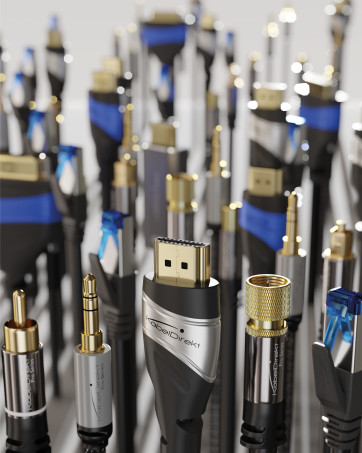
Image: German-engineered quality ensures durability and reliable performance.
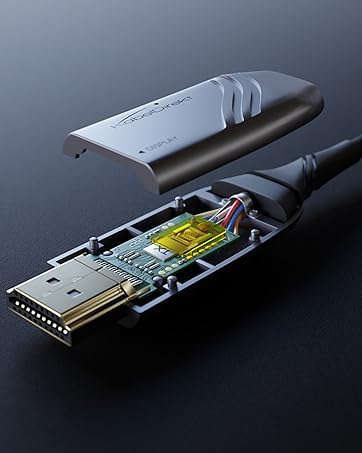
Image: High-purity copper conductors and robust shielding contribute to stable, interference-free transmission.