
giriiş
The Jabra Music Street2 Bluetooth Stereo Headset is designed to provide high-quality audio and hands-free communication. This manual provides essential information for the proper use, maintenance, and troubleshooting of your device. Please read it carefully before use.
Kurmak
1. Kulaklığı Şarj Etme
Before first use, fully charge the headset. Connect the micro-USB charging cable to the charging port on the headset and the other end to a USB power source.
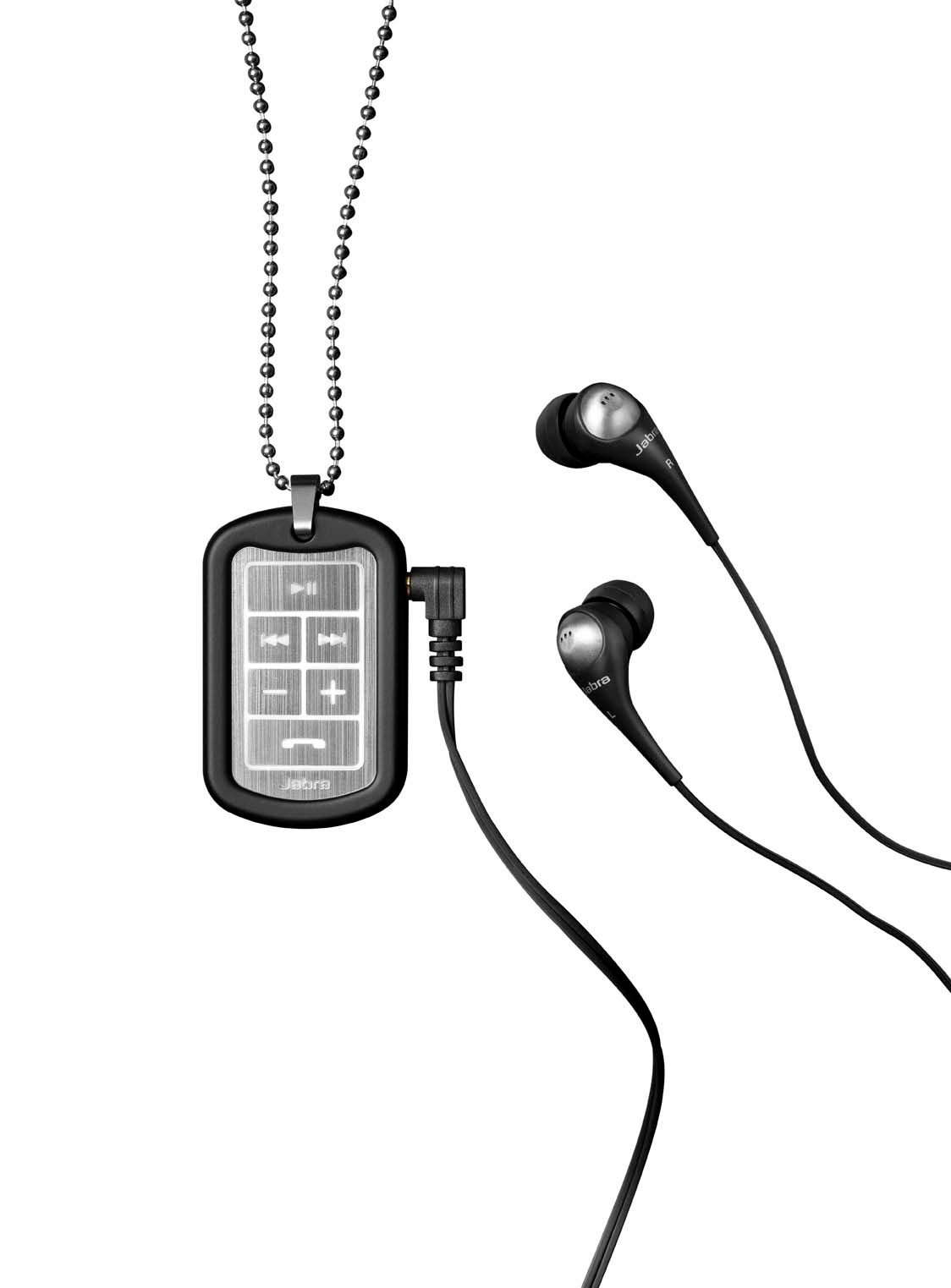
Image: The Jabra Music Street2 headset, highlighting the micro-USB charging port located on the side of the control unit.
- Tam şarj genellikle yaklaşık 2 saat sürer.
- LED göstergesi şarj durumunu gösterecektir (örneğin, kırmızı şarj oluyor, mavi tamamen şarj oluyor).
2. Bluetooth Cihazıyla Eşleştirme
- Kulaklığın kapalı olduğundan emin olun.
- Press and hold the Multi-function button (usually the play/pause button) for approximately 5-7 seconds until the LED indicator flashes blue rapidly. This indicates pairing mode.
- Bluetooth özellikli cihazınızda (akıllı telefon, tablet vb.) Bluetooth ayarlarına gidin ve Bluetooth'u etkinleştirin.
- Arama available devices. "Jabra Street2" should appear in the list.
- Select "Jabra Street2" to connect. If prompted for a passcode, enter "0000" (four zeros).
- Once successfully paired, the LED indicator will flash blue slowly.
The headset can remember multiple paired devices but can only be connected to one at a time.
Kullanım Talimatları
Güç Açık/Kapalı
- Güç Açık: LED mavi renkte yanıp sönene kadar Çok Fonksiyonlu düğmeyi basılı tutun.
- Kapat: Çok fonksiyonlu düğmeye basılı tutun, LED kırmızı renkte yanıp sönene ve ardından sönene kadar bekleyin.
Müzik Kontrolü
- Oynat/Duraklat: Çok işlevli düğmeye bir kez basın.
- Sonraki Parça: "Sonraki Parça" düğmesine (genellikle ileri ok işaretiyle gösterilir) basın.
- Önceki parça: "Önceki Parça" düğmesine (genellikle geri ok işaretiyle gösterilir) basın.
- Sesi aç: "+" butonuna basın.
- Sesi kıs: "-" tuşuna basın.
Yönetim Çağrı
- Cevap Çağrısı: Çok işlevli düğmeye bir kez basın.
- Çağrı Sonu: Görüşme sırasında Çok Fonksiyonlu düğmeye bir kez basın.
- Çağrıyı Reddet: Çok işlevli düğmeyi 2 saniye basılı tutun.
- Son Numarayı Tekrar Ara: Görüşmede olmadığınız bir zamanda Çok Fonksiyonlu düğmeye iki kez basın.
- Sesli arama: Press the Multi-function button once when not on a call (if supported by your phone).
The headset automatically switches between music and calls.
Bakım
- Keep the headset dry. Moisture can damage the electronic circuits.
- Aşırı sıcaklıklardan kaçının. Yüksek sıcaklıklar elektronik cihazların ömrünü kısaltabilir, pilleri bozabilir ve bazı plastiklerin deforme olmasına veya erimesine neden olabilir.
- Do not attempt to open the headset. Unauthorized modifications can damage the unit and void your warranty.
- Clean the headset with a soft, dry cloth. Do not use harsh chemicals or detergents.
- Kulaklığı uzun süre kullanmadığınız zamanlarda serin ve kuru bir yerde saklayın.
Sorun giderme
Güç Yok
- Kulaklığın tamamen şarj olduğundan emin olun. Bir güç kaynağına bağlayın ve şarj göstergesini kontrol edin.
Cihazla Eşleştirilemiyor
- Make sure the headset is in pairing mode (LED flashing blue rapidly).
- Ensure Bluetooth is enabled on your device and it is within range (typically 10 meters or 33 feet).
- Try turning off and on both the headset and your Bluetooth device.
- If previously paired, try deleting "Jabra Street2" from your device's Bluetooth list and re-pairing.
Ses Yok veya Ses Kalitesi Kötü
- Hem kulaklığınızdaki hem de bağlı cihazınızdaki ses seviyelerini kontrol edin.
- Kulaklığın cihazınıza doğru şekilde bağlı olduğundan emin olun.
- Girişimden kaçınmak için cihazınıza yaklaşın.
- Ensure the ear buds are correctly inserted and fit snugly to block external noise.
Calls Not Switching Automatically
- Verify that the headset is the active audio device for calls on your phone's Bluetooth settings.
- Some phone models may require manual selection of the audio output during a call.
Özellikler
| Model Adı | Jabra Music Street2 |
| Bluetooth Sürümü | 3.0 + EDR |
| kablosuz Menzil | 10 metreye (33 feet) kadar |
| Konuşma Zamanı | 8 saate kadar |
| Bekleme Süresi | 9.5 güne kadar |
| Şarj Süresi | Yaklaşık 2 saat |
| Bağlantı | Bluetooth, 3.5 mm Jack (for wired connection if applicable) |
| Özellikler | Virtual surround sound, power bass, noise-blocking ear buds, automatic music/call switching |
Garanti ve Destek
Jabra products are covered by a limited warranty. For specific warranty terms and conditions, please refer to the warranty card included with your product or visit the official Jabra webalan.
For technical support, frequently asked questions, or to download the latest software/firmware updates, please visit the official Jabra support page:
You may also contact Jabra customer service directly for assistance.