
1. Giriş
The Magellan RoadMate 2230T-LM is a portable GPS navigation device designed to provide reliable guidance for your journeys. It features lifetime map updates and lifetime traffic alerts, ensuring you have the most current road information and can avoid congestion. This manual provides essential information for setting up, operating, and maintaining your device.

Şekil 1.1: Ön view of the Magellan RoadMate 2230T-LM GPS Navigator.
2. Güvenlik Bilgileri
Please read and understand all safety information before using your Magellan RoadMate 2230T-LM. Failure to follow these instructions could result in injury or damage.
- Sürüş güvenliği: Always prioritize safe driving. Do not operate the device or input data while driving. Pull over to a safe location before making any adjustments or entering information.
- Trafik Kanunları: Always obey all traffic laws and regulations. The GPS device is a navigational aid and should not supersede actual road signs or traffic conditions.
- Montaj: Cihazın güvenli bir şekilde monte edildiğinden ve görüşünüzü engellemediğinden emin olun. view Yolun trafiğini engellemek veya araç kontrollerine müdahale etmek.
- Güç Kaynağı: Yalnızca ürünle birlikte verilen güç adaptörünü ve kabloları kullanın. Yetkisiz aksesuarların kullanılması cihaza zarar verebilir ve garantiyi geçersiz kılabilir.
- Sıcaklık: Cihazı aşırı sıcaklıklara, uzun süre doğrudan güneş ışığına veya aşırı neme maruz bırakmaktan kaçının.
3. Paket İçeriği
Ürün paketinizde tüm öğelerin mevcut olduğunu doğrulayın:
- Magellan RoadMate 2230T-LM GPS Navigator
- Ön Cam Bağlantısı
- USB kablosu
- Araç Güç Adaptörü
- Lithium Ion Battery (pre-installed)
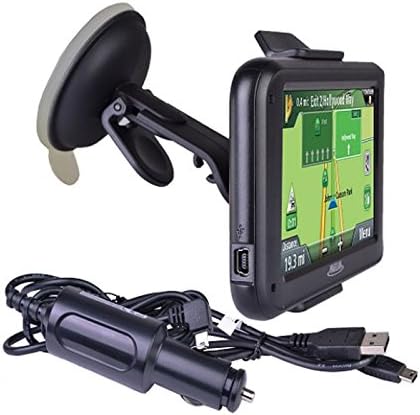
Figure 3.1: Included accessories: GPS unit, windshield mount, and charging cables.
4. Kurulum
4.1 Cihazı Şarj Etme
Before first use, fully charge your RoadMate 2230T-LM. Connect the USB cable to the device and then to the vehicle power adapter or a computer USB port. The battery indicator on the screen will show charging status. A full charge typically takes approximately 2 hours.
4.2 Cihazın Montajı
The RoadMate 2230T-LM comes with a windshield mount for secure placement in your vehicle.
- Clean the desired area on your windshield with a non-abrasive cleaner.
- Attach the mounting bracket to the back of the GPS unit until it clicks into place.
- Press the suction cup firmly against the clean windshield surface and flip the lever to secure it.
- Cihazın açısını en uygun şekilde ayarlayın. viewsürüşünüzü engellemeden view.
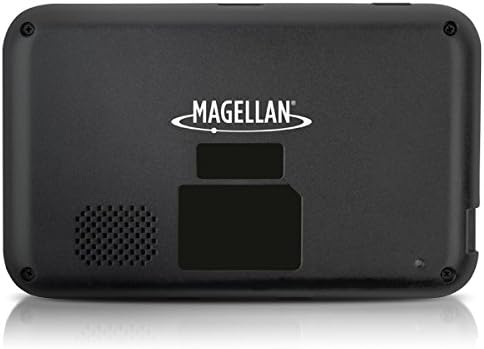
Şekil 4.1: Arka view of the GPS unit, showing the speaker and mounting area.
5. Kullanım Talimatları
5.1 Açma/Kapatma
Press and hold the power button located on the device's top edge to turn it on or off. A short press will put the device into sleep mode.
5.2 Temel Gezinme
The RoadMate 2230T-LM features a touchscreen interface for all operations.
- Hedefinizi girin: From the main menu, tap 'Go To' or 'New Destination'. You can enter an address, point of interest (POI), or select from recent destinations.
- Rota Hesaplaması: After entering your destination, the device will calculate the fastest or shortest route based on your preferences.
- Talimatları izleyin: Follow the spoken turn-by-turn directions and on-screen map guidance. The device will display upcoming turns, speed limits, and estimated arrival times.
5.3 Ömür Boyu Harita Güncellemeleri
Your device includes lifetime map updates. To ensure you have the latest maps, connect your device to a computer with internet access and use the Magellan Content Manager software (available for download from the Magellan website). Follow the on-screen instructions to download and install map updates. Regular updates are recommended for optimal navigation accuracy.
5.4 Lifetime Traffic Alerts
The RoadMate 2230T-LM provides real-time traffic information to help you avoid delays. Traffic alerts are automatically received and displayed on the map. The device may suggest alternative routes to bypass heavy traffic or incidents.
5.5 Özel Özellikler
- Traffic Camera Alerts: Receive audible and visual warnings for upcoming traffic cameras.
- Best Parking: Find nearby parking options at your destination.
- Hız limitleri: The device displays the current speed limit for the road you are on.
6. Bakım
6.1 Cihazın Temizlenmesi
Use a soft, lint-free cloth to clean the screen and exterior of the device. Do not use abrasive cleaners or solvents, as they may damage the surfaces.
6.2 Yazılım ve Harita Güncellemeleri
Regularly check for software and map updates via the Magellan website. Keeping your device updated ensures optimal performance and the most accurate navigation data.
6.3 Pil Bakımı
Pil ömrünü uzatmak için pili sık sık tamamen boşaltmaktan kaçının. Cihazı uzun süre kullanmadığınız zamanlarda serin ve kuru bir yerde saklayın.
7. Sorun Giderme
If you encounter issues with your Magellan RoadMate 2230T-LM, refer to the following common problems and solutions:
- GPS Sinyali Yok: Cihazın açık olduğundan emin olun view of the sky. Move away from tall buildings or dense foliage. Allow several minutes for the device to acquire satellites.
- Unit Freezes or Reboots: Try performing a soft reset by pressing and holding the power button for 10-15 seconds until the device restarts. If the issue persists, ensure the software is up to date.
- Inaccurate Routing/Voice Prompts: Verify that your maps are up to date. Check your navigation settings for route preferences (e.g., fastest, shortest, avoid tolls). Ensure the device's time and date settings are correct.
- Kötü Ses Kalitesi: Check the volume settings on the device. Ensure the speaker is not obstructed.
- Pil Şarj olmuyor: Ensure the USB cable and power adapter are securely connected. Try a different USB port or power source.
For further assistance, visit the official Magellan support website veya müşteri hizmetleriyle iletişime geçin.
8. Özellikler
| Model Adı | RoadMate 2230T-LM |
| Ürün Model Numarası | RM2230SGLUC |
| Ürün Boyutları | 13 x 6.1 x 7.1 inç |
| Ürün Ağırlığı | 5 ons |
| Ekran Boyutu | 4.3 inç |
| İnsan Arayüzü Girişi | Dokunmatik ekran |
| Bağlantı Teknolojisi | USB |
| Pil Türü | 1 Lityum İyon pil (dahil) |
| Pil Ömrü | 2 Saate Kadar |
| Harita türü | Kuzey Amerika |
| Montaj Tipi | Ön Cam Bağlantısı |
| Özel Özellikler | Traffic Camera Alerts, Best Parking, Touchscreen |
9. Garanti ve Destek
For information regarding your product's warranty, please refer to the warranty card included in your original packaging or visit the official Magellan website. For technical support, frequently asked questions, and additional resources, please visit Magellan Support.