
1. Giriş
This manual provides essential information for the safe and efficient operation of your Alto Professional TMX160 DFX 16-Channel Powered Mixer. The TMX160 DFX is a versatile audio mixing console featuring 16 input channels, a built-in Alesis digital effects processor, and an integrated power amplifier capable of delivering 750W stereo output at 4Ω or 1500W mono output at 8Ω. It includes 12 XLR microphone inputs with phantom power, 16 line inputs, and stereo RCA inputs, along with a 3-band equalizer on each mono and stereo channel.
Please read this manual thoroughly before using the product to ensure proper setup and operation. Keep this manual for future reference.
2. Güvenlik Bilgileri
Yangın, elektrik çarpması ve kişilerin yaralanma riskini azaltmak için bu ürünü kullanırken her zaman temel güvenlik önlemlerine uyun.
- Güç Kaynağı: Cihazı yalnızca belirtilen voltajdaki bir AC elektrik prizine bağlayın.tage.
- Topraklama: Ensure the unit is properly grounded. Do not defeat the safety purpose of the polarized or grounding-type plug.
- Su ve Nem: Bu ekipmanı yağmur veya neme maruz bırakmayın. Su yakınında kullanmayın.
- Havalandırma: Yeterli havalandırma sağlayın. Havalandırma açıklıklarını kapatmayın.
- Sıcaklık: Radyatörler, kalorifer ızgaraları, sobalar veya diğer cihazlar (dahil) gibi herhangi bir ısı kaynağının yakınına kurmayın. amp(ısı üreten)
- Kablolar: Güç kablolarını üzerine basılmaya veya sıkışmaya karşı koruyun.
- Servis: Tüm servis işlemlerini yetkili servis personeline yaptırın. Bu ürünü kendiniz tamir etmeye çalışmayın.
3. Kurulum
3.1 Paketin Açılması ve Muayene
Carefully unpack the TMX160 DFX mixer and inspect it for any signs of damage that may have occurred during transit. If any damage is found, contact your dealer immediately.
3.2 Gücün Bağlanması
Connect the supplied AC power cord to the mixer's power input and then to a suitable grounded AC power outlet. Ensure the mixer's power switch is in the OFF position before connecting to power.
3.3 Girişlerin Bağlanması
The TMX160 DFX offers a variety of input options:
- Microphone Inputs (MIC 1-12): Use XLR cables to connect microphones to the 12 XLR inputs. Phantom power (+48V) can be activated for condenser microphones.
- Hat Girişleri (Kanallar 1-16): Use 1/4-inch TRS or TS cables for line-level instruments or devices. Channels 13/14 and 15/16 are stereo line inputs, also accepting RCA for 2-Track In.
- 2-Track In: Connect external audio sources like CD players or media players using RCA cables.
3.4 Çıkışların Bağlanması
Connect your speakers or monitoring system to the appropriate outputs:
- Hoparlör Çıkışları: Connect passive speakers to the power amplifier outputs. Ensure the impedance of your speakers matches the mixer's output capabilities (e.g., 4Ω for 750W stereo, 8Ω for 1500W mono).
- Monitor/Aux Outputs: Use these outputs to send signals to stage monitörler veya harici efekt işlemcileri.
- Stereo Out/Mono Out: These outputs provide the main mix signal for recording or connecting to additional sound systems.
3.5 İlk Güç Açma
After all connections are made, ensure all channel faders and the main mix fader are at their lowest settings. Turn on any connected devices (e.g., microphones, instruments) first, then power on the TMX160 DFX mixer. Finally, turn on your power amphayat verenler veya aktif konuşmacılar.
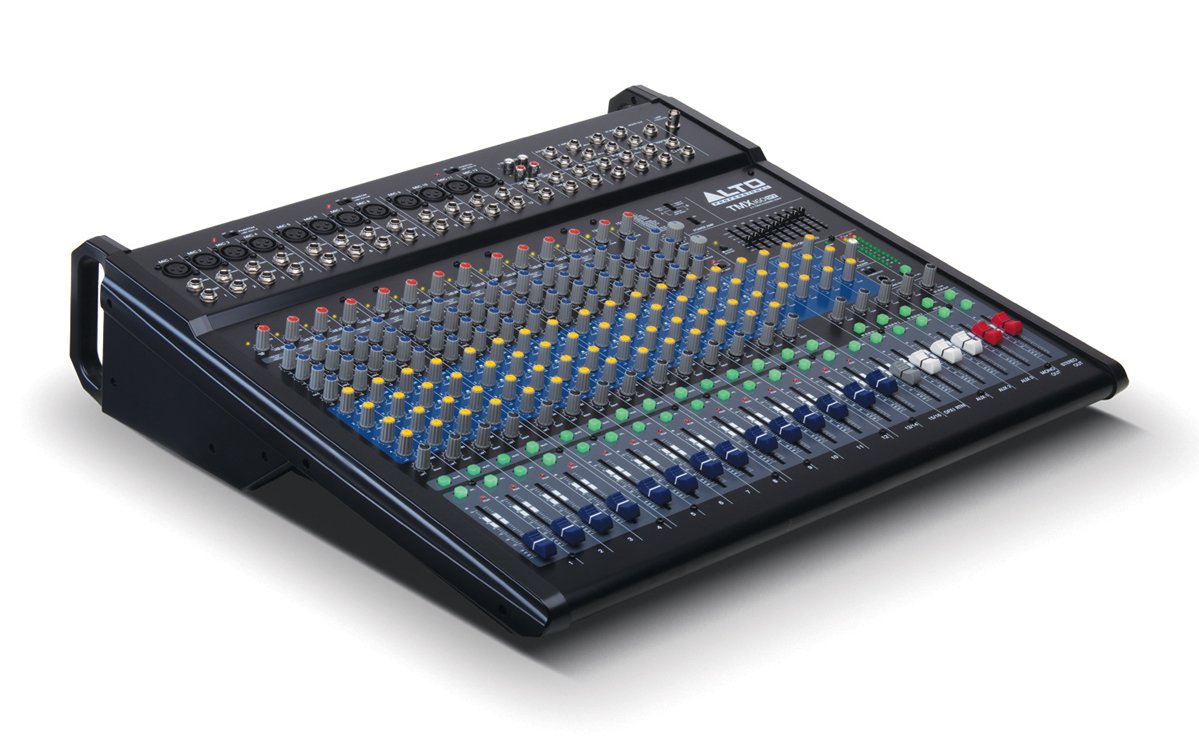
Şekil 1: Ön panel üstüview of the Alto Professional TMX160 DFX mixer. This image shows the comprehensive layout including microphone and line inputs at the top, channel controls in the middle, and faders at the bottom.
4. Operasyon
4.1 Kanal Kontrolleri
Each input channel (1-16) features a set of controls to shape its sound:
- KAZANÇ: Adjusts the input sensitivity for the connected microphone or line-level device. Set this to achieve a strong signal without clipping (distortion).
- EQ (Yüksek, Orta, Düşük): A 3-band equalizer allows you to boost or cut frequencies (treble, midrange, bass) for each channel.
- AUX Gönderimleri: Controls the amount of signal sent from the channel to the auxiliary outputs (e.g., for monitors or external effects).
- TAVA: Kanalın sinyalini stereo alan içinde (soldan sağa) konumlandırır.
- SEVİYE Sürgüsü: Ana miksajda kanalın genel ses seviyesini kontrol eder.
4.2 Ana Bölüm
The master section controls the overall output of the mixer:
- Ana Miks Fader'ları: Control the overall volume of the stereo output.
- DFX (Digital Effects) Controls: Select and adjust parameters for the built-in Alesis digital effects.
- Stereo Graphic EQ: A 7-band graphic equalizer allows for fine-tuning the overall frequency response of the main mix.
- Güç Amp Kontroller: Adjust the output level and mode (Stereo/Mono) for the integrated power ampcankurtaran.
4.3 Built-in Alesis Digital Effects
The TMX160 DFX features a high-quality Alesis digital effects processor. Use the DFX controls in the master section to browse and select from various effects such as reverb, delay, chorus, and more. Adjust the effect send levels on individual channels and the overall effect return level in the master section to blend the effects into your mix.
Şekil 2: Ayrıntılı view of the input channels, showing individual GAIN, EQ, AUX, PAN, and LEVEL controls for precise audio shaping.
5. Bakım
Proper maintenance ensures the longevity and optimal performance of your TMX160 DFX mixer.
- Temizlik: Mikserin dış yüzeyini temizlemek için yumuşak, kuru bir bez kullanın. Aşındırıcı temizleyiciler, çözücüler veya cilalar kullanmaktan kaçının.
- Toz: Aşırı ısınmayı önlemek için havalandırma açıklıklarındaki tozu düzenli olarak temizleyin.
- Depolamak: Uzun süre kullanılmadığı zamanlarda mikseri serin, kuru bir yerde, doğrudan güneş ışığından ve aşırı sıcaklıklardan uzakta saklayın.
- Sürgüler ve Düğmeler: Avoid applying excessive force to faders and knobs. Keep them free from dust and debris.
6. Sorun Giderme
If you encounter issues with your TMX160 DFX, refer to the following common problems and solutions:
- Güç Yok:
- Check if the power cord is securely connected to both the mixer and the AC outlet.
- Klima prizinin çalışır durumda olduğunu doğrulayın.
- Mikser üzerindeki güç düğmesinin AÇIK konumda olduğundan emin olun.
- Ses Çıkışı Yok:
- Tüm giriş ve çıkış kablo bağlantılarını kontrol edin.
- Ensure channel GAIN and LEVEL faders are appropriately set.
- Verify the Main Mix faders are raised.
- Check if connected speakers or power amplifiers are turned on and functioning.
- Gücü Sağlayın Amp controls are set correctly for your speaker configuration.
- Bozuk Ses:
- Reduce the GAIN setting for the input channel.
- Lower the channel LEVEL fader or Main Mix faders.
- Hasarlı kabloları kontrol edin.
- Duyulmayan Etkiler:
- Ensure the DFX send controls on the channels are turned up.
- Verify the DFX return level in the master section is raised.
- Check the selected effect program.
If the problem persists after trying these steps, contact Alto Professional customer support.
7. Özellikler
| Özellik | Şartname |
|---|---|
| Marka | Alto Profesyonel |
| Örnek | TMX160 DFX |
| Kanal Sayısı | 16 |
| Ürün Ağırlığı | 12.5 Kilogram |
| Bağlantı Teknolojisi | Ek |
| Ses Girişi | XLR, RCA, Line, AUX, 2-Track |
| Üretici | müzikte |
| ASIN | B007T1VZ52 |
| Güç Çıkışı (Stereo) | 750W @ 4Ω |
| Power Output (Mono) | 1500W @ 8Ω |
| Ekolayzer | 3-band EQ per channel, Stereo Graphic EQ |
| Etkileri | Built-in Alesis Digital Effector (24-bit A/D and D/A converters) |
| Boyutlar (G x D x Y) | Yaklaşık. 21.9 x 22.2 x 5.7 inç (555 x 565 x 145 mm) |
8. Garanti ve Destek
For warranty information and technical support, please refer to the documentation included with your product or visit the official Alto Professional webSite. Satın alma fişinizi, garanti talepleriniz için satın alma belgeniz olarak saklayın.
For further assistance, you may contact Alto Professional customer service directly.


