
giriiş
Satın aldığınız için teşekkür ederizasing the GPX Weatherx WR282B Weather and Alert Radio. This portable radio is designed to provide you with AM/FM radio reception and access to all 7 NOAA weatherband channels, ensuring you stay informed during various conditions. It offers flexible power options, operating on either AC power or D-size batteries, making it suitable for both indoor and outdoor use.
Please read this manual thoroughly before operating the device to ensure proper use and to maximize its performance and longevity.
Önemli Güvenlik Bilgileri
- Talimatları okuyun: Ürün çalıştırılmadan önce tüm güvenlik ve çalıştırma talimatları okunmalıdır.
- Talimatları Saklayın: Güvenlik ve kullanım talimatları ileride başvurmak üzere saklanmalıdır.
- Uyarıları Dikkate Alın: Ürün üzerinde ve kullanım kılavuzunda yer alan tüm uyarılara mutlaka uyulmalıdır.
- Talimatları izleyin: Tüm kullanım ve işletme talimatlarına uyulmalıdır.
- Su ve Nem: Do not use this product near water (e.g., near a bathtub, washbowl, kitchen sink, laundry tub, in a wet basement, or near a swimming pool).
- Temizlik: Sadece kuru bezle temizleyin.
- Havalandırma: Havalandırma açıklıklarını kapatmayın. Üreticinin talimatlarına uygun şekilde kurulum yapın.
- Sıcaklık: Radyatörler, kalorifer ızgaraları, sobalar veya diğer cihazlar (dahil) gibi herhangi bir ısı kaynağının yakınına kurmayın. amp(ısı üreten)
- Güç Kablosu Koruması: Güç kablosunun, özellikle fişlerde, prizlerde ve cihazdan çıktığı noktalarda üzerine basılmasını veya sıkışmasını önleyin.
- Yıldırım: Yıldırımlı havalarda veya uzun süre kullanılmayacaksa bu cihazın fişini çekin.
- Servis: Tüm servisleri kalifiye servis personeline yaptırın. Cihaz herhangi bir şekilde hasar gördüğünde, örneğin güç kaynağı kablosu veya fişi hasar gördüğünde, cihaza sıvı döküldüğünde veya içine nesneler düştüğünde, cihaz yağmura veya neme maruz kaldığında, normal şekilde çalışmadığında veya düşürüldüğünde servis gereklidir.
Özellikler
- AM/FM Radyo Tuneri
- Weatherband - All 7 NOAA Channels
- Swivel Telescopic Antenna
- Ses Kontrolü
- Audio Line Input (Auxiliary Input)
- Entegre Taşıma Kolu
- Dual Power Options: AC/DC Adapter or 3 x 'D' Batteries
Paket İçeriği
- GPX Weatherx WR282B Weather and Alert Radio
- AC/DC Güç Adaptörü
- Kullanım Kılavuzu (bu belge)
Kontroller ve Göstergeler
Familiarize yourself with the various controls and indicators on your WR282B radio.
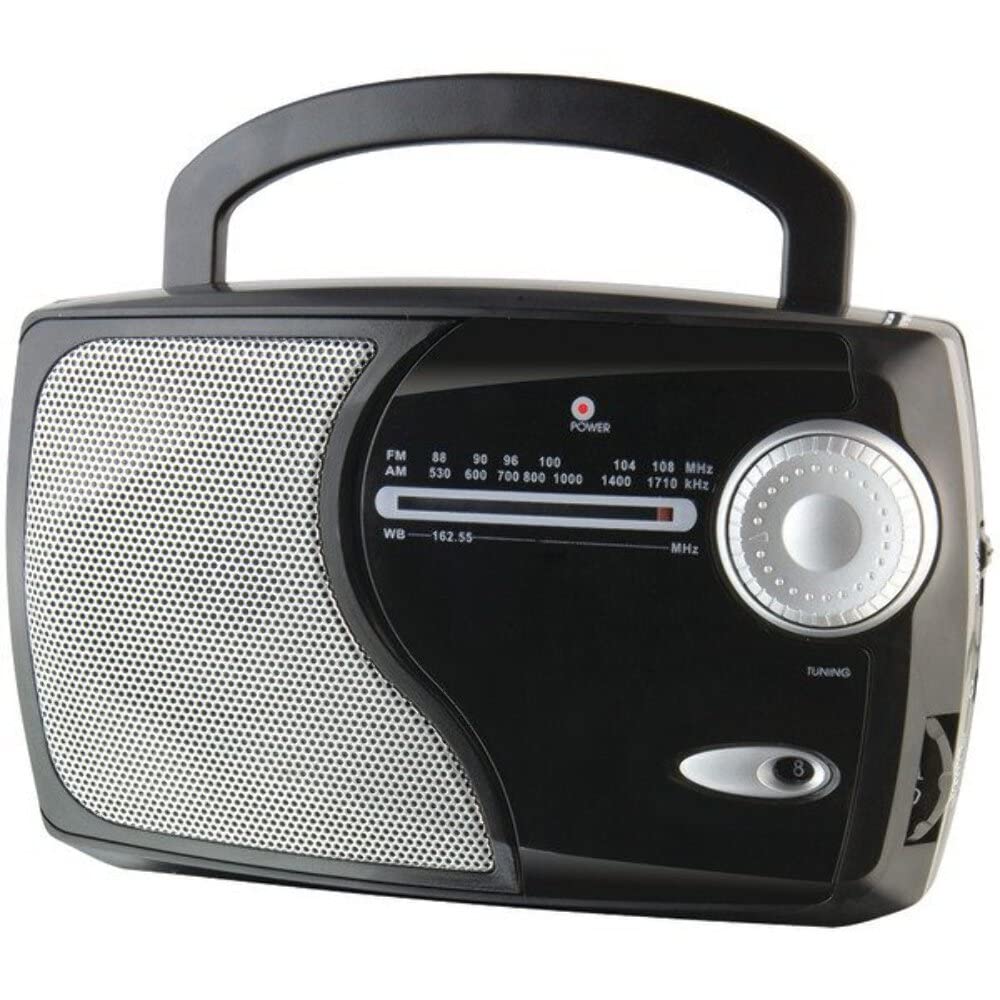
Resim: Ön view of the GPX Weatherx WR282B radio, showing the speaker, tuning dial, and control knobs.
- Güç/Ses Düğmesi: Turns the radio on/off and adjusts the audio output level.
- Bant Seçici Anahtar: Selects between AM, FM, and Weatherband (WB) modes.
- Ayar Düğmesi: Adjusts the frequency to tune into desired radio stations or weather channels.
- Ayar Göstergesi: Illuminates when a strong signal is received.
- Frekans Arama: Geçerli radyo frekansını görüntüler.
- Teleskopik Anten: Extendable antenna for improved FM and Weatherband reception.
- Yardımcı Giriş (AUX IN): Harici ses cihazlarını bağlamak için 3.5 mm jak.
- AC Güç Girişi: Jack for connecting the included AC/DC power adapter.
- Pil Bölmesi: Located on the back, holds 3 'D' size batteries.
- Taşıma Sapı: Kolay taşınabilirlik için.
Kurmak
Radyoya Güç Verme
The WR282B radio can be powered using either the included AC/DC power adapter or three 'D' size batteries.
1. AC Güçle Çalışma
- Ensure the radio is turned off by rotating the Power/Volume knob counter-clockwise until it clicks.
- Insert the small plug of the AC/DC power adapter into the AC Power Input jack on the radio.
- Plug the other end of the AC/DC power adapter into a standard wall outlet (AC 120V~60Hz).
- Radyo artık AC güç kaynağıyla kullanıma hazır.
Not: When the AC adapter is connected, battery power is automatically disconnected.
2. Pil Gücüyle Çalışma
- Radyonun kapalı olduğundan emin olun.
- Radyonun arkasındaki pil bölmesini bulun.
- Pil bölmesinin kapağını açın.
- Insert three (3) 'D' size batteries (not included) into the compartment, observing the correct polarity (+/-) as indicated inside the compartment.
- Pil bölmesi kapağını sıkıca kapatın.
- The radio is now ready for use with battery power.
Önemli: Radyo uzun süre kullanılmayacaksa, sızıntıyı ve hasarı önlemek için pilleri çıkarın.
Kullanım Talimatları
1. Turning On and Adjusting Volume
- Döndür Güç/Ses Düğmesi clockwise to turn on the radio. Continue rotating to increase the volume to a comfortable listening level.
- Radyo'yu kapatmak için, Güç/Ses Düğmesi counter-clockwise until it clicks.
2. Selecting a Radio Band (AM/FM/Weatherband)
- Kullanın Bant Seçici Anahtarı to choose your desired listening mode:
- AM: İçin Amplitude Modulation radio stations.
- Dışişleri Bakanı: For Frequency Modulation radio stations.
- DB: For NOAA Weatherband channels.
3. Tuning to a Station or Channel
- Uzatmak teleskopik Anten fully for optimal FM and Weatherband reception. For AM reception, the radio has a built-in antenna, and adjusting the radio's position may improve reception.
- Döndür Ayar Düğmesi to scan through frequencies on the Frekans Arama.
- When a strong signal is received, the Ayar Göstergesi ışık aydınlatacaktır.
- For Weatherband (WB) mode, tune to one of the 7 NOAA weather channels (162.400 MHz to 162.550 MHz).
4. Using the Auxiliary Input (AUX IN)
- Connect a 3.5mm audio cable (not included) from your external audio device (e.g., MP3 player, smartphone) to the Yardımcı Giriş (AUX IN) jack on the radio.
- Ensure the radio is turned on and the volume is adjusted.
- The audio from your external device will now play through the radio's speaker. Control playback and track selection from your external device.
Bakım
- Temizlik: Wipe the exterior of the radio with a soft, dry cloth. Do not use abrasive cleaners, waxes, or solvents.
- Pil Değişimi: Replace all three 'D' batteries when the radio's performance diminishes or if the unit will not be used for an extended period. Always replace with new batteries of the same type.
- Depolamak: When storing the radio for a long time, remove the batteries to prevent leakage. Store in a cool, dry place away from direct sunlight and extreme temperatures.
- Anten Bakımı: Bükülme veya kırılmayı önlemek için teleskopik anteni nazikçe tutun.
Sorun giderme
| Sorun | Olası Neden | Çözüm |
|---|---|---|
| Güç yok |
|
|
| Zayıf radyo alımı |
|
|
| AUX girişinden ses gelmiyor. |
|
|
Özellikler
- Modeli: WR282B
- Radyo Bantları: AM, FM, Weatherband (7 NOAA channels)
- Güç Kaynağı: AC 120V~60Hz (via included adapter) or 3 x 'D' Batteries (not included)
- Bağlantı: 3.5mm Yardımcı Giriş
- Anten: Telescopic (FM/WB), Built-in Ferrite Bar (AM)
- Ürün Ölçüleri: 8.86" L x 2.76" W x 5.51" H (approximately)
- Ürün Ağırlığı: 1.06 pound (piller hariç)
Garanti ve Destek
For detailed warranty information and customer support, please refer to the warranty card included with your product or visit the official GPX website. Herhangi bir garanti talebi için satın alma belgeniz olarak satın alma makbuzunuzu saklayın.
If you experience issues not covered in the troubleshooting section, please contact GPX customer service for assistance.